.png) Get Started
Get Started
Support teams usually hit the same wall before they start looking at chatbot development services. The inbox fills with repeat questions. Moderators answer the same setup issue all day in Discord. Web chat stays open, but users still wait because the queue keeps growing.
That pressure makes custom development sound like the obvious next move. Sometimes it is. But buying chatbot development services isn't like adding one more SaaS tool to the stack. It's closer to commissioning a product build that has to fit support operations, knowledge sources, workflows, channels, and escalation rules from day one.
A lot of teams learn that after they've already sat through vendor demos.
The right time to look at chatbot development services is when the support problem is operational, not cosmetic. A team doesn't need a bot because AI is trending. A team needs one when repetitive demand is crowding out higher-value work, human agents are stuck answering routine questions, and users can't get fast answers across the channels they already use.
That's why this category has expanded so quickly. Market research indicates that AI chatbots can handle up to 80% of routine questions, and adoption across businesses grew by roughly 4.7x between 2020 and 2025, reflecting the shift from rule-based scripts to systems that can deflect tickets and hand off more complex issues to people when needed, according to Jotform's chatbot statistics summary.
A few patterns usually show up together:
Practical rule: If the team can name the top repeated questions without looking at a dashboard, there's probably enough concentration to justify automation.
The key decision is whether the business needs a custom-built support system or better execution on standard support workflows. That distinction matters because a custom project brings procurement, technical design, integration work, testing, governance, and ongoing maintenance.
Buyers often assume the hard part is model quality. It usually isn't. The harder part is making the bot useful inside a real support environment.
A chatbot that can answer one polished demo prompt isn't necessarily ready for production. It still needs to find the right source content, decide when confidence is too low, preserve context, route to the right human team, and avoid creating extra work through bad answers.
That's why chatbot development services should be treated as a strategic operational decision. The spend isn't just on AI behavior. It's on process design, integration logic, QA discipline, and long-term ownership.
Most failed chatbot projects start with a solution statement. “We need an AI chatbot” sounds decisive, but it hides the true question. What work should the bot take off the team's plate, on which channel, for which users, and with what handoff rules?
A useful scope starts with support reality. Pull actual tickets, Discord threads, Telegram messages, or web chat transcripts. Group them by issue type. Then identify where automation would remove friction instead of adding another layer to the support process.
The cleanest scope usually comes from a short list of recurring, bounded support jobs.
Examples include:
That doesn't mean the bot should only answer FAQs. It means the first phase should focus on questions with predictable structure and clear source material. Teams can review common chatbot use cases to pressure-test whether the problem is really support automation, guided onboarding, lead qualification, or internal knowledge access. Those are different projects, even if vendors pitch them with the same language.
A bot for a private B2B SaaS workspace has different requirements from one serving a public gaming or Web3 community. The channel shapes the experience. So does user behavior.
A serious scope document should answer questions like these:
Buyers who skip this step usually end up comparing polished demos instead of comparing fit.
One of the most overlooked scoping issues is who gets left out. A recent review found that research on chatbots for users with low digital literacy, limited bandwidth, or language barriers is still limited, which makes these constraints especially important during buyer scoping, as noted in this review on underserved populations and chatbot deployment.
That has practical consequences. If users rely on mobile devices, short messages, screenshots, or unstable connectivity, the conversation design needs to account for it. If users aren't fluent in support language, fallback copy and escalation prompts need extra care. If accessibility matters, the vendor should discuss it in concrete terms, not as a generic feature claim.
A good scope document doesn't ask for “multilingual AI support.” It defines who the users are, what they struggle with, and what a successful conversation looks like for them.
A weak RFP invites vague answers. Vendors respond with polished promises, broad capability lists, and pricing that looks comparable until implementation starts. Then the gaps appear.
The RFP should force specificity. If a vendor can't answer clearly before the project begins, things won't get clearer once contracts are signed.
Start with the operating context. The vendor should understand what support team, community team, or CX function will own the bot, which channels matter, and what current workflow is breaking down.
Then require detail in these areas:
Ask vendors to respond to practical scenarios, not just capabilities.
For example:
The best RFP responses read like implementation plans. The worst ones read like website copy.
The commercial section should break costs apart. Buyers need to see the difference between discovery, build, integration work, channel deployment, maintenance, and ongoing support. Otherwise, the cheapest proposal often turns into the least predictable one.
A useful pricing request includes:
Cost AreaWhat to Ask ForDiscoveryScope validation, workshops, requirements documentationBuildConversation design, logic development, admin toolingIntegrationsThird-party systems, custom APIs, testing effortLaunchDeployment, training, handover, QA supportOngoingHosting, maintenance, retraining, monitoring, support retainers
An RFP should also ask who does what on the buyer side. Many projects stall because vendors assume internal teams will clean knowledge bases, define escalation rules, or provide approved content quickly. Those assumptions need to be explicit before work starts.
Most vendor shortlists look similar on paper. AI expertise. Omnichannel support. Custom integrations. Analytics. Ongoing optimization. The differences usually appear when buyers test how each vendor thinks about failure, not just success.
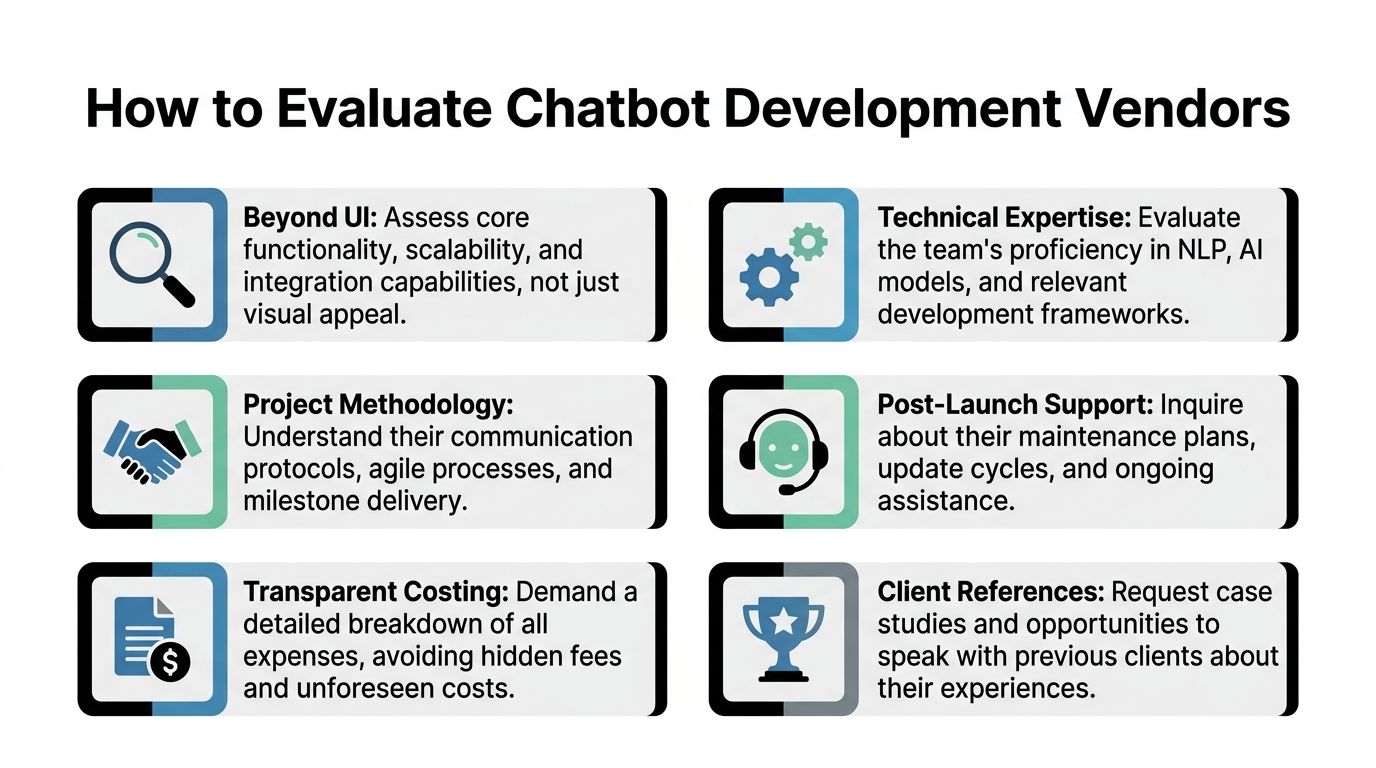
A strong vendor will talk in operational detail. A weak one stays at the feature level.
A practical chatbot development workflow starts with 2 to 3 high-volume use cases and defined success metrics, while a common failure pattern is focusing on tools before process, which leads to weak escalation design, poor fallback handling, and incomplete integration mapping, according to AgileEngine's chatbot development guide.
That insight is useful in vendor reviews because it gives buyers a simple stress test. Ask each vendor how they would phase the rollout. If the answer jumps straight to model choice or interface design, that's a warning sign. Good teams usually start with support volume, workflow boundaries, handoff conditions, and source quality.
Here's a short video worth reviewing before final selection:
Use a structured comparison instead of impression-based scoring.
Evaluation CriteriaWhat to Look ForRed FlagsTechnical fitClear experience with the channels, APIs, and data sources requiredGeneric claims with no explanation of integration approachDiscovery methodA defined process for narrowing use cases and documenting requirementsImmediate fixed proposal with little discoveryEscalation designSpecific human handoff logic, ownership rules, and transcript continuity“The AI will handle most cases” with no routing detailKnowledge handlingVersioning, source governance, update process, fallback behaviorAssumes any document dump will workQA disciplineTest plan covering routine and edge-case conversationsNo mention of regression testing or production monitoringSupport modelNamed post-launch ownership, maintenance terms, review cadenceLaunch-only engagement with vague support language
Some questions expose operational maturity very quickly:
A vendor that can't explain fallback behavior clearly probably hasn't operated bots in a messy support environment.
The buyer should also look for evidence that the vendor understands channel nuance. A chatbot in web chat behaves differently from one in a public Discord server. Public spaces require moderation awareness, short response design, and clear escalation into private support when sensitive information is involved.
Security review should be practical too. Buyers need to know what data the bot can access, how permissions are enforced, where logs are stored, and who can review transcripts. None of that is glamorous, but it usually matters more than a UI prototype.
Custom chatbot development rarely moves as fast as the sales process suggests. The build itself is only one part of the work. Teams still need to agree on scope, clean source content, define edge cases, test live workflows, and decide who owns the bot after launch.
That's why timelines stretch. A conversation system may look simple from the outside, but the operational details add up quickly.
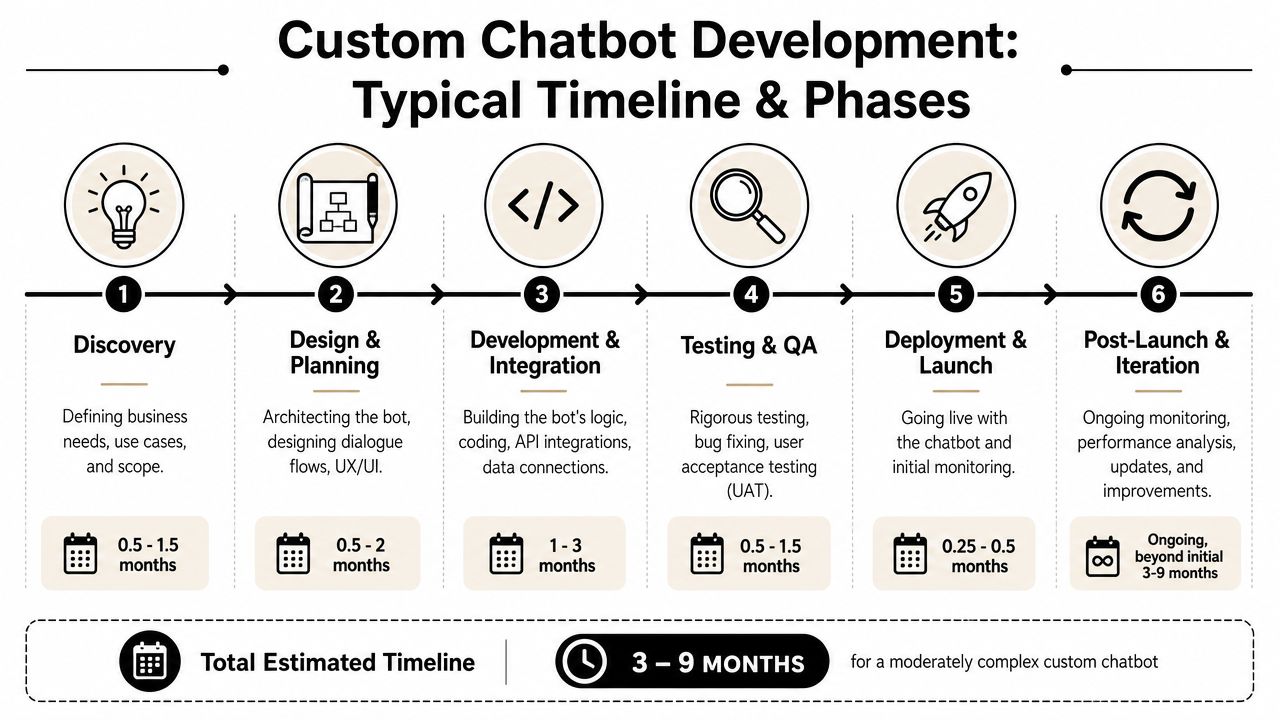
A typical custom project usually passes through a sequence like this:
The visible interface often takes less time than the hidden plumbing. Integration work, source cleanup, and exception handling tend to dominate effort because they involve several teams, not just one vendor squad.
Cost usually rises for practical reasons, not abstract “AI complexity.”
The common drivers are:
Cost DriverWhy It Increases SpendMore channelsEach channel has different UX rules, permissions, and message patternsDeeper integrationsSecure access to billing, CRM, account systems, or internal tools takes timeMessy source contentOutdated docs and conflicting policies create extra content and QA workComplex escalationMultiple queues, teams, and SLAs require more workflow designOngoing governanceMonitoring, retraining, approvals, and ownership add recurring effort
If a vendor gives a firm price before discovery, the buyer should assume either the scope is shallow or the change orders will come later.
There's also a planning mistake that hurts budgets. Teams often budget for build, but not for iteration. A chatbot needs transcript review, source maintenance, and regular tuning after launch. Without that, the system drifts, answers become less reliable, and users lose trust.
A more realistic budget conversation separates one-time implementation from continuing operational ownership. That makes trade-offs visible early, especially for support leaders deciding between custom development and an existing platform.
A bot isn't successful because it launched. It's successful if it resolves the right work, escalates the right edge cases, and reduces support friction without degrading user trust.
That's why success metrics need to be defined before implementation starts. Otherwise, the team ends up celebrating activity instead of outcomes.
For support teams, the most useful operational measures are usually:
Not every metric should trend in one direction. A very low escalation rate can be a bad sign if the bot is answering beyond its competence. In many support environments, a disciplined handoff is better than a weak answer dressed up as confidence.
Teams that manage chatbot quality seriously don't rely only on live feedback. They run tests continuously.
For technical benchmarking, chatbot teams should run automated conversation tests and measure intent prediction score, conversation completion rate, and incorrect-answer counts, while also tracking production metrics such as resolution rate and escalation frequency, according to Shakurova's chatbot development best practices. Buyers that want a clearer view of post-launch reporting should review what strong analytics for chatbots look like in practice.
Success should be reviewed at the conversation level, not just the dashboard level. Averages can hide failure patterns that users hit every day.
A lightweight review loop usually works better than occasional large audits:
That discipline matters more than any single launch milestone. A bot improves when the team treats it like an operational system with owners, not a one-time project handed over after deployment.
After going through the buyer process, many teams reach the same conclusion. They don't need a fully custom build. They need faster answers, cleaner handoffs, and one place to manage support across community channels.
That distinction matters because the chatbot market is getting bigger in both directions. One market estimate projects the global chatbot market at $9.56 billion in 2025 and $41.24 billion by 2033, showing sustained demand for AI agents while leaving room for both custom services and scalable platforms, according to Grand View Research's chatbot market analysis.
Custom development makes sense when the support experience depends on unusual workflows, proprietary systems, or strict compliance requirements that off-the-shelf products can't accommodate.
But a lot of community and SaaS teams are dealing with a more familiar set of needs:
For those teams, a platform approach can be a better fit than hiring an agency to assemble the same building blocks from scratch.
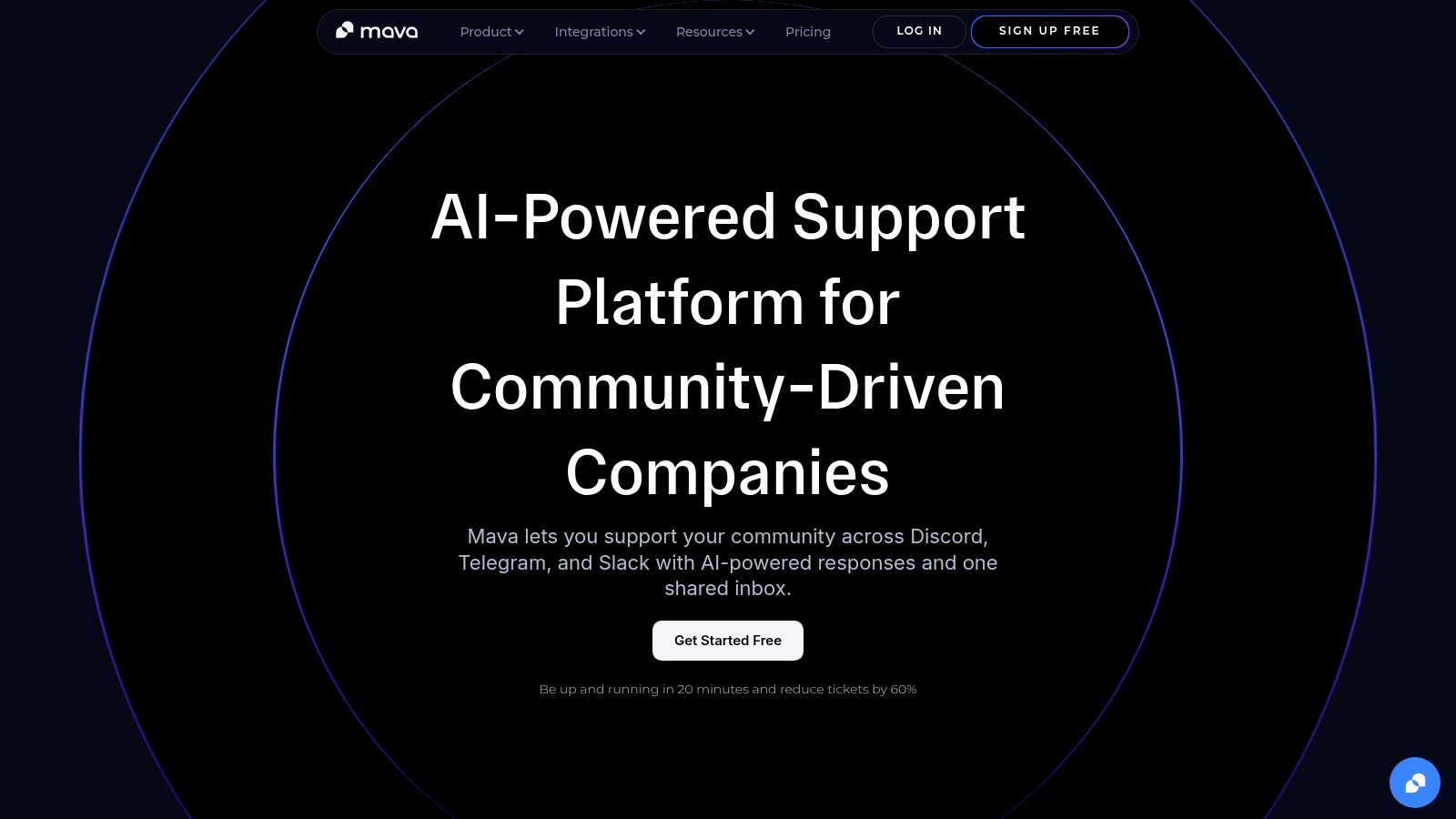
One example is Mava, which is built for support on Discord, Telegram, Slack, and the web. It lets teams import existing knowledge sources such as websites, GitBook, and Google Docs, use AI to answer repetitive questions, route conversations into a shared inbox, and hand over to human agents when needed. Teams comparing platform and custom paths can use this guide to AI customer support bots versus developing your own GPT bot to frame the trade-off more clearly.
The practical advantage isn't that custom development is wrong. It's that many buyers overbuy. They pay for bespoke architecture when the actual problem is execution speed, channel coverage, and support workflow discipline.
That's especially true for community-led companies. Public support environments change quickly. Documentation changes. Moderation needs shift. Product launches trigger sudden ticket spikes. In those conditions, being able to deploy and adapt quickly often matters more than owning every layer of a custom build.
Teams exploring chatbot development services should be strict about scope, skeptical about vague proposals, and honest about whether they need a custom project at all. For community-heavy support on Discord, Telegram, Slack, and the web, Mava is a practical option to evaluate if the goal is to launch quickly, unify human and AI support, and reduce repetitive ticket load without taking on a long development cycle.
.png)
.png)
.png)
