.png) Get Started
Get Started
A lot of support teams reach the same breaking point the same way. The Discord server is active, Telegram never slows down, moderators are copying the same answers into threads, and the actual support queue keeps growing because nobody has time to clean up the docs. The knowledge exists, but it's scattered across Google Docs, GitBook, Notion pages, website articles, and old pinned messages that only one team member remembers.
That's usually when “knowledge base integration” starts sounding like an infrastructure project instead of a support project. But for community support, it's the opposite. It's how a team turns scattered answers into a system an AI agent can use in real time, without forcing moderators to become full-time librarians.
The hard part isn't importing content. The hard part is deciding what should be trusted, what should stay private, how updates flow, and how humans stay in control when the AI is uncertain. Teams that get this right don't just answer faster. They reduce chaos, protect agent time, and stop burning out the people who've been carrying support manually.
A few years ago, a knowledge base often meant a help center with searchable articles. Useful, but passive. Someone had to stop what they were doing, search, open a page, skim it, and decide whether it effectively answered the question.
Community support doesn't work that way anymore. Questions arrive in public channels, private tickets, DMs, and embedded chat. Users don't want a list of possible articles. They want an answer that fits the context they're in right now.
Modern knowledge base integration is different because the knowledge base is no longer just a destination. It becomes the retrieval layer behind an AI support workflow. Amazon Bedrock's documentation describes a setup where a knowledge base connects to structured or unstructured data sources, syncs those sources, and returns relevant sources for natural-language responses, including workflows that can transform a user query into a structured query, retrieve evidence from the source of truth, and use that evidence to produce a response through Amazon Bedrock knowledge base documentation.
That changes the job of support ops. The goal isn't “publish more docs.” The goal is “make trusted knowledge retrievable, permission-aware, and usable by automation.”
For a Discord or Slack community, that distinction matters. A static FAQ can't resolve a burst of repetitive questions after a product change. An integrated retrieval system can surface the right answer, with source context, inside the conversation where the question appears.
Modern support teams don't need more content first. They need a cleaner path between the source of truth and the place where users ask for help.
The urgency is also real. A 2026 projection says 80% of enterprises are expected to be using GenAI APIs, applications, and models in production, up from under 5% in 2023 according to Korra's generative AI and knowledge base statistics summary. That doesn't mean every team needs a massive AI program. It does mean the baseline has shifted. Users increasingly expect instant, relevant support.
Community platforms expose support gaps faster than email queues do. Bad answers get repeated in public. Old instructions get copied by helpful members. Moderators become the unofficial search engine.
Teams trying to evaluate the broader infrastructure side of this shift may find useful context in REDCHIP IT SOLUTIONS INC. on tech trends, especially when support leaders need to explain why AI-ready knowledge systems are becoming operational requirements instead of side projects.
Knowledge base integration now sits at the center of scalable support. That's why the setup work matters so much.
Teams typically don't start with a clean library. They start with a pile.
There's a product setup guide in GitBook, policy notes in Notion, moderator macros in Google Docs, changelog details on the website, and a few critical answers buried inside old support threads. If that content gets imported as-is, the AI won't magically fix it. It will inherit the inconsistency.
Bloomfire's guidance aligns with the practical workflow support teams use most often: inventory existing content, classify it into consistent categories, and connect it to the consuming application through APIs or a vector-store-backed retrieval layer in Bloomfire's guide to organizing a knowledge base.
Before any connector is turned on, gather every source that currently answers customer questions. Then sort each item into one of three buckets:
This step feels slow, but it prevents a common failure mode. Teams connect everything, launch quickly, and then spend the next month explaining why the bot pulled an obsolete answer from an old blog post.
An AI-friendly article is usually narrower than a human-friendly internal memo. It should answer one problem clearly, use stable terminology, and avoid mixing multiple workflows into one giant page.
A few practical cleanup rules help immediately:
Practical rule: If a moderator has to explain an article before sending it, the article isn't ready for integration.
Source TypeCommon ProblemPreparation ActionGoogle DocsLong, unstructured text with outdated notes mixed inSplit into smaller Q&A-style articles and remove revision clutterGitBookGood structure, but inconsistent naming across sectionsStandardize titles, tags, and category labelsWebsite blogMarketing tone, mixed intent, and duplicate feature mentionsSeparate educational blog posts from support-grade instructionsNotionInternal process notes mixed with public-facing help contentCreate clear public vs internal content boundariesHelp center exportDuplicate articles and legacy versionsMerge duplicates and archive old versionsCommunity postsUseful answers hidden inside threadsConvert repeated answers into formal articles with clear ownership
Categories need to make sense to both users and operators. Product area, account access, billing, integrations, security, moderation, and troubleshooting are common examples. The specific labels matter less than consistency.
A messy taxonomy causes two problems at once. Users can't find content manually, and retrieval systems index overlapping concepts with weak boundaries. That's when a question about account roles gets answered with a permissions article meant for admins only.
The teams that move fastest here usually nominate one owner per category. That person doesn't need to write every article. They just need authority to decide which version is current.
Once the source material is cleaned up, the integration step gets much easier to trust. At this stage, teams connect docs platforms, website content, or uploaded files into one retrieval layer that an AI can search quickly.
A support platform such as Mava can import knowledge from sources like websites, GitBook, and Google Docs so the AI has a central place to retrieve answers for channels such as Discord, Telegram, Slack, and web chat.
From the team's point of view, importing often looks simple. Connect a source, choose what to include, and sync. Behind the scenes, the system is doing more than copying pages.
It breaks content into retrievable units, indexes them, and prepares them so the AI can match user questions to relevant source material. That's why article structure matters so much before import. Clean chunks retrieve better than giant pages.
Amazon's documentation captures the core shift well. Modern integration can turn a user query into a structured query, retrieve evidence from the source of truth, and use that evidence to produce a response. That's a different model from old-school documentation search. It's an integrated retrieval workflow.
Different source types call for different import methods:
A strong first import is narrow. Teams often get better results by selecting a clean subset of support-critical content rather than ingesting every page they own.
For teams tuning articles before or after import, this guide to optimizing a knowledge base for AI bots is useful because it focuses on how retrieval quality depends on article structure, clarity, and scope.
The AI doesn't need every possible sentence about a topic. It needs the most authoritative answer in a form it can retrieve reliably.
That usually means each article should contain:
A quick walkthrough helps make the mechanics less abstract.
When this is done well, the result doesn't feel like a bigger help center. It feels like a support agent that can find the right answer when a user asks a messy, real-world question.
Most failed AI support rollouts don't fail at launch. They fail a few weeks later, when the content changes but the AI answer doesn't.
That's why sync strategy deserves the same attention as the original import. A knowledge base integration that isn't maintained becomes a very efficient way to spread outdated information.
Teams often over-focus on how many articles they've connected and under-focus on how those articles stay current. In practice, a smaller synced knowledge base is safer than a large stale one.
There are usually three workable sync patterns:
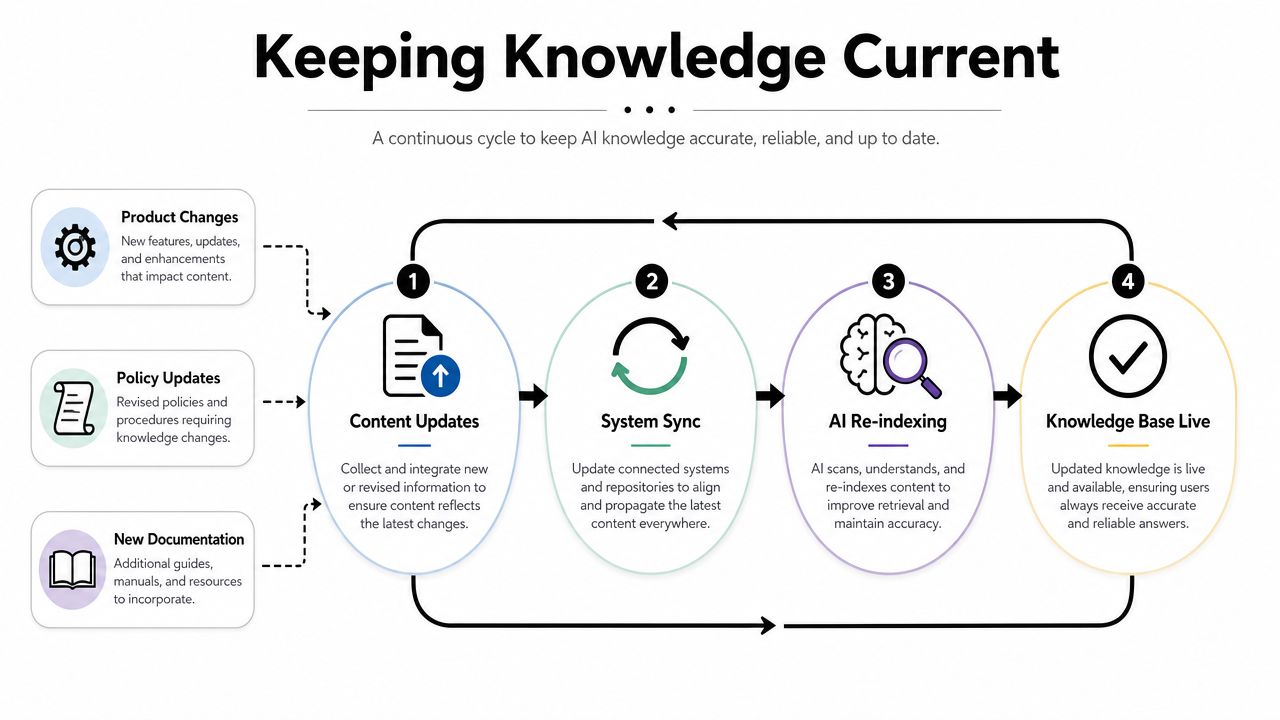
Merge's guidance highlights a point many setup guides skip: governance for accuracy and permissions after integration is the hard problem, because a single integrated knowledge base can expose the wrong information if permissions and refresh rules aren't designed carefully in Merge's discussion of knowledge base integration governance.
That issue is especially sharp in community support. Public FAQs, moderator playbooks, internal escalation notes, and account-specific procedures often live near each other. If the retrieval layer doesn't respect boundaries, the AI may answer a public user with material meant only for staff.
The fastest way to lose trust in an AI agent is to let it answer confidently from the wrong document.
A sustainable setup usually includes these controls:
For teams evaluating broader retrieval and search architecture, enterprise search solution considerations can help frame when simple sync is enough and when a more governed search layer is necessary.
The operational question isn't “Can the system sync?” It's “Can the team trust what happens after it syncs?”
The safest launch pattern is small, boring, and deliberate. That's a good thing.
Gleap's implementation guidance recommends starting with the highest-friction questions, publishing only 10 to 15 core articles in the first rollout, and then iterating weekly from real support demand through Gleap's knowledge base rollout playbook. That advice holds up because the first version of an AI support agent shouldn't try to be all-encompassing. It should try to be dependable.
A new manager often assumes the AI should answer everything on day one. In practice, the first week should look more like this:
The team reviews recent tickets and community threads, then picks the questions that repeatedly consume moderator time. Login failures. Wallet connection issues. Subscription status confusion. Basic integration setup. Policy clarifications that are asked every day.
Those become the launch set. Not every possible question. Just the ones that create the most support drag.
Start with the questions agents are tired of answering, not the questions leadership finds strategically interesting.
Once the initial articles are live, the AI should answer only within that narrow scope. Human reviewers then look for three things:
The first corrections usually reveal content problems more than model problems. Maybe the billing policy article uses internal wording. Maybe the troubleshooting guide combines mobile and desktop steps in a way that confuses retrieval. Maybe two near-duplicate articles compete for the same question.
That's why weekly iteration works. Real demand exposes weak spots much faster than a planning document does.
A reliable feedback loop usually has a few lightweight habits:
The AI gets better when the team treats every correction as a documentation signal, not just a bot issue. That mindset keeps the knowledge base integration healthy instead of turning the support queue into a debugging exercise.
A connected knowledge base only yields value when it drives action. Otherwise, the team has built a cleaner library, not a support system.
Automation should sit on top of the integrated knowledge base in a way that matches risk. Straightforward questions can be answered instantly. Sensitive or ambiguous ones should route to people without hesitation.
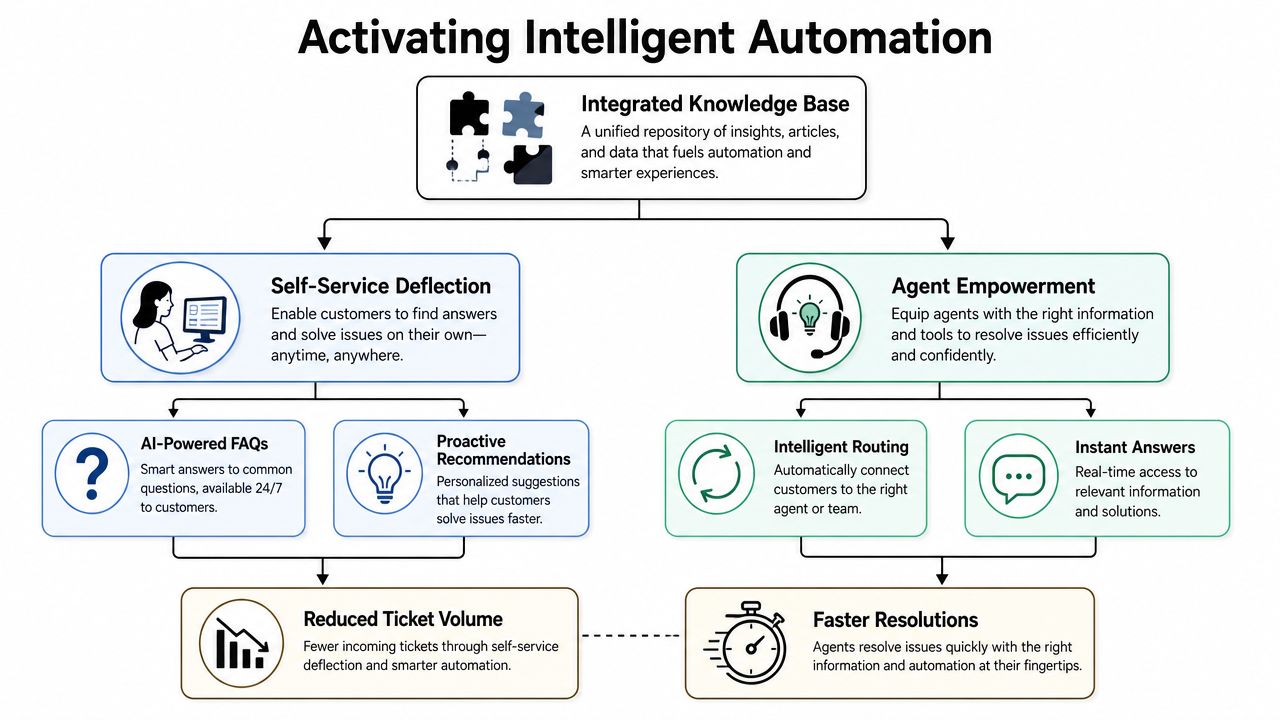
Two practical lenses help when designing automation rules:
First, ask how certain the system is that it found the right answer. Second, ask what happens if it's wrong. A cosmetic product question and a security incident should not share the same automation threshold.
That leads to cleaner workflows such as:
Support teams usually get value fastest from a handful of direct rules:
Community support differs from standard web chat. The team isn't just trying to close tickets. It's managing public visibility, moderation workload, and user trust at the same time.
Automation works best when the AI handles repetition and humans handle judgment.
Good routing also improves internal operations. Agents shouldn't have to reread a long thread to figure out whether a question belongs to support, success, billing, or moderation. The integrated knowledge base helps by grounding the AI's first response. Routing rules then decide who should own the conversation next.
The result is a support system that feels responsive without becoming reckless.
A knowledge base integration is working when the team can see three things clearly. What the AI resolved well, where users got stuck, and which content gaps are still creating manual work.
The easiest mistake here is tracking only volume. A drop in tickets can be good, but it can also mean users gave up. Metrics need interpretation.
A practical review cadence usually starts with a short scorecard:
For teams building a reporting view around bot performance, analytics for chatbots is a useful reference because it frames bot metrics as operational feedback, not vanity numbers.
When the AI cites the wrong article, the cause is often one of a few familiar issues:
When the AI gives vague responses, the source content is often too vague too. The model can't invent a clear policy from an unclear paragraph without increasing risk.
A healthy optimization loop looks simple. Review failed queries. Rewrite weak articles. Archive conflicting pages. Tighten category boundaries. Then test again on real conversations.
The strongest signal of progress isn't that the AI talks more. It's that agents intervene less often on repetitive issues and spend more time on exceptions, escalations, and relationship-heavy work.
Mava helps community-driven teams connect existing knowledge sources, run AI support across Discord, Telegram, Slack, and the web, and keep human agents in the loop when automation shouldn't decide alone. For teams trying to move from scattered docs and repetitive moderator replies to a validated support workflow, Mava is one option to evaluate.
.png)
.png)
.png)
