.png) Get Started
Get Started

A support lead opens Slack to answer a routine question about pricing logic. The answer is somewhere in a Discord thread, a Notion page, a Google Doc from last quarter, and a GitBook article that may or may not be current. Ten minutes later, they're still hunting. Someone else gets pinged. A second answer appears, slightly different from the first. The customer waits while the team reconstructs knowledge the company already had.
That’s what internal knowledge chaos looks like in a startup. It rarely starts as a systems problem. It starts as speed. Teams move fast, add tools, create docs in the nearest available place, and assume search will sort it out later. For community and support teams, later arrives all at once. Volume climbs, repetitive questions pile up, and the same small group becomes the human search engine for everyone else.
A proper search engine for intranet fixes that by turning scattered internal content into something your team can use under pressure. If you run support on Slack, Discord, Telegram, docs, and shared drives, you don’t need enterprise theory. You need a practical system that surfaces the right answer quickly, respects permissions, and doesn’t require a large IT department to keep it alive.
The failure pattern is usually easy to spot. A moderator needs the latest refund policy. Search in Slack returns old messages, the docs site has two versions, and the internal wiki ranks a stale page above the current one. They pick the most plausible answer, post it, and hope it’s still right.
That kind of workflow doesn't just waste time. It makes support inconsistent, increases internal interruptions, and trains the team not to trust the knowledge base. Once trust drops, people stop searching and start asking in chat. Then your best operators become bottlenecks.
More than 80% of organizations report that their intranets lack consumer-grade search functionality, according to Simpplr’s analysis of why intranet search fails. The same source warns that without effective search, intranets become “digital black holes where critical information is lost, and employees disengage.”
For a support or community team, bad search creates very specific damage:
Bad internal search doesn’t stay internal. It leaks into every customer reply.
The frustrating part is that employees already have the knowledge. They just don’t have a reliable path to it. Search feels broken because it often is broken. It was bolted onto a pile of tools that were never designed to work as one knowledge system.
Large enterprises have this problem at scale. Startups feel it sooner because fewer people carry more context. One support lead, one product manager, and one engineer often hold the “real” answers in their heads. The rest of the company depends on finding fragments across conversations, docs, and tickets.
When that happens, a search engine for intranet stops being a nice-to-have. It becomes operational infrastructure.
A modern search engine for intranet is a private search layer across your company’s internal tools. The easiest way to think about it is this: it’s your company’s own Google, but scoped to your internal documents, chats, wikis, files, and systems.
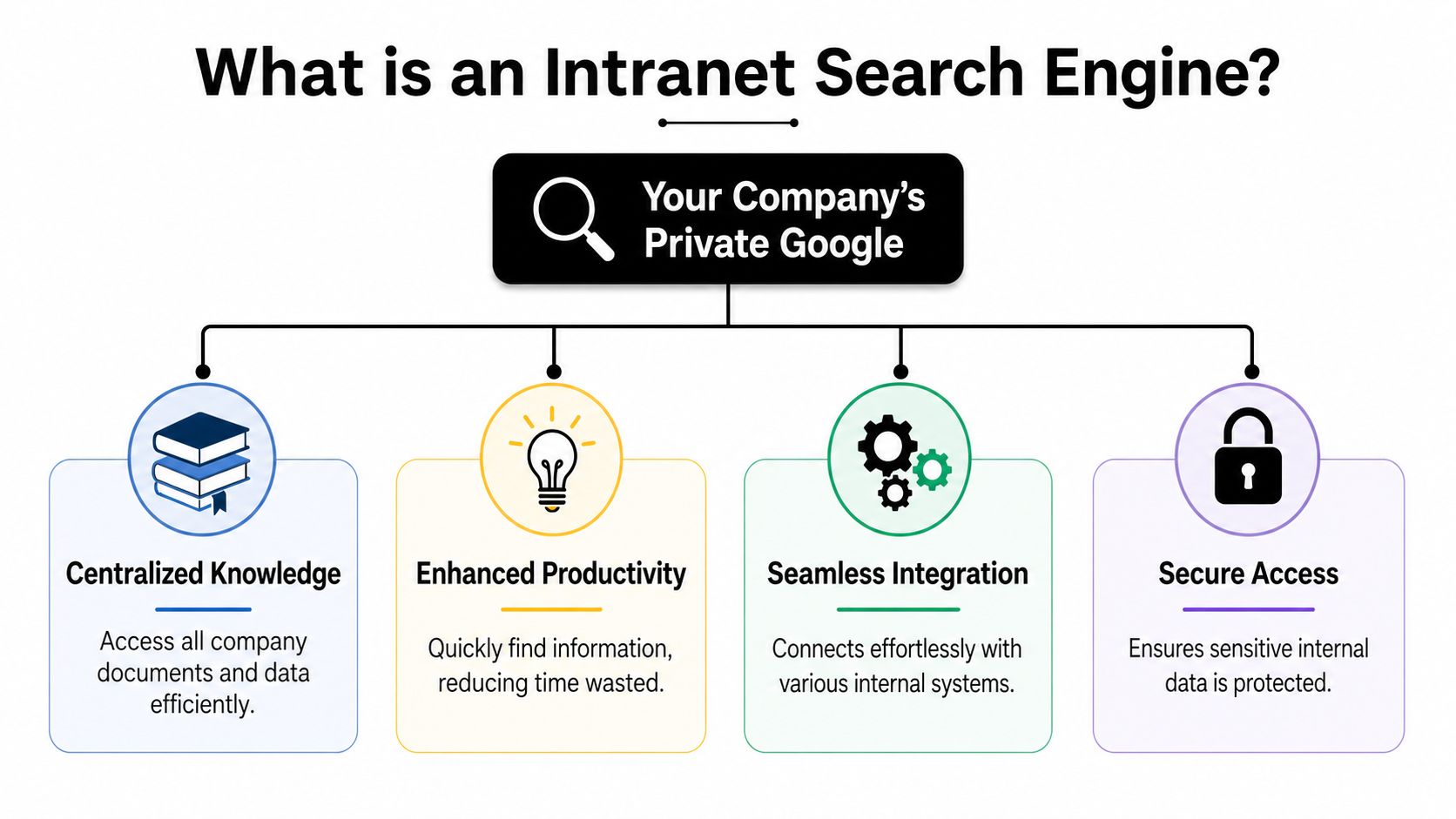
Native search inside Slack only searches Slack. Native search inside Notion only searches Notion. An intranet search engine works across all of them, ideally from one interface and with one relevance model.
That matters in community-heavy companies because knowledge doesn’t live in one clean repository. It lives in Discord support threads, internal Slack channels, product docs, issue trackers, shared drives, and sometimes scraped content from web-based docs. Teams building retrieval pipelines for mixed sources often use tooling like Web Scraping API for RAG when they need to ingest web content cleanly into a broader knowledge workflow.
A useful mental model has four parts.
The market already reflects how important this has become. AgilityPortal’s overview of intranet search platforms highlights major options such as Microsoft SharePoint Search, Elastic Workplace Search, Google Cloud Search, Coveo, Apache Solr, Meilisearch, and Glean. Each fits a different operating model. Some lean into Microsoft-heavy environments. Others prioritize flexibility, AI relevance, or open-source control.
Practical rule: if a vendor only shows a pretty search box but can’t clearly explain connectors, indexing, ranking, and permissions, you’re looking at a demo, not a solution.
A simple search bar isn’t the product. The product is the system behind it. For support teams, that system decides whether an agent gets the current escalation policy in seconds or wastes time opening five tabs and second-guessing all of them.
Support teams don’t need a giant feature matrix. They need the handful of capabilities that reduce context switching and surface trustworthy answers fast.
Federated search is near the top of the list. If your answer might live in Slack, Discord, a help center, and a file drive, your team shouldn’t run four separate searches. A good search engine for intranet can query across those sources and return one result set.
Natural language processing matters because support queries are messy. People search with shorthand, slang, abbreviations, and partial memory. According to Glean’s guide to intranet search engines, modern search engines use NLP to interpret context, synonyms, and misspellings, resulting in up to 20% time savings for employee search tasks.
That productivity gain usually comes from basic things done well:
A support knowledge base also becomes more useful to AI workflows when the source content is structured and searchable. Teams working on optimizing a knowledge base for AI bots usually discover the same thing: retrieval quality starts with internal content quality.
Filters and permissions are where many implementations fail.
Facets and filters help support agents narrow quickly by channel, date, author, team, or content type. This is the difference between “all results about billing” and “the latest internal billing policy approved by ops.”
Permission-aware search is paramount. Search should respect source permissions automatically, so a contractor doesn’t see private incident notes and a moderator doesn’t see finance docs they shouldn’t access.
Here’s a short demo worth watching if you’re evaluating the user experience side of internal search and support workflows:
Three other features often matter more than buyers expect:
If your team can’t review zero-result searches and low-confidence queries, you’re not improving search. You’re just running it.
For support teams, the best feature isn’t “AI” in the abstract. It’s relevance that holds up under pressure.
Most intranet search projects come down to two architecture patterns. You don’t need to be an engineer to understand them, but you do need to know the trade-offs because they affect speed, freshness, permissions, and maintenance.
A unified index copies or syncs content from multiple tools into one central search index. That index is what users search.
This pattern usually gives you better control over ranking, filtering, and performance. It’s easier to apply one relevance model across Slack, docs, tickets, and wikis when everything has been normalized into one schema. It’s also where classic search concepts like inverted indexes become useful. If you want a plain-English primer, this technical overview of inverted indexes is a solid reference.
The downside is operational. You need ingestion jobs, sync schedules, deduplication rules, and a plan for stale content. If syncing breaks, search can look complete while imperceptibly drifting out of date.
Federated search sends a query out to multiple source systems and aggregates the results in real time.
This is attractive when you don’t want to duplicate data or maintain a large central index. It can also reduce some data residency and duplication concerns. In practice, though, ranking gets trickier because each source may score results differently, return different metadata, or respond at different speeds.
A simple way to evaluate the trade-off:
PatternUsually stronger atUsually weaker atUnified indexSpeed, relevance tuning, cross-source consistencyFreshness management, ingestion complexityFederated searchReal-time source access, less copied dataLatency, uneven ranking, source dependency
The right answer depends on your stack. If support lives across fast-moving systems and the team needs one coherent result page, a unified index often feels better. If your organization is strict about keeping data in source systems, federated search may be easier to justify.
Monday morning, a support lead searches for a refund exception. The right answer exists in Notion, a Slack thread, and a pinned Discord message, but search surfaces an outdated doc first. That is the build versus buy decision. It is a decision about whether your team wants to own the reliability, relevance, and permissions model behind every internal answer.
For startups and SMBs, that ownership question matters more than broad feature lists. Large enterprises can afford a search team, long integration projects, and months of tuning. Community-centric teams usually cannot. They need search to work across chat, docs, help content, and internal runbooks without turning into another platform that engineering has to keep alive.
FactorSaaS Solution (e.g., Mava)Open-Source (e.g., Meilisearch)Custom BuildTime to initial valueFaster to launch if connectors already existModerate, depends on setup and integrationsSlowest, because everything must be designed and implementedControl over ranking and UXGood, within vendor limitsHighHighestMaintenance burdenLower, vendor handles most platform upkeepTeam owns hosting, upgrades, monitoring, backupsTeam owns everythingConnector availabilityOften strong for common toolsVaries. You may need to build ingestion yourselfYou build what you needSecurity and permissions workOften built in, but verify carefullyYou must configure and test itYou design and maintain itBest fitTeams that need speed and predictable operationsTechnical teams that want flexibility without full custom workCompanies treating search as core infrastructure
The expensive part of "build" is rarely the first version. It is the second month, when someone asks why a private Slack thread appeared in results, why deleted pages still rank, or why Discord answers never make it into the index unless an engineer restarts a sync job.
Building search means owning connector maintenance, permission syncing, ranking logic, analytics, search QA, and ongoing tuning.
Owning search means owning every ugly edge case. Deleted docs, renamed channels, duplicate pages, private content leaks, and stale rankings all become your problem.
There are valid reasons to build. Some teams have niche internal systems, strict hosting rules, or product-specific ranking needs that off-the-shelf tools do not handle well. Open source can be a good middle path if your team is comfortable running infrastructure and writing ingestion code, but does not want to build a search engine from scratch.
Buying is usually the better call when search supports operations rather than defines the product. That is common for support teams, community managers, and CX leads who need faster answers across Slack, Discord, docs, and ticket history, not a year-long infrastructure project. If you want a realistic benchmark for what users will expect, review products that already combine search with agent workflows, such as AI support tooling built for community and support teams.
A simple rule works well here. Build if search is strategic enough to deserve ongoing engineering ownership. Buy if the goal is to reduce answer time, keep permissions intact, and stop tribal knowledge from living in chat.
The wrong way to choose a search engine for intranet is to compare only features on a pricing page. The right way is to test whether it survives your messiest workflows.
Community-first teams have unusual knowledge sprawl. A policy might start in Notion, get clarified in Slack, get challenged in Discord, and finally show up in a help article. If a product only shines in clean enterprise demos with SharePoint folders and polished metadata, it may struggle in a startup where knowledge formation happens in public channels and fast-moving docs.
Start with your real sources. Not the ideal future state. The current one.
Ask whether the system can handle:
For SMBs, implementation cost matters more than feature abundance. Zbrain’s intranet search guide notes that implementing a custom search solution can take 4-12 weeks and add hidden DevOps costs of $50K-$150K annually. The same guide says that failing to solve the problem with a dedicated tool can increase support ticket volumes by 40-60%.
Those numbers are why “free” open-source often isn’t free in practice. The software may be free. The operational ownership isn’t.
Use questions that expose total cost of ownership, not just capability.
A startup-friendly choice usually isn't the product with the longest feature list. It’s the one your team can implement, trust, and keep healthy without turning search into a side project that never ends.
A good rollout is smaller than commonly assumed. Don’t start by indexing everything. Start by making search dependable for the questions your support team answers every day.
Launching early is fine. Launching with untrusted results is not.
A rollout succeeds when the team stops asking, “Where was that doc again?” and starts assuming search will find it.
Yes. Native search works inside one product. A search engine for intranet is meant to search across multiple internal systems with one relevance layer.
A good implementation respects permissions from the source systems or maps them carefully into the search layer. If a tool can’t explain permission handling clearly, don’t trust it with internal knowledge.
Only if they want to own search as ongoing infrastructure. Otherwise, maintenance and tuning can outweigh the flexibility.
Usually once the pilot covers a narrow set of frequent support questions and the team trusts the top results. Value shows up first in fewer interruptions and faster answer retrieval.
If your team supports users across Discord, Slack, Telegram, and the web, Mava is worth a look. It brings community support into one shared inbox, connects with your existing knowledge sources, and uses AI to resolve repetitive questions while handing off the hard ones to humans with context intact. For fast-growing teams that need practical support automation without stitching together a dozen tools, it’s a clean way to reduce chaos and make internal knowledge effectively usable.
.png)
.png)
.png)
