.png) Get Started
Get Started
A support lead opens Discord in the morning and sees the same pattern again. A paying customer reported a broken integration overnight. Three community members replied with guesses. A moderator added an emoji. Someone tagged “team” in a public thread. Hours later, an engineer finally notices it, but by then the customer is angry, other users are piling on, and nobody can reconstruct what was already tried.
That doesn't happen because the team is careless. It happens because chat creates the illusion of responsiveness while hiding the absence of process. In Discord, Slack, and Telegram, messages move fast, context fragments, and responsibility gets fuzzy. The team thinks it has a support workflow because people are talking. What it has is a series of interruptions.
Escalation paths fix that. They turn “someone should look at this” into a defined handoff, with named owners, clear triggers, and a reliable route from first contact to resolution. That matters even more in community support than in traditional help desks, because public channels amplify every delay.
A fast-moving community usually starts with an informal rule. Tag an admin. DM a moderator. Hope the right person is online.
That works for a small server. It breaks as volume rises.
A bug report in Discord doesn't arrive as a clean ticket. It arrives mixed with memes, feature debates, off-topic chat, and repeated questions. A refund complaint in Telegram can sit next to spam, wallet issues, and moderator chatter. In Slack communities, a serious outage can get buried under product feedback and partnership requests. The problem isn't the platform. The problem is that support work is being handled in a stream designed for conversation, not accountability.
A foundational operational definition of escalation paths is a pre-set sequence of notifications and handoffs that activates when an incident occurs, and many guides recommend keeping that chain short, typically 3 to 4 levels maximum, to avoid delays, as noted in OneUptime's guide to incident escalation paths. That principle applies cleanly to communities. If a moderator has to ask around in three channels before finding the right owner, the path is already too long.
The usual failure modes are easy to spot:
Community support chaos is rarely a staffing problem first. It's usually a routing problem.
Formal escalation paths don't mean turning a Discord server into a stiff enterprise queue. They mean preserving the speed of chat while adding rules for what happens next. Teams that already think in channels should also think in handoffs, priorities, and owners.
That's also why community support often benefits from an omnichannel support model. Users may start in Discord, continue in web chat, and need a private follow-up without losing context. Without escalation rules, each channel becomes a fresh start. With them, the team can carry one issue across surfaces without dropping it.
A good escalation path does three simple things:
That's the difference between a noisy chat community and a support operation people can trust.
Escalation efforts often falter before a chart is ever drawn. They never define the trigger.
If moderators have to decide from scratch whether a message is urgent, every escalation becomes subjective. One person escalates based on tone. Another escalates based on technical complexity. A third waits because the issue “doesn't seem widespread yet.” The result is inconsistency, and inconsistent support always looks worse in public than in private.
Operational guidance treats time thresholds as a core trigger for escalation when an issue can't be resolved within a set window, and it frames escalation as a standardized workflow with seven steps: problem identification, analysis, escalation to the next level, solution finding, implementation, monitoring, and closure, according to the Well Architected Guide on defining escalation paths. For community teams, that means the trigger can't live in someone's head. It has to be written down.
Most community support environments need four categories. Not ten. Not a giant spreadsheet on day one.
These are the easiest to operationalize because they remove debate.
Examples:
Time triggers work well in chat because they catch the silent failures. Nobody argues whether a message “feels urgent” when it has sat too long.
Not every question deserves the same route.
A simple matrix usually works:
Severity rules are what stop a UI typo from reaching engineering leadership while ensuring a serious incident doesn't stall at moderator level.
Practical rule: If the impact touches trust, money, or access, the team should define an explicit escalation path before the next incident happens.
Community support has a quirk that traditional ticket systems don't always handle well. Users often describe serious problems casually. A message like “wallet not updating” might be routine, or it might signal a system issue.
Escalate when the issue requires knowledge the frontline team doesn't have.
Useful examples:
This prevents L1 moderators from spending too long troubleshooting something they can't solve.
Keyword-based routing shouldn't replace judgment, but it helps catch risky cases quickly.
Terms worth flagging often include:
The point isn't to auto-escalate every message blindly. The point is to force review.
A strong trigger set fits on one page. If the team needs a workshop every time a complaint arrives, the rules are too complicated.
A practical version for a SaaS Discord server might look like this:
Trigger typeExample in communityActionTimeNo meaningful reply in the defined response windowNotify support queueSeverityMultiple users reporting failed loginRoute to technical supportComplexityRequires product database or admin accessMove to internal support specialistKeywordMessage includes refund or security vulnerabilityImmediate private review and escalation
Good criteria reduce mental load. They give moderators permission to act quickly without overthinking. They also create fairness, because users get routed by the issue, not by who happened to see it first.
Once the team knows when to escalate, the next failure point is ownership. Many communities say they have escalation paths, but what they have is a list of people who might help.
That's not enough. Escalation has to route by role, not by whichever staff member is online or active in chat.
Guidance for escalation design recommends using a severity matrix that maps issue severity to named roles and response timelines, and pairing hierarchical escalation for approval decisions with functional escalation for specialist input, as described in NinjaOne's client-facing escalation path guidance. That distinction matters in community support. A moderator may need a product specialist to diagnose a bug, while a community manager or lead may need to step in for messaging, priority, or public response.
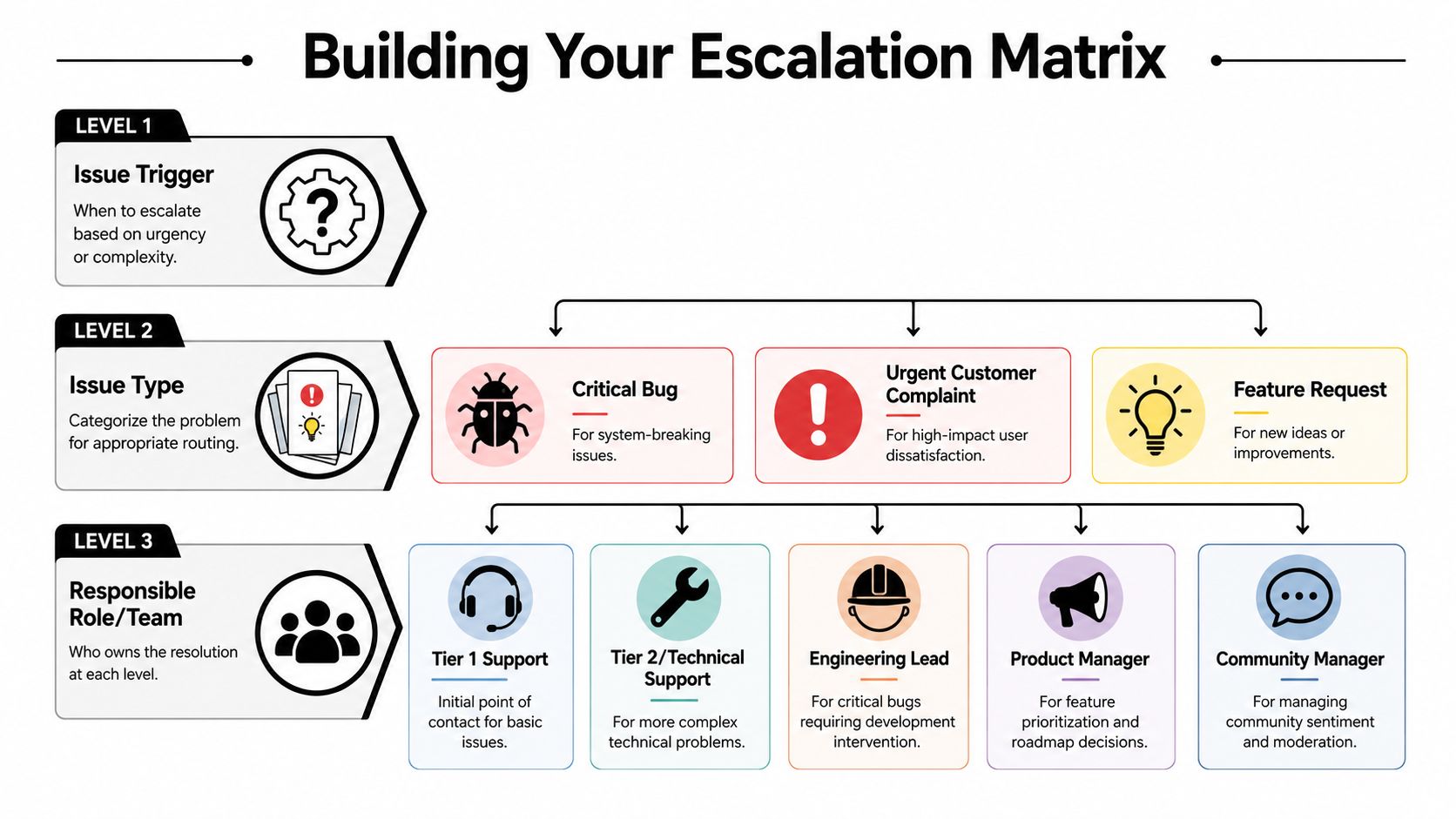
Most community teams can operate well with three levels.
This is the frontline. In a community setting, that usually means moderators, community ops, or AI-assisted triage.
Level 1 should:
Level 1 should not be expected to solve deep technical issues, approve exceptions, or invent policy.
This is the team that can work the problem.
Depending on the company, Level 2 may include:
Level 2 handles cases that need systems access, specialist knowledge, or direct ownership across channels.
Scarce expertise lives here.
Typical Level 3 owners:
Level 3 should not become the default destination for messy cases. If too much lands here, the matrix is poorly designed or L1 and L2 are under-equipped.
This matrix is enough for many gaming, SaaS, and Web3 communities to start.
Severity LevelExample IssueLevel 1 (Mods / AI)Level 2 (Support Team)Level 3 (Engineering / Leadership)LowHow-to question, missing FAQ answerReply with article or guided answerReview if pattern repeatsNot neededMediumSingle-user billing issue, account confusionCollect details, move to private handlingInvestigate and resolveEscalate only if policy exception neededHighMultiple reports of failed feature or broken purchase flowConfirm pattern, gather examples, flag urgencyOwn user communication and triageEngineering investigates root causeCriticalSecurity concern, outage, major reputational complaintContain, document, alert immediatelyCoordinate responseLeadership and specialists take over
That table only works if each role has a written scope. “Support team” is too vague if nobody knows whether billing sits there, whether community managers can issue credits, or whether moderators are allowed to move users into private threads.
A useful matrix answers questions like these:
Without that clarity, teams create shadow roles. The same reliable moderator ends up doing everything. The engineer who answers fast becomes an unofficial support queue. The community manager becomes the escalation path for every emotional complaint.
A role-based setup also survives staffing changes better. Individual names change. Responsibilities shouldn't.
For communities with layered permissions, it helps to document Discord server roles alongside the escalation matrix so moderators, support agents, and specialists know what access they need to act on a handoff.
The handoff should name the next owner before it leaves the current one. If that owner is unclear, the escalation hasn't happened yet.
This distinction saves a lot of wasted time.
Escalation typeWhat it meansExampleFunctionalSend to the person with the right expertiseModerator routes API error to technical supportHierarchicalSend upward for authority or prioritySupport lead asks product leader to approve exception handling
Community teams often overuse hierarchical escalation when they really need functional escalation. A moderator pings a manager because the issue feels serious, but the manager can't diagnose it. The result is delay plus noise.
A strong matrix routes first to knowledge, then to authority only when needed.
A documented process is only half a system. The other half is execution inside the tools people already use.
If the escalation path lives in a Notion page that nobody checks during a live incident, it won't hold under pressure. The workflow has to show up where the message starts.
Modern escalation paths are increasingly conditional, not linear. Tooling can route by priority, working hours, and rotation instead of forcing a simple chain, which is especially important for distributed teams and schedule-aware coverage, as explained in incident.io's documentation on escalation paths. That applies directly to community support. A Discord report at night shouldn't wait for the same daytime owner if another team is on coverage. A Telegram issue in one region may need a different route from a Slack issue in another.
Automation isn't there to remove judgment. It's there to enforce the boring parts consistently.
Useful handoff automation usually covers four actions:
The biggest mistake is automating only the alert. A ping without context just creates another interruption.
A practical Discord flow often starts with one visible action:
From there, the workflow can create a private thread, assign a support role, and attach the original discussion so the next owner doesn't ask the user to repeat everything.
Many Discord setups fall short in this scenario. They alert the right person but leave the evidence behind in a public channel.
Slack communities often need stricter channel discipline because everything looks equally important in a stream.
Useful patterns include:
Slack is especially prone to “I thought someone else had it.” Automation should assign, not just announce.
A number of teams use shared-inbox tooling to bridge this gap. For example, automating customer support workflows becomes easier when Discord, Slack, Telegram, and web chat can feed one place with status tracking and human handoff rules. Mava is one example of that kind of setup.
Web chat adds another useful layer because it can do structured intake before the issue enters the team queue.
An AI agent or chatbot can ask:
That makes community escalation cleaner. Instead of dragging a frustrated user through public back-and-forth, the team can shift the case into a private channel with enough context to act.
A quick walkthrough helps show how that looks in practice:
The old model was simple. Notify Person A, then Person B, then the manager.
Community support rarely works that way. Better logic looks more like this:
ConditionRouteBilling keyword in public Discord postMove to private support queueBug report with multiple matching user messagesRoute to technical supportHigh-severity complaint outside working hoursSend to on-call coverageFeature request from community discussionSend to product feedback backlog, not incident queue
Good automation doesn't escalate more. It escalates cleaner.
If the system can separate routine questions from real incidents, specialists stay focused and frontline teams move faster.
An escalation path that hasn't been tested is just an opinion.
Teams often discover the weak points only during a messy incident. The moderator doesn't know which role to tag. The support lead can't tell whether engineering has accepted the handoff. The user gets three different updates from three different people. All of that is preventable, but only if the team treats escalation as a living system.
The most practical escalation workflow is a stepwise process: define the problem, assess impact, document attempted fixes, choose the right escalation level based on the decision required, and escalate with options, not just problems. One project-management guide also notes that an escalation “should finalize within 30 days,” reinforcing the need for bounded resolution windows, as outlined in Planta's guide to escalation management.
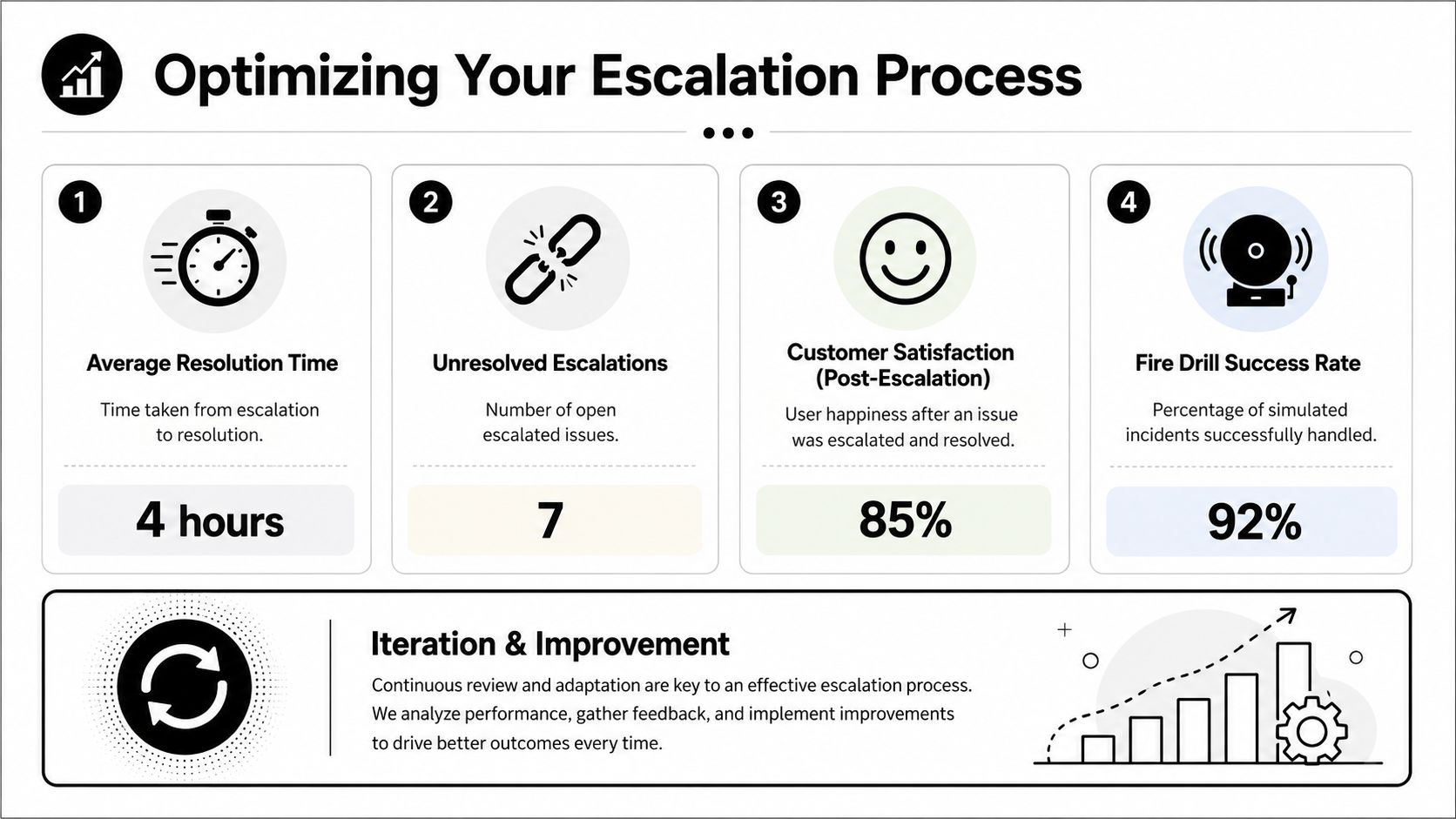
Community teams should run lightweight fire drills. Nothing elaborate is required. A lead can post a mock scenario, assign it realistic channel context, and watch what happens.
Good scenarios include:
What matters is whether the team follows the path under pressure.
Questions worth asking after each drill:
The infographic above shows sample values, but teams should focus less on any universal benchmark and more on trendlines inside their own operation.
The most useful indicators are usually:
If Level 1 forwards nearly everything, the team may have weak training, poor macros, or unclear criteria. If Level 2 is overloaded with cases that should have stayed at the frontline, the triggers are too loose. If Level 3 receives unstructured escalations, the handoff format is broken.
A useful review doesn't need a giant template. It needs honest answers.
A simple format works well:
Review questionWhat to look forWas the issue classified correctly?Wrong severity often causes the wrong routeWas the escalation too early or too late?Thresholds may need adjustmentDid the next team have enough context?Missing history slows resolutionDid ownership stay clear end to end?Shared responsibility often means no responsibilityWhat should change now?Update trigger, owner, workflow, or knowledge base
The best escalation review ends with one change in the system, not a vague promise to “communicate better.”
That's how the process gets sharper. One trigger gets rewritten. One ownership gap gets closed. One handoff field becomes mandatory. Over time, the team stops relying on heroics and starts relying on design.
Community support gets dismissed as messy by nature. It isn't. It's only messy when the team treats every post like a fresh surprise.
Formal escalation paths change that. They give moderators a rule for when to act, support agents a route for where issues go next, and specialists a cleaner handoff with enough context to solve the problem. They also protect the public side of community support, where delays and mixed messages don't stay private.
The strongest systems don't feel bureaucratic to users. They feel reliable. A complaint gets acknowledged. A bug report reaches the right team. A complex case moves into private handling without starting over. The team knows who owns what, and users can tell.
That's the payoff. Less scrambling. Fewer dropped issues. Better use of engineering time. More trust in the support function.
For Discord, Slack, and Telegram teams, the work usually starts small. Define the triggers. Name the roles. Keep the chain short. Automate the handoffs that happen every day. Then test the process until it holds up when volume spikes.
A community doesn't need a giant enterprise service desk to do this well. It needs discipline where chat is weak. That means clear thresholds, explicit ownership, and a support path that still works when the channel is moving faster than any human can read.
Teams handling support across Discord, Telegram, Slack, and the web can use Mava to bring those conversations into a shared workflow with AI triage, human handoff, and channel-aware support operations. For community-driven companies trying to make escalation paths usable in real time, that kind of structure helps turn scattered chats into trackable support.
.png)
.png)
.png)
