.png) Get Started
Get Started

Scaling player support means fixing channel architecture, building moderation workflows that don't depend on heroic effort, and using AI bots trained on your game to handle the long tail of repetitive questions. This guide covers structuring help channels, triage systems, patch-rollout spikes, and the metrics that actually matter for a gaming community.
Every game studio launching on Discord starts with the same optimistic setup: a few channels, a handful of mods, and a genuinely excited player base. Then the community grows. Suddenly, your general chat is buried under bug reports, your moderation team is burning out by Tuesday, and players are posting support requests in channels that were never meant for them. The chaos doesn't arrive all at once. It sneaks up gradually, one unanswered message at a time.
Scaling player support on Discord isn't just a technical challenge. It's a core part of gaming community management that determines whether your players feel like valued members of something real or just another user waiting on a response. Getting this right takes architecture, automation, and a clear sense of where human judgment still matters most.
The early days of running a game server feel manageable. Your team knows most of the regulars, response times are solid, and the community has genuine energy. But Discord was never designed to function as a support platform. It was built for conversation, and conversations don't scale the way ticketing systems do. As Co-op Board games states, with 74% of Discord's 28.4 million servers being gaming-dedicated and the platform now reaching 259.2 million monthly active users, the volume problem is only getting worse.
When player numbers double or triple, the cracks in your setup become visible fast. Support requests land across multiple channels. Players DM mods directly, pulling them out of the workflow entirely. Repeat questions flood your chat, forcing the same answers dozens of times a day. What worked at 500 members stops working at 5,000.
The problem isn't your team's effort. It's that the structure underneath was never built for this kind of load.
This is where intentional gaming community management becomes critical: build systems that keep the community functional as it grows, without requiring heroic effort from your staff to maintain it.
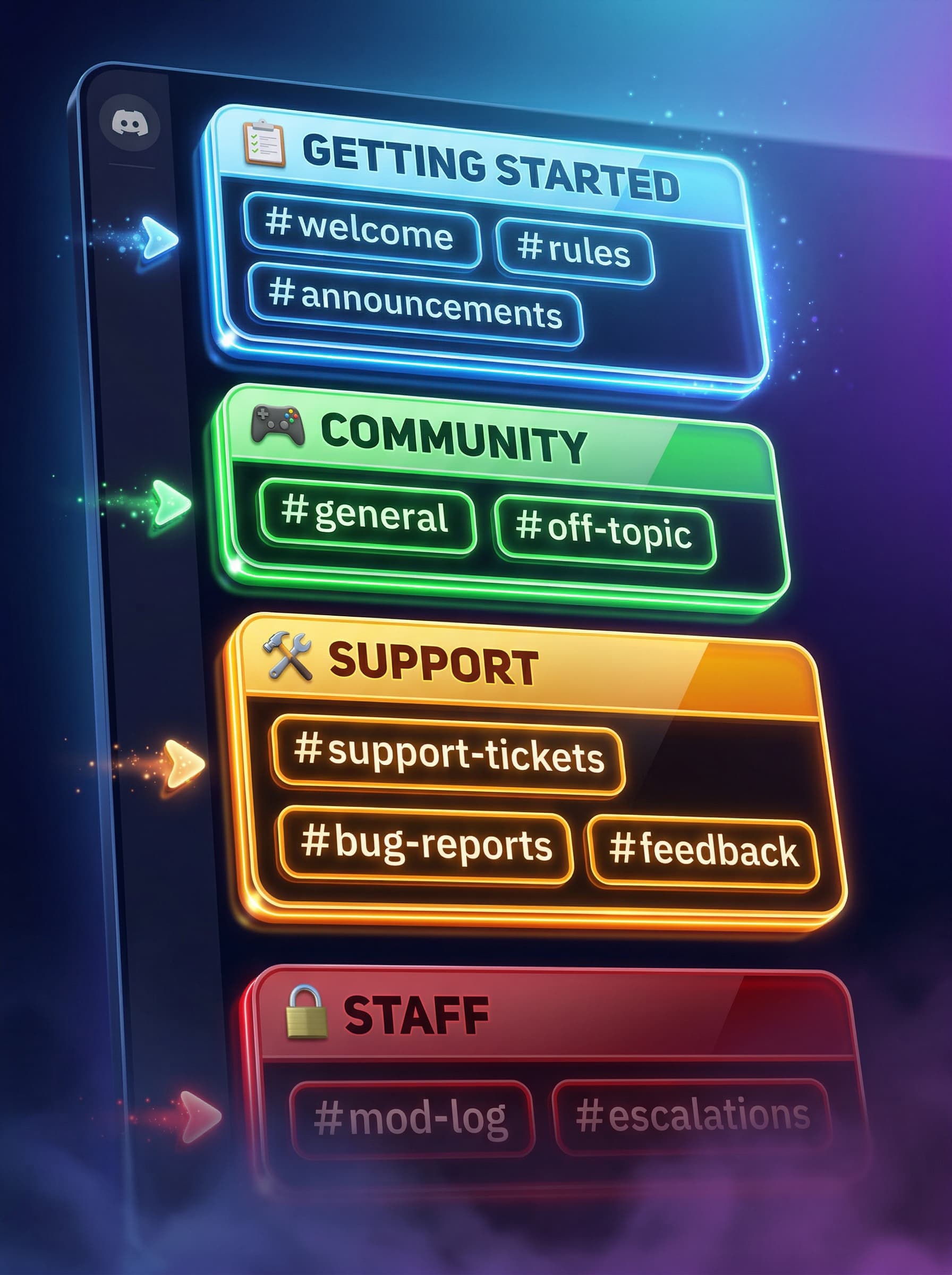
Discord gives you almost unlimited flexibility in how you structure a server, which is both a gift and a trap. Without clear architecture, players default to posting everywhere, and your team spends more time redirecting questions than actually answering them.
The foundation of any solid game community Discord setup is channel clarity. Players shouldn't have to guess where to go. A minimal but effective structure looks like this:
📋 GETTING STARTED
  #welcome
  #rules
  #announcements

🎮 COMMUNITY
  #general
  #off-topic

🛠️ SUPPORT
  #support-tickets
  #bug-reports
  #feedback

🔒 STAFF (internal)
  #mod-log
  #escalations
Each category serves a distinct purpose. Players land in your server and immediately know where support happens, where bug reports go, and where open conversation belongs.
Separating support from general conversation is the single most impactful structural change you can make. A dedicated #support-tickets channel gives players a clear starting point, while Discord's native thread functionality lets individual issues get handled without polluting the main feed. Each thread becomes its own contained conversation, making it easier to track, escalate, or resolve without losing context.
For higher-volume servers, a ticketing workflow built on top of Discord threads creates a formal support loop. Players open a thread, describe their issue, and your team works through it to resolution. This mirrors how professional support tools operate and translates directly into faster resolution times and fewer things slipping through the cracks. For Web3 gaming communities like Fusionist, which manages one of the largest gaming community Discord servers, using secure private threads also reduces exposure to phishing attempts that frequently target large gaming communities.
Role-based access keeps your channels functional once they exist. Assigning roles based on verification status, account age, or involvement lets you control who can post where. Newer members might see a read-only
#announcements
channel, while verified players gain access to
#feedback
and testing channels. Moderators get access to internal escalation channels the general community never sees.
This layered structure reduces irrelevant posts in support channels and creates a sense of earned trust for players who've been around longer. Reaction roles and slash commands can automate the assignment process so your team isn't manually granting access as the server scales.

A sustainable moderation workflow is one your team can maintain consistently without requiring anyone to be online around the clock. When moderation depends entirely on individuals being available and attentive, you create a brittle system that breaks the moment someone takes a day off.
Building resilient workflows means documenting your processes, distributing responsibilities, and introducing automation for tasks that don't require human judgment. Studios relying purely on manual moderation are working harder than they need to.
Not all incoming messages deserve the same urgency. A clear triage framework keeps your team focused on what matters:
This logic means your mods aren't triaging manually; they're handling only what the system correctly identifies as requiring human judgment.
Every patch drop creates a predictable support surge. Players hit the same bugs, ask the same questions ("when will X be fixed?", "why can't I connect?"), and flood #bug-reports and #support-tickets simultaneously. Without a plan, this overwhelms your mod team within hours.
The solution is pre-configured AI triage that activates at volume thresholds. Before a patch goes live, update your knowledge base with known issues, rollout timelines, and fix ETAs. When the spike hits, AI handles the repetitive query volume automatically, preserving your mod bandwidth for genuine escalations. Slowmode on #general during high-traffic windows prevents chat from becoming unreadable while the team focuses on support.
At a certain scale, standalone Discord bots and manual workflows stop being sufficient. Bots like ticket tools handle Discord-only queues but offer no AI, no analytics, and no multi-channel visibility. Your team ends up juggling separate tabs for Discord, Telegram, and email with no unified view of what's open, what's resolved, or where the bottlenecks are.
This is where purpose-built infrastructure changes the equation. Mava was built from the ground up for Discord, Telegram, and Slack, not retrofitted from an email-first support tool. Its Discord support capabilities are native to how gaming communities actually operate: private threads, ticket workflows, and AI triage that understands the specific language and issues of your game. With AI automation and knowledge base training, Mava can resolve up to 50-60% of community queries autonomously, trained on your patch notes, FAQs, and known issue logs. Check out Mava's Web3 case studies for more on how communities at that scale handle support without burning out their moderation teams.
Setup takes around 20 minutes, and Mava's pricing scales with community size, so you're not paying for enterprise tooling before you actually need it.
Ready to stop managing Discord support manually? Mava connects your Discord tickets, Telegram threads, and web chat into a single workflow your team can actually keep up with.
Most community management guides focus on high-priority issues: bugs, outages, frustrated players ready to churn. But the long tail of support, the hundreds of small, routine questions your community asks every week, consumes a disproportionate amount of your team's time.
Generic chatbots frustrate players because they give irrelevant answers. A bot trained on your patch notes, FAQ, known bugs list, and onboarding documentation can answer the specific questions your players actually ask. Mava's AI works this way: trainable on your knowledge base so it reflects your game's specific context. In public Discord channels, it can respond to common questions without creating a ticket at all. In private ticket threads, it surfaces relevant answers before a human agent steps in, reducing the volume that reaches your team and preserving their attention for complex interactions where empathy and judgment actually matter.
Player feedback is one of the most valuable assets a game studio has, and most studios aren't collecting it systematically. Feedback gets scattered across general chat, buried in threads, or lost in moderation noise. Your game dev community ends up relying on what squeaks loudest rather than what's most representative.
Turning Discord into a structured feedback engine requires dedicated #feedback channels, clear prompts that guide players toward specific types of input, and a process for aggregating and tagging that input before it reaches your dev team. If a hundred players open tickets about the same confusing mechanic in week one of a new patch, that's a design signal, not just a support problem. Mava's analytics surface exactly these patterns across your support requests, helping your team spot recurring issues before they escalate.

Raw member count tells you almost nothing about community health. These are the metrics worth tracking:
Vanity metrics like total server members or message volume don't reflect support quality. The indicators above do. Mava's shared inbox and ticket management dashboard tracks all of these in one place, including CSAT scores, AI-resolved vs. human-resolved volume, and open ticket trends over time. With full historical data, you can identify seasonal spikes, connect support surges to specific patch drops, and make the case for operational investment with numbers rather than anecdote.
Good gaming Discord best practices aren't about being everywhere at once. They're about building systems that make your team's presence count and giving your players the experience of being supported by a studio that actually takes them seriously.
.png)
.png)
.png)
