.png) Get Started
Get Started
A lot of teams start in the same place. They open a Discord server or Slack workspace, invite a few hundred people, post a welcome message, and expect momentum to show up on its own. For a week, it looks promising. Then questions sit unanswered, introductions get no replies, the loudest members set the tone, and every product issue spills into the main chat.
That's usually the moment people realize community isn't a side project. It's an operating system.
Learning how to build an online community isn't about launching faster or stuffing more people into channels. It's about designing a space that can survive normal human behavior: silence, conflict, support volume, uneven participation, and the slow fade that hits after novelty wears off. Communities break when there's no structure for those realities.
Most failed communities don't fail because demand was weak. They fail because nobody built the mechanics that turn attention into participation.
A new community feels exciting because the container exists. There's a logo, some channels, maybe a launch thread and a handful of friendly early members. That setup creates the illusion of progress. But a community only becomes real when members know what to do, what not to do, where to ask for help, and why it's worth coming back.
The common pattern looks like this:
That's why community should be treated less like a campaign and more like a product. It needs a clear use case, predictable onboarding, moderation systems, and a support layer that protects the conversation itself.
Community growth without operational design creates noise faster than it creates value.
There's also a business model issue behind many weak launches. Teams say they want a community, but what they really want is cheaper support, stronger retention, better user feedback, or more advocacy. Those are legitimate goals. They just need to be designed deliberately. A useful framing comes from the idea of community-driven companies, where the community isn't bolted onto the business but tied directly to how the company serves users, gathers insight, and earns trust through daily interaction, as discussed in this overview of community-driven companies.
A resilient community needs four things working together:
Teams often focus on the first and ignore the rest. That's why the room fills up but never gets healthier.
A community without a defined purpose becomes a miscellaneous chat room. That might work for a friend group. It doesn't work for a company, product ecosystem, or professional network.
The first decision isn't which platform to use. It's what job the community will do for members.
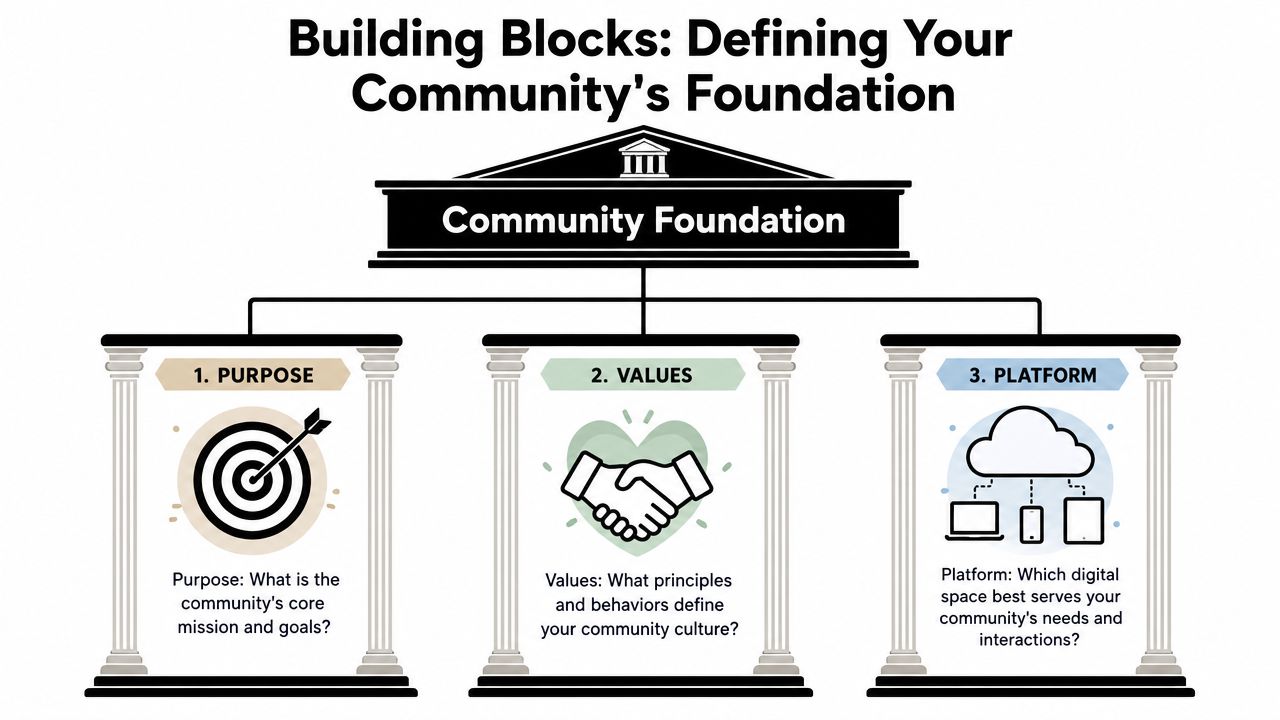
A useful community purpose is specific enough to guide behavior. One practical filter is SPARK:
A weak purpose sounds like “a place for everyone interested in our brand.”
A stronger one sounds like “a place where power users help each other ship faster, troubleshoot edge cases, and share working setups.”
That difference matters because purpose drives structure. It tells the team which channels deserve priority, which behaviors to reward, and which content doesn't belong.
Most communities are designed for an imaginary average member. That person doesn't exist. The fix is to sketch two or three real personas before launch.
A practical set might include:
Member TypeWhat They Need FastWhat Makes Them StayWhat Can Push Them OutNew userClear next step, simple welcome, safe place to ask basic questionsQuick answers and visible progressFeeling behind or ignoredExperienced practitionerHigh-signal discussion, peer exchange, recognitionAccess to advanced conversationsRepetitive beginner noiseCustomer advocateCloser relationship with the team, early visibility, statusTrust and meaningful participationBeing used only for promotion
Those personas shape everything from onboarding prompts to moderation policy. They also stop teams from overbuilding for edge cases.
For teams studying existing behavior patterns before launch, niche ecosystems can be useful signals. A curated list of top Reddit communities for SaaS growth can help identify how different founder and operator groups talk, what they ask repeatedly, and where discussion quality breaks down.
Platform choice should follow interaction style, not trend preference.
Platform Comparison for Online Communities
PlatformBest ForKey StrengthPotential DownsideDiscordReal-time product communities, gaming, developer ecosystemsFlexible channels, roles, live discussionCan become noisy without strong structureSlackProfessional groups, customer communities, internal-external hybridsFamiliar workflow, good for focused conversationMessage flow can bury useful knowledgeTelegramMobile-first communities, fast updates, global audiencesSimple access, low friction, strong mobile adoptionHarder to preserve structure and signalSelf-hosted web platformsForums, knowledge-driven communities, long-term archivesBetter organization, stronger search, owned experienceRequires more setup and ongoing management
Decision rule: Pick the platform that supports the member behavior you want to repeat, not the one your team already happens to use.
Values belong in this foundation too. If the team says the community should be respectful, inclusive, and useful, those words need an operational meaning. Otherwise they stay decorative.
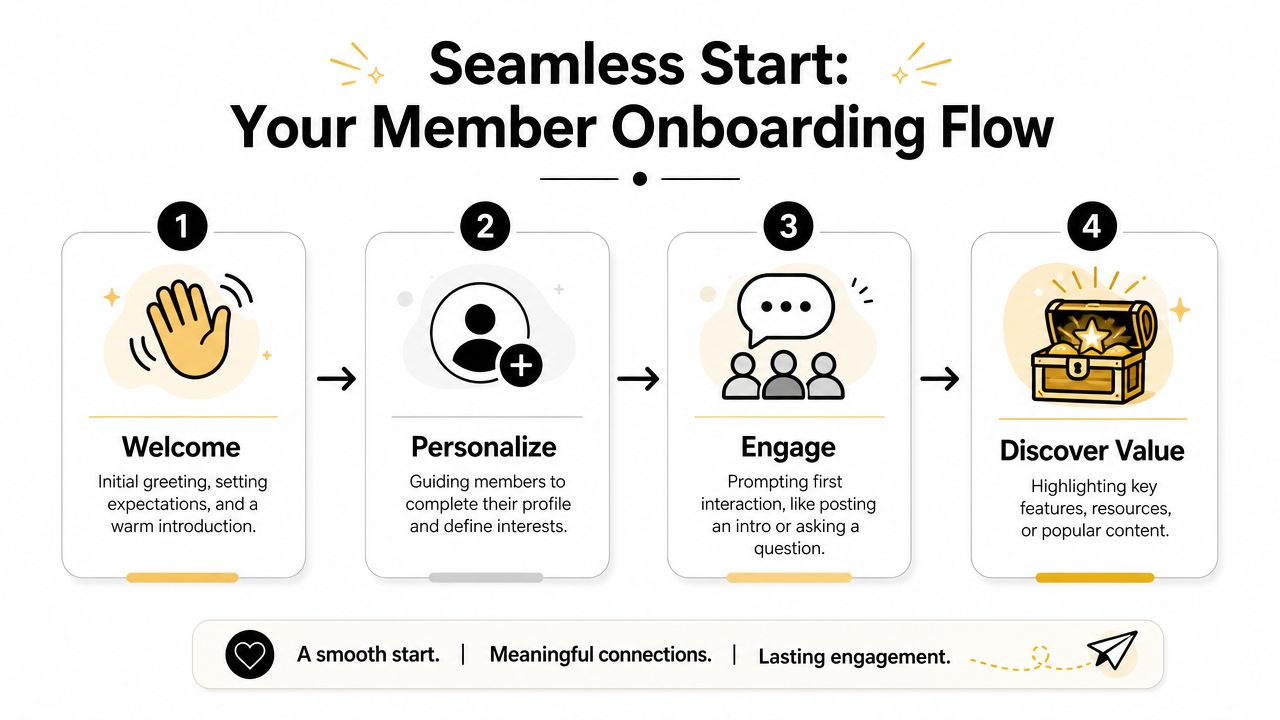
The first days after joining decide whether a member becomes active, passive, or gone. Most communities waste that window by giving people too many options and too little direction.
A strong onboarding flow doesn't try to explain everything. It gets a new member to one useful action at a time.
A common failure case looks familiar. Someone joins, lands in a channel list that feels like airport signage, sees a bot DM with ten instructions, and leaves without posting. Nothing is broken technically. The experience is still poor.
The member journey should move in a sequence:
That flow works because each step lowers uncertainty. The member doesn't need to guess where to go or what “good participation” looks like.
A simple welcome sequence might include:
Teams that want examples of onboarding mechanics on Discord can review practical Discord onboarding patterns.
A short walkthrough can help teams map this flow before they build it:
The best onboarding messages are narrow and easy to answer. They don't ask for a biography. They invite one clear move.
For example:
New members are more likely to post when the first question has a small surface area and an obvious answer.
Compare these two prompts:
The second prompt gives the member a structure. It also gives moderators and existing members something concrete to respond to.
Automation helps with routing and consistency, but people still create belonging. A moderator or community lead should visibly greet new members, tag them into a relevant thread when appropriate, and reply to first posts quickly. That's less about hospitality theater and more about training. It shows what kind of participation gets noticed.
A useful onboarding flow teaches community norms without sounding like a legal document. Members learn by doing, not by reading a wall of text.
A community usually looks alive right before it starts to sag. New posts are still going up. Reactions are still coming in. Then the same five people carry every thread, staff starts scrambling for ideas, and quieter members stop checking in because nothing feels worth returning for.
Repeatable rituals prevent that slide. They reduce the pressure to invent fresh programming every week, and they give members a clear reason to come back. More importantly, they create operating structure. That matters later, when the community grows and your team has to preserve quality without burning out moderators or community managers.
Good rituals are easy to run on a tired Tuesday.
That is the standard I use. If a format only works when the community lead has extra time, it is not a system. It is a burst of effort disguised as strategy.
A practical cadence might include:
Consistency beats volume here. One dependable ritual with clear facilitation usually does more for habit formation than a full calendar of loosely run events.
A lot of community content is written like a newsletter. Clean copy, polished framing, little room to join. That format can inform members, but it rarely gets them talking to each other.
Participation rises when the post gives members a job. Ask for a decision, an example, a trade-off, or a reaction to something concrete.
FormatWhy It WorksWatch Out ForSpecific promptGives members an easy starting pointGets stale if the question never changesHot-seat Q&ACreates urgency and surfaces expertiseNeeds a host who can keep the thread movingPeer critique threadProduces practical value between membersNeeds clear boundaries to prevent pile-onsBuild-in-public check-inBuilds accountability and visible progressCan turn into self-promotion if left unchecked
The trade-off is straightforward. Open-ended formats can attract more responses, but they also invite weaker ones. Structured prompts usually produce fewer comments and better comments. In healthy communities, that is often the better bargain.
Good rituals train member behavior. They show what kind of contribution gets noticed, answered, and repeated.
Engagement systems fail when they ignore support load.
Every recurring thread should have an owner, a response standard, and a cleanup rule. Decide who opens it, who replies if nobody bites, when it gets summarized, and when off-topic comments get redirected. Without those rules, even a popular format becomes expensive to maintain.
This is one of the mistakes many teams make early. They chase activity first and assume order can come later. In practice, messy engagement creates hidden work. Moderators spend more time redirecting repetitive questions, founders get pulled into basic support, and strong members stop contributing because the signal drops.
A better approach is to pair each ritual with light operating rules from day one:
That structure keeps rituals useful as membership grows.
Automation helps with scheduling, reminders, tagging, and follow-up. Teams that borrow workflows from an AI automation agency can reduce manual admin work and keep recurring formats on time. That is useful. It is not enough.
A healthy community still needs human judgment. Someone has to notice when a ritual has gone stale, when one member is dominating every thread, or when a discussion belongs in support instead of general conversation. Automation keeps the engine running. Humans keep the room worth entering.
The test is simple. Members should recognize the rhythm, but still find real conversation inside it.
Moderation isn't cleanup. It's infrastructure.
Teams often treat moderation as something to add after growth arrives. That's backwards. By then, the norms are already set, the regulars already know what they can get away with, and every enforcement decision feels personal because there's no system behind it.
A key challenge is building a community that is inclusive and resilient to conflict. Most guides stop at values statements rather than operational guidance on moderation and governance. Communities need structures for decision-making and escalation, not just content and growth tactics, as noted in this guidance on building an inclusive online community.
Weak guidelines sound like brand copy. Strong guidelines describe observable behavior.
Instead of writing:
Write rules that moderators can apply consistently:
That shift matters because moderators need language they can point to in live situations.
A governance framework should answer three questions:
A simple ladder often works:
Not every case moves linearly. Severe harassment, threats, or coordinated abuse may require immediate removal. The point is consistency. Members don't need every detail of internal process, but they do need to trust that the process exists.
The job of moderation is to protect the conditions for useful participation, not to win arguments.
As a community matures, moderation blends into governance. Members want to know who can change rules, how feedback gets reviewed, and what happens when a long-time contributor causes harm.
That doesn't require bureaucracy. It requires clarity. Useful practices include:
Volunteer moderators can be a strength if they're trained and supported. Without support, they burn out or enforce unevenly. Good moderator training covers tone, boundaries, evidence gathering, private versus public intervention, and when to hand off a case.
A familiar failure pattern shows up around the same point. The community is growing, participation looks healthy, and then every unresolved product question, billing issue, and bug report starts pouring into the main channels.
At first, the team treats it as a good sign. Members are engaged. They trust the space enough to ask for help there. Then the costs show up. Helpful moderators turn into part-time support reps. The same setup questions get answered over and over. Strong contributors stop posting because discussion threads are buried under troubleshooting. Growth keeps climbing while conversation quality drops.
That decline is avoidable, but only if support is designed as part of the community system from day one. If you wait until volume spikes, you force moderators to improvise triage in public, and that is how burnout starts.
Healthy communities need a visible line between discussion and help requests. Without it, every busy channel becomes an intake queue.
The fix is structural. Set up distinct paths for support, product discussion, and peer conversation. Make routing rules obvious. Tell members where account issues go, where bug reports belong, and which spaces are for broader discussion. If someone posts in the wrong place, redirect fast and consistently.
A scalable support model usually includes:
This protects the core value of the community. Members can still get help, but support volume no longer overwhelms the spaces meant for exchange, expertise, and relationship building.
A large share of community support is repetitive. Setup steps, policy clarifications, pricing basics, and known fixes do not need a fresh manual response every time. They need fast, accurate answers and a clean handoff when the issue gets specific.
An AI support automation workflow for community channels can handle that first layer by pulling from an existing knowledge base, answering common questions across channels, and routing edge cases to a human. Mava is one example of this setup for teams handling Discord, Telegram, Slack, and web support from a shared inbox with AI-assisted triage.
The important choice is not the tool. It is the operating model behind the tool.
A workable support system should define:
Support LayerBest Handled ByWhyRepetitive factual questionsAI or saved repliesSpeed and consistencyAccount-specific issuesHuman supportNeeds verification and judgmentSensitive complaintsSenior human ownerRequires discretion and escalationCommunity rule concernsModerator or community leadNeeds policy context
Teams that skip this split usually create hidden failure points. Staff answer easy questions manually until they are overloaded, then response times slip, moderators get curt, and members start feeling ignored.
Burnout in community teams rarely starts with a crisis. It starts with constant low-level load. Public replies. DMs. Follow-ups. Escalations spread across too many channels. Rewriting the same answer in slightly different words ten times a week.
That work looks manageable from the outside because it is distributed and reactive. In practice, it drains attention from the jobs that keep a community healthy: welcoming the right members, spotting behavior shifts early, supporting contributors, and maintaining quality standards.
A strong support workflow reduces that strain by centralizing queues, documenting handoffs, and setting rules for what gets answered where. It also gives moderators permission not to do everything themselves. That matters more than many teams admit. Communities do not break only because of spam or weak engagement. They also break when the people holding them together are exhausted.
A community dashboard should show whether the space is becoming more useful, not just larger.
That's why the most defensible metric stack focuses on activity quality, response latency, and retention behavior, rather than vanity growth alone. Community operations guidance also stresses defining success metrics before launch, assigning moderators, setting rules, and building a management system that can sustain engagement as volume grows. A practical benchmark approach is to instrument workflows around response times, moderation coverage, and early-member activation, then iterate on prompts, rewards, and roles when participation stalls, as summarized in HubSpot's online community launch guidance.
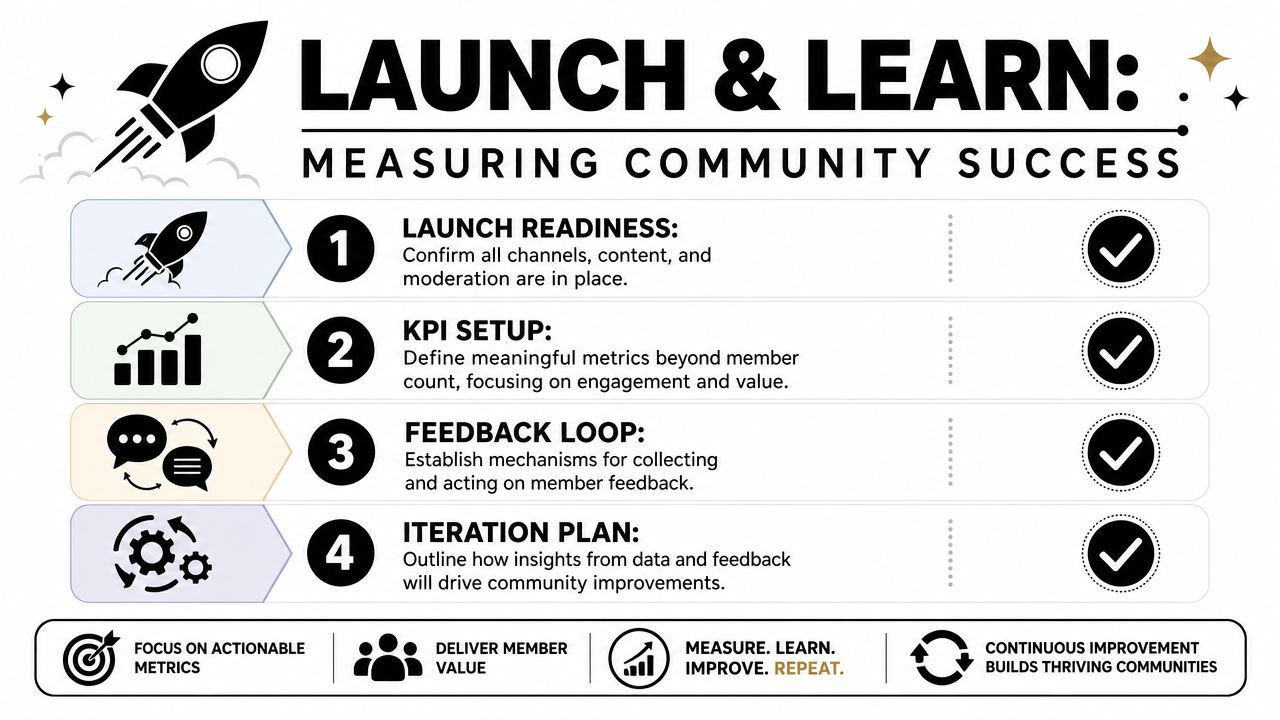
A practical measurement set includes questions like these:
Those measures reveal more than total member count ever will. Sign-ups can grow while quality falls. That's a common failure mode when teams optimize acquisition and underinvest in moderation capacity or onboarding.
A simple operating dashboard might track:
AreaWhat to WatchWhy It MattersActivationFirst post, first reply, first useful actionShows whether onboarding worksResponsivenessTime to first response, unanswered questionsIndicates support and moderator coverageContribution qualityDepth of replies, repeat contributors, useful threadsShows whether discussion is worth returning toRetention behaviorReturning members and recurring participation patternsSignals lasting value after the launch phase
If the only number the team celebrates is member count, the team will eventually build for sign-ups instead of usefulness.
An effective community launch starts with a soft-launch cohort of trusted members to validate the concept and workflows before opening to a full audience. The operational risk in launching broadly too early is that the space feels empty, inconsistent, or unmanaged before norms form, a point emphasized in CMX's community-building guidance.
That soft launch should be treated like a live systems test.
A practical checklist looks like this:
The best launches feel active on day one because they were prepared before day one.
If the goal is to build a community that stays useful as it grows, the support layer can't be an afterthought. Mava helps community teams manage support across Discord, Telegram, Slack, and the web with a shared inbox, AI-assisted replies, and human handoffs that keep discussion spaces cleaner and response workflows more consistent.
.png)
.png)
.png)
