.png) Get Started
Get Started
Support teams often hit the same wall at the same time. A question lands in Discord, then again in Slack, then again in email, and each answer is slightly different because a different person wrote it in a different moment. By the end of the week, the community has three versions of the truth, moderators are tired of repeating themselves, and the AI bot is pulling from a messy pile of half-answers.
That's usually the moment when a kb article template stops feeling like documentation admin and starts looking like infrastructure. In community-first support, especially on Discord, Slack, and Telegram, the issue isn't just speed. It's whether every answer can be reused, found, trusted, and turned into something an AI agent can deliver cleanly in public and private conversations.
A strong template system does more than make articles look tidy. It gives human agents a repeatable way to write answers, gives users a better self-serve path, and gives conversational AI cleaner source material. Teams that want stronger self-service support workflows usually don't need more content first. They need more structure.
Support debt rarely shows up as one dramatic failure. It shows up in dozens of small inconsistencies.
A moderator answers a wallet connection question in Discord with a quick workaround. A support rep answers the same issue in email with an older set of steps. Someone in product posts a release note in Slack that changes the flow, but nobody updates the help center. Users don't see the internal confusion, but they feel it immediately. They get mixed guidance, longer resolution times, and less confidence in every answer that follows.
Community-led companies feel this faster than traditional ticket-based teams. Public channels reward speed, but speed without structure creates copy-paste support that degrades over time. The same answer gets shortened, paraphrased, and stripped of context until it's barely usable.
A loose article library might be enough for a small website FAQ. It doesn't hold up when answers need to work inside Discord threads, Slack DMs, Telegram chats, and AI-generated replies.
What usually fails:
A bot can't resolve a repetitive question cleanly if the source material was written like an internal note.
Templates solve this by turning tribal knowledge into a system. They standardize what belongs in an article, what order it appears in, and what kind of question that article is meant to answer. That makes human support more consistent, and it makes AI answers less brittle.
The practical shift is simple. Instead of writing articles from scratch every time, the team chooses a content type and fills in a known structure. That structure becomes a retrieval advantage.
When a Discord user asks a setup question, the bot should find a clean how-to. When someone reports an error, it should retrieve a troubleshooting flow, not a release note or a long feature overview. The template determines whether that handoff works.
The teams that scale best usually treat the kb article template as a support operating standard, not a writing convenience. That's the difference between a help center that stores information and one that reduces repeated work.
Most support libraries become bloated because teams publish articles based on who wrote them, not on what job the article needs to do. The fix is to narrow the core set.
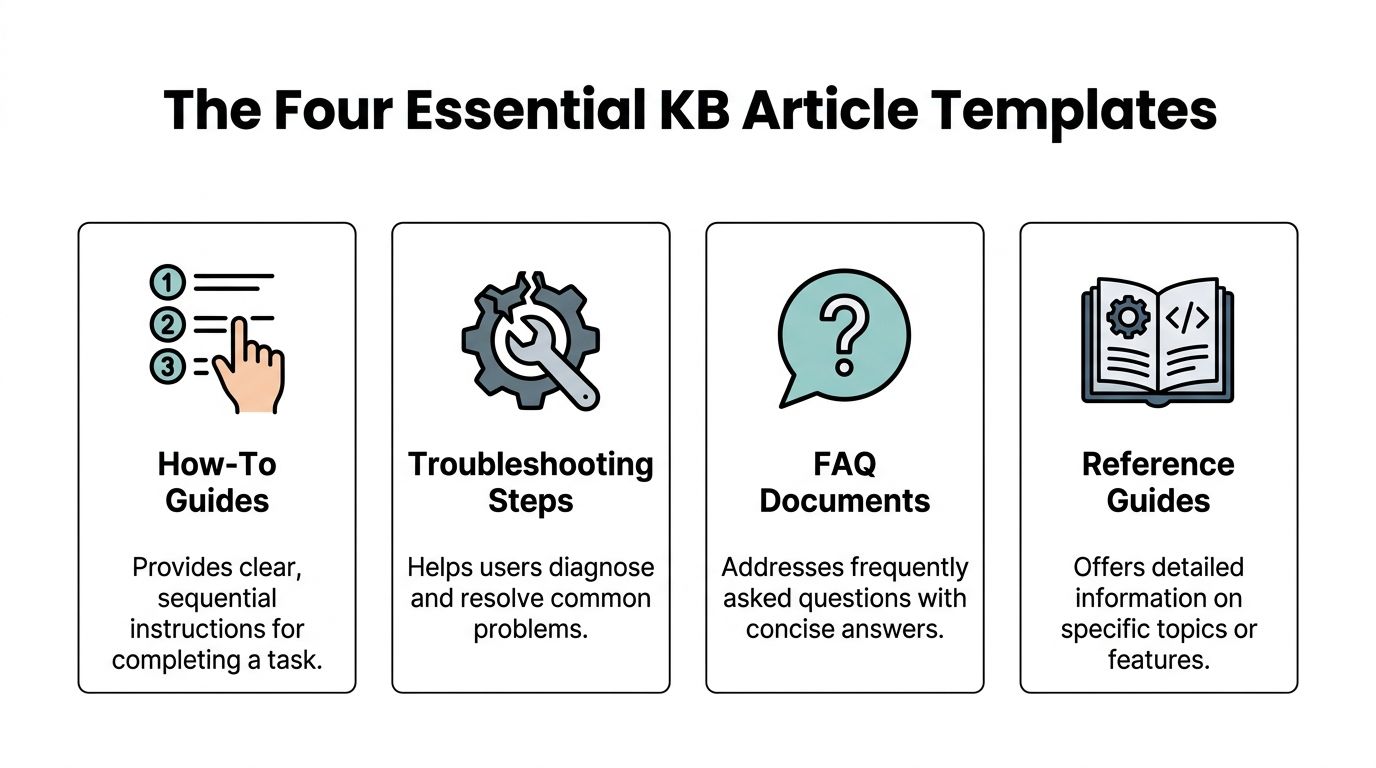
For launch-stage and growth-stage support operations, four templates carry most of the load: How-To Guides, Troubleshooting Steps, FAQ Documents, and Reference Guides. That aligns with benchmark guidance that highlights FAQs, troubleshooting guides, how-to articles, and getting started guides as core KB structures, while broader B2B libraries often also include feature overviews and glossaries. It also reinforces the rule that each article should focus on one topic per piece for searchability and SEO, as noted in Pylon's guide to knowledge base article templates.
A how-to article handles one task from start to finish. It should help a user complete something, not understand everything around it.
Use it for: connecting an account, changing a setting, inviting teammates, submitting a claim, enabling a feature.
Template skeleton
Good title: Connect Slack to your workspace
Bad title: Slack integration information
Why it works for AI: the steps are sequential, the goal is explicit, and the completion state is clear. Bots perform better when the article has one action and one endpoint.
Troubleshooting content should diagnose first, then resolve. Many teams skip diagnosis and dump possible fixes into a single page. That forces users to guess.
Use it for: sync failures, payment errors, missing permissions, login issues, broken notifications.
A troubleshooting article needs distinct components:
ComponentWhy it mattersSymptomsHelps the user confirm they're in the right articleLikely causesReduces random trial and errorResolution stepsGives ordered actionsEscalation pathTells the user what to do if the fix fails
Good title: Why isn't Slack syncing?
Bad title: Integration problems
Practical rule: If support agents can't identify the issue from the title alone, the article isn't ready for public channels or bot retrieval.
For conversational platforms, this format is essential. A bot replying in Telegram or Discord needs symptom-based matching. If the article doesn't state the visible problem clearly, retrieval quality drops fast.
FAQ pages work when they are narrow. They fail when they become junk drawers.
An FAQ should answer a cluster of closely related repetitive questions with short responses. It is not a substitute for process documentation. If an answer requires multiple steps, link out to a how-to or troubleshooting article.
Use it for: billing basics, role permissions, plan limits, moderation policies, community access rules.
Template skeleton
Good title: Billing FAQs
Bad title: Everything about billing and invoices
This format is especially effective in Slack communities, where users often ask direct, repeated questions that don't justify a full article. It also gives AI bots compact, low-ambiguity snippets to return.
Reference content is where teams often get lazy. They call something “documentation” and publish a wall of detail. Good reference guides are structured lookup pages.
Use it for: role definitions, command lists, API field explanations, status meanings, supported integrations, glossary terms.
A reference article should include:
Good title: Webhook event reference
Bad title: About webhooks
Reference pages matter because not every question is procedural. Some users don't need steps. They need a precise answer. In bot environments, these articles often support follow-up questions after the AI has already provided a first response.
Policy and announcement content still matters, but it shouldn't be confused with support resolution content. Release notes, outage posts, and temporary process changes belong in the library only if they have a clear expiry or update path. Otherwise, bots may surface old announcements as current guidance.
The useful test is simple: Does this article help a user do something, fix something, verify something, or understand a defined term? If not, it may belong in a different channel.
The best kb article template still fails if the writing is slow to scan. Community users don't read support content the way legal teams read contracts. They scan, test one instruction, and bounce if the answer looks buried.
That's why article drafting should optimize for resolution speed, not prose quality. Strong support writing is clear, compressed, and easy for both people and bots to parse.
Support titles shouldn't sound clever. They should sound searchable.
Expert benchmark guidance recommends starting how-to titles with action verbs, using question formats for troubleshooting, keeping titles under 10 words for search scannability, and leading with the answer in the first paragraph, as outlined in Pylon's knowledge base template benchmarks.
That guidance matters even more in AI-assisted support because retrieval often starts from the title and opening lines.
A few patterns work well:
What doesn't work is internal language. “Account access flow” may make sense to the team. Users will still search “can't log in.”
A support article should pay off immediately. The opening paragraph must tell the user whether they're in the right place and what to do next.
Weak opener:
This article covers several things you may want to know about integration setup and common errors.
Better opener:
If the Slack integration isn't syncing, the most common cause is missing channel permissions. Check app permissions first, then reconnect the workspace.
That answer-first pattern helps three groups at once:
Put the likely answer in the first paragraph. Put the explanation after it.
Most support friction comes from density, not complexity. Even technical issues become manageable when the formatting is disciplined.
Use numbered lists for actions that must happen in order. Use bullets for features, options, or non-sequential checks. Keep paragraphs short. Use bold sparingly to signal labels, not to decorate every line.
A practical writing pattern looks like this:
For teams training internal authors, this video gives a useful baseline on structuring article content and keeping technical explanations readable:
Discord and Slack support depends on reusable fragments. That means every article should contain at least one response-ready section that an agent can paste without editing.
Examples:
Before reconnecting the integration, confirm the app still has access to the correct channel and workspace permissions.
If the issue continues after step 3, contact support with the error message and a screenshot of the integration settings page.
These compact lines become operational shortcuts. They also reduce the temptation for moderators to improvise, which is where knowledge drift starts.
An AI support bot is only as reliable as the content it retrieves. If the knowledge base is inconsistent, bloated, or tagged loosely, the bot won't become “smarter” through prompting alone. It will just answer with more confidence than the source material deserves.
That's why AI optimization starts with document design.
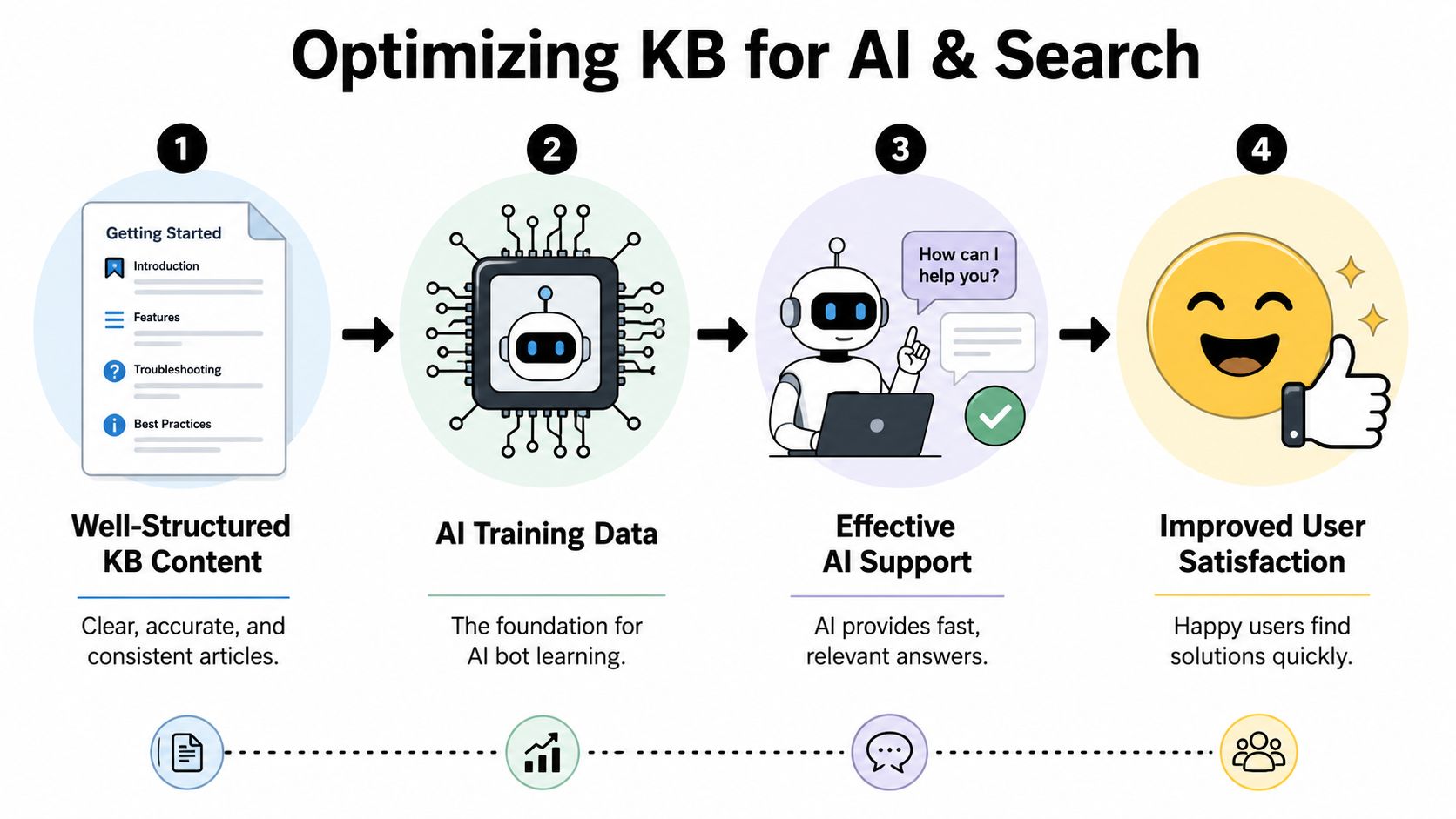
Bots perform best when each article has a stable hierarchy. The exact markup system can vary by platform, but the principle is fixed: one topic, one clear title, predictable subheadings, and no mixed intent.
Strong AI-readable structure includes:
This is also where search visibility overlaps with bot performance. Teams thinking beyond their own help center should study how structured support content contributes to achieving LLM visibility, because the same clarity that helps internal bots retrieve answers also improves how external AI systems interpret and surface documentation.
Tags are often treated like filing labels. In reality, tags are retrieval controls.
Benchmark guidance for KB management recommends a three-tier tagging system using department, content type, and audience, alongside controlled vocabularies and version control metadata. It also notes that articles with high view counts and low ticket deflection often signal discovery without resolution, which is a revision problem, not a publishing success, as described in this guide to optimizing your knowledge base for AI bots.
A practical schema looks like this:
Tag layerExample valuesPurposeDepartmentSupport, Product, BillingNarrows ownership and search domainContent typeHow-to, FAQ, Troubleshooting, ReferenceHelps bots match intentAudienceAdmin, End user, Moderator, DeveloperPrevents wrong-context answers
Controlled vocabularies matter. If one author tags an article “payments” and another uses “billing,” retrieval gets noisy unless the system has a documented standard.
Users don't search with internal product language. They search with the language they use in chat. A good article should include the preferred product term while still acknowledging common alternatives naturally in the text.
For example, a team may officially call something a “workspace,” while users say “server” in Discord or “group” in Telegram. The article should establish the canonical term and then reference the common variant once where it helps retrieval.
That is enough. Stuffing the article with every synonym variation usually hurts readability and creates ambiguity for bots.
The best AI-ready article doesn't sound robotic. It sounds precise.
A knowledge base without maintenance turns into a liability faster than many realize. The older the content, the more dangerous the confidence. Users trust the article because it exists. Agents trust it because it was published. Bots trust it because it's in the index.
None of those signals guarantee it's still correct.
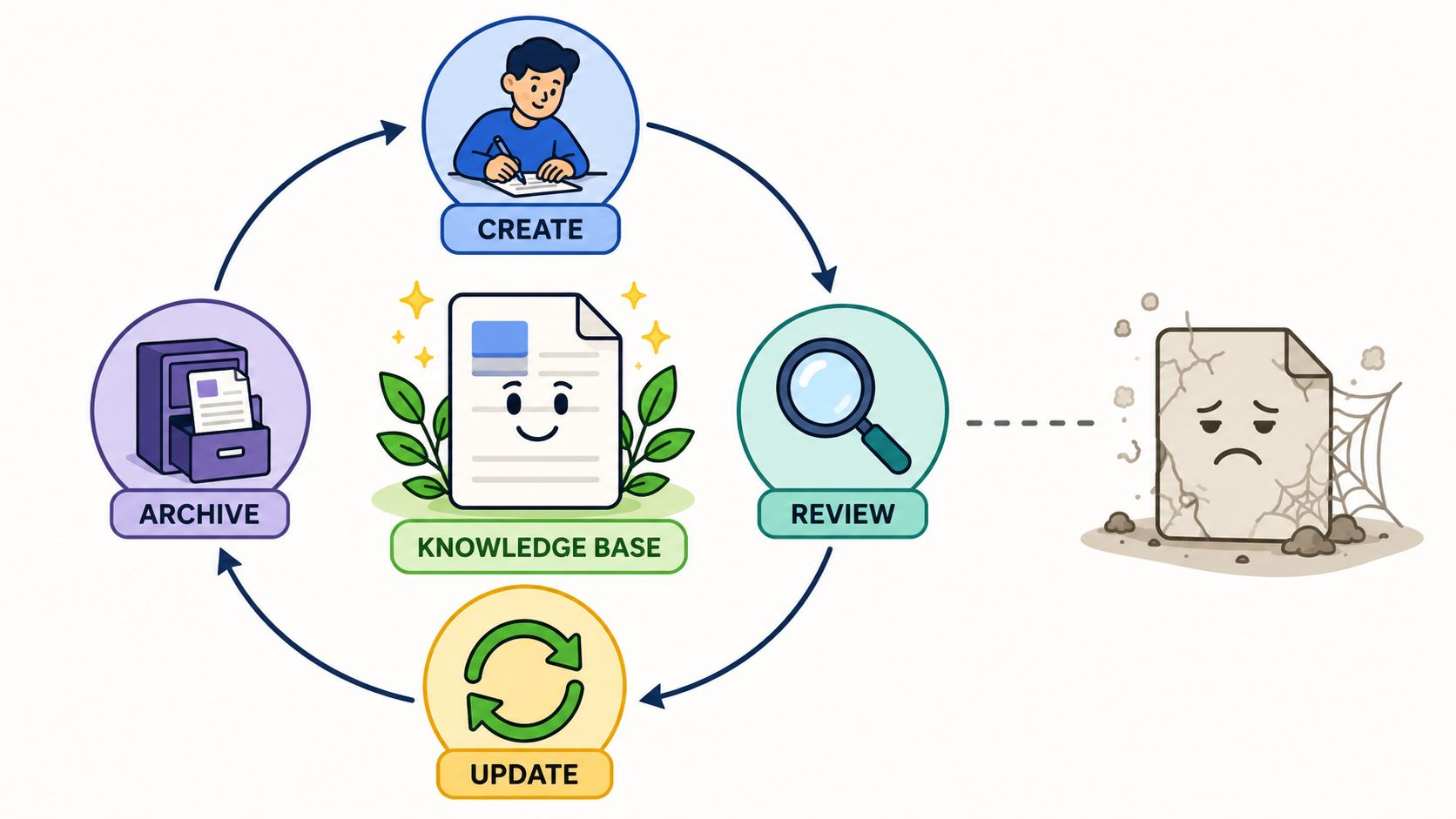
A disciplined lifecycle starts before the first article is written. To maximize deflection rates, organizations should analyze their top 20 most frequent ticket types from the past quarter and map each one to a specific template category, according to SIIT's guidance on knowledge base article templates. The same guidance recommends planning maintenance through ownership fields and review date prompts.
That advice matters because many teams start with whatever content is easiest to publish. They write a polished getting-started page, a broad product overview, and a few feature pages, then wonder why repeated tickets keep coming in. The issue isn't effort. The issue is prioritization.
For community support teams, the better sequence is:
Ownership is where most documentation programs either stabilize or decay.
If no owner is named, every broken article turns into a low-priority shared problem. If an owner and review date exist, outdated content becomes visible work. That is a much better operating model, especially when multiple teams contribute knowledge.
A simple lifecycle works well:
StageWhat the team doesDraftCapture the answer in the right templateReviewCheck product accuracy, naming, and scopePublishAdd tags, ownership, and related linksAnalyzeWatch what gets used and what fails to resolveArchive or updateRetire old content or revise it
For teams connecting docs into support operations, a knowledge base integration strategy matters because analytics and retrieval only become useful when article performance is visible inside the workflow, not buried in a separate docs tool.
Not every weak article looks weak at first glance. Some pages get a lot of traffic because users can find them easily, but they still don't solve the problem. That pattern usually means the article title matches intent, while the body fails to resolve it.
Those articles deserve revision before the team creates net-new content.
Common reasons include:
A healthy knowledge base is not the one with the most pages. It's the one where each page has a clear owner, a known purpose, and an obvious path to review.
Many teams don't need a six-month documentation project. They need a controlled first month.
Audit recent support conversations and identify the repeated questions that keep showing up across community channels and tickets. Don't chase edge cases. Pick the issues that create visible support drag and fit cleanly into how-to, troubleshooting, FAQ, or reference formats.
Draft articles only for the highest-friction topics. Keep each article focused on one question or task. Use a strict kb article template, write the answer in the opening paragraph, and make sure the title matches the way users ask the question.
Publish the first batch and connect it to the channels where users already ask for help. That means the knowledge shouldn't live as a passive library. Agents should use it in replies, moderators should link it in community threads, and the support workflow should surface it during live conversations.
Review what happened. Look at which questions are now easier to answer, which articles get discovered but still trigger follow-up tickets, and where users still need a human handoff. Those patterns usually reveal whether the problem is article quality, template mismatch, or missing content.
Start narrow. A small set of high-quality articles beats a large help center full of partial answers.
The fastest win comes from discipline, not volume. Build the first template set around repeated issues, keep ownership clear, and treat every published article as training data for both humans and AI.
Teams that want to scale support across Discord, Telegram, Slack, email, and the web can use Mava to turn an existing knowledge base into an AI-powered support layer, route conversations through a shared inbox, and keep human handoffs clean when automation shouldn't guess.
.png)
.png)
.png)
