.png) Get Started
Get Started
Support often breaks long before a team calls it broken.
A community starts on Discord or Telegram because that's where users already are. Questions arrive in public channels, bug reports show up in direct messages, account issues land in email, and moderators forward urgent threads into Slack with a quick note that says “can someone take this?” At first, the setup feels lightweight. Then volume rises, context gets split across tools, and nobody can tell which issues are still open.
That's the moment when ticketing support software stops being a nice extra and becomes operating infrastructure.
A familiar pattern shows up in community-driven companies. A user reports a wallet issue in Discord. Another follows up in a Telegram group. A moderator copies part of the conversation into an internal channel. Later, the same user emails support because nobody replied in the original thread. The team now has three fragments of one issue, spread across three systems, with no reliable owner.
That kind of setup doesn't fail because the team is careless. It fails because community support moves fast, happens in public and private spaces at once, and rarely stays in a neat email chain. Traditional processes assume a customer submits one request through one channel. Community support doesn't work like that.
For teams in Web3, gaming, developer tools, and fast-moving SaaS products, this problem gets worse as the community becomes more active. Moderators spend their time reconstructing conversations instead of solving issues. Support leads lose visibility into backlog. Users repeat themselves. Frustration grows on both sides. The diagnosis in why customer support in Web3 breaks under community volume will feel familiar to anyone trying to manage support from chat threads alone.
Public chat creates urgency. It doesn't create accountability.
Old-school tools also create a false sense of coverage. A team sees messages flowing and assumes support is happening. But a busy Discord server isn't a queue, a Telegram thread isn't a case record, and a shared inbox doesn't preserve the context that agents need when users jump channels.
The ultimate cost isn't just slower replies. It's the loss of trust that happens when users feel like every interaction starts from zero.
A fragmented support setup usually shows the same warning signs:
That's the tipping point. Not when support becomes busy, but when the team can no longer trust its own process.
Ticketing support software is often described too narrowly. It's not just a tool that assigns a case number to an incoming message. It's a system that turns scattered conversations into structured work.
A simple inbox receives messages. A proper support system receives, routes, tracks, updates, and closes them. That's the practical difference between a mailbox and a post office.
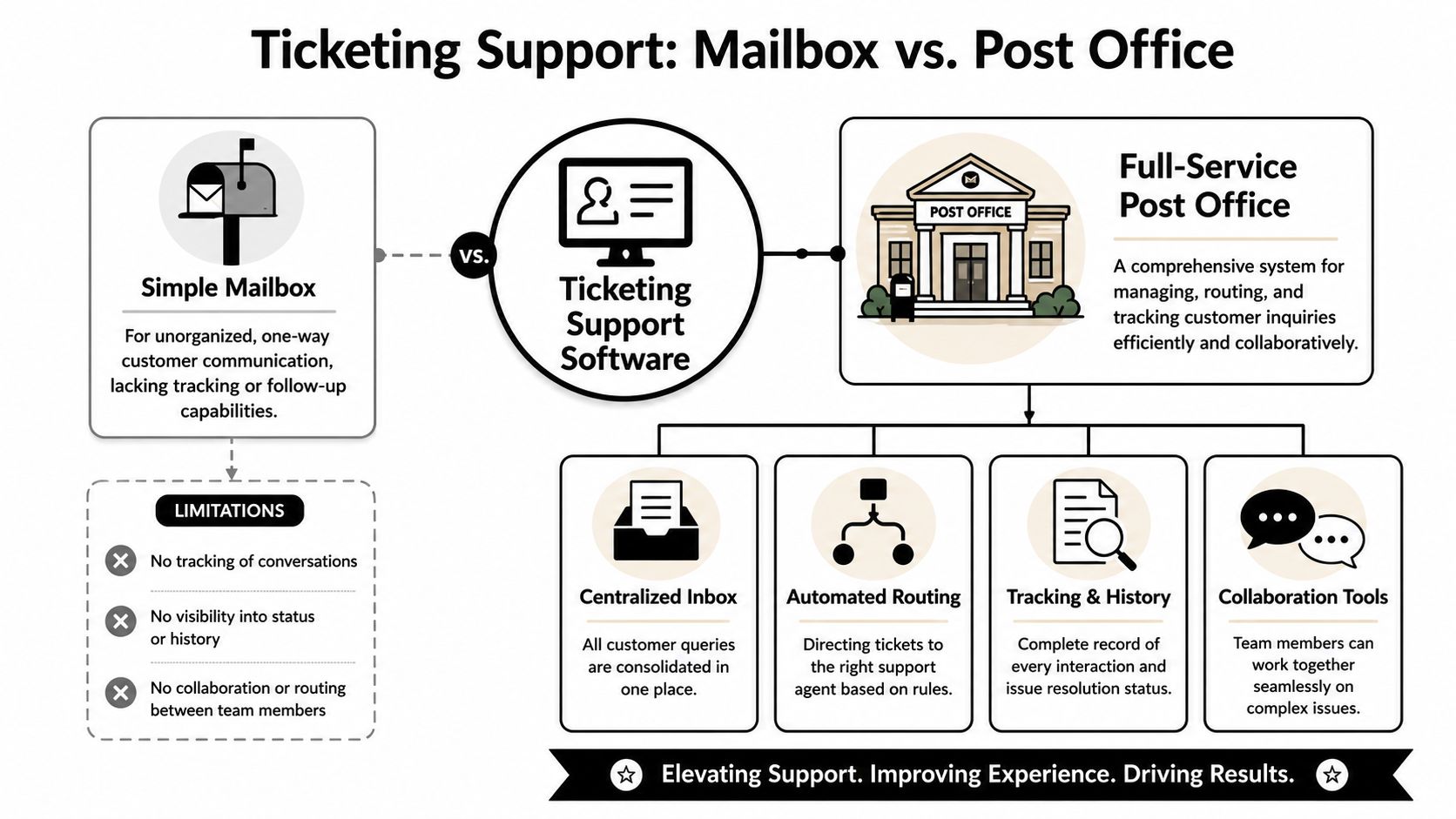
A mailbox is passive. Messages arrive and wait for someone to notice them. If two people reply, work overlaps. If nobody replies, the message sinks. If the customer follows up elsewhere, the history fragments.
A post office is operational. Every item has a destination, a status, a route, and a record. That's what ticketing support software does for support teams. It creates a single source of truth for each request, no matter where it started.
That structure matters more now because support no longer lives in one channel. The help desk and ticketing software market was estimated at US$ 3.64 billion in 2023 and is projected to reach US$ 7.51 billion by 2031, with a 9.5% CAGR, according to The Insight Partners' help desk and ticketing software market report. That growth reflects a clear shift. Organizations are investing in centralized request tracking because ad hoc message handling doesn't scale.
A capable ticketing support software setup should do more than capture incoming requests. It should create order around them.
Practical rule: If a team can't tell who owns an issue, what happened last, and what should happen next, it doesn't have a support system. It has message traffic.
This distinction matters most in chat-first companies. Many teams buy a basic ticket bot for Discord and assume they've solved the problem. Usually, they've only added a thin intake layer. The deeper need is operational continuity across channels, roles, and issue types.
That's why the strongest implementations treat ticketing support software as a workflow engine, not a message collector. The value isn't the ticket number. The value is the shared context behind it.
Modern support teams don't need more places where requests can land. They need fewer places where context can get lost.
The strongest ticketing support software earns its place through four capabilities: unified intake, automation, service controls, and connected workflows. Without those, teams end up recreating the same manual process inside a shinier interface.
A community-driven support team can't afford to split work by channel. Discord issues often turn into billing questions. Telegram bug reports can become account reviews. Email follow-ups might contain the missing screenshot that explains a public complaint.
A unified inbox fixes that by putting the thread, user history, assignee, and status in one place. That's very different from a simple Discord ticket bot. Bots can open a private thread, but they usually don't give teams a durable cross-channel record, meaningful collaboration, or reliable reporting.
For teams comparing options, a shared inbox built for multi-channel support workflows shows what the category is aiming for: one workspace for requests that begin in community chat, private tickets, or the web.
Support starts to scale when routine work stops depending on manual intervention.
Modern tools are increasingly defined by workflow automation and AI-powered routing. Industry guidance summarized by Baserow's overview of modern ticketing systems notes that machine-learning classification can predict issue type and recommend solutions, which improves efficiency beyond making first responses faster.
That matters because repetitive support work usually isn't the answer itself. It's the administrative layer around it:
A support queue without rules becomes a popularity contest. The loudest user gets help first. The oldest issue waits. Agents cherry-pick easier requests.
Good ticketing support software adds service controls that make work predictable:
A ticketing tool should reduce decision fatigue. If agents have to invent the workflow on every ticket, the software isn't doing enough.
Support rarely solves issues alone. Billing teams need account details. Product teams need bug patterns. Community managers need visibility into user sentiment and recurring friction.
That's where integrations matter. Not because an integration list looks impressive on a pricing page, but because support work often depends on systems outside support. A ticket should be able to pull the right context in and send the right signal out.
Simple chat bots struggle here. They can collect requests. They can't usually connect support operations into the wider business with enough depth to handle scale.
The biggest win from ticketing support software isn't administrative neatness. It's continuity. Users stop falling into the gaps between channels, and teams stop rebuilding context from scratch.
That matters more for community-led companies than for traditional email-first support operations. A 2025 Gartner study found that 68% of community-driven SaaS startups report context fragmentation as their top support failure. The same finding points to the core reason traditional tools miss the mark: vendors prioritize enterprise CRM integrations over community platform APIs, leaving managers with disconnected systems.
A user doesn't care whether the team classifies an issue as support, moderation, onboarding, or account operations. The user cares that the team remembers what already happened.
When a ticketing system unifies Discord, Telegram, Slack, and web support, agents can respond with the full thread in view. That changes the quality of the conversation. The user doesn't need to repost screenshots, restate timelines, or explain why the issue is urgent for the third time.
Community teams often underestimate how much trust is built through continuity alone. Fast replies matter, but coherent replies matter more.
AI and automation are most useful when they remove predictable load without cutting humans out of the harder conversations. Repetitive questions, status checks, policy clarifications, and basic troubleshooting don't need to consume the same human attention as edge cases or sensitive account issues.
That gives community managers and support agents room to do the work only people can do well:
Teams that want a broader operating model for SaaS support can compare these patterns with community-aware SaaS customer support practices for 2026.
Leadership needs more than anecdotal updates from the front line. It needs to know where support demand is coming from, where work gets stuck, and whether automation is helping or hurting.
That's one reason modern support software has become a strategic purchase rather than a narrow help desk decision. The old model treated support as a cost center with an inbox. The newer model treats support as an operating function that shapes retention, product feedback, and user trust.
Legacy tools were built for forms, email queues, and formal case submission. Community companies deal with live conversation, slang, fast-moving threads, and public pressure. The workflow needs to match that reality.
One option in this category is Mava, which provides an AI-powered shared inbox for support across Discord, Telegram, Slack, and the web, with AI handoff to human agents when needed. The broader point is bigger than any one product. Community support needs native channel support and unified context, not another system that treats chat as an afterthought.
Organizations often buy the wrong platform for one simple reason. They evaluate a support tool like a feature checklist, not like an operating model.
For community-driven companies, the right choice depends less on whether a vendor offers “omnichannel support” on a sales page and more on how the system behaves when users jump between public chat, private threads, and web contact forms. The smartest buying process is question-led.
The table below is a better starting point than a generic feature matrix.
Evaluation AreaKey Question to AskWhy It MattersChannel coverageDoes it natively support Discord, Telegram, Slack, email, and web chat in one workspace?Native support preserves thread history and reduces manual copy-paste between systems.Context handlingCan agents see a complete interaction history when a user switches channels?Without unified history, users repeat themselves and agents make avoidable mistakes.AI behaviorDoes the AI answer from a real knowledge source and hand over cleanly to a human when confidence is low?AI should reduce repetitive work, not create cleanup work for agents.Workflow automationCan the team route, tag, assign, escalate, and update tickets automatically?Manual triage is one of the first bottlenecks as volume grows.CollaborationAre internal notes, ownership, queue views, and status tracking built in?Complex issues usually involve more than one team member.ReportingCan managers track ticket volume, response trends, resolution trends, and automation performance?Support leaders need evidence to improve staffing and workflows.Pricing modelDoes pricing reflect agent count only, or can it scale with AI-assisted resolution?Pricing shape affects whether automation lowers cost or just shifts it around.ImplementationHow quickly can the team connect channels and import existing support content?Slow setup often delays adoption and forces teams back into old habits.
Pricing gets misread all the time. Many teams assume support software scales linearly with headcount because that's how older help desk pricing was framed. But that model breaks down when AI starts resolving a meaningful share of repetitive requests.
Verified market data shows that 72% of community teams expect AI to resolve 50% to 60% of repetitive queries, yet only 8% of ticketing vendors offer pricing tiers based on AI-resolution rates instead of agent count. That same dataset notes this dynamic pricing can reduce operational costs by 40% for teams with high ticket volume.
That doesn't mean every company should chase an AI-based pricing model. It does mean buyers should ask whether the pricing structure rewards automation or punishes it.
The wrong support platform doesn't just cost money. It locks the team into the wrong workflow for the next stage of growth.
A disciplined evaluation usually works better than a long RFP.
The right platform should make support operations simpler under pressure, not just look organized during a polished walkthrough.
Buying software doesn't fix support. Teams fix support by turning the tool into a repeatable operating rhythm.
The implementation phase matters because many migrations fail at this point. A company imports channels, opens the inbox, and assumes the system will create clarity on its own. It won't. The team needs structure around setup, behavior, and measurement.
Start with intake design, not automation rules. The first job is to connect the channels that matter and decide how requests should enter the system. Community support often mixes public posts, private tickets, moderator escalations, and direct user contact. Those paths need to map into a support workflow that keeps context intact.
Then clean up source material. If AI will assist with replies, the knowledge base needs current policies, accurate product explanations, and clear escalation boundaries. Outdated help content creates fast but unreliable answers, which is worse than no automation at all.
Once channels are connected, the team needs consistent handling rules.
Create queues that reflect actual work types. Separate urgent incidents from general questions. Define when a moderator should escalate to support. Decide when an agent should move a public thread into a private ticket. Give every status a meaning the whole team understands.
A simple onboarding checklist helps:
Teams shouldn't automate confusion. They should automate a process that already makes sense.
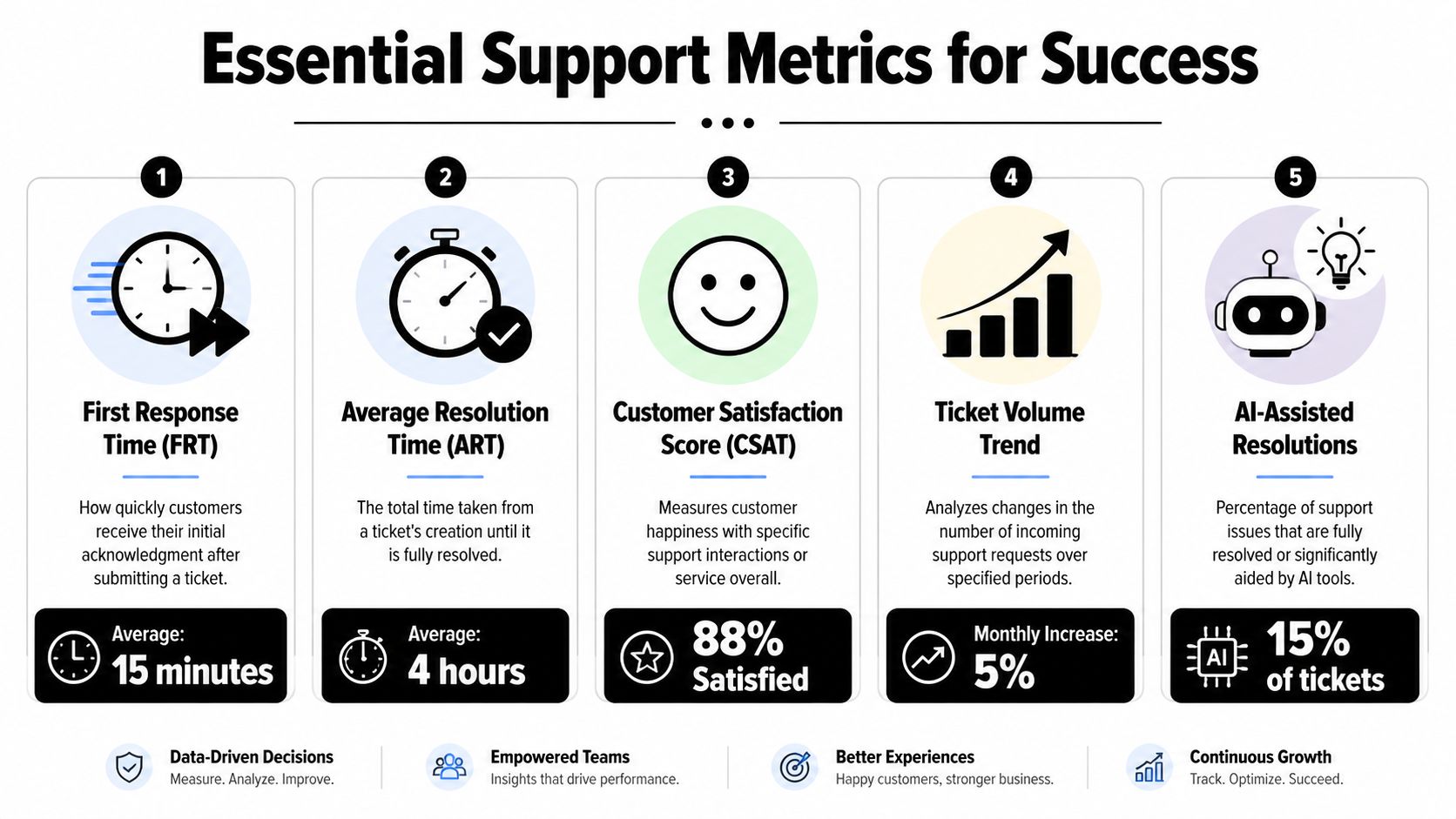
The long-term advantage of ticketing support software is that it turns support into a measurable operation. According to Salesforce's explanation of ticketing software and service metrics, the emergence of ticketing systems marked a shift from ad hoc inbox management to measurable service operations, including metrics like ticket volume, first response time, and resolution time.
That measurement culture is what allows scaling to happen without guesswork.
As the team matures, leaders can review queue pressure, identify repetitive requests worth automating, and spot where support demand reflects a product or onboarding problem rather than a staffing problem. That's the point where the tool stops being a queue manager and becomes a feedback system for the business.
A support team can't improve what it only feels. It needs a small set of metrics that reveal speed, quality, workload, and automation health.
The most useful dashboards don't try to measure everything. They track the few signals that change staffing, workflow, and product decisions.
The video below gives a practical view of how teams think about modern support operations and workflow design.
Metrics should trigger investigation, not panic.
A slower first response time doesn't always mean the team needs more agents. It may mean requests aren't being routed well. A higher ticket volume doesn't automatically mean support quality is falling. It may signal that the company launched something new and users need guidance. A low AI resolution rate doesn't mean AI is failing. It often means the source content is thin, outdated, or too vague.
The strongest support leaders use metrics to ask better questions:
Support improves when measurement leads to better operational choices, not when dashboards become performance theater.
Teams that support users in Discord, Telegram, Slack, and the web need more than a generic help desk. Mava is an AI-powered support platform built for community-driven companies, with a shared inbox, AI agents, workflow automation, and analytics designed for chat-first support environments.
.png)
.png)
.png)
