.png) Get Started
Get Started
Support starts to break long before a team admits it's broken.
A community manager notices it first. A bug report arrives in a Discord channel. A billing question lands in email. Two moderators answer the same setup question in different Slack threads. Someone sends a direct message, gets no reply, and posts publicly that support is ignoring them. Nothing looks catastrophic on its own. Together, it becomes a system held together by memory, screenshots, and good intentions.
That's usually the moment behind the search for what is a ticketing system. The question isn't really about software. It's about control. It's about replacing scattered conversations with a process the team can trust.
The early version of community support feels manageable because it's personal. One person remembers who asked what. A moderator knows which messages still need replies. Someone stars important emails and pins a few Discord posts. It works until volume rises, new teammates join, or users start asking in five places at once.
Then support becomes strangely visible and invisible at the same time. Messages are everywhere, but ownership is nowhere. A public channel makes the queue look active, yet nobody knows which issues are resolved, which are waiting on the user, and which have gone stale.
A Discord server is often the first place this shows up. Users post bug reports in general chat because that's where they already are. Moderators try to help in public, but the conversation gets buried under memes, feature requests, and new questions. Sensitive issues move to direct messages, where context disappears for the rest of the team.
Slack has a different version of the same problem. Internal threads become informal ticket queues. One teammate knows the refund process. Another knows API errors. A third person handles the angry messages because they're “good with people.” That kind of tribal routing feels fast until someone is off sick or leaves.
Support debt builds when unanswered conversations stay scattered across channels instead of moving into a shared workflow.
The difference between community-led help and formal help desk operations starts to matter. The strongest teams usually blend both, not pick one side. The trade-offs are laid out well in this breakdown of community-led support vs help desks.
A ticketing system doesn't make support less human. It makes it less fragile.
Instead of relying on memory, the team creates a record for each request. Instead of asking “did anyone reply to this?”, the team can see status, owner, and history. Instead of treating Discord, email, and Slack like separate worlds, the team starts managing support as one operation.
That shift matters most when the team outgrows improvisation. Community support is conversational by nature, but it still needs structure underneath. Without that structure, fast replies in the moment create slow chaos later.
A ticketing system turns conversations into work that can be tracked.
The simplest way to think about it is a busy restaurant kitchen. Orders come in from different tables, delivery apps, and walk-ins. The kitchen can't rely on servers shouting requests from memory. Each order needs to become a standardized ticket so cooks know what to make, in what order, and for whom. Support works the same way.
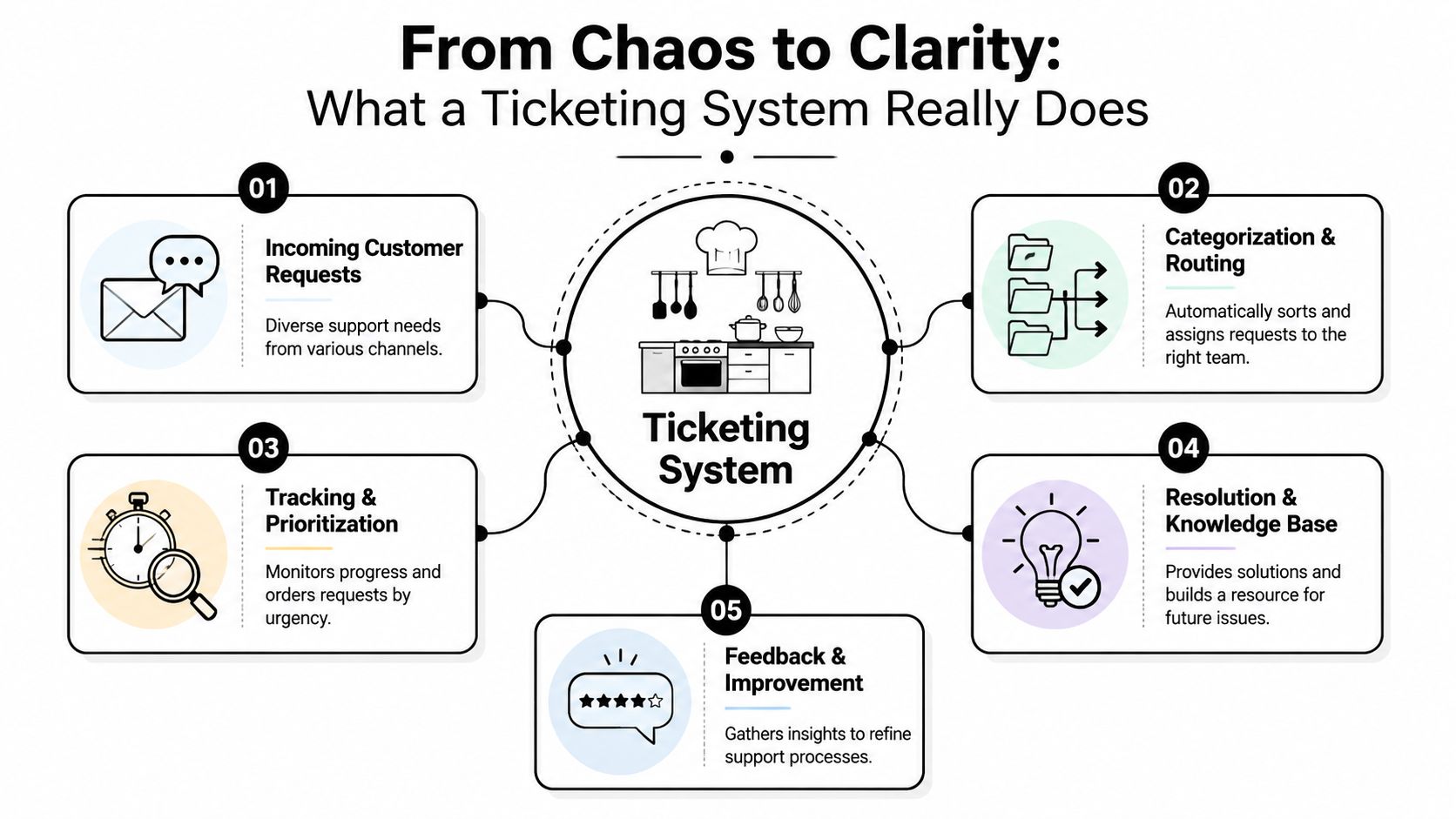
In support, the “order” might be a Discord post, an email, a web chat, or a Slack message. The system captures that request, gives it structure, and moves it through a defined workflow. That's the core answer to what is a ticketing system.
According to Decagon's glossary, a ticketing system captures every incoming request as a structured record and tracks it through a lifecycle of capture, triage, work, and close, while consolidating inputs into a single prioritized queue that prevents inbox silos from hiding issues (Decagon on ticketing system architecture).
That lifecycle is practical, not theoretical:
A strong explainer for teams that want to manage customer enquiries with software is that the software itself isn't the point. The actual value is consistent intake, ownership, and follow-through.
Practical rule: If a user can ask for help in multiple places, the team needs one place to manage the resulting work.
Video walkthroughs can help make that workflow feel less abstract:
A ticketing system is not just a list of messages. It's not a dressed-up inbox. It's not a bot that auto-replies and disappears.
When teams fail with ticketing, it's usually because they recreate their old chaos inside a new tool. They dump every conversation into one queue, skip categorization, and never define who owns what. The result looks more organized, but it still depends on individuals noticing things manually.
The good version is boring in the best way. Requests come in. They get classified. They move forward. Anyone on the team can see what happened and what should happen next.
Not all ticketing systems are equally useful. Some collect requests. Fewer help a team operate well under pressure.
The difference usually comes down to a few building blocks working together. When one is missing, support slows down in familiar ways. Replies lose context. Agents duplicate work. Escalations become guesswork.
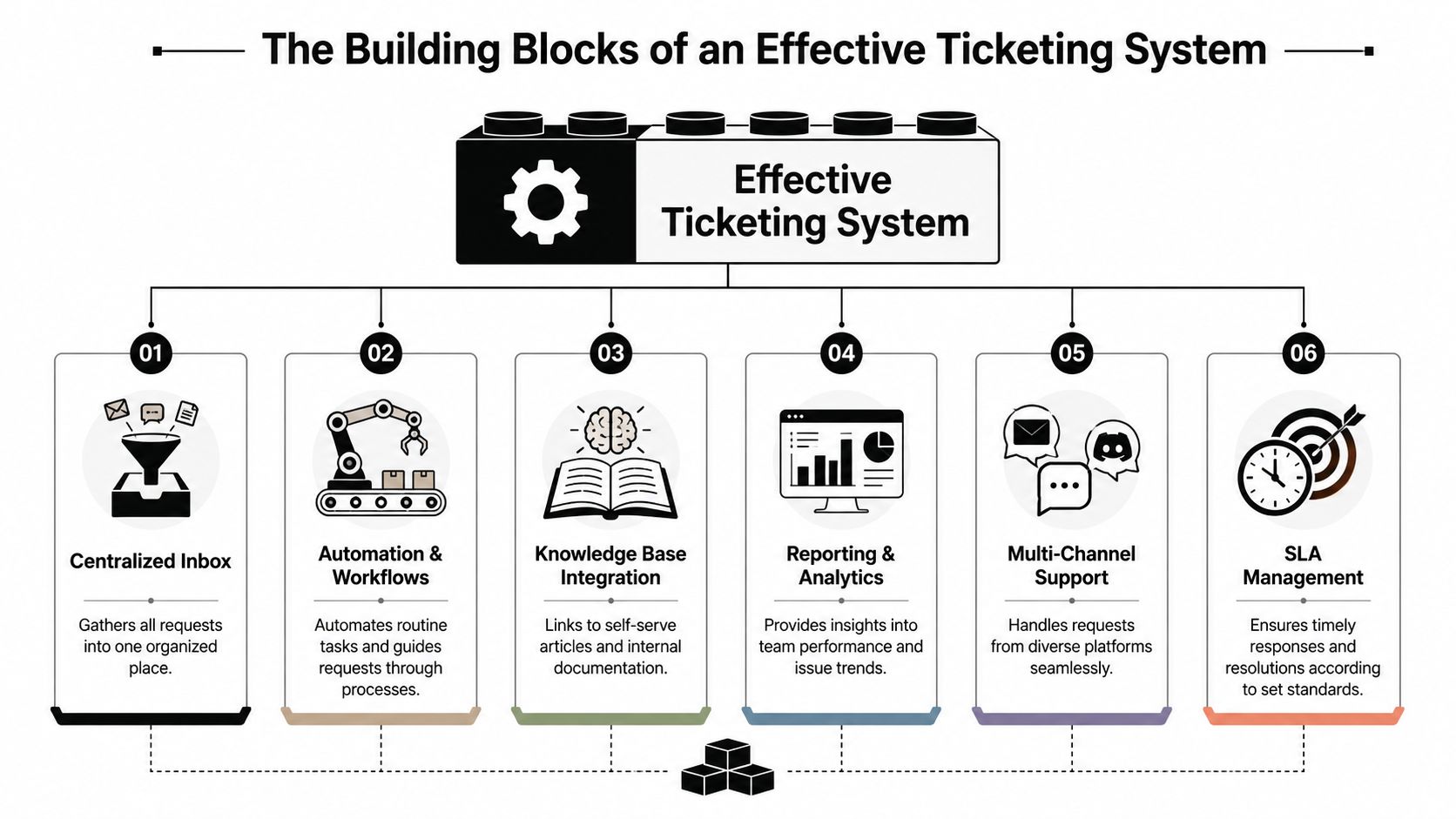
The shared inbox is the operational center. It pulls requests from different channels into one place so the team can see the full queue instead of watching separate apps all day.
That matters even more for community teams, where support doesn't arrive in a neat format. A user might start in a public Discord channel, continue in a private ticket thread, and follow up by email. Without a shared workspace, the team pieces that journey together manually. This guide on what a shared mailbox is gets at the core idea well.
A good shared inbox also changes team behavior. People stop hoarding context in personal DMs or browser tabs. Work becomes visible.
A ticket without properties is just a message with extra steps.
The useful fields are usually simple:
A support team can't prioritize what it hasn't labeled.
The mistake here is overbuilding too early. Teams often create too many statuses and custom fields before they understand their real workflow. The better approach is to start with a small set that changes decisions.
Automation is what keeps a system from becoming a manual sorting machine. Basic rules can route tickets by keyword, send confirmation messages, or move issues to the right team. More advanced workflows can escalate based on urgency, channel, or customer tier.
Knowledge is the other half. If agents can't find reliable answers quickly, ticketing software just moves confusion around faster. The best setups link internal guidance and external help content directly into the workflow.
A simple way to judge system quality is this table:
ComponentWhat it fixesWhat happens without itShared inboxFragmented conversationsTeam members miss requests across appsTicket fieldsUnclear ownership and priorityEverything looks equally urgentAutomation rulesRepetitive admin workStaff spend time sorting instead of solvingKnowledge baseInconsistent answersUsers get different guidance from different people
Each piece becomes more useful when connected to the others. A shared inbox without automation becomes noisy. Automation without good ticket fields misroutes work. A knowledge base without workflow integration sits unused.
That's why teams should evaluate systems as operating models, not feature checklists. A tool can advertise channels, bots, and dashboards, yet still fail if agents can't move from intake to resolution without friction.
Traditional help desks were built around email. A message arrived, an agent replied, and the thread became the case record. That model still works for many businesses. It just doesn't match how community-driven support happens.
On Discord, Slack, and Telegram, support is conversational, public, fast-moving, and messy. A question may begin in front of everyone, attract advice from volunteers, branch into side discussions, and then require private follow-up for account details. The system has to handle both visibility and control.
Email support assumes users are willing to leave the product or community space, open another channel, and wait. Community support assumes the opposite. People ask where they already are.
That changes the design requirements. In email, each thread is already separate. In Discord, messages compete with everything else in the channel. In Slack, important questions can hide inside internal chatter. In Telegram, high-velocity chat can bury context within minutes.
A practical comparison looks like this:
EnvironmentStrengthWeaknessEmail help deskClean thread historyPulls users away from the communityDiscord or Slack without ticketingFast, familiar, low frictionNo durable queue or ownershipConversational ticketingMeets users in-channel while structuring workRequires careful workflow design
The best modern systems don't force a web form on users who are already speaking in a channel. They create structure around the conversation instead.
That can mean a bot turning a public message into a private support thread. It can mean converting a moderator handoff into a tracked ticket. It can mean syncing channel conversations into a unified inbox where agents can assign status and collaborate behind the scenes.
Public conversation is good for community trust. Private workflow is good for resolution. Strong ticketing systems support both.
This shift aligns with broader digital behavior. The digital ticketing market news from Market.us says the global digital ticketing market was valued at US$27.8 billion in 2024 and is projected to reach approximately US$107.7 billion by 2034, with mobile ticketing via QR codes holding a 58% market share in 2023. The larger point for support teams is clear. Users increasingly expect digital-first, low-friction interactions.
What works is channel-native intake with centralized management. Users ask in Discord. The team handles the operational side in one system. Context stays attached. Ownership stays visible.
What fails is pretending public chat itself is the system. Public channels are great for discovery and quick peer help. They're weak at accountability. Once a request requires tracking, privacy, escalation, or collaboration across shifts, it needs ticketing underneath the conversation.
For teams operating in these environments, Mava is one example of a platform built around that model. It brings Discord, Telegram, Slack, web chat, and email into one shared inbox with ticket workflows and AI handoff.
AI changes ticketing most where support teams feel the most drag. Repetitive questions, manual triage, and slow handoffs eat time without adding much value.
Basic automation has existed for years. It can assign by keyword, send canned acknowledgments, and escalate by rule. Useful, but limited. AI goes further because it can interpret intent, pull from documentation, and decide whether a request needs a human now or later.
The fastest wins usually come from repetitive support. Password questions, setup issues, policy clarifications, and common troubleshooting steps don't always need a person to type the same answer again.
The AI customer service statistics collected by Lorikeet project the global AI customer service market at $15.12 billion in 2026, growing at a 25.8% compound annual growth rate to $117.87 billion by 2034. The same source says AI-native platforms now achieve 55–70% first-contact resolution at $1–3 per resolution, while agent-assisted support costs $13.50 per contact.
Those numbers explain why support leaders are rethinking the old model. If AI can resolve a large share of routine issues quickly and cheaply, human teams can spend more energy on edge cases, escalations, and emotionally complex conversations.
A useful AI workflow doesn't just answer. It also sorts.
For example, an incoming request can be analyzed for topic, urgency, and likely owner. A billing issue shouldn't land with the moderators who handle abuse reports. A bug report from a high-value user may need a different path than a general “how do I” question. AI can make that first pass faster, then hand over with context intact.
A practical guide for teams evaluating that shift is this overview of AI in customer support.
Good AI removes queue noise. It doesn't remove judgment.
AI works best when the knowledge behind it is current and the handoff rules are clear. Without that, the system replies confidently but unhelpfully, which creates more cleanup for agents.
The strongest setup is usually hybrid:
Teams don't need AI everywhere on day one. They need it where repetition is high and stakes are low enough to automate safely.
The first ticketing system doesn't need to be perfect. It needs to fit the team's actual support behavior.
A community team should start by looking at channel reality, not vendor promises. If users ask for help in Discord and Telegram, a tool that works beautifully only in email will create friction immediately. If moderators and support staff collaborate in Slack, the system should support that handoff cleanly.
Feature lists can be noisy. A shorter checklist usually makes better decisions:
Teams that rely on moderators, ambassadors, or part-time helpers can also borrow ideas from adjacent operations tooling. Some of the coordination patterns used in volunteer management tools are useful when support work spans people with different roles and availability.
Most failed implementations share the same problem. The team tries to model every edge case on day one.
A phased rollout works better:
The first goal isn't elegance. The first goal is that no request disappears.
One more warning matters here. Don't buy software designed for a classic call center if the team lives in community platforms. The process mismatch will show up immediately. Good implementations feel like a cleaner version of how the team already works, not a forced migration into someone else's model.
Mava helps teams run support where their users already are. It brings Discord, Telegram, Slack, web chat, and email into one shared inbox, adds AI answers and ticket workflows, and gives support teams a structured way to manage both public and private conversations. For community-driven companies that have outgrown scattered messages and lightweight bots, Mava is a practical way to turn support chaos into a system.
.png)
.png)
.png)
