.png) Get Started
Get Started
A Discord server is buzzing. Slack is full of internal handoffs. Email keeps pulling the team back into old workflows. Support starts the day with good intentions, then turns into tab-switching, duplicated replies, missing context, and customers repeating the same story three times.
That's where a lot of community-driven companies get stuck. Traditional CRM best practices assume support lives in one channel, follows neat forms, and moves in clean stages. Community support doesn't work like that. Questions show up in public threads, private messages, mod channels, ticket bots, web chat, and inboxes at the same time.
The gap is real. Most CRM guidance still doesn't explain how to turn messy conversational support into structured records without losing context, even though this is a growing need for companies that rely on community support as a primary channel according to Destination CRM. For teams trying to scale, generic advice isn't enough.
The good news is that modern systems can handle this if the workflow is designed around the community, not forced on top of it. Strong CRM best practices now depend on adoption, data quality, automation, and consistent action, not just buying a platform. Teams evaluating the category can also find leading CRM capital sources to understand how seriously the market takes this space.
Support breaks when every channel becomes its own little universe. A moderator answers in Discord, someone from success replies in email, and a second teammate picks up the same issue in Slack without seeing the history. A unified inbox fixes that first.
For community teams, this isn't just convenience. It's the operating layer that keeps Discord tickets, Telegram messages, web chat, and email attached to the same customer context. The best setups don't force every channel to behave the same way. They centralize visibility while preserving channel-specific behavior.
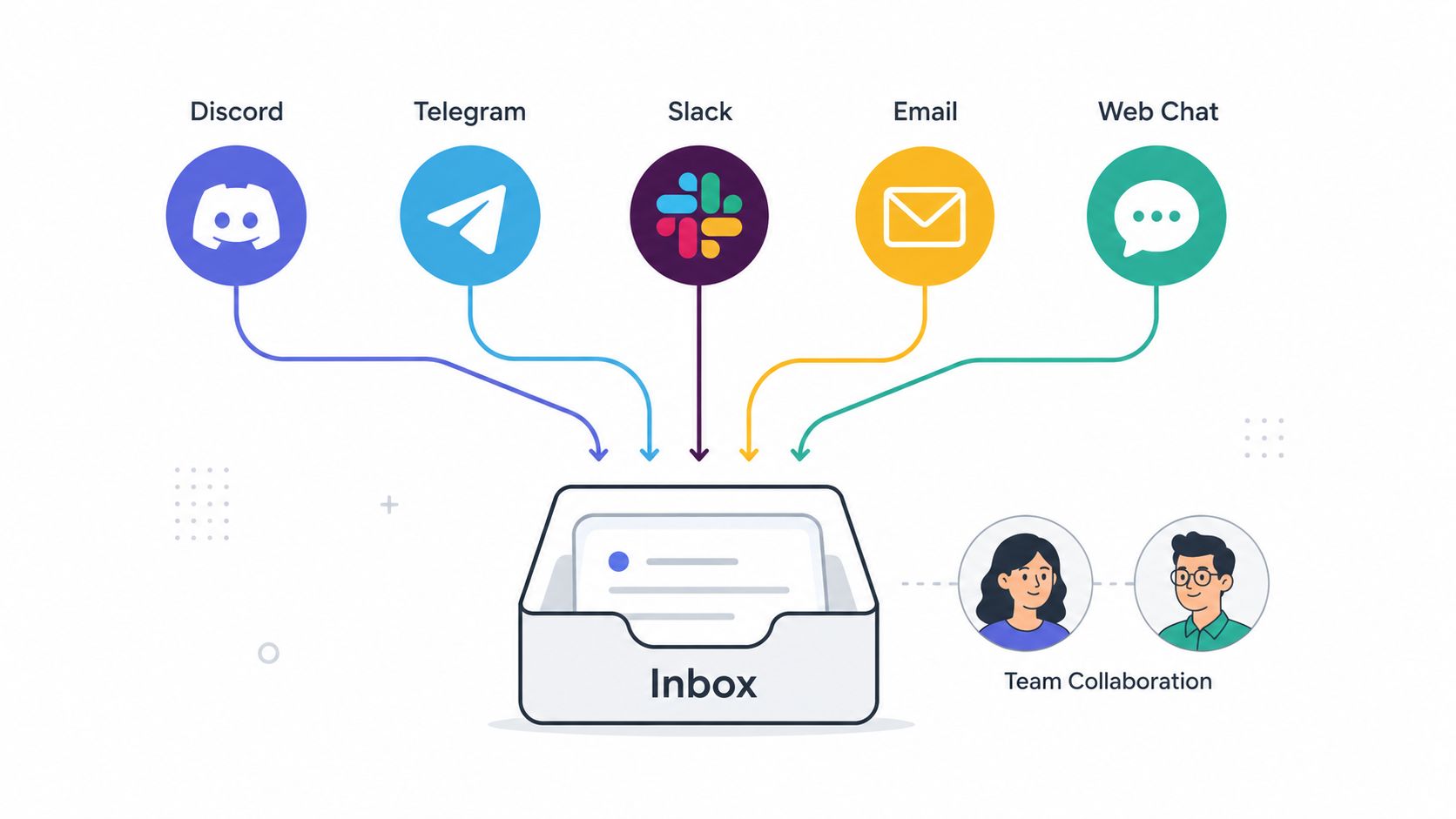
A crypto project might handle wallet questions in Telegram, moderation appeals in Discord, and partnership requests by email. A SaaS startup might combine product support from in-app chat with onboarding questions from Slack Connect. The workflow only scales if the team sees all of it in one place. That's why many teams start with an omnichannel customer support setup before they add more advanced automation.
A strong inbox strategy starts narrow. Pull in the two or three highest-volume channels first, then standardize ownership, priority, and status rules before adding more.
Practical rule: If a customer can contact the team in five places, the team still needs one operational home.
What doesn't work is trying to unify channels without changing habits. If team members keep replying natively inside every platform, the inbox becomes a mirror instead of a system of record.
When ticket volume rises, routing becomes the first real bottleneck. Not because agents can't answer, but because someone still has to read everything, decide where it belongs, and forward it to the right person. AI should take that layer off the team's plate.
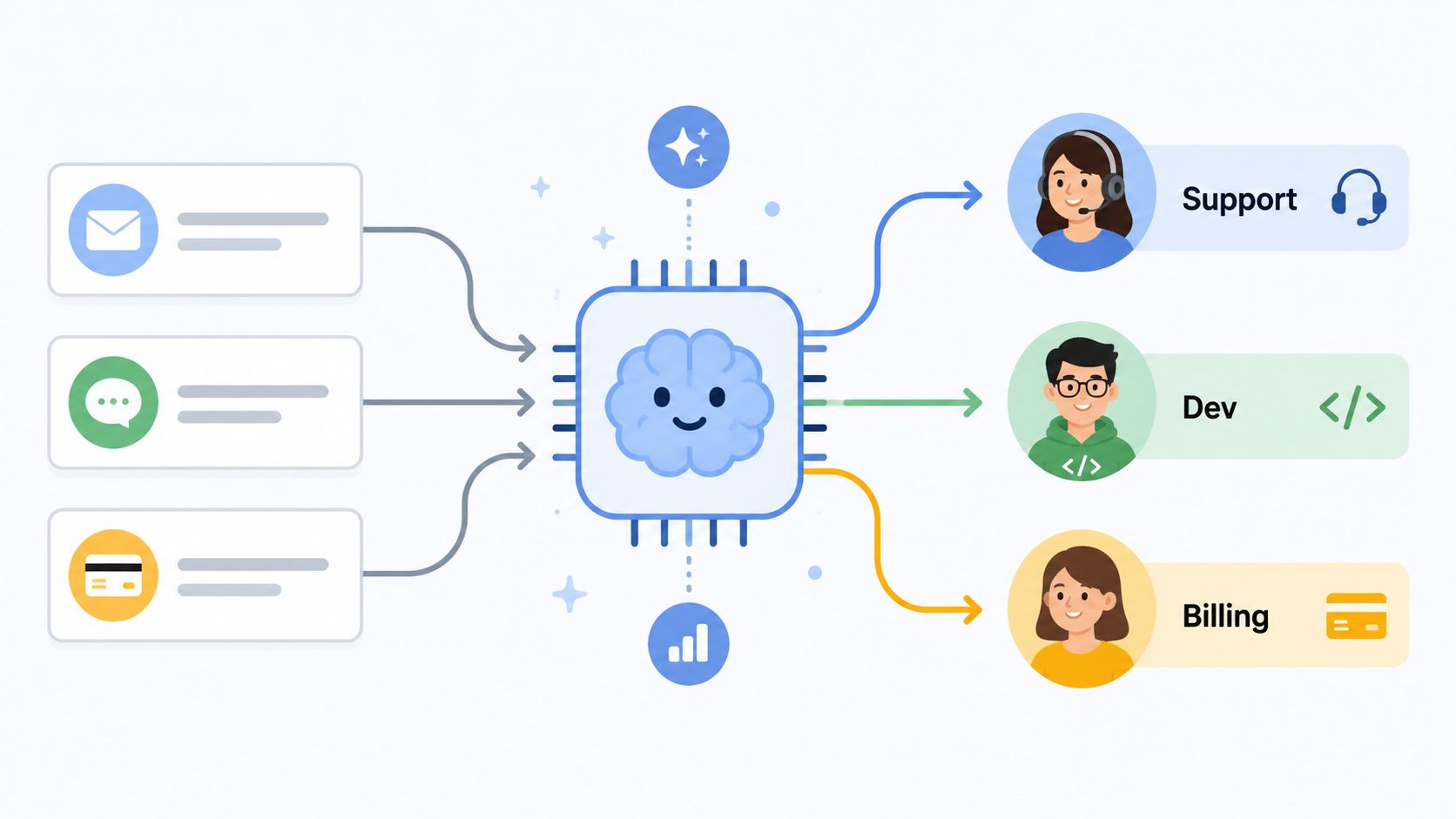
The strongest use case isn't replacing support. It's sorting repetitive questions fast, sending complex issues to the right queue, and preserving enough context that the customer doesn't have to start over. Standard CRM advice often treats AI as a broad trend. It rarely gives teams a practical framework for balancing AI resolution with high-quality human handoff, which is one reason this remains an underserved area as discussed by Techforce Services.
A Web3 team might let AI answer token vesting FAQs but route contract bugs to developers. A gaming studio might auto-handle account recovery prompts while sending harassment reports to human moderators. A support team can also use a ticket bot dashboard for routing and queue visibility so triage decisions are visible instead of hidden inside bot logic.
The first routing rules should target repetitive, high-volume requests. Password resets, billing receipts, role access questions, account verification, and basic setup blockers usually fit well.
Later in the workflow, teams can see how agent deployment is accelerating across the ecosystem through launches such as the BNB Agent Studio rollout.
A quick product walkthrough helps make this real:
What doesn't work is asking AI to solve edge cases before it can reliably classify basics.
Self-service only reduces load when the knowledge base is clean, current, and written for real questions. The raw material often already exists. It's just scattered across Notion pages, GitBook articles, pinned Discord posts, changelogs, and internal docs.
That scattered state creates two problems. Customers can't find answers, and AI can't reliably resolve repetitive issues because the source material conflicts or goes stale.
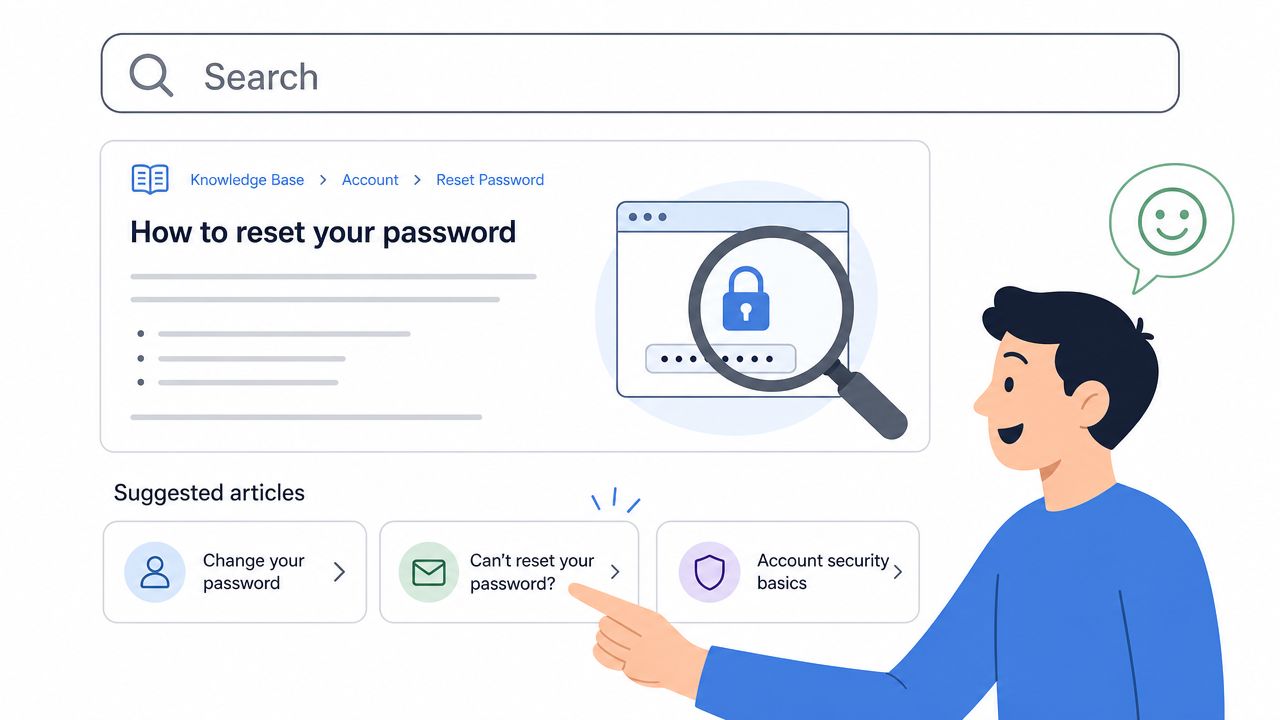
A better approach is to build one structured source of truth, then train support workflows against it. Teams that are serious about scale usually treat documentation as part of support operations, not a side project. A practical starting point is to follow knowledge management best practices for support teams and map content by product area, user journey, and common blockers.
Developer platforms often need setup walkthroughs and API troubleshooting. NFT and crypto communities need plain-language guidance around wallet connection, gas fees, and security. SaaS teams need onboarding articles that answer “what should happen next?” before a ticket gets created.
Good documentation doesn't try to sound complete. It tries to solve the next likely problem.
Useful patterns include:
What doesn't work is publishing a help center once and assuming it will stay useful. Repeated tickets should trigger documentation updates within the support workflow itself.
Customers notice inconsistency faster than teams do. Discord gets a friendly answer, email gets a formal one, Telegram gets a rushed reply, and none of them match on policy. That doesn't feel flexible. It feels unreliable.
Consistency matters even more in community-led companies because trust is public. A moderation decision in Discord can spill into Telegram and then land in someone's inbox as a complaint. If the policy changes by channel, the team creates avoidable friction.
The fix isn't making every response sound robotic. A gaming community can be more playful in Discord than in email. A B2B SaaS company can sound sharper in email and more conversational in Slack. The key is keeping the same standards on security, escalation, ownership, and next steps.
Teams usually need a simple operating guide for each channel. It should define who responds there, how quickly, what kinds of requests belong there, and when to move the conversation.
One useful compromise is to standardize the structure of an answer rather than the script. A good reply can still sound human while covering acknowledgment, action taken, and next step every time.
What doesn't work is copying email templates into community channels. They read stiff, and they slow the pace that makes community support feel responsive.
A lot of follow-up traffic isn't caused by slow resolution. It's caused by invisible resolution. Customers ask again because they don't know whether the issue is being worked on, waiting on engineering, or already solved.
Visible ticket status solves part of that immediately. It gives customers a sense of movement and gives teams a shared language for where work stands. In community environments, transparency matters even more because users often discuss their issue publicly while waiting.
A Discord server might reflect ticket progress in a support thread. A SaaS team might show customer-visible statuses in a portal. A Web3 project might separate “reported,” “investigating,” and “resolved” so the support team and the community aren't guessing.
This is often overbuilt. They create too many stages, then agents stop updating them because the workflow feels bureaucratic.
A better model uses only the statuses that change customer expectations:
Watch for this failure mode: if agents can't explain the difference between two statuses in one sentence, one of them should be removed.
What doesn't work is internal-only status discipline. If customers can't see progress, the workflow may still help managers, but it won't reduce anxiety or duplicate follow-ups.
Generic support training breaks fast in niche communities. A Web3 member asking about wallet approvals, a mod dealing with token impersonation, or a developer struggling with framework-specific auth flows needs context-rich support, not generic CRM etiquette.
Many CRM best practices still feel incomplete. They focus on clean records and standard fields, but community support often starts with messy, conversational signals. Public ticket threads, reactions, shorthand, slang, and partial screenshots all carry meaning that a structured CRM doesn't naturally capture.
The team needs a support model that understands the community's vocabulary and common failure modes. A DeFi project should document token names, contract references, scams to watch for, and known user misconceptions. A game studio should define issue taxonomy around modes, patches, accounts, and progression loss. A developer tool company should maintain a glossary for frameworks, environments, and recurring setup mistakes.
Training should include more than product facts. It should include how members describe problems in the wild.
What doesn't work is assuming official documentation already reflects real support demand. Usually it reflects how the product team talks, not how the community asks for help.
A support lead opens Discord at 8:10 a.m. and sees five complaints about missing roles. By 8:18, Telegram has three wallet-connection reports with the same error language. Slack starts filling with API timeout complaints from paying customers. If those signals stay trapped in separate channels, engineering hears about the problem late and support spends the next hour answering the same question one ticket at a time.
Proactive monitoring turns community noise into an operating signal. The CRM should group repeated symptoms across Discord, Telegram, Slack, and email fast enough for the team to spot a real incident while it is still small. That only works if ticket tags, timestamps, channel source, and ownership stay clean. Bad categorization hides patterns. Missing context slows escalation.
Teams usually feel this pain during fast-moving incidents. Moderators can see that something is off, but they cannot prove scope, affected user segment, or likely root cause without pulling screenshots from three tools and stitching the story together by hand.
Escalation works best when support, product, and engineering agree on the trigger points ahead of time.
The trade-off is simple. Tight thresholds catch issues earlier but can create alert fatigue. Loose thresholds reduce noise but let real problems sit too long. For community-driven companies, I have found it safer to bias toward early review for account access, payments, moderation abuse, and security-adjacent reports, then keep a higher bar for feature confusion or one-off bugs.
The CRM should also help support separate trend from coincidence. A game studio might catch a broken patch by watching crash reports cluster around one platform within minutes of release. A crypto team might spot coordinated scam activity from repeated mentions of the same wallet address or impersonation pattern. A SaaS company might detect onboarding friction when setup failures spike after a product change.
What fails in practice is loose escalation. Raw screenshots dropped into an engineering channel rarely give enough context to act. A short, structured report does.
Support quality drops when knowledge stays trapped inside the person who solved the issue last time. Community teams feel this especially hard because shifts overlap, moderators rotate, and part-time contributors often handle the earliest signals.
The CRM should support internal collaboration as much as customer response. Shared notes, internal comments, linked prior cases, and lightweight peer review keep context alive across handoffs. This matters in distributed support teams and in communities that never really go offline.
A common example is a 24-hour Discord operation where one teammate identifies the issue, another tests a workaround, and a third closes the loop after engineering responds. Without internal notes, the customer sees fragmented support. With them, the next responder can continue cleanly.
The best collaboration systems make it easier to find a previous answer than to rewrite one from scratch.
A lightweight peer review process also helps on sensitive replies. Moderation appeals, billing disputes, and security-adjacent issues usually benefit from a second set of eyes before the team sends a final answer.
What doesn't work is relying on chat memory. If the answer only lives in a Slack thread, it will be lost exactly when the team needs it most.
A Discord user gets their answer in six minutes, reacts with a thumbs-up, and still leaves the community a week later because the issue that sent them to support never really got resolved. That is why satisfaction tracking needs more than a single score. Community support sits close to product friction, moderation policy, and public sentiment, so the CRM has to capture what happened, how the person felt, and whether the team fixed the underlying problem.
This matters even more in Slack, Telegram, and Discord environments where the conversation history is fragmented across channels and responders. CRM adoption is now common across business teams, as Freshworks reported in its 2024 State of CRM survey, but adoption only helps if teams log the right context and use it to change workflows. A dashboard full of scores does not improve support on its own.
A useful feedback loop separates support quality from product outcome. Someone can be frustrated about a bug and still feel well supported. The opposite happens too. The issue gets solved, but the customer leaves with less trust because the answer felt cold, delayed, or inconsistent across channels.
That is why I prefer short, targeted follow-ups tied to ticket type and channel instead of one generic CSAT form for everything.
Strong patterns include:
One simple rule helps. Never use satisfaction scores as a weapon against agents.
Agents stop documenting edge cases when they think every low rating will be held against them. In community-led support, low scores often reflect product defects, unclear policy, or a mismatch between what the community expected and what the team could do. Review feedback at the system level first, then coach individuals on the parts they can control, such as tone, clarity, and follow-through.
The best teams treat satisfaction data as an operating input. They adjust macros, rewrite knowledge base articles, tighten routing rules, and flag recurring complaints for product or community leads. That closes the loop in a way customers can feel, not just measure.
A Discord member asks about a failed payment, hits the bot first, then lands with a human agent ten minutes later and has to explain the whole story again. That is the moment people stop trusting your support stack.
At scale, automation succeeds or fails on handoff quality. In community support, that means more than passing along a ticket ID. The agent needs the source channel, message history, account details, tags, prior bot replies, and the exact reason the workflow escalated. Without that context preservation, AI reduces queue volume on paper while increasing frustration in the conversations that matter most.
The teams that get value from automation treat handoff design as an operations problem, not a model problem. CRM returns improve when teams use the system as intended, with clear workflows, training, and role-based visibility, as noted earlier. Support teams feel that in practical terms. Fewer repeated questions. Faster resolution on high-risk cases. Better judgment about when the bot should step aside.
Start with repetitive, low-risk requests from channels like Slack, Discord, and Telegram. Password resets, status checks, basic policy questions, and known how-to requests are good candidates. Build the handoff path before expanding coverage, especially for public community threads where one bad bot exchange can shape how dozens of people view your team.
A workable protocol usually includes:
One trade-off is worth stating plainly. Aggressive deflection can make dashboards look better while making support worse. If the bot keeps borderline cases too long, customers wait longer, agents inherit messier threads, and your team loses the chance to step in early when trust is still recoverable.
Good AI handoff logic protects against that. It creates a smooth transfer, preserves context, and gives agents enough signal to correct the bot fast. For community-led companies, that is what scalable automation looks like.
ItemImplementation complexityResource requirementsExpected outcomesIdeal use casesKey advantagesUnified Inbox Strategy for Multi-Channel SupportMedium–High (multiple integrations)Platform connectors, onboarding, team trainingUnified view, fewer missed/duplicate messagesCommunities on Discord/Telegram/Slack + email/web chatSingle source of truth, consistent responsesAI-Powered Intelligent Ticket Triage and RoutingHigh (AI models, tuning)Training data, ML models, monitoring, feedback loopsFaster routing, reduced human load, instant answers for common issuesHigh-volume communities or repetitive queriesAutomates classification/prioritization, improves response timeKnowledge Base-Driven Self-Service StrategyMedium (content build + search)Documentation authors, CMS, analytics, maintenanceLower inbound tickets, 24/7 self-resolutionTechnical products, onboarding-heavy services, common FAQsScales support cost-effectively, improves AI accuracyMulti-Channel Community Support ConsistencyMedium (process + training)Style guides, templates, cross-channel trainingConsistent tone and SLAs, reduced user confusionBrand-sensitive or multi-platform communitiesBuilds trust, simplifies training and analyticsTicket Status Tracking and Workflow TransparencyLow–Medium (workflow config)Ticketing system, SLA settings, notification toolingFewer follow-ups, clearer expectations, bottleneck visibilityTeams needing customer visibility and SLA complianceTransparency, proactive ticket managementCommunity-Specific Knowledge Training and ContextHigh (custom training)Community experts, specialized docs, regular updatesHigher first-contact resolution, culturally aligned supportNiche communities (Web3, gaming, developer tools)Native tone and accuracy, fewer escalationsProactive Monitoring and Issue EscalationMedium–High (analytics + alerts)Analytics infrastructure, anomaly detection, product integrationEarly detection of incidents, reduced repeat reportsProducts with real-time risk (SaaS, APIs, infra)Detects trends early, speeds product feedbackSupport Team Collaboration and Knowledge SharingLow–Medium (process + tools)Internal notes, shared libraries, peer review workflowsReduced duplication, faster onboarding, better solutionsDistributed or shift-based support teamsPrevents silos, preserves organizational memorySatisfaction Metrics and Feedback LoopsMedium (surveys + analysis)Survey tools, analytics, regular review cadenceData-driven improvements, accountability, trend visibilityTeams focused on quality and retentionIdentifies weak areas, measures impact of changesScalable Automation and AI Handoff ProtocolHigh (rules + seamless context)AI systems, handoff logic, context preservation, monitoringSmooth AI→human transitions, sustainable scaling of supportHigh-automation environments with critical escalationsPreserves context, reduces repeats, enables scale
A product issue hits at 9:12 a.m. Users report it in Discord first. Ten minutes later, the same complaint shows up in Slack, email, and web chat. By noon, the support team has answered it four different ways, a moderator has promised an ETA nobody confirmed, and product still does not have a clean summary of impact.
That pattern is common in community-led companies. The problem usually is not effort. It is fragmented support operations.
The CRM best practices in this guide work because they turn scattered conversations into one operating system for support. The goal is not to force Discord, Telegram, Slack, email, and chat into the same tone or workflow. The goal is to keep shared context, clear ownership, and consistent answers across every channel where customers ask for help. That matters more in community support than in traditional ticket queues because the conversation is public, fast, and easy to duplicate.
The shift from reactive support to a growth engine happens when teams stop treating support as a cleanup function. A unified inbox cuts duplicate replies. Reliable status tracking reduces repeat pings. Internal notes preserve context between moderators, agents, and on-call staff. A maintained knowledge base gives customers, AI agents, and human teammates one source to work from.
Clean data still matters, but the practical issue is simpler than a market statistic. If identities are split across channels, routing breaks. If tags are inconsistent, reporting becomes noise. If ticket history is incomplete, every escalation starts from zero. Teams that run community support well usually put basic discipline in place early: clear ownership for records, regular cleanup, and simple rules for how conversations get logged.
Access matters too. Community issues do not wait for desk hours. Moderators and support leads need to review ticket history, update status, and escalate incidents from wherever the conversation starts. In practice, that is often the difference between a contained issue and a day-long thread full of conflicting answers.
Start small, then tighten the system. Bring the highest-volume channels into one queue. Clean up the knowledge base your team utilizes. Add AI triage where the request patterns are repetitive and low risk. Define handoff rules that preserve conversation history, customer profile, and prior actions. Then review what the team ignores, where AI creates friction, and which workflows still live in private DMs or tribal knowledge.
Done well, support becomes more than a response layer. It becomes an early warning system for product issues, a source of language customers use, and a reliable view of where users get stuck. That is what turns community support into an operational advantage.
Teams that support customers across Discord, Telegram, Slack, email, and web chat need a system built for that reality. Mava gives community-driven companies a shared inbox, AI agents trained on existing docs, clear ticket status tracking, automation, analytics, and human handoff that preserves context. For teams ready to replace scattered bots and manual triage with a cleaner support operation, Mava is a practical place to start.
.png)
.png)
.png)
