.png) Get Started
Get Started
Support teams at community-first companies often run the same broken playbook without meaning to. Discord DMs sit in one tab, Telegram threads in another, email in a help desk, and web chat somewhere else entirely. A user asks a question in a public channel, follows up privately, then gets an email reply from someone who has none of the history.
That setup isn't modern support. It's channel sprawl with manual patchwork.
For teams running SaaS communities, gaming servers, developer ecosystems, or Web3 projects, the problem gets worse because the busiest conversations don't happen in a traditional call center. They happen in fast-moving spaces where context disappears quickly, moderation and support overlap, and the same issue can surface publicly, privately, and asynchronously within minutes. Omnichannel customer support is what turns that mess into a system.
Multichannel support means a company shows up in several places. Omnichannel customer support means those places are connected.
That difference matters most when a user moves between channels. A member might report a bug in a Discord support channel, continue the conversation through email because screenshots are easier there, and then get a final resolution in web chat after logging into the product. In a multichannel setup, each step looks like a new ticket. In an omnichannel setup, it stays one conversation with one history.
The practical definition is simple. Omnichannel customer support is a support architecture that preserves context across channels.
Without that continuity, agents waste time reconstructing the story. Users repeat themselves. Community managers scroll through logs, search usernames manually, and guess whether a Telegram message belongs to the same person who emailed yesterday. That isn't just inefficient. It changes how customers feel about the company.
Customers rarely care how many channels a company offers. They care whether the company remembers them when they switch channels.
A real omnichannel experience feels unremarkable in the best way. The chatbot knows what happened in the public thread. The human agent sees the order history and prior replies. The follow-up email reflects the same case, not a fresh start.
This shift isn't niche. In 2023, the global omnichannel customer service market was valued at approximately USD 14.2 billion, and it's projected to reach USD 35.6 billion by 2032, with a 10.8% CAGR according to Plivo's omnichannel customer service statistics roundup.
That growth makes sense because disconnected support creates the same failure pattern across industries:
It isn't just adding more support endpoints. It also isn't a shared inbox slapped on top of disconnected systems.
A company can offer Discord, Slack, Telegram, email, and chat and still deliver a fragmented experience. Omnichannel customer support only exists when the support stack treats those interactions as part of the same customer record and operational workflow.
Community-first support breaks down when the team treats every channel like a separate department. That creates duplicate work, uneven answers, and a support queue that feels larger than it really is.
A unified support strategy fixes that by changing how work enters the system and how agents act on it. The gain isn't theoretical. Teams with fully integrated omnichannel systems achieve a 30% reduction in average handle time and a 25% increase in customer satisfaction scores compared to siloed multi-channel setups, according to Ringover's overview of omnichannel communication for customer service.
A quick summary helps frame the business case.
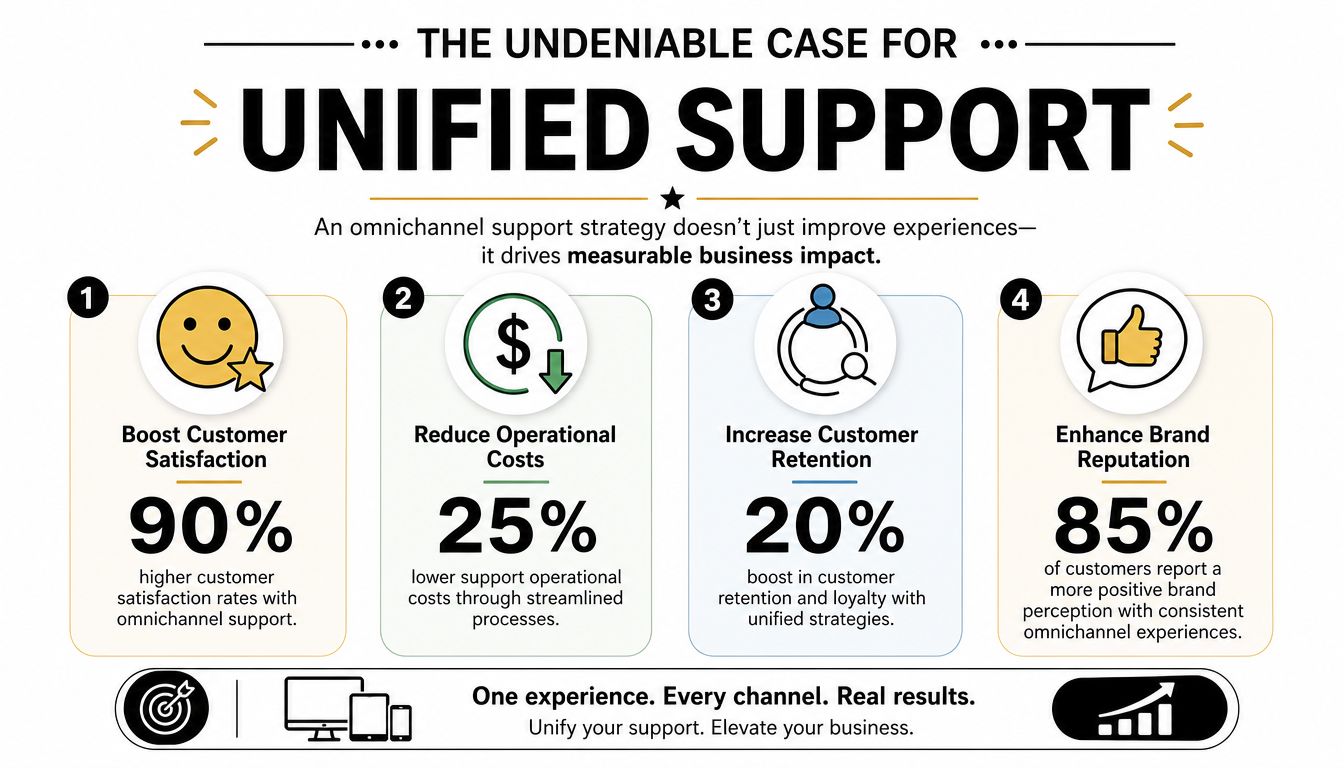
The biggest operational change is that agents stop doing detective work. When history, tags, prior replies, and channel transitions live in one place, the team spends less time asking baseline questions and more time solving the issue.
That matters even more in communities where support and reputation are tied together. A poor answer in a public Discord thread isn't just one failed interaction. It shapes how everyone watching perceives the product. A unified system helps keep replies consistent whether the question arrives in a private ticket, an email thread, or a public channel that needs moderation and escalation.
The usual cost isn't only slower response times. It's hidden drag:
Practical rule: if agents need to ask "Has anyone already spoken to this user?" more than a few times a day, the support stack isn't unified.
The business case is easier to see in community-led companies because support often sits close to product feedback, onboarding, and expansion. Better continuity doesn't just make support cheaper to run. It helps the company spot bugs earlier, route product questions faster, and protect high-value users before frustration turns into churn.
Later in the evaluation process, many teams find it useful to watch a working example of omnichannel support design in action.
It's common for teams to understand the customer problem before they understand the system design. That's normal. The architecture matters because omnichannel customer support only works when the tools are built to carry context cleanly from one layer to another.
A useful mental model is a central nervous system. Channels collect signals, the integration layer carries them, and the operational layer decides what happens next.
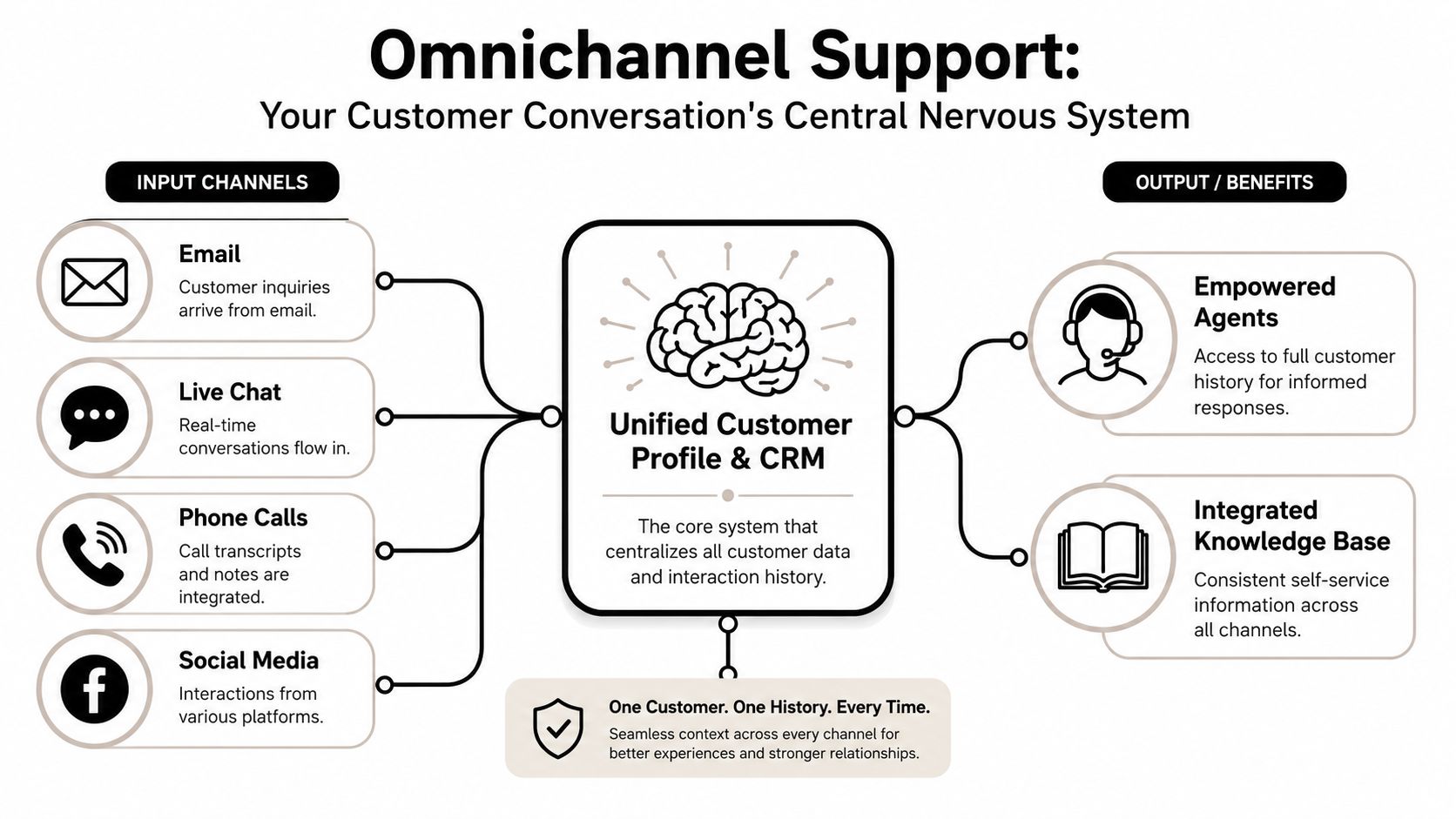
A true omnichannel architecture uses a three-layer model in which the middle integration layer converges channel data and synchronizes conversation and order history to create a single 360-degree customer view, as described in UDesk's explanation of how omnichannel customer service works.
Those layers look like this:
LayerWhat it includesWhy it mattersFront endDiscord, Telegram, Slack, web chat, email, social channelsThis is where customers actually ask for helpMiddle integration layerIdentity stitching, sync logic, thread mapping, event routingThis is what preserves continuity across channelsBack endRouting rules, analytics, CRM, knowledge systems, automationThis is where teams manage work and measure outcomes
The middle layer is the piece most companies underestimate. Without it, every channel can be connected technically while still acting like a silo operationally.
Consider a common support path. A user posts in a Discord help channel. A bot converts that message into a ticket. The issue gets escalated because billing is involved, so the conversation moves into a private flow. Later, an agent sends documentation by email because it's easier to search and forward.
If the system is built properly, the agent never loses the thread. The ticket history, user identity, notes, and status move with the case.
If the system is built poorly, the handoff breaks in one of three places:
A detailed omni channel platform guide from Mava shows this idea through the lens of community support tooling, where thread continuity across Discord, Telegram, email, and web chat is the hard part.
The best omnichannel systems don't make channels disappear. They make channel changes irrelevant to the customer.
They usually buy a channel adapter, not an operating model. Connecting APIs is necessary, but it isn't enough. The workflows, identities, statuses, and reporting logic all need to point back to one customer timeline. Otherwise the team just gets a prettier version of the same fragmentation.
Traditional omnichannel advice usually assumes customers open tickets through email, forms, or phone. That misses how community-first companies operate. Questions arrive in public, move fast, and often start in places that were built for conversation, not support process.
That gap shows up in the data. Gartner research cited by IBM says that by 2024, 75% of B2B customer interactions in digital-first sectors occur in non-traditional channels, while 89% of support teams report fragmentation in tracking these interactions, leading to a 35% increase in repeat queries. The figures appear in IBM's discussion of omnichannel customer service.
Discord is public by default, noisy by nature, and excellent for early signal detection. It's also easy to misuse.
Strong Discord support usually includes:
Public replies still matter. They reduce duplicate questions and show responsiveness. But private escalation should happen quickly for account-specific, billing, or security cases.
Teams building that workflow can use channel-specific ideas from this guide to providing great customer support on Discord.
Telegram creates a different problem. Conversations can be fast, informal, and difficult to organize if the team relies on manual scanning.
The best pattern is to separate discovery from handling:
That protects the public channel from becoming a support graveyard. It also gives the team a stable record of what happened.
Public channels are good for visibility. They are bad as the only system of record.
Slack is often used for partner communities, premium customer groups, and internal escalation. The trap is treating it like email with better notifications.
A few habits keep Slack usable for support:
Slack works well when it acts as a conversation layer attached to a real support workflow. It fails when teams try to use channels alone as their ticket system.
Discord, Telegram, and Slack each have different norms, but the support principle is the same. Capture the interaction, preserve the context, and give the team one queue to manage.
One platform that does that is Mava, which brings support requests from Discord, Telegram, Slack, web chat, and email into a unified inbox so teams can manage public and private conversations on a single timeline. The key benefit isn't channel coverage by itself. It's that agents can work from one queue instead of rebuilding context from scattered threads.
AI works well in support when the underlying data is clean. It works badly when the team asks it to operate on fragmented conversations, duplicate identities, and half-complete histories.
That's why omnichannel customer support and automation belong together. A unified support layer gives AI enough context to answer repetitive questions, classify intent, and hand off intelligently when a human needs to step in.
Community-driven companies usually have a predictable block of repeat work. Access issues, billing questions, wallet connection problems, role assignment, onboarding steps, API key confusion, and status checks show up every day.
A strong automation setup handles tasks like these:
A practical automation guide for these workflows appears in Mava's post on how to automate customer support.
The handoff from AI to human is the point where many support stacks fail. If the bot answers publicly, then a human agent opens a separate private thread with no transcript, the user experiences the same old fragmentation with a new label.
Good handoffs include three things:
Handoff elementWhat it should containConversation historyThe full exchange, not a summary that strips useful detailIntent and metadataTags, channel source, urgency, and linked account infoNext-step ownershipA clear assignee, queue, or escalation path
AI shouldn't force a reset. It should shorten the path to the right human.
Not every issue belongs in a bot flow. High-risk account actions, emotionally charged complaints, fraud concerns, and nuanced product failures often need human judgment early. The point of AI isn't to block access to people. It's to remove repetitive load so the team can spend its attention where empathy, discretion, or deeper investigation matter.
Most support dashboards are too channel-specific to answer the central question. Is the support operation getting easier for customers and more manageable for the team?
An omnichannel system lets leaders measure that across the full journey instead of inside isolated tools.
A strong baseline dashboard usually includes:
The advantage of omnichannel reporting is that these metrics stop being channel silos. Leaders can compare outcomes across Discord, Telegram, email, and web chat using one operational view rather than four separate reports.
This kind of consolidated visibility is easier to understand when seen in product form.
Community-first support should also track patterns that don't show up in classic help desk reporting:
These metrics help staffing, documentation, and product feedback loops. If the same question starts rising in Discord and Telegram at once, that's often a signal that onboarding, docs, or release messaging broke somewhere upstream.
A dashboard should help answer operational decisions, not just summarize traffic. If one channel has fast first responses but poor resolution quality, the issue may be training. If AI deflects many low-complexity questions but satisfaction falls, the knowledge source may be stale. If topic spikes cluster around one release, support has become an early-warning system for product teams.
Many teams don't need a dramatic replatforming project. They need a controlled migration that fixes context loss first, then adds automation and analytics once the foundation is stable.
That work goes better when the rollout follows a sequence.
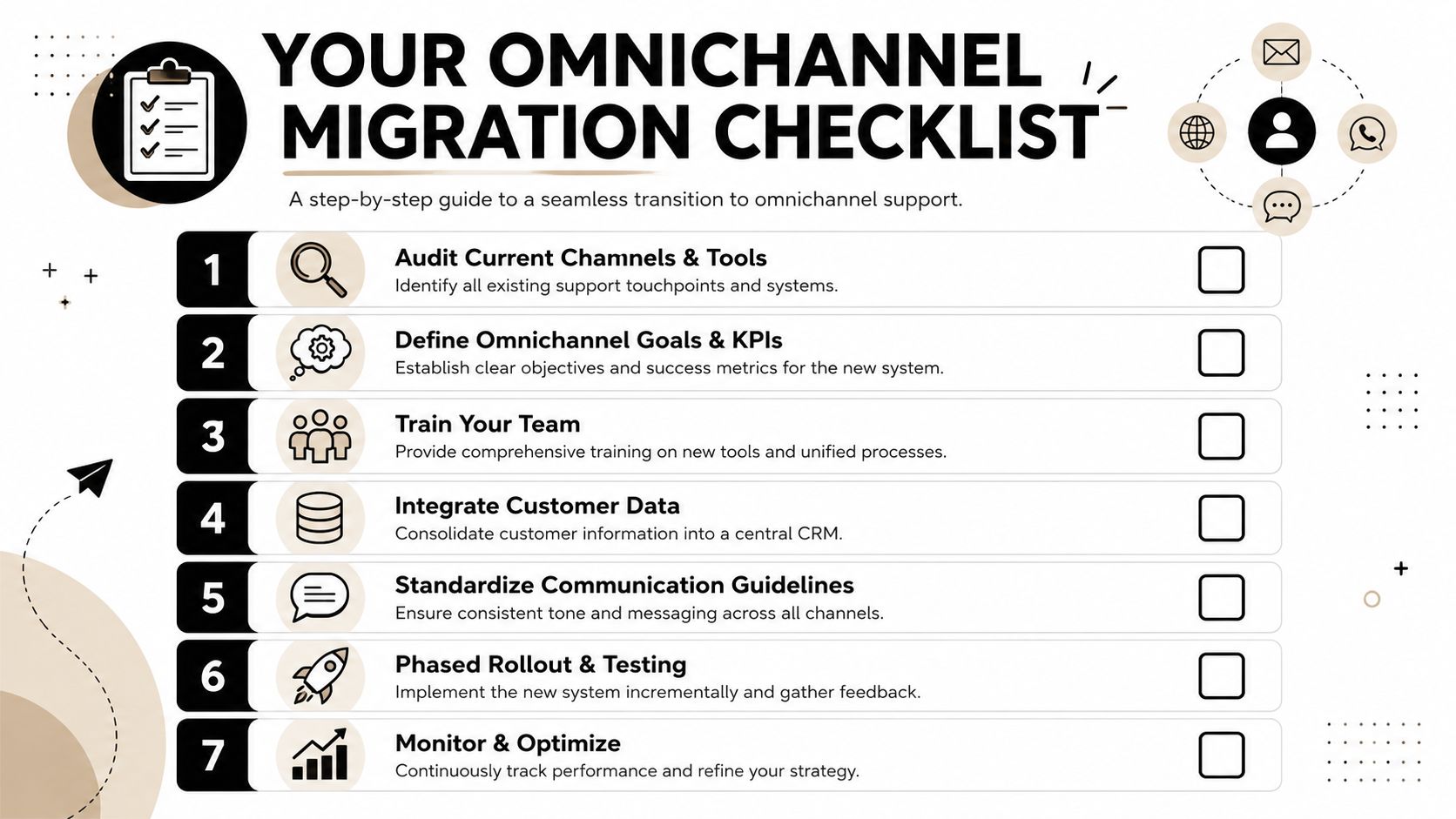
Implementation note: migrate the record of work first, then optimize automations. Teams that reverse that order usually automate bad process.
A smooth cutover depends less on software setup and more on operational readiness.
Some teams also need role clarity. Moderators, support agents, customer success managers, and product specialists often touch the same conversations. The new system should clarify handoffs, not blur them.
A phased rollout is usually safer than a big-bang migration. Start with the channels that generate the most support load or the most painful fragmentation. Stabilize there. Then add secondary channels, deeper automation, and reporting layers once the team is operating comfortably.
After launch, review:
AreaWhat to checkQueue healthAre tickets assigned, tagged, and closed consistently?Channel continuityCan agents follow the same customer across transitions?Knowledge qualityAre AI and agents using the same current answers?Team adoptionHave people actually stopped working from side inboxes and DMs?
The migration is working when support feels calmer for the team and less repetitive for customers. That's usually the earliest reliable sign.
Teams running support in Discord, Telegram, Slack, email, and web chat need a system that keeps context intact across all of them. Mava gives community-first companies a shared inbox, AI support automation, and cross-channel workflows built for that exact operating model.
.png)
.png)
.png)
