.png) Get Started
Get Started
A community support bot answers a Discord question in seconds. The answer sounds polished, cites a feature name that used to exist, and points a user toward a policy that the team changed months ago. The moderator who spots it now has two jobs instead of one. Fix the user's problem, then repair the damage caused by the bot.
That's what AI hallucinations look like in real support operations. They aren't just weird model behavior. They create duplicate work, public confusion, and a quiet drop in trust that spreads faster than generally anticipated. Once members learn that the bot might be confidently wrong, they stop treating it like a shortcut and start treating it like a risk.
For teams that care about fast support on Discord, Telegram, Slack, or web chat, learning how to prevent AI hallucinations isn't a model-selection exercise. It's an operating model. The strongest setups combine a clean knowledge base, retrieval that grounds answers in real documentation, prompts that narrow behavior, and review workflows that stop bad responses before they scale.
A common failure pattern in community support is simple. A user asks, “How do staking rewards work after the latest update?” The bot replies immediately, uses the old program terms, and describes a rule that no longer applies. Other members see the exchange. Some follow the wrong guidance. One moderator jumps in to correct it. Another has to answer the same question again in DMs because the public thread already created doubt.
Support leaders usually adopt AI to deflect repetitive questions. A hallucinating bot does the opposite. It creates rework.
The first cost is obvious. Human agents have to step in and correct the answer. The second cost is harder to measure but often worse. Users stop trusting quick answers, so they ask for confirmation more often, escalate earlier, and tag staff in public threads instead of using self-service.
Practical rule: A fast wrong answer is more expensive than a slower handoff to a human.
This gets more serious in community-led products where support happens in public. On Discord or Telegram, one wrong answer doesn't stay contained inside a private ticket. It becomes a reference point that other users quote, repost, and challenge. That can affect sentiment, retention, and even the broader impact on brand AI visibility when people repeatedly encounter inconsistent answers tied to the same brand.
Hallucinations are dangerous because they rarely sound uncertain. The model often answers with the same tone it uses when it's correct. For a support team, that's worse than an obvious error.
A hesitant bot that says it can't verify a detail gives a moderator a clean handoff point. A smooth, specific, unsupported answer gives the user the impression that the matter is settled. By the time a human fixes it, the trust damage has already happened.
Community managers often focus on answer speed, channel coverage, and volume reduction. Those matter. But if the bot can't stay close to verified information, every apparent efficiency gain comes with cleanup work attached.
Treating hallucinations as a pure model problem leads teams into the wrong fixes. Swapping models might reduce some errors, but it won't solve stale docs, conflicting policies, weak prompts, or missing escalation rules.
A trustworthy support bot needs a stack of controls:
That last piece is the one many teams skip. And it's usually the difference between an AI bot that helps moderators and one that keeps creating fires.
The best anti-hallucination tactic starts before the bot answers a single question. It starts with the content the system is allowed to trust.
Teams often connect a bot to a GitBook, a help center, a Notion workspace, or a folder of Google Docs and assume the AI will figure it out. It won't. If the source material is outdated, duplicated, or contradictory, the bot will retrieve bad context and answer with confidence anyway.
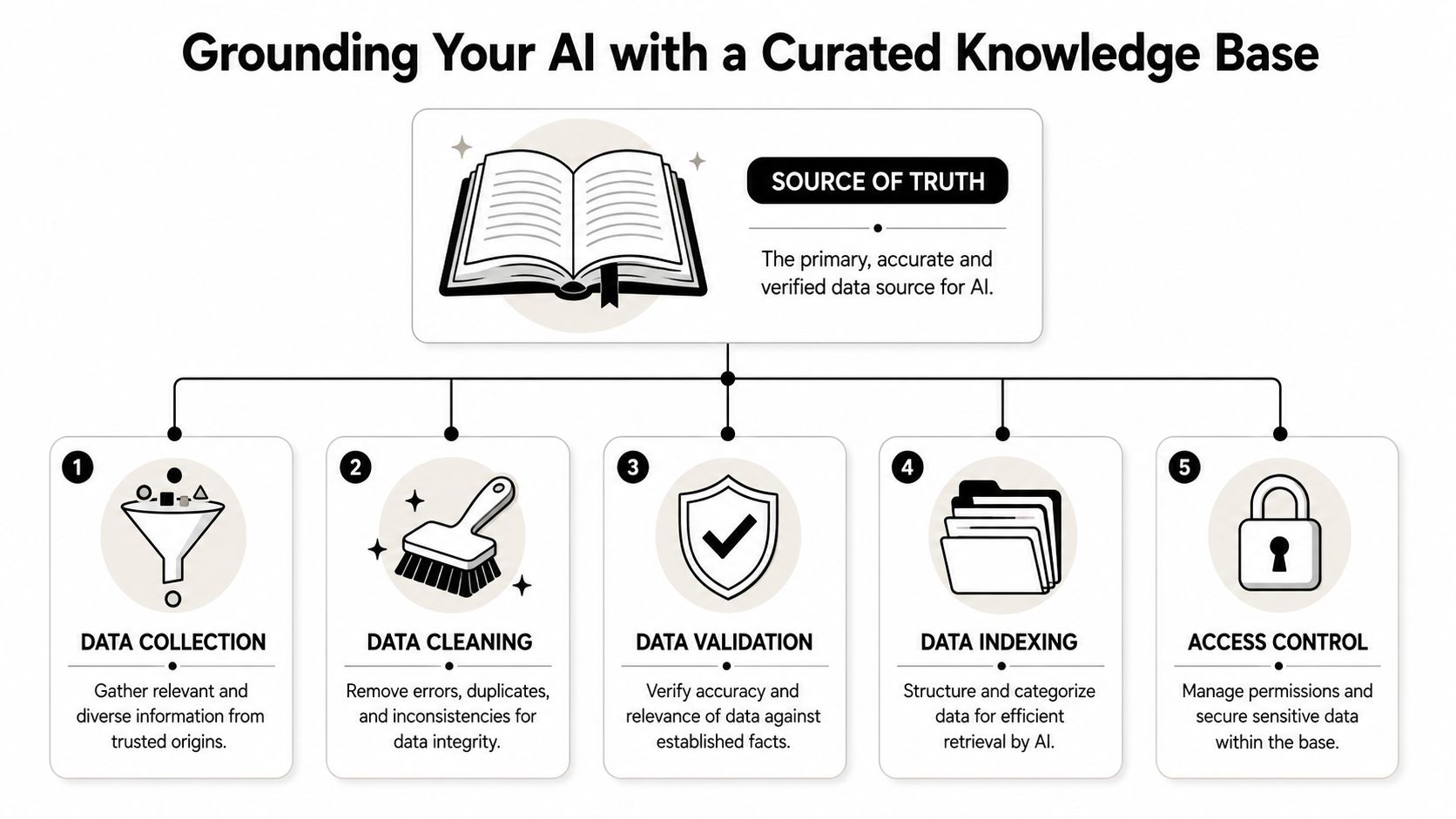
The baseline strategy is straightforward. Prioritize high-quality, current, and diverse training data, and keep human oversight by qualified AI specialists in the loop so someone can catch problems early instead of after users see them. For support teams, that translates into content governance, not just model tuning.
Before connecting any source to an AI bot, support leaders should review what's inside it.
A practical audit usually looks like this:
For teams refining that process, this guide on data integrity for generative AI is useful because it frames content quality as a deployment issue, not just a documentation issue.
A knowledge base written for humans can still be poor for AI retrieval. Long pages packed with several topics force the system to pull mixed context. That's where hallucinations often start.
The cleaner the source material, the less the model has to infer.
Use a simpler structure:
Content choiceBetter approach for AI supportOne long FAQ pageSplit into single-topic articlesVague headingsUse direct headings with the exact issue nameMixed policies in one docSeparate by workflow or product areaMarketing languageRewrite into plain operational language
A few content rules make a big difference:
Teams that want a more detailed checklist can use this resource on optimizing a knowledge base for AI bots.
A short walkthrough helps teams visualize what “AI-ready” looks like.
Most support teams already know docs drift. The mistake is treating that drift as a documentation annoyance instead of a reliability risk.
A curated knowledge base needs recurring review:
That's how to prevent AI hallucinations at the foundation layer. If the source of truth is sloppy, every downstream control has to work harder.
A support bot shouldn't answer from memory when the answer already exists in the team's documentation. That's the practical case for Retrieval-Augmented Generation, usually shortened to RAG.
RAG forces the system to look up relevant information first, then generate the answer from that retrieved context. For support teams, the simplest mental model is this: the bot checks the playbook before it speaks.
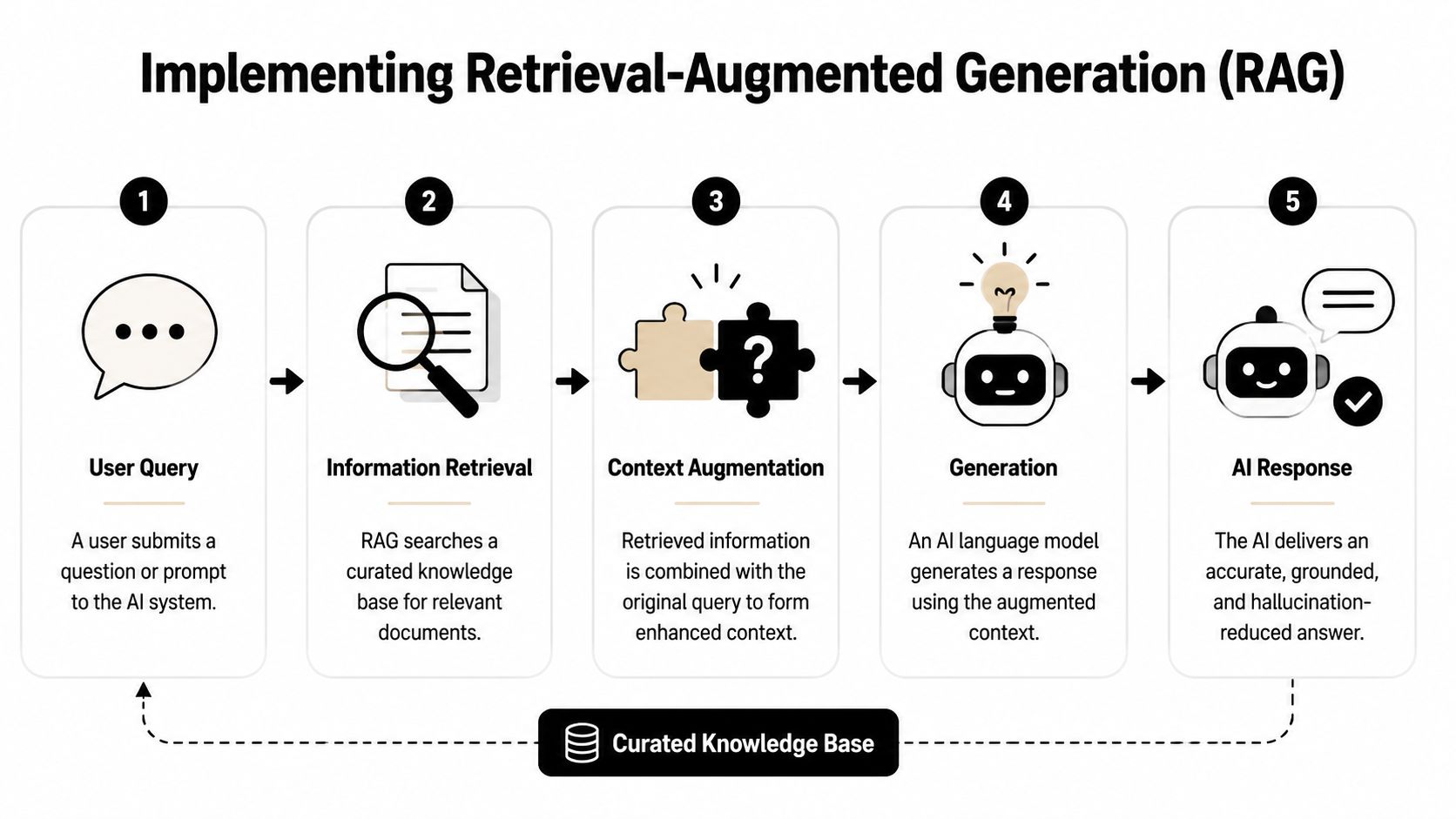
Without retrieval, the model relies on its internal training data and whatever patterns it can infer from the prompt. That's where stale details, invented links, and unsupported policy explanations show up.
With retrieval, the model gets fed approved context in real time. The verified guidance is clear on this point. Using RAG with reliable information sources significantly reduces hallucinations and increases the model's ability to admit that it lacks information. That matters in support because “I don't know” is often the safest answer when no trusted article covers the question.
In enterprise support settings, RAG combined with domain-specific fine-tuning reduces hallucination rates by up to 60% by grounding responses in verified knowledge bases, according to BARC's write-up on reliable GenAI.
A weak RAG implementation still fails. It might search badly, pull the wrong chunk, or retrieve stale content. Support leaders should think in workflows, not buzzwords.
A practical retrieval-first flow looks like this:
This becomes especially important on Discord, where users ask short, messy, context-light questions. Retrieval needs to handle slang, abbreviations, and partial feature names without grabbing unrelated docs.
The best thing about RAG in support isn't that it sounds smarter. It's that it makes the bot easier to trust.
When the answer comes from a specific article, moderators can verify it quickly. When no relevant article is found, the system can refuse cleanly instead of improvising. That creates better handoffs.
A support bot earns trust when staff can trace what it said back to a document they already trust.
This is also where document freshness matters. Verified guidance recommends regularly refreshing embeddings with the latest content from CMS platforms, databases, or knowledge repositories, and retiring outdated data so the model doesn't rely on stale information.
Some teams hear “use RAG” and assume the problem is solved. It isn't. Retrieval can fail when the knowledge base is bloated, when chunks are too broad, or when labels are inconsistent.
A few implementation choices usually improve outcomes:
RAG choiceSupport impactSmaller, focused documentsBetter match qualitySearchable diagrams and structured docsMore usable contextRetrieval-first workflowFewer guessed answersUp-to-date embeddingsLess stale guidance
Other useful controls from the verified guidance include self-consistent sampling, constrained output with schemas or templates, red-team testing with adversarial prompts, and post-hoc verification that flags potential hallucinations for human review.
For teams wiring retrieval into support operations, this overview of knowledge base integration for AI support is a practical place to compare setup choices.
RAG is the core technical control because it changes what the model is allowed to rely on. That's a much stronger defense than telling a general model to “be accurate” and hoping for the best.
Once the bot has the right information, it still needs clear instructions. Prompts and guardrails tell the system how to behave when answering users, when to refuse, and what format to use.
Many support teams under-specify the job. They give the bot a friendly persona and a few broad instructions, then wonder why it improvises. Models fill empty space. If the rules are vague, the model will make judgment calls the team never intended.
A useful support prompt is narrow and explicit. It should define role, scope, evidence rules, and refusal behavior.
A strong baseline prompt often includes instructions like:
That's much stronger than “Be helpful and accurate.”
One of the most useful prompt-level controls is also one of the simplest. Explicitly ask the model to analyze, recheck, and fact-check its answer before replying.
According to the verified data, explicitly requesting the AI to analyze, recheck, and fact-check its response before replying achieved a 52% reduction in hallucinations across ChatGPT and Claude models, as noted in this PromptEngineering discussion of tested methods.
That matters because many support errors aren't retrieval failures. They're synthesis failures. The model sees the right information but phrases it loosely, overstates certainty, or adds a detail that wasn't in the source.
Operational advice: Add the self-check to the hidden system instructions, not as an optional user-facing behavior.
A support-safe version might say:
Review the retrieved source again before answering. Verify that every factual statement in the response is supported by the provided context. If any part isn't supported, remove it or state that the information can't be confirmed.
Guardrails are the structural rules around the prompt. They limit how far the model can wander even when a question is messy.
Useful guardrails for support include:
A practical comparison helps:
Weak instructionBetter guardrail“Answer accurately”“Use only retrieved context and refuse unsupported claims”“Be helpful”“If no evidence is found, escalate to a human”“Format clearly”“Return answer, cited article title, and confidence label”
Teams looking at broader support bot design patterns can use this review of AI chatbots for customer service pros, cons, and best practices.
Prompts won't save a bad knowledge base, and they won't replace retrieval. But they do stop many avoidable failures. They're the rules of engagement that keep a grounded bot from drifting into unsupported answers.
Even a well-grounded bot with strong prompts won't earn internal trust if the support team can't inspect what it's doing. This is the gap many deployments miss.
The technical side gets attention. The operational side gets hand-waved. But for community managers, trust doesn't come from hearing that the model uses RAG. It comes from knowing which answers were safe, which were uncertain, and what happened when the bot wasn't sure.
The verified guidance identifies a critical gap between technical mitigation and process trust. Support leaders need confidence estimation metrics and audit trails so they can trust AI resolution rates and route low-confidence answers to humans without breaking user trust, as discussed in this piece on navigating AI risks in support workflows.
That point matters more in Discord support than in static benchmarks. Real users ask incomplete questions, pile onto threads, and expect immediate answers. A benchmark score doesn't tell a moderator whether the current answer should go live.
A support team should be able to inspect an AI response after the fact without guessing how it was produced.
At minimum, the review record should capture:
This makes post-incident cleanup much faster. If the bot gives a wrong answer about account eligibility, the team needs to know whether the problem came from stale source content, a retrieval miss, or an answer-generation mistake.
Staff won't trust a bot they can't audit, especially after the first public miss.
Support teams often make one of two mistakes. They let the AI answer everything, or they escalate everything remotely complex. Neither scales well.
A better model is selective automation. High-confidence, evidence-backed answers can publish automatically. Low-confidence or unsupported answers should move into a human queue.
That routing logic can be simple:
SituationBetter workflowClear answer found in approved docsAuto-reply with source-backed responsePartial match or conflicting contextHold for human reviewNo answer foundRespond with a limitation message and escalateSensitive issue categorySkip automation and assign directly
“I don't know” becomes useful instead of embarrassing. If the system can admit uncertainty and hand off cleanly, users see restraint rather than failure.
A single hallucination matters. Repeated classes of hallucinations matter more.
Support leaders should review a sample of AI-resolved tickets and look for patterns such as:
Those patterns usually point to one of three fixes. Update the knowledge base, tighten the prompt, or change the routing threshold. Monitoring isn't just for measuring the bot. It's for deciding which layer of the system needs work.
Hallucinations won't disappear entirely. The safer goal is fast detection and controlled recovery.
A practical incident workflow includes:
That's how to prevent AI hallucinations from becoming trust failures. The bot doesn't have to be perfect. The support process has to be accountable.
Teams often ask how to eliminate hallucinations. That framing leads to disappointment. A better question is how to build a support system that contains, detects, and reduces them before they damage trust.
The strongest setups work in layers. A curated knowledge base gives the bot something real to rely on. Retrieval keeps answers tied to that source of truth. Prompts and guardrails narrow behavior so the model doesn't improvise. Monitoring and human review create the process trust that support teams need before they'll let automation scale.
Support leaders already understand operational controls in other areas. AI support needs the same mindset. It helps to borrow ideas from broader governance work such as implementing GRC solutions, where the focus is accountability, traceability, and controlled escalation rather than blind automation.
That's the right lens for community support. A bot should handle repetitive questions well, admit uncertainty when needed, and hand off gracefully when the situation calls for judgment. Human agents should own edge cases, exceptions, and the continuous improvement loop.
The goal isn't a perfect bot. It's a reliable support system that can be trusted in public.
A support bot becomes useful when moderators stop treating it like a liability and start treating it like a dependable teammate. That only happens when the technical controls and the operating process are built together.
Teams that want one place to run that playbook can use Mava to connect an existing knowledge base, deploy AI support across Discord, Telegram, Slack, web chat, and email, and route conversations into a shared inbox where humans can review, step in, and scale support with more confidence.
.png)
.png)
.png)
