.png) Get Started
Get Started
A lot of teams are in the same spot right now. Their Discord or Telegram community is active, product adoption is growing, and support has turned into a stream of repeated questions that never really stops. Login issues, wallet connection problems, role access, setup confusion, feature availability, pricing details, bug workarounds. The same answers get typed again and again, usually by the same moderators.
That's when an AI bot starts to look appealing.
Then reality hits. A bot connected to messy community history usually gives messy answers. It grabs outdated guidance from a chat thread, misses the difference between a public FAQ and a private moderator note, or responds with something technically plausible but operationally wrong. On community-heavy platforms, that failure is more visible than it is on a traditional help desk because the bad answer often lands in public.
Strong knowledge base training fixes that. Not by making the model smarter in the abstract, but by giving it a clean system for finding the right answer from approved material at the right time.
The usual failure pattern is easy to recognize. A team launches a bot after importing a help center, a few docs, and some old support threads. At first it handles basic questions. A few weeks later, users start hitting edge cases. The product changes. Community slang shifts. A moderator posts a workaround in a private channel, but the public documentation never gets updated. The bot keeps answering from stale material because nobody built a process for keeping its knowledge current.
That problem is sharper in Discord and Telegram than in a conventional support portal. Community conversations are fast, fragmented, and full of implied context. A single answer can depend on product version, user role, region, wallet type, permissions, or launch stage. Raw chat logs don't form a knowledge base on their own.
Deployment is often considered the hard part. It usually isn't. The hard part is preventing training decay after deployment.
Research highlighted in Atlassian's overview of knowledge management points to an overlooked issue in community-driven environments. Some studies show 73% of knowledge base projects fail due to lack of continuous optimization based on actual user behavior (Atlassian knowledge base overview). That finding matches what operators on fast-moving community platforms already know. Static documentation ages quickly when primary product education is happening in chat.
Practical rule: If the support team is still saying “the bot is mostly right,” the knowledge base isn't finished. It's drifting.
A weak bot usually suffers from one of three problems:
That's why AI support should be treated as an operational system, not a widget. Teams looking at strategies for customer support automation ROI usually get the most value when they start with workflow discipline before bot expansion. Good automation follows good support structure.
The best-performing setups don't ask the bot to invent support quality. They give it a disciplined source of truth, narrow the kinds of questions it should answer, and route everything else cleanly to humans.
A bot underperforms when it's expected to “know the community.” It improves when it's trained to retrieve approved guidance, answer recurring questions, and escalate uncertainty without guessing.
Knowledge base training starts before anything is uploaded. The first job is deciding what counts as usable knowledge and what should stay out of the system.
For a SaaS help center, that's manageable. For a Discord or Telegram support operation, it's more complicated because the most valuable information often lives in unstructured places: pinned messages, solved threads, moderator replies, internal incident notes, and repeated answers buried inside public tickets.
Sorting knowledge by source type before by topic often yields better results.
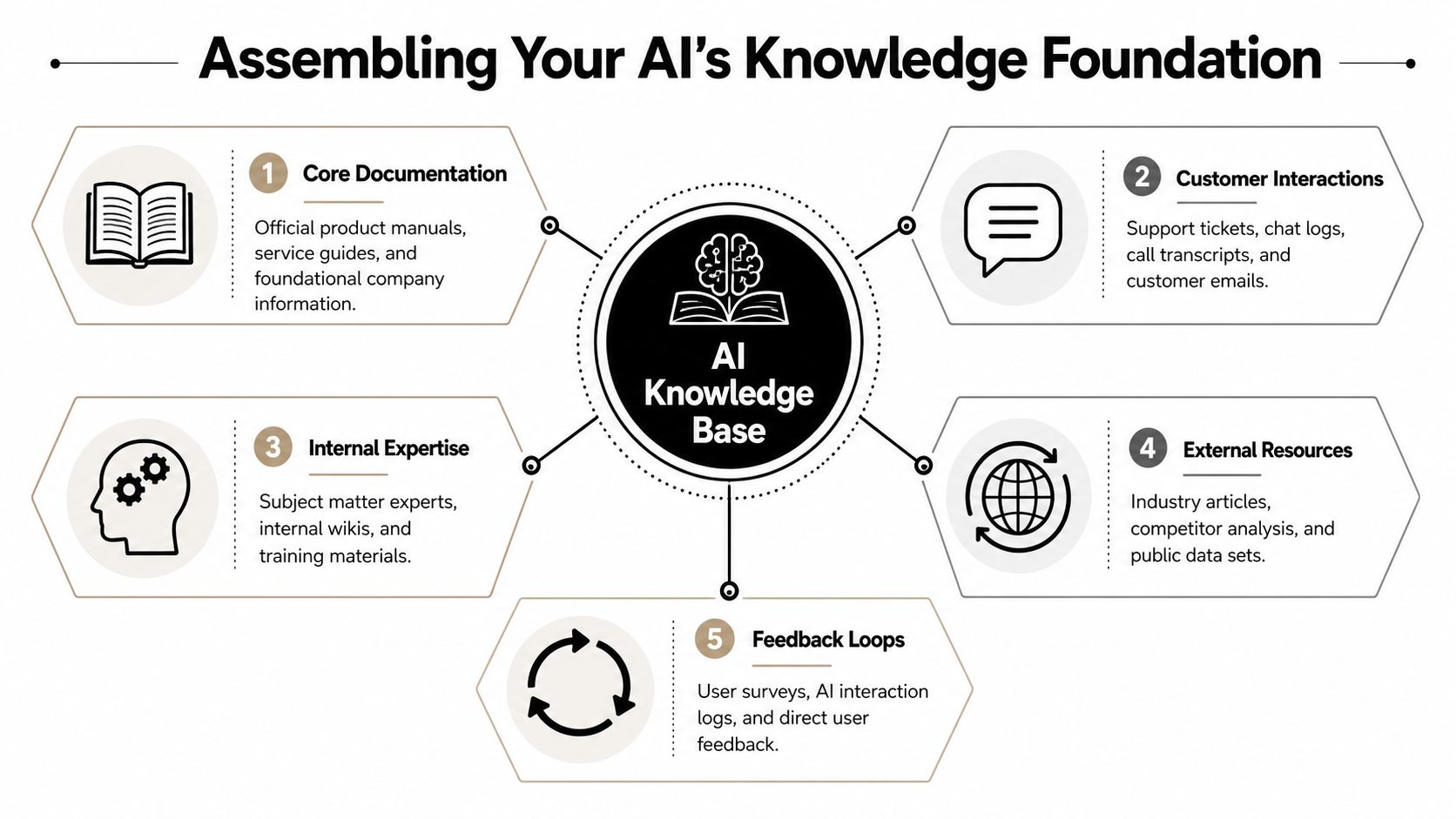
A practical collection model usually includes these groups:
Community support operates differently from a generic corporate knowledge base. On Discord or Slack, a large share of support may happen in public channels, while sensitive issues move into private tickets or moderator-only discussions. Zendesk's overview highlights this as a major unresolved question, noting the challenge of training AI on both public and private community tickets without violating trust, especially where 60% of tickets might be public and sensitive issues remain private (Zendesk knowledge base guide).
That isn't just a privacy issue. It's a training quality issue.
A reliable workflow uses clear dataset boundaries:
Public answers should come from public truth. Private context should help human teams operate, not leak into general AI responses.
The raw material from chat needs editing. A solved Discord thread should become a short article or Q&A pair with a stable title, clear prerequisites, a tested resolution path, and a note on when to escalate.
That's also why teams often benefit from a documented import process such as this guide on optimizing your knowledge base for AI bots. The underlying lesson isn't about a specific tool. It's that AI performs better when source material is curated, scoped, and intentionally written for retrieval.
A good filter for every candidate article is simple:
QuestionKeep it in the KB if the answer is...Is it repeatable?Useful beyond one single user caseIs it approved?Aligned with current policy or product behaviorIs it safe?Free of private or sensitive detailsIs it stable?Likely to remain true until the next product changeIs it actionable?Clear enough for a user or agent to follow
If a source fails one of those tests, it shouldn't be part of knowledge base training yet.
Once the source material is selected, the next job is making it legible for retrieval. At this stage, many teams lose accuracy. They assume that if humans can read a document, the AI can use it effectively. That's not how it works.
A support knowledge base needs the same discipline as a well-run internal wiki. Headings need to be explicit. Steps need to be short. Scope conditions need to be visible. Deprecated guidance needs to be removed, not merely buried lower on the page.
A smaller set of well-structured articles usually outperforms a huge archive of messy content.
Think of the knowledge base like a library. If the books are stacked in random piles, adding more books doesn't help the researcher. It slows them down.
The same logic applies to AI retrieval. If three articles answer the same question with slightly different wording, the model may retrieve the wrong one. If a troubleshooting page mixes setup, billing, bug notices, and edge-case moderator instructions in one long block, answer quality drops because relevance gets diluted.
A messy source often looks like this:
An import-ready source usually looks more like this:
Clean formatting isn't cosmetic. It's retrieval infrastructure.
A helpful external reference for this mindset is understanding AI content management, especially for teams trying to connect content operations with downstream AI behavior rather than treating docs as a separate function.
Most support leaders should resist the urge to create a brand-new documentation universe just for AI. It's usually better to import from maintained systems the team already uses, such as website help centers, GitBook, Notion exports, or Google Docs, then clean and consolidate where overlap exists.
For teams working across community channels, one option is using knowledge base integration workflows that pull from existing sources instead of forcing agents to manually rewrite everything into a new tool. That matters because consistency breaks down when support content lives in one place for humans and another for AI.
A practical import checklist:
What doesn't work is bulk importing every transcript, every thread, and every doc draft. That creates a larger corpus, not a smarter one.
Many teams use the word “training” to mean “uploading documents.” Modern AI support systems usually work differently. The stronger pattern is Retrieval-Augmented Generation, or RAG, where the system retrieves relevant pieces of the knowledge base for the question being asked, then uses that retrieved context to generate the response.
That distinction matters because it changes how teams troubleshoot quality. If the answer is wrong, the issue is often retrieval quality, content structure, or source approval. It isn't always the language model itself.
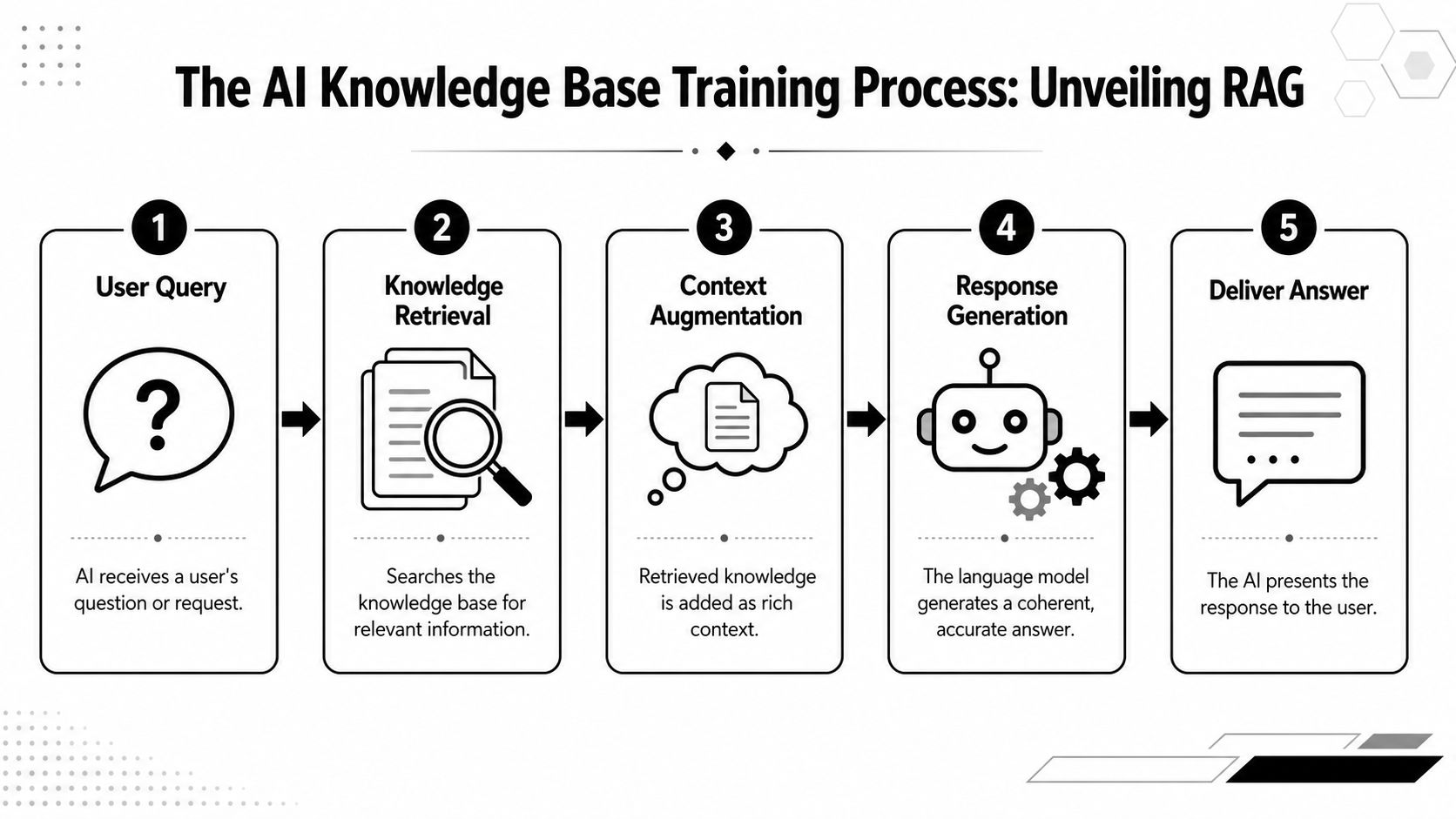
A typical flow looks like this:
TypingMind's documentation describes this RAG approach directly and notes an important failure mode: teams that skip early analysis of ticket patterns and search behavior can end up with up to 40% higher rates of irrelevant knowledge base content (TypingMind knowledge base training notes).
That's why retrieval quality starts long before deployment. If recurring ticket types aren't understood early, the AI may be technically functional while still being operationally useless.
To make the process more concrete, this walkthrough is worth watching:
Community support changes fast. Product launches, token mechanics, role permissions, campaign rules, and bot commands can all change on short notice. RAG is better suited to that environment because teams can update the underlying knowledge base and let the system retrieve current content rather than hoping a static prompt still reflects reality.
A community bot shouldn't “remember” everything. It should fetch the right answer from the right source at the moment it needs to respond.
That's also why imported knowledge should be chunked around one intent at a time. A billing policy article and a wallet troubleshooting article may both mention account access, but they shouldn't live in the same retrieval unit. Precision improves when each content fragment has a narrow job.
A support bot isn't successful because it replies quickly. It's successful when it resolves the right questions, avoids bad answers, and reduces unnecessary human workload without damaging trust.
The easiest mistake here is measuring activity instead of outcomes. Message count, session count, or number of AI replies can look healthy while the team is still handling most of the actual work behind the scenes.
A well-maintained knowledge base can self-serve 20% to 40% of total support volume on its own, and teams should push for even stronger deflection on repetitive tier-1 questions after AI is added, with targets reaching up to 60% in those cases (customer support knowledge base statistics).
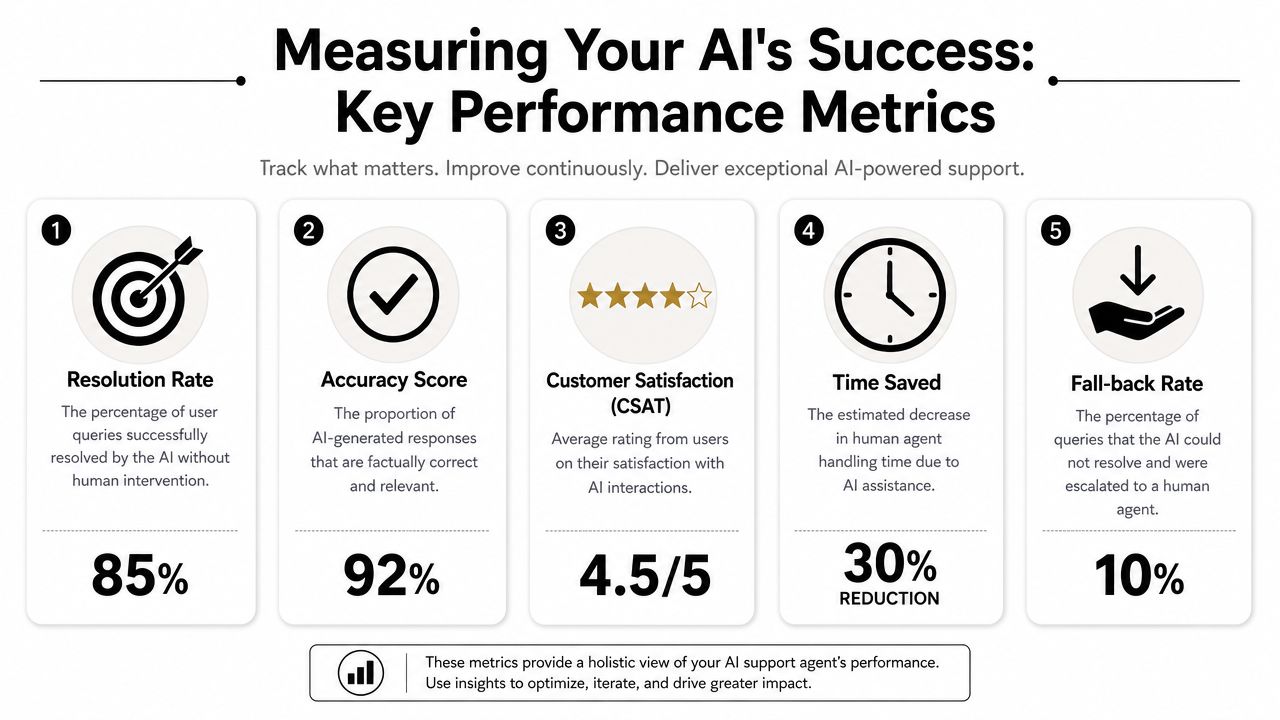
For community teams, the most useful scorecard usually includes:
The strongest performance reviews don't only ask, “How much did the bot handle?” They ask, “Where did it fail, and was the failure safe?”
A simple review table helps:
MetricHealthy signWarning signDeflectionRepetitive issues stop reaching human queuesThe bot replies often but tickets still arriveResolutionUsers complete the task after the answerUsers return with the same question phrased differentlyEscalationContext passes cleanly to an agentUsers need to restate issue historyContent coverageNew launches quickly produce usable articlesProduct changes create answer gaps for daysTrustSensitive cases route to humansThe bot tries to answer beyond approved scope
A lot of teams also need a separate hallucination review process. That's especially true for public communities where a wrong answer can get screenshotted and spread. This resource on how to prevent AI hallucinations is useful because it focuses on operational controls, not just model behavior.
If the bot gets uncertain questions wrong in public, that's not a minor QA issue. It's a support governance issue.
The launch date matters less than the operating model that follows it. A bot with no governance starts decaying almost immediately, especially in community environments where product changes and user language evolve week by week.
Good knowledge base training becomes durable only when ownership is explicit. Someone has to review content, decide what gets promoted from chat into documentation, retire outdated material, and monitor where the bot is failing. If everybody owns it, nobody does.
A workable model usually assigns responsibility across three groups:
This doesn't need a massive committee. It needs a repeatable routine.
Zendesk's AI knowledge base guidance points to the value of continuous improvement, with strong programs using monthly content performance reviews and quarterly gap analyses, a practice that correlates with a 2.5x improvement in sustained AI resolution accuracy over 12 months. The same source notes that successful knowledge base training can achieve up to a 60% reduction in ticket load when that operating rhythm is in place (Zendesk AI knowledge base practices).
Rolling out in stages is advisable instead of exposing the bot to the full community on day one.
A safer sequence looks like this:
Launching broadly with weak governance usually creates cleanup work that's harder than the original implementation.
Teams operating in regulated, privacy-sensitive, or trust-sensitive environments should also define review rules for dataset access, contributor permissions, and auditability. For organizations formalizing that layer, this guide to AI governance for enterprises is a useful companion to the content workflow side.
The teams that get long-term value from AI support don't treat knowledge maintenance as side work. They treat it as part of support production. That's what keeps the bot useful after the first week, after the next release, and after the community starts asking new questions in new language.
Teams running support across Discord, Telegram, Slack, email, and the web need a system that can handle both public conversation volume and private ticket complexity. Mava is one option built for that model, with AI support workflows that use imported knowledge sources, unified inbox handling, and human handoff across community channels.
.png)
.png)
.png)
