.png) Get Started
Get Started
Support starts to break long before a team admits it's breaking.
A community manager notices it first. Discord DMs pile up. Bug reports land in a public channel, then get copied into Notion, then forwarded to email. Someone on Slack asks for an invoice update while a user on Telegram wants help with a wallet issue and a web visitor is waiting in chat for a login fix. The team is answering people, but not with confidence. Context gets lost, duplicate replies happen, and moderators become accidental support agents.
That's usually the moment a community-led company realizes it doesn't have a support process. It has a collection of habits.
For companies built around Discord, Slack, or Telegram, that problem feels different from a traditional support desk. These channels aren't just places where tickets appear. They are the product environment, the user base, and the brand experience all at once. A public support answer can calm a whole thread. A missed question can spark churn in full view of the community.
A multichannel contact center gives structure to that chaos. Not in a big-enterprise, call-center sense. In a practical operating sense. It gives the team a way to accept support requests across the channels users already prefer, route them sanely, track ownership, and keep quality from collapsing as volume grows.
Most community-first teams don't decide to build a multichannel contact center because they love operations. They do it because the existing setup stops working.
A small team can survive on hustle for a while. One moderator checks Discord, another watches support@, a product manager answers Slack messages from customers, and somebody keeps an eye on the chat widget. That works until the same user asks in two places, a bug report gets buried in a fast-moving channel, or a private account issue gets handled in public because no one moved it in time.
The problem isn't message volume alone. It's fragmentation.
Community businesses have a channel mix that's unusually messy. Discord has threads, channels, and DMs. Slack often mixes internal collaboration with external support communities. Telegram is fast but hard to govern without a clear intake model. Email still matters for billing, legal, and account-sensitive conversations. Web chat often catches pre-sales questions that become support later. Each channel has its own pace, tone, and risk profile.
Support breaks when the team has to remember the system instead of relying on one.
The fix isn't forcing everyone into a sterile portal that the community won't use. The fix is building a support layer around the channels people already trust. A multichannel contact center does that by treating each entry point as valid, while giving the team rules, routing, and visibility behind the scenes.
For community-driven companies, cohesion doesn't mean making every channel feel the same. It means making the operation behind them dependable.
A multichannel contact center is often explained too loosely. In practice, it means a support operation that handles conversations across several channels, such as phone, email, web chat, SMS, video, and social messaging. The important part is what happens behind the scenes.
According to SQM Group's explanation of multichannel versus omnichannel contact centers, a multichannel contact center facilitates diverse interaction channels, including telephone calls, emails, web chats, SMS/MMS, video meetings, and social media messaging, while those channels often operate independently without full integration.
That independence matters more than many organizations realize.
A useful way to think about it is a building with many entrances. Users can walk in through the phone door, the email door, the chat door, or the social door. That's the multichannel part. The company offers access in several ways.
But inside, those doors may still lead to separate rooms. One team sees email history. Another sees chat. A moderator in Discord knows the public thread, but the billing agent only sees the email escalation. The user experiences one company. The staff experiences separate systems.
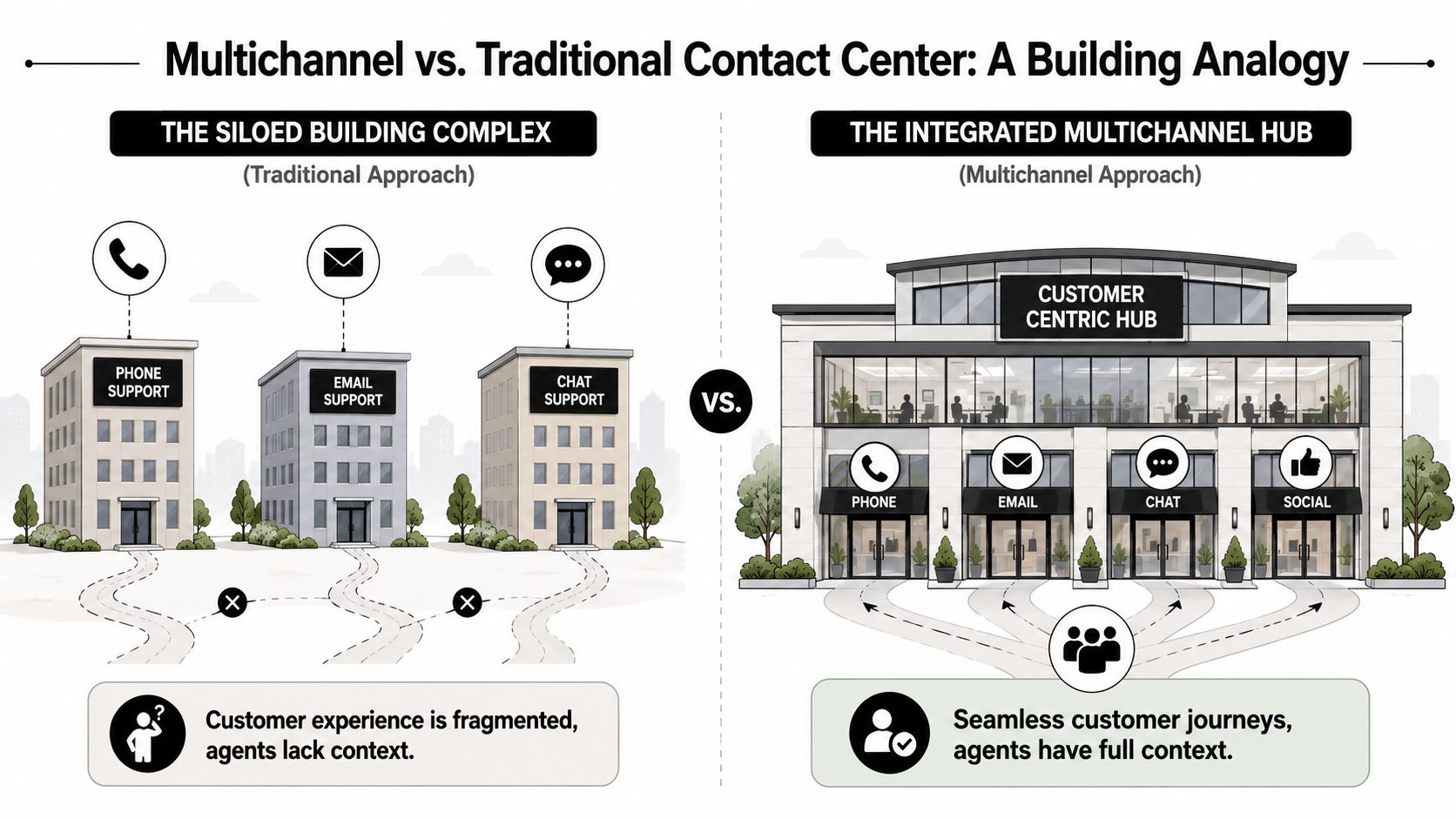
That's why teams often confuse multichannel with omnichannel. Omnichannel is the connected version. The doors are different, but the building is joined up, and context travels with the customer.
For leaders comparing architectures, unified customer experience solutions are worth reviewing because they clarify what true continuity requires beyond merely adding more channels.
AttributeMultichannelOmnichannelCustomer accessMultiple support entry pointsMultiple support entry pointsData flowOften siloed by channelUnified across channelsAgent contextPartial, depends on tool accessShared customer historyHandoffsOften manualDesigned to retain contextReportingFrequently stitched togetherMore centralizedBest fitExpanding channel coverage quicklyDelivering seamless cross-channel journeys
A lot of community-led companies should start with multichannel before they chase omnichannel. That's especially true when the immediate pain is scattered intake, inconsistent ownership, and poor routing.
The explainer below helps frame the difference visually before choosing a tool stack.
Discord and Slack intensify this difference. A team may technically support multiple channels, but still force staff to copy links, summarize threads manually, and ask users to repeat themselves. That's not a tooling inconvenience. It changes service quality.
The same SQM Group source notes that 66% of companies still operate on hosted or on-premises platforms rather than pure CCaaS, which signals how many organizations are still working in environments that haven't fully moved to integrated data synchronization for omnichannel workflows.
More channels don't automatically produce better support. They only increase the number of places where support can fail.
For a growing community business, the first strategic question isn't “How many channels should be opened?” It's “Which channels can the team manage without losing context, ownership, and trust?”
For community-first companies, Discord, Slack, and Telegram aren't side channels. They are the customer environment. Support strategy has to start there.
A traditional support plan often assumes users will leave the product experience and submit a form. Community users usually won't. They ask where they already are. In Discord, that might be a public support channel or a DM. In Slack, it may be a shared customer workspace or a channel with partner admins. In Telegram, it's often direct and immediate, with very little patience for handoffs.
The first move is deciding which spaces are official support surfaces.
That means setting explicit rules such as:
#support or #help channel prevents bug reports from scattering across general chat.Without those rules, communities train users into bad habits. People post in the loudest channel because that's where they've seen others get attention.
Discord isn't email with emojis. Slack isn't a help desk with reactions. Telegram isn't a mini CRM. Each one changes how support should be handled.
Discord works best when public answers are reusable and private escalation is easy. Slack usually needs tighter boundaries because internal and external communication can blur fast. Telegram demands short, direct flows because long support processes feel clumsy there.
A useful model is:
That last step matters. If every issue disappears into private handling, the community never sees resolution patterns and keeps asking the same questions.
Community support should feel native to the platform, not imported from an enterprise playbook.
A channel strategy isn't complete until moderators and support agents can apply it consistently. The playbook should answer practical questions:
Teams building support on Slack can benefit from examples like this guide to AI-powered customer support on Slack, because it shows how to operationalize support inside a collaboration environment rather than bolting on a separate help flow.
Community companies scale best when they stop treating channels as a list and start treating them as distinct operating environments.
A multichannel contact center only works if the underlying architecture reduces operational load. If the stack adds handoffs, duplicate triage, or brittle integrations, the team ends up with a more expensive version of the original mess.
The foundation is usually a shared inbox that brings together conversations from channels such as Discord, Telegram, Slack, web chat, and email. Not because every conversation becomes identical, but because assignment, status, ownership, and internal notes need one operational layer.
A useful multichannel support stack usually includes these layers:
The inbox is the visible part. Routing is what protects quality. A wallet recovery issue shouldn't land with a volunteer moderator. A product bug from a high-value customer shouldn't sit in the same pile as a basic FAQ. Good routing avoids both.
This is one of the most important buying decisions and one that teams often miss.
According to Zoom's guidance on evaluating multichannel contact center platforms, technical evaluation should verify whether AI runs natively across all channels or exists as a third-party bolt-on layer, because bolt-on architectures create maintenance overhead and coverage gaps while native AI trains on unified data for more consistent outcomes.
That's highly relevant for community support. Bolt-on AI usually breaks at the edges. It might answer web chat well but fail in Discord threads. It may classify email correctly while ignoring Slack context. Native AI tends to work better when the same system can see the same workflows, statuses, and knowledge sources across channels.
Zoom's piece also notes that 41% of customers expect live chat on websites. For community businesses, that means web chat shouldn't sit outside the support system. It should feed the same operating model as Discord and email, even if the experience looks different on the front end.
Community teams sometimes underweight this part because they're moving fast. That's a mistake. The architecture should be reviewed for:
A practical overview of what this kind of connected stack should look like appears in this guide to an omni-channel platform, especially for teams trying to consolidate community and traditional support surfaces in one workflow.
A multichannel contact center needs a scoreboard, but not every common support metric helps a community team make better decisions.
Average handle time, for example, can mislead badly in community settings. A Discord thread may resolve in several short touches over time. A Telegram exchange may need immediate brevity. An email can be long but efficient. The job isn't to chase one number across all of them. The job is to understand whether the system is reducing effort for users and load for the team.
The larger analytics market reflects how seriously companies are taking this problem. The contact center analytics market analysis from Scoop Market says the global contact center analytics market was valued at USD 1.60 billion in 2022 and is projected to reach USD 9.71 billion by 2033, growing at a 17.8% CAGR, driven by the need for personalized experiences.
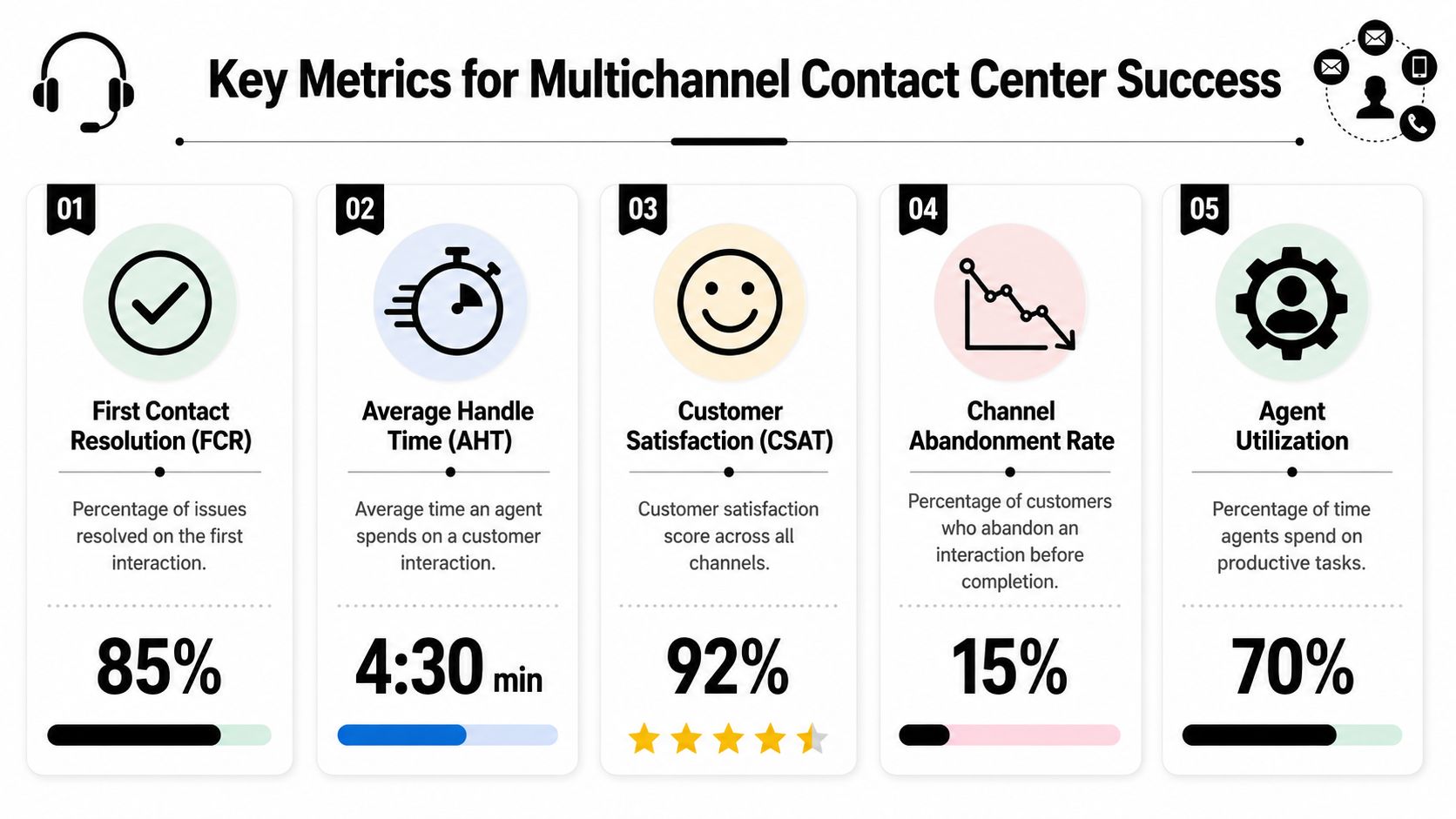
Track a small set of KPIs that lead to action:
Metrics should answer staffing and system questions, not just feed weekly reporting.
If public Discord support generates recurring known issues, the team may need better pinned guidance, a bot flow, or improved product messaging. If Slack requests are low volume but high complexity, route them to senior agents instead of treating them like general queue work. If email starts collecting escalations that began elsewhere, the handoff process is probably leaking context.
Practical rule: Measure what helps the team change behavior this week, not what looks polished in a dashboard.
The best KPI set for a community-centric support operation is usually narrower than leaders expect and more channel-specific than generic support templates suggest.
Launching a multichannel contact center goes badly when teams try to transform everything at once. The cleaner approach is phased, operational, and boring in the right places.

Some details make a disproportionate difference:
A useful reference point for teams moving from ad hoc bots to real workflow control is this guide to a ticket bot dashboard, especially for understanding how queue visibility and status tracking change day-to-day operations.
The common executive impulse is to turn on every channel and prove scale immediately. That creates noise, not maturity.
A better first launch might include Discord plus email, or Slack plus web chat, with Telegram added after routing, knowledge, and escalation rules are stable. Teams that stage implementation usually fix process flaws before those flaws become customer-facing habits.
The biggest mistake is assuming that adding channels is the same as building a system.
A multichannel setup can still produce fragmented service if context doesn't travel with the work. As Reve Chat's explanation of multichannel architecture puts it, in a multichannel contact center, communication channels operate in silos with no automatic data synchronization, so what happens inside one channel doesn't necessarily move into another on its own.
Use channel-specific playbooks. Keep private escalation paths obvious. Build internal notes and statuses into the workflow so handoffs happen inside the system, not in side chats. Review a small sample of conversations every week to catch drift early.
If a support process depends on heroic memory, it won't survive growth.
Most multichannel failures don't come from bad intentions. They come from teams trying to scale personal hustle instead of replacing it with clear operating rules.
A multichannel contact center isn't just a bigger inbox. It's a way to turn scattered conversations into a support operation that can survive growth.
For community-driven companies, that means treating Discord, Slack, and Telegram as first-class support environments, not awkward exceptions to a traditional help desk model. The teams that do this well don't chase channel count. They build clear entry points, sane routing, useful automation, and reporting that helps them adjust quickly.
Support becomes more scalable when the system carries the load instead of the moderators.
Usually, yes. Many community businesses need better structure before they need full omnichannel continuity. If the current pain is scattered intake, no ownership, and inconsistent replies, a multichannel model can solve a lot. Omnichannel becomes more important when customers regularly move across channels during one issue and expect full context every time.
The primary support channel should be the one users already trust and use consistently. For many community-led companies, that's Discord. For B2B products with customer workspaces, it may be Slack. Email should still exist for sensitive, formal, or account-linked issues even if it isn't the front door.
Some should. Public questions that have reusable answers can stay public. Issues involving billing, account access, security, moderation disputes, or long back-and-forth usually need a private ticket or tracked thread. The key is having a clear rule for when that transition happens.
Discord is faster, more public, and more interrupt-driven. Messages pile up quickly, multiple people can answer at once, and users often expect near-real-time responses. It's easier to build trust in public there, but it's also easier to lose control of context without queueing and ownership.
Yes, if the automation is grounded in a real knowledge source and connected to the actual workflows agents use. AI is most helpful for repetitive questions, intake, tagging, and first-pass answers. It's less useful when the team expects it to handle vague, emotionally sensitive, or account-specific issues without escalation.
Start with one shared inbox, one channel playbook, and one clear escalation path. If those three pieces are stable, automation and reporting become much more useful. If they aren't, new tools mostly make the confusion move faster.
Teams that support users on Discord, Telegram, Slack, email, and the web need tooling that matches how community support works. Mava gives community-driven companies a shared inbox, AI automation, analytics, and channel-native workflows built for that environment, so teams can scale support without losing context.
.png)
.png)
.png)
