.png) Get Started
Get Started
Support teams at community-first companies often end up running four separate support systems without meaning to. Discord handles public questions. Telegram absorbs urgent complaints. Slack catches partner or internal escalations. Web chat becomes the fallback for everyone who doesn't want to post in public. The result looks like coverage, but operationally it's fragmentation.
That's the trap behind most discussions of the omni channel platform. The term sounds right, but the usual definition comes from retail and lifecycle marketing. It assumes the hard part is coordinating email, CRM records, and web behavior. For community-driven companies, the hard part is different. It's preserving conversation context when a user moves from a Discord thread to a private message, then to web chat, without forcing that user to start over.
Traditional platforms rarely solve that problem well. They were built to orchestrate campaigns, not to follow messy, real-time, multi-party support conversations. For companies running support where their users already gather, that distinction matters more than any polished dashboard or vendor demo.
A familiar support day starts with a moderator answering a billing question in Discord, then jumping into Telegram to calm down a frustrated user, then checking web chat for signup issues, then scanning Slack because an enterprise customer wants an update. Each channel has its own thread logic, permissions, tone, and urgency level.
The failure usually doesn't start with volume. It starts with context switching.
A user asks in public because they want a fast answer. A teammate moves the conversation private because account details are sensitive. Another teammate picks it up later and can't see the original public exchange. The user repeats the issue, gets a slightly different answer, and loses confidence in the team. Nothing about that feels “omnichannel” from the user's side.
Three things go wrong before leadership even notices a tooling problem:
Practical rule: If a team can't reconstruct a full support story across channels in one place, it doesn't have an omni channel platform. It has a collection of inboxes.
This gets worse for teams that rely on social listening or proactive outreach. Signals about bugs, fraud reports, or rollout confusion often start outside the support queue. Resources like twtaio's X data scraping can help teams capture public discussion patterns earlier, but gathering signals is only useful if those signals can connect back to the same support workflow and member record.
At this point, teams usually buy a platform marketed as omnichannel. The demo looks promising because it shows messages from different channels inside one dashboard. But a shared view isn't the same thing as a shared context layer.
Community support needs the platform to understand replies, thread trees, private escalations, moderator notes, and identity stitching across Discord, Telegram, Slack, and embedded chat. Most tools stop at ingestion. They pull messages in, but they don't preserve the logic of the conversation.
In marketing software, an omni channel platform usually means coordinated delivery across email, social, web, and mobile. That's valid for campaign teams. It just isn't enough for a community company whose support happens in live chat environments.
For communities, the better definition is simpler. An omni channel platform should maintain one continuous support relationship with a member, even when the conversation moves across channels, formats, and visibility levels.
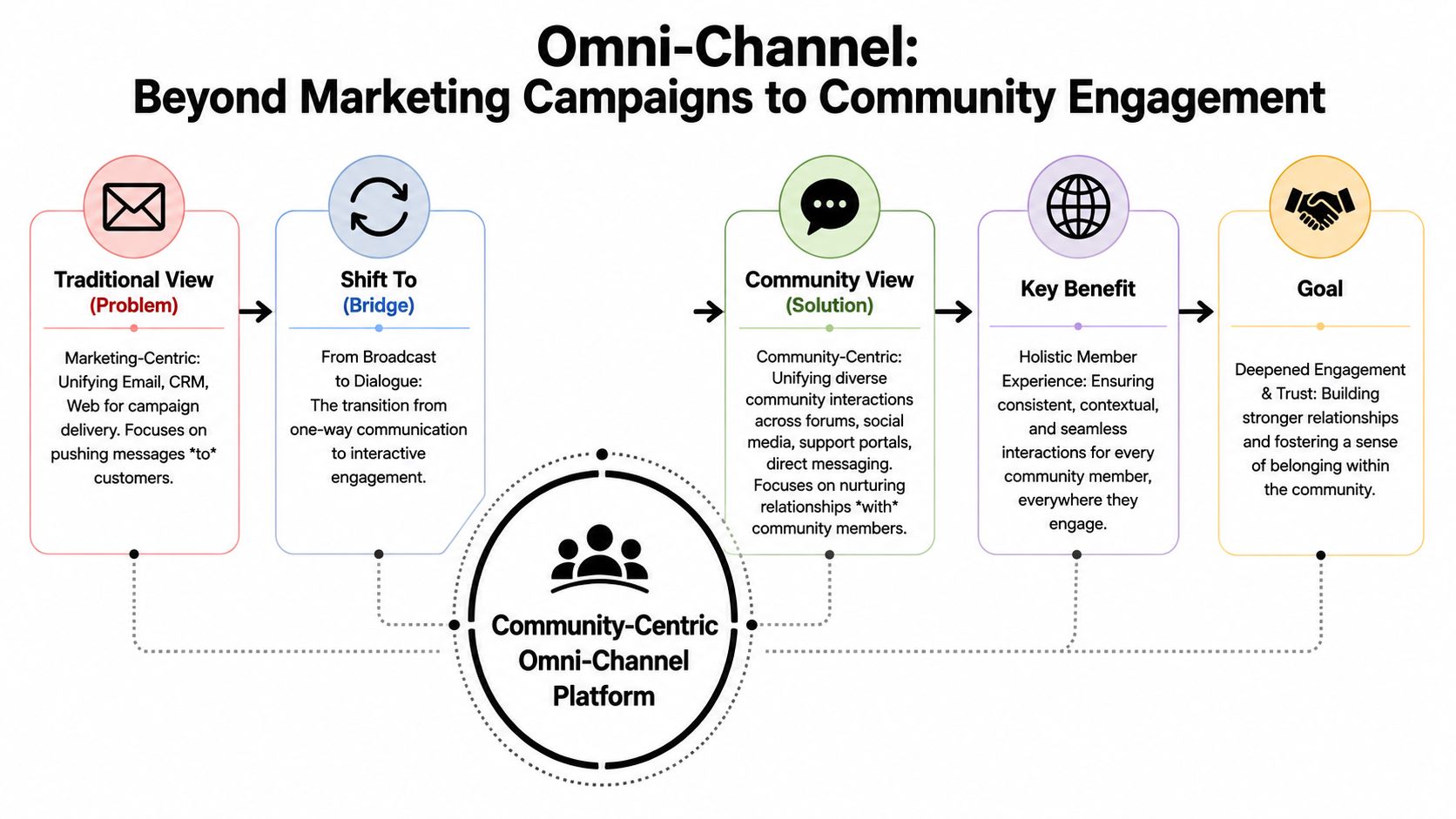
The old model treats channels like delivery pipes. Email sends one message. Web chat handles another. CRM stores the contact. The system is built to push communications outward.
Community support works the opposite way. Members move first. They ask publicly, switch private, reply hours later, tag a moderator, or continue the issue on another device. The system has to follow them, not the other way around.
That gap is larger than most vendors admit. The documented disconnect between marketing-focused omnichannel and community support is hard to ignore. 73% of Gen Z and Millennial users prefer community platforms for support over email or traditional tickets, and 60% of SaaS companies report using community platforms for support, yet few omnichannel solutions offer native context preservation or AI agents that can parse Discord and Telegram thread structures without breaking conversation flow (Alumio's omnichannel strategy overview).
A useful mental model is this. A marketing platform is a switchboard. A community platform needs to act more like a translator that follows the member everywhere and never loses the thread.
That changes the buying criteria:
Teams hiring for these environments already recognize the difference. Job descriptions in Web3 and community operations increasingly prioritize tooling fluency, moderation judgment, and real-time support coordination. That's visible in strategic Web3 community job insights, where the work sits much closer to live operations than to campaign management.
For teams evaluating this shift in more depth, Mava's guide to omnichannel support implementation is a useful reference because it frames omnichannel around support workflows, not just channel presence.
The channel isn't the product decision. The continuity of the user experience is.
Most failures are predictable because most platforms were never designed for non-linear support. They assume a user submits a ticket, an agent replies, and the issue closes in a contained thread. Community support doesn't behave like that.
A member might ask a question in a Discord channel, get partial guidance from another user, move to a moderator DM, receive an AI reply in web chat later, and then return to Telegram with a screenshot. That's one issue. Generic platforms often record it as three or four disconnected interactions.
The weak point isn't just “integration quality.” It's the inability to preserve thread logic and identity continuity across platforms that were never standardized for support use.
The documented numbers on this are blunt. AI can resolve 50% to 60% of repetitive queries, but 85% of omni-channel implementation failures happen because companies can't unify resolution metrics across Discord, Telegram, Slack, and web chat into a single source of truth. 70% of community managers also report that AI handoffs to humans fail because the platform can't carry full conversation history from Telegram to web chat (Matomo's omnichannel analytics article).
When that happens, the user pays the price. They re-explain the issue. They repost screenshots. They lose trust in automation and assume the team is disorganized, even when the agents are doing solid work.
A second failure comes from measurement. Traditional platforms love clean dashboard metrics because they fit a linear support model. Community support is messier.
A few common examples:
If the platform measures messages well but measures resolution badly, it will reward the wrong behavior.
Before signing with any vendor, teams should push on failure points, not feature lists.
QuestionWhy it mattersCan the platform preserve a conversation when it moves from public to private?That's where most context loss startsDoes the AI understand channel-specific thread structure?Chat support breaks when the bot reads isolated messagesCan human agents see the full handoff transcript?Without that, escalations create frictionAre analytics unified at the issue level, not just the channel level?Otherwise ROI reporting is distorted
Most community companies don't need more channels inside one inbox. They need fewer broken handoffs.
A real community omni channel platform can't be assembled from disconnected add-ons. The architecture has to assume that content, identity, routing, and analytics will move together. The underlying principle is straightforward: one source of truth, distributed across many support surfaces.
That matters because well-developed omnichannel systems require a centralized content repository and channel-agnostic content architecture, which lets teams adapt content across web, mobile, email, and social without rebuilding it manually. This model has been documented to reduce deployment time by 60%, and platforms with governance and workflow controls achieve a 50% improvement in cross-channel campaign effectiveness (verified industry benchmark reference provided in brief).
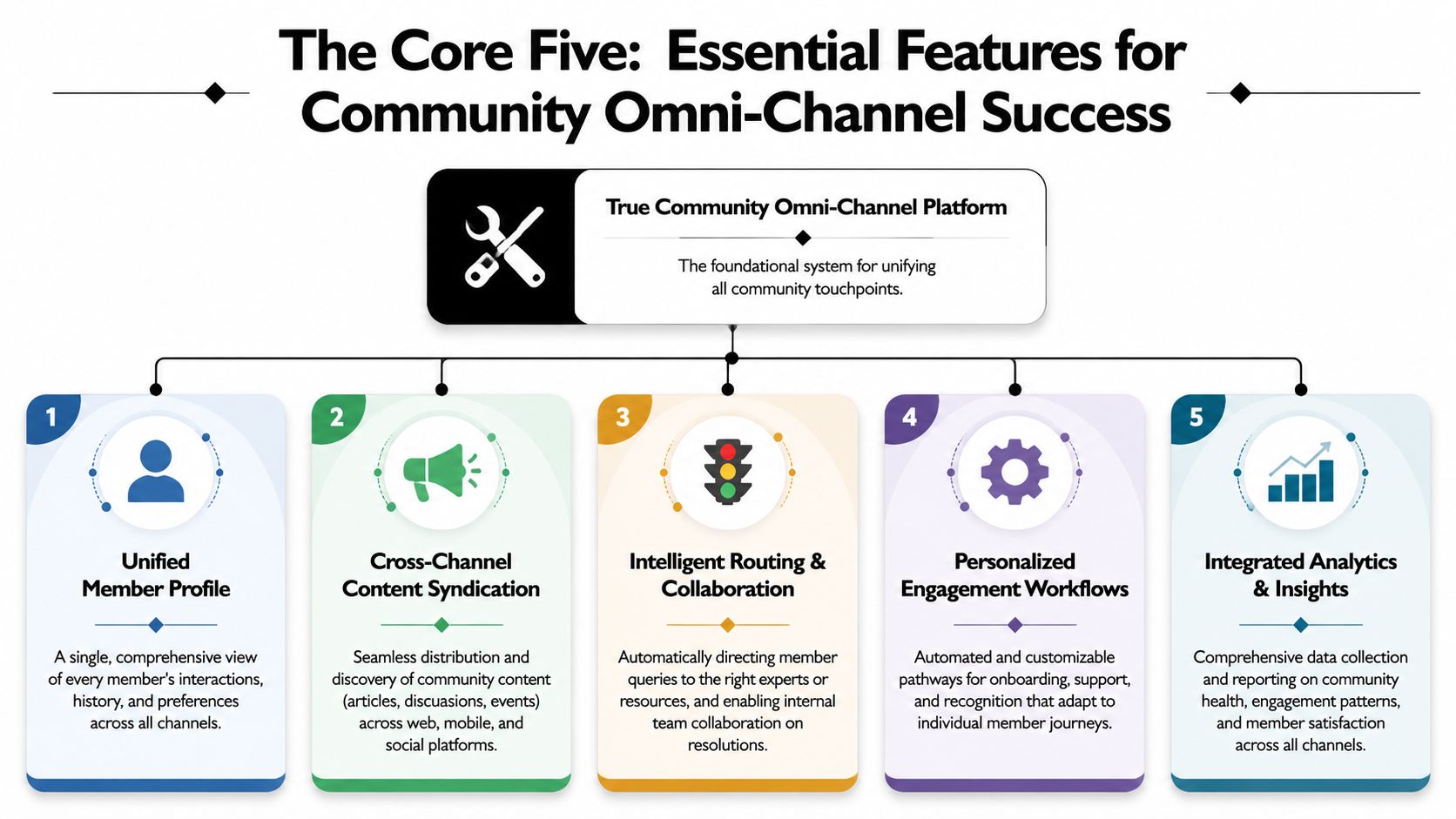
This is the baseline, but it only counts if the integrations are native and not shallow relays through a third-party connector.
A useful shared inbox for community support needs to pull in:
If Discord tickets, Telegram chats, and web conversations all arrive as flattened messages, the team still has to reconstruct the story manually.
AI should answer repetitive questions fast, but it needs the right source material and the right memory model.
That means two things:
A platform like Mava's ticket bot dashboard illustrates this support-first approach by combining shared inbox workflows with AI and analytics in a single operational layer, rather than treating AI as a bolt-on widget.
Here's a useful product sanity check. If the AI demo only shows isolated FAQ answers, the platform probably isn't designed for real community support.
This feature is where many vendor claims collapse under live usage.
The handoff should pass:
Without that package, agents start cold and users repeat themselves. That's not a handoff. It's a restart.
A quick visual can help teams align on what a complete platform should include.
Leaders need one place to inspect support health across channels without flattening away the complexity that makes communities different.
Look for dashboards that can answer questions like:
The best support teams don't maintain separate truth sources for bots, agents, and members. They maintain one evolving knowledge layer and distribute it everywhere.
Field note: When teams treat the knowledge base as content infrastructure instead of a help-center side project, support quality becomes more consistent across every channel.
That's what turns an omni channel platform from a routing tool into a real support system.
Community teams often inherit the wrong scorecard. Ticket volume, median response time, and inbox throughput are useful operational indicators, but they don't tell leadership whether support is strengthening retention or processing noise faster.
A better scorecard connects frontline support behavior to customer continuity.
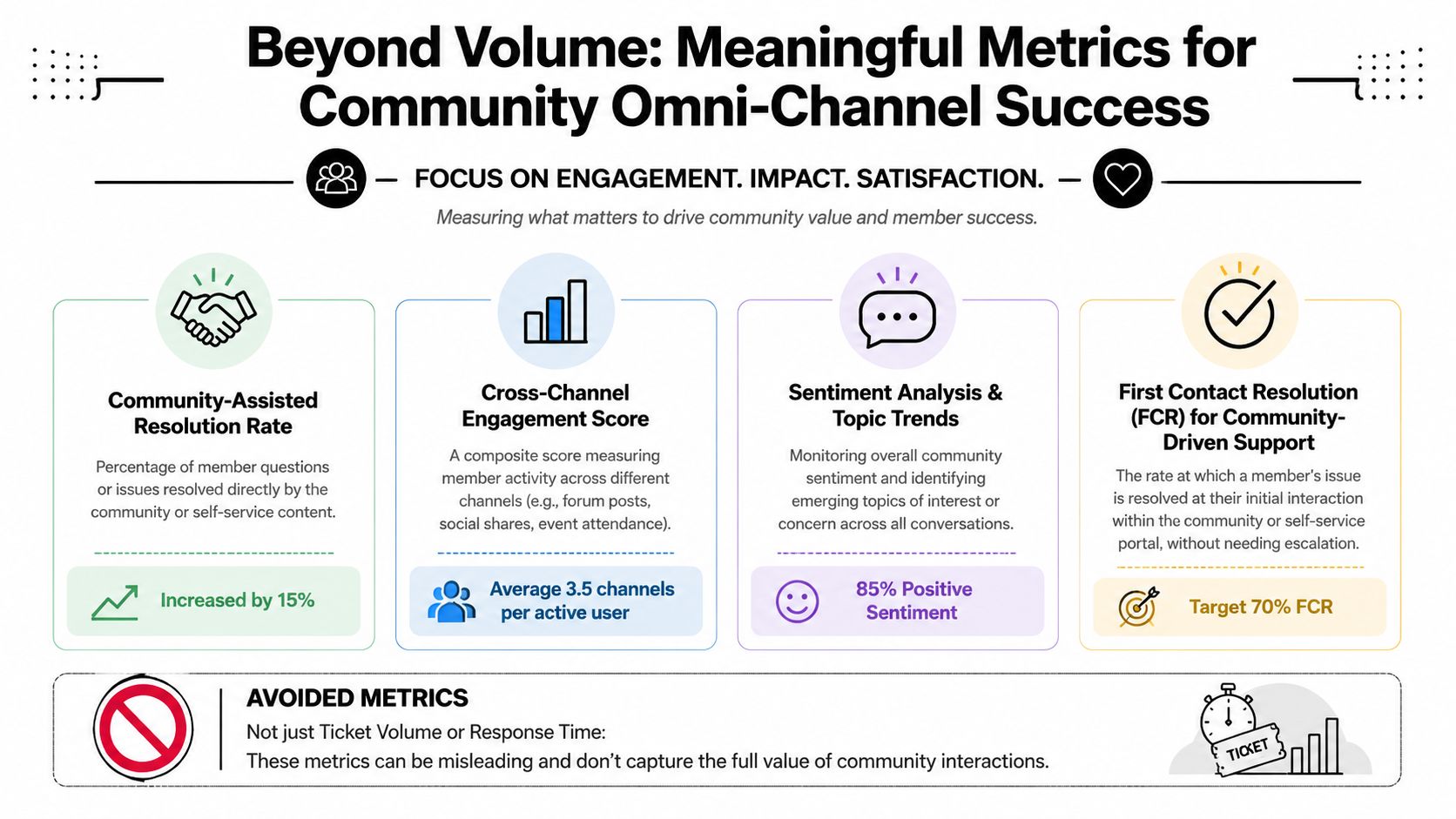
Teams running a community omni channel platform should focus on issue-level outcomes:
A second layer should track operational health:
MetricWhat it revealsRepeat contact on the same issueWhether context is being preservedPublic-to-private transfer rateHow often sensitive or complex cases escalateReopen rateWhether “resolved” means resolvedKnowledge gap tagsWhere documentation is failing agents and AI
Executives care about retention and lifetime value because those metrics reflect the long-term effect of customer experience. Support leaders should frame omnichannel reporting the same way.
The business case is already strong. Companies with omni-channel customer engagement strategies retain 89% of their customers, and Google data shows omnichannel shoppers have a 30% higher lifetime value than single-channel shoppers (verified industry benchmark reference provided in brief).
That doesn't mean every support improvement instantly changes revenue. It means a unified experience has measurable commercial value, and support owns a meaningful piece of that outcome.
Some metrics still matter, but they shouldn't dominate decision-making.
What matters is whether the member felt known, helped, and carried through to resolution without friction.
Software demos tend to reward surface polish. Community support buyers should evaluate plumbing. The right omni channel platform isn't the one with the prettiest inbox. It's the one that keeps support coherent when channel behavior gets messy.
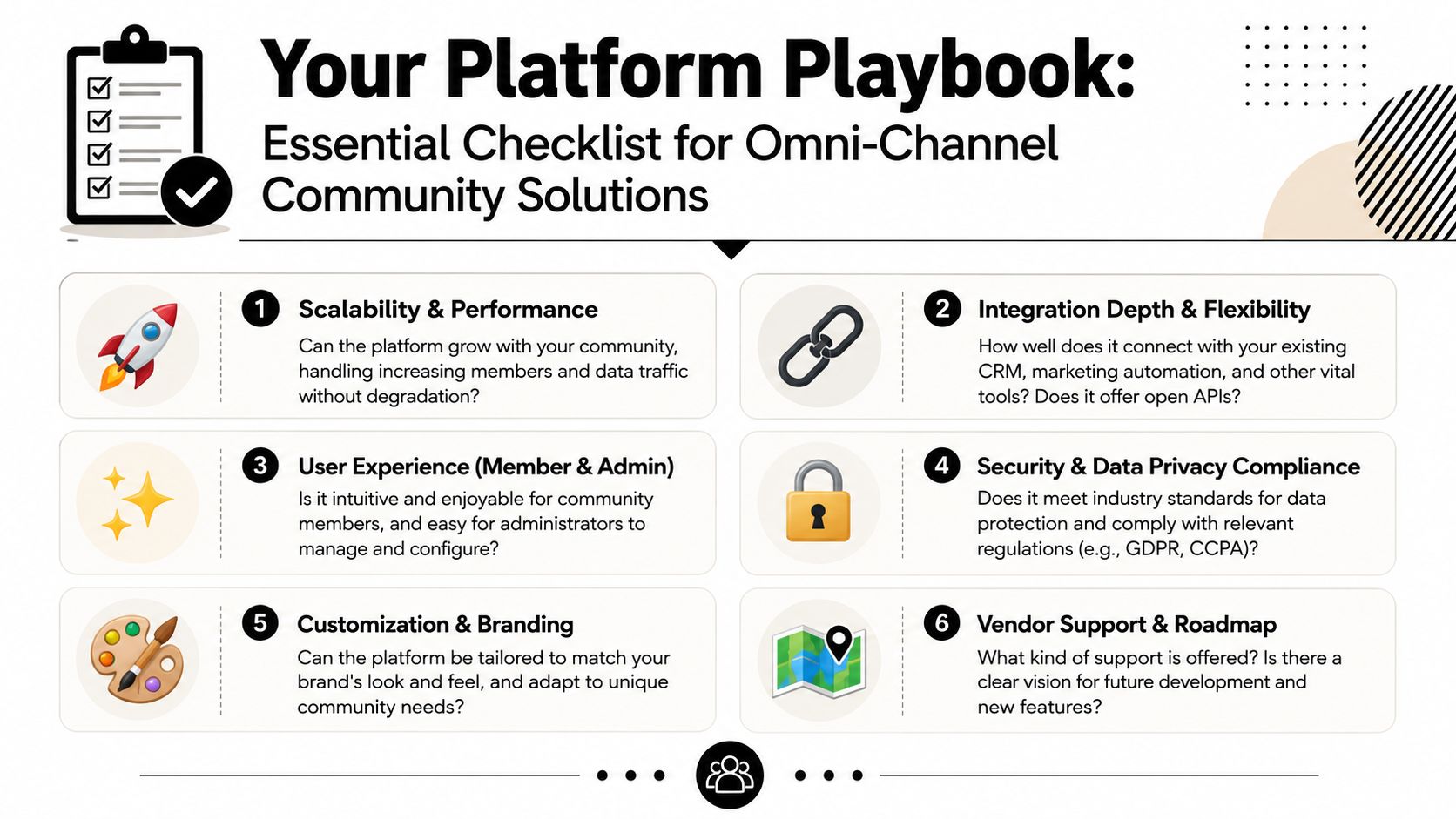
Start with the basics, but evaluate them through a community-support lens.
For teams comparing options, Mava's overview of ticketing support software is a useful benchmark because it frames evaluation around operational workflows rather than generic help desk terminology.
In these situations, generic vendors usually get exposed.
CapabilityDiscordTelegramSlackWeb ChatThread awarenessMust preserve channel threads, replies, and moderator interventionsMust handle group chats, reply chains, and private follow-upMust support channels, DMs, and internal collaboration contextMust preserve session history and reconnect returning usersIdentity continuityShould connect server identity with private interactions where appropriateNeeds reliable user mapping across group and direct chatShould separate internal staff users from external member contextMust connect anonymous and authenticated sessions when possiblePermissions and rolesMust respect server roles and support handoff rulesShould manage admin controls and channel boundaries cleanlyNeeds workspace-aware access and handoff visibilityShould support branded flows and controlled agent accessAI groundingMust read community-specific docs and thread contextMust avoid shallow answers in rapid message burstsShould distinguish internal notes from user-facing repliesNeeds strong FAQ grounding and escalation rulesHandoff qualityPublic-to-private continuity is essentialGroup-to-DM continuity is essentialTeam collaboration must stay attached to the issueBot-to-human transfer should preserve full transcriptReportingNeeds issue-level views across public and private activityMust avoid splitting one issue across multiple chatsShould separate internal collaboration from user resolution metricsMust connect chat outcomes back to the broader support journey
Ask the vendor to move one issue from a public Discord thread to a private conversation, then to web chat, and show the full history in one view. If they can't demo that cleanly, the problem won't improve after purchase.
Also ask:
A serious buyer should leave the demo with operational answers, not branding impressions.
The safest rollout starts narrow. Teams should begin with one high-volume channel, define routing rules, train the AI on a clean knowledge source, and only then expand into adjacent surfaces like Telegram, Slack, or web chat.
This reduces two common deployment mistakes. First, launching across every channel before the support taxonomy is stable. Second, turning on AI before the underlying knowledge base is usable.
A practical sequence looks like this:
The architectural lesson matters here. A scalable omnichannel system depends on a coordinated backend backbone, not just interface improvements. In verified industry benchmarks, that kind of unified architecture has been associated with approximately 40% fewer fulfillment errors and a 25% increase in order-to-delivery speed because real-time data synchronization removes lag between systems (verified industry benchmark reference provided in brief). The retail example is different from community support, but the principle is the same. Clean backend synchronization prevents broken experiences.
The teams that succeed treat implementation like support operations design, not a channel expansion project.
Teams that support users on Discord, Telegram, Slack, and the web need more than a generic omnichannel dashboard. They need one system that preserves context, unifies analytics, and makes AI and human support work together cleanly. Mava is built for that model, with an AI-powered shared inbox for community-driven support across chat channels and web chat, plus knowledge base import, automation, and analytics designed for real support workflows.
.png)
.png)
.png)
