.png) Get Started
Get Started
Support teams usually reach the same breaking point in stages. First, the inbox gets noisy. Then Discord threads and Telegram chats fill with the same questions about login issues, pricing, integrations, or status updates. After that, the team starts answering by muscle memory, while the harder tickets wait longer than they should.
That's when a rules based chatbot starts to look attractive. It promises order, speed, and consistency. For the right jobs, it delivers. For the wrong jobs, it creates a second support problem that agents still have to clean up.
A lot of teams treat a rules based chatbot as a long-term support strategy. It isn't. It's a useful first layer for narrow, repetitive tasks. Its primary value comes from knowing exactly where that layer should stop, and when the support operation needs to graduate to a hybrid or AI-led model.
A rules based chatbot is the automation choice many support teams make when repeated questions start swallowing the day. It works well when the team can predict the question and control the answer. If users ask, “How do I reset my password?” or “Where's the status page?” a scripted bot can answer instantly and consistently.
That model has deep roots. The first rule-based “chatterbot,” ELIZA, was developed in 1966 by Joseph Weizenbaum, and it used strict symbolic rules to manipulate user input and choose predefined responses, setting the pattern for later rule-based bots, as noted in this history of chatbots. The core idea hasn't changed much since then. The bot follows a programmed path instead of understanding intent.
For support leaders, that matters because it frames the technology correctly. A rules based chatbot is not a digital teammate. It is closer to a digital flowchart placed in front of the user.
Practical rule: Use a rules based chatbot when the support team can list the exact question variants that should trigger the exact approved answer.
That's why these bots often show up early in a team's automation journey. They're straightforward to launch for top FAQs, onboarding prompts, and simple routing. They can also be a useful first step before broader customer support automation rolls out across channels.
The first win is rarely sophistication. It's relief. A support lead removes some of the repetitive load from moderators or agents, and response consistency improves overnight.
That's a good start. It's just not the finish line.
The danger starts when the team mistakes predictability for scalability. A rules based chatbot can absorb routine traffic, but it can't stretch very far beyond what people already mapped by hand. As soon as the product changes, the policies shift, or users start phrasing questions in new ways, the tidy flowchart turns brittle.
A rules based chatbot runs on simple logic. If this happens, then do that. If a message contains “pricing,” send the pricing reply. If it contains “refund,” show the refund flow. If the user clicks “technical issue,” ask the next qualifying question.
That sounds basic because it is. The bot isn't reasoning. It's matching patterns and moving the user through a fixed path.

Rule-based chatbots operate as closed-domain dialog agents built explicitly as decision trees, using regular expressions to match user input patterns against predefined scripts instead of analyzing semantic intent, according to GeeksforGeeks' explanation of rule-based chatbot construction.
In practical terms, most support teams are dealing with four moving parts:
For narrow support tasks, this structure is useful because it's deterministic. The team knows what answer will be sent. Legal, policy, and compliance stakeholders usually like that. Brand teams like it too because messaging stays tight.
A simple example looks like this:
User inputBot ruleResult“How do I reset my password?”Match “reset password”Send reset steps“Is the service down?”Match “service down” or “status”Send status page link“I was charged twice and my team access broke after upgrade”No clean matchFallback or escalation
The problem shows up in the third row. Users don't naturally speak in neat categories. They mix billing, product behavior, account history, urgency, and frustration in the same message. A rules based chatbot can only respond to what has already been anticipated and encoded.
The more natural the user's language becomes, the more artificial the rules can feel.
Every “simple” bot flow hides a design job. Someone has to collect common questions, write response copy, define triggers, test edge cases, maintain links, and update the logic when the product changes. Teams often underestimate that work because each individual rule looks small.
One rule is small. Fifty rules create a maintenance system.
The cleanest way to compare these systems is this. A rules based chatbot behaves like a vending machine. The user selects from a limited menu, and the machine returns the mapped output. An AI chatbot behaves more like a concierge. The user describes the problem in ordinary language, and the system tries to interpret intent, context, and the best next answer.
Both models can be useful. They solve different support problems.
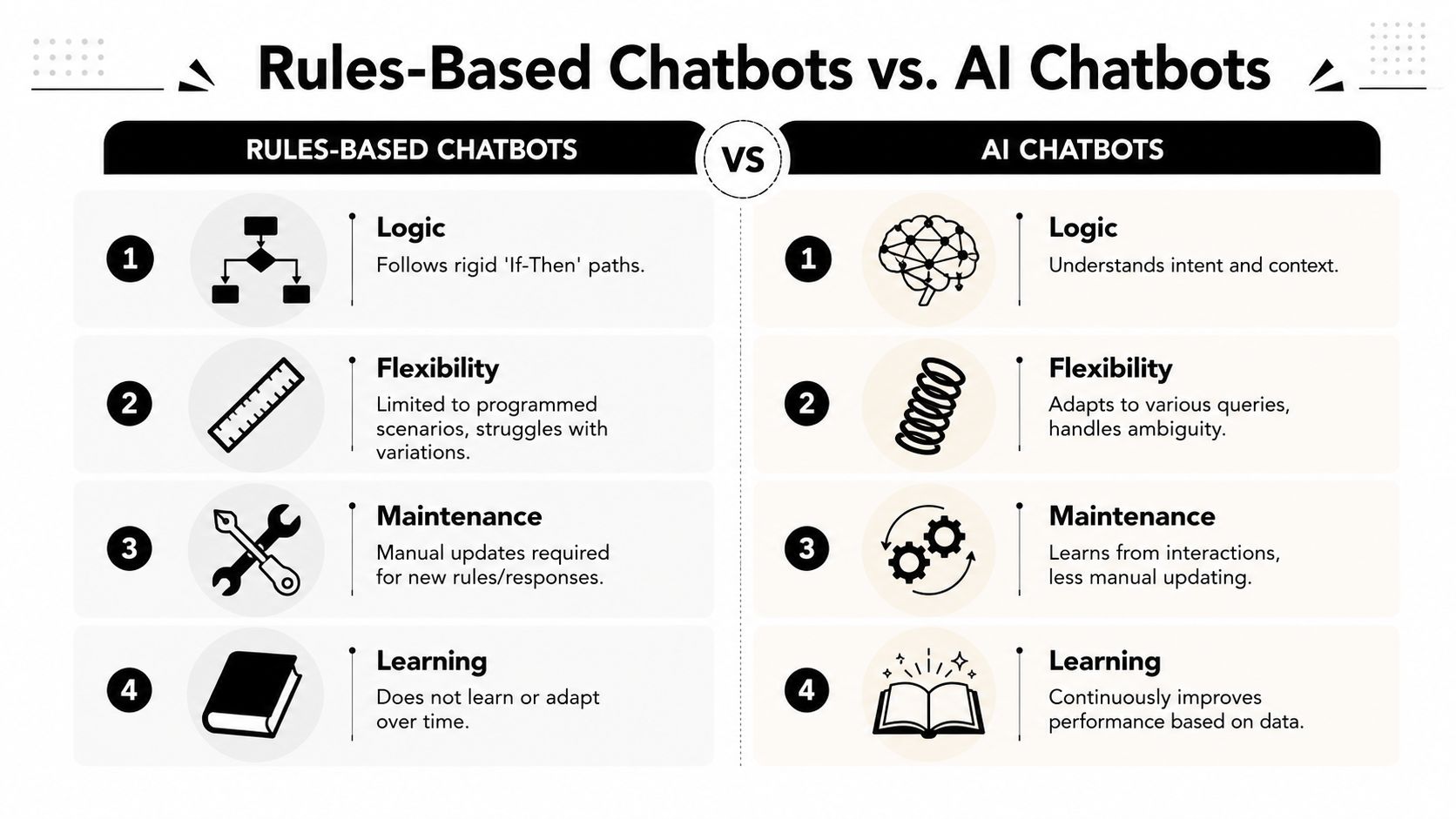
Benchmark data shows rule-based chatbots don't have machine learning or NLP for intent recognition, and in dynamic support environments they often post a failure rate exceeding 40% when users use complex phrasing, according to HeroThemes on rule-based chatbot limitations. That single operational difference drives most of the trade-offs below.
DimensionRules based chatbotAI chatbotConversation styleScripted and narrowNatural and flexibleUnderstandingMatches keywords and pathsInterprets intent and contextMaintenanceManual updates for new casesMore adaptable once configuredConsistencyVery high on approved flowsStrong, but depends on setup and guardrailsEdge casesBreaks easily outside scriptBetter at handling ambiguityBest fitFAQ, triage, simple workflowsKnowledge-heavy, variable support
A rules based chatbot is still the better choice when the team needs tight control. If the support operation must present exact options, approved wording, or a very strict intake path, rules are hard to beat.
That applies to tasks like:
There's also less ambiguity for admins. They can inspect the flow and know exactly what happened.
AI becomes more useful when support traffic is messy. That includes long user messages, mixed intents, incomplete context, and questions phrased ten different ways. It's also better suited when the team has a large knowledge base that changes often.
The practical decision isn't “rules or AI forever.” It's whether the support queue still behaves like a menu, or whether it now behaves like a conversation.
Teams that are weighing that jump should understand the difference between retrieval and model customization. A helpful explainer is ThirstySprout on LLM fine-tuning options, which lays out when retrieval-based approaches make sense versus deeper model changes.
If users must learn how to talk to the bot, the bot is usually too rigid for the channel.
For support teams comparing deployment options, this broader view of AI chatbots for customer service is often more useful than a pure feature checklist, because channel mix, handoff design, and content quality usually matter more than the widget itself.
The sweet spot for a rules based chatbot is simple. High volume, low complexity, low ambiguity. That's where it saves time without creating confusion.
Community and support teams usually get the best results when they stop asking the bot to “handle support” and instead assign it a small number of repetitive jobs.
A Discord community with constant onboarding traffic can use a bot to greet new members and point them to channels for rules, verification, announcements, and support. That's not glamorous automation, but it reduces noise fast.
A Telegram support group can use a rules based chatbot to answer standard prompts such as wallet setup instructions, documentation links, token disclaimers, or a status page reference. In these cases, the answer is stable and the audience often needs direction more than conversation.
Another reliable use is FAQ containment. A bot can handle a “Top 10 questions” layer before the user ever reaches a human thread.
For SaaS support teams, a rules based chatbot often works well for intake and routing:
A strong rules based chatbot doesn't try to answer everything. It does a few things cleanly:
A good rule flow feels short. A bad one feels like the user is being interrogated by a form.
That's why triage is often a better use case than full resolution. Asking two or three routing questions is manageable. Trying to encode every possible support outcome into a decision tree usually isn't.
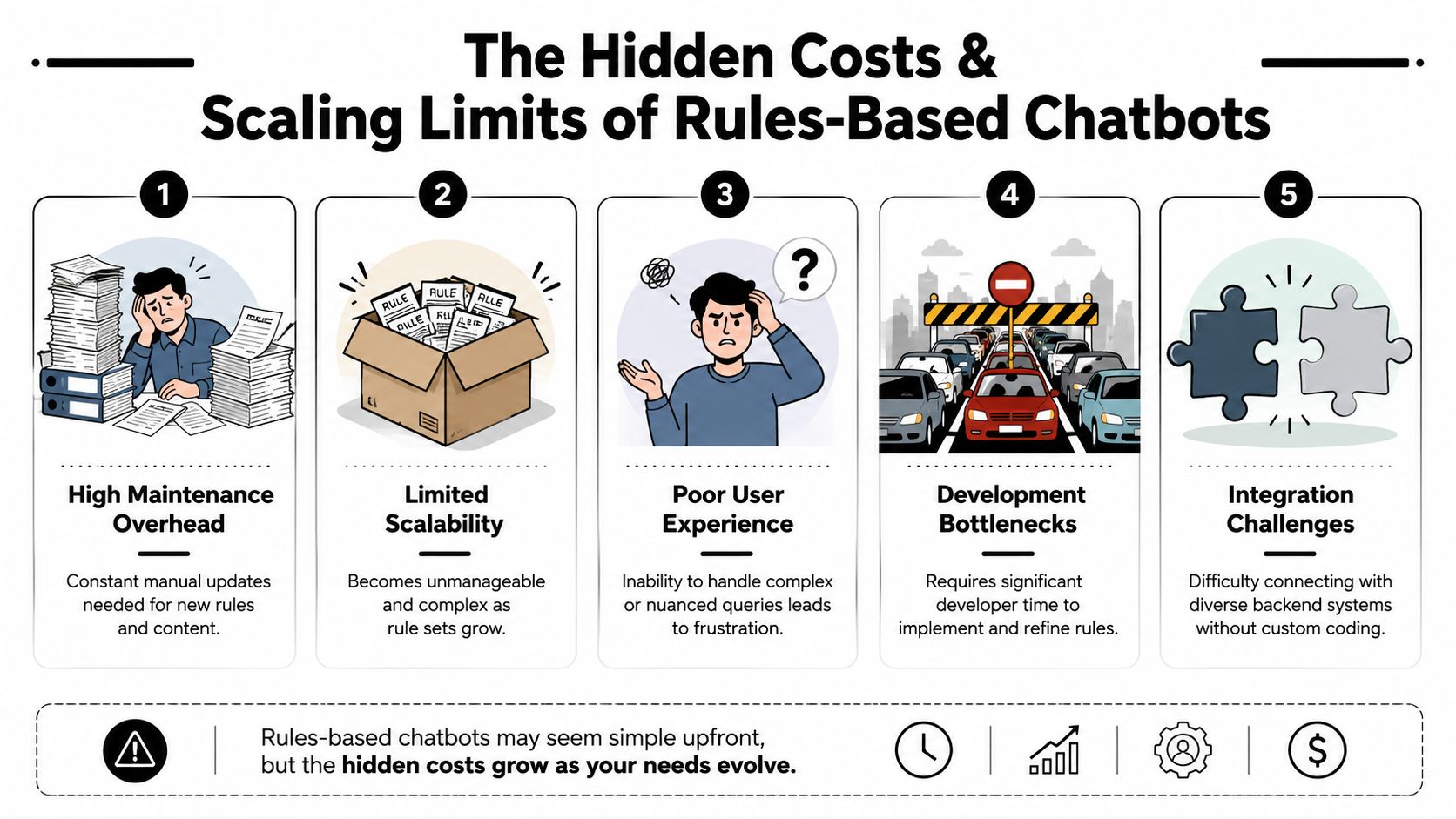
The low upfront appeal of a rules based chatbot hides the actual operating cost. The bot may be cheap per interaction, but the support team still pays for every rule that has to be written, reviewed, updated, tested, and repaired when reality changes.
That burden grows steadily. New product features launch. Pricing pages move. Documentation gets rewritten. Edge cases appear in tickets. The bot doesn't adapt on its own, so the team maintains a growing web of brittle logic.
The expensive part isn't the first launch. It's the months after launch.
Data from Rasa notes that rule-based bots often fail to handle 60 to 70% of modern customer queries because of poor intent recognition, which leads to escalations and frustrated users in dynamic support environments, as described in Rasa's discussion of chatbot challenges. That's the cost many teams miss when they compare tools only on setup effort or per-message pricing.
Here's how that hidden cost shows up operationally:
A rules based chatbot scales best when questions are repetitive and phrased in predictable ways. Once the support operation grows beyond that, the bot starts imposing a ceiling.
That ceiling usually appears in three places:
Scaling pressureWhat happens to the botWhat the team feelsProduct complexity risesMore rules and exceptionsMaintenance backlogUser language varies moreMatch rates fallMore escalationsChannel volume growsBroken flows get noticed fasterBrand friction
Support leaders often notice the same pattern. The first version of the bot feels efficient. The fourth version feels fragile. By the time the team is maintaining dozens of flows across community channels, email, and web chat, the “simple” solution isn't simple anymore.
Cheap automation becomes expensive when humans spend their day rescuing users from it.
If the team keeps adding branches to cover new wording, exceptions, and edge cases, it's usually time to stop building a larger tree and start changing the system. A rules based chatbot should reduce operational complexity. When it begins creating its own backlog, it has reached its practical limit.
The strongest support design today isn't rules only and it isn't AI only. It's a hybrid system that uses each layer for what it does best.
The first layer handles the obvious stuff. The second layer handles intent and knowledge retrieval. The final layer brings in a human when judgment, empathy, or account-level action is needed.
A practical hybrid flow often looks like this:
This model works because it preserves the strengths of rules without forcing them to solve problems they were never built for.
A hybrid setup is only as good as the information it can access. If the AI layer can't read current docs, product help pages, release notes, or community guidance, the system won't stay useful for long.
For teams building retrieval-based support, infrastructure around content ingestion matters more than many realize. Tools like Web Scraping API for RAG are useful in this stack because they help keep knowledge pipelines current when content lives across websites and documentation systems.
The same principle applies whether the support team serves a SaaS product, a game studio, or a Web3 community. Fresh knowledge beats clever prompting.
The worst chatbot experiences happen when the handoff path is hidden or messy. Users get trapped, repeat themselves, or lose the history of what already happened. A good hybrid system avoids that by treating human escalation as a primary workflow.
Important handoff rules include:
A short product walkthrough helps make this architecture concrete:
The best automation shortens the path to resolution. It doesn't defend itself when it's no longer helpful.
A support team should graduate from a pure rules based chatbot when the traffic is too varied for static flows, when maintenance starts eating agent time, or when escalation quality matters more than keeping the bot simple.
Teams starting with automation should begin narrowly. Pick the most repetitive questions, write approved answers, test the paths on real user phrasing, and make the route to a human obvious from the start. That's a much safer rollout than trying to automate the entire queue in one pass.
The next decision is architectural. Build for evolution, not permanence. A rules based chatbot can be the first layer, but the system should be ready to absorb richer knowledge, better routing, and stronger handoff workflows as the support operation matures. That's why a solid knowledge base integration strategy matters early, even if the first bot is simple.
Support leaders also need to look past mechanics and think about disclosure, governance, and user trust. According to Dialzara's overview of ethical guidelines for trustworthy AI chatbots, California's SB 243 (2025) requires mandatory AI disclosure to users, with fines over $10K for non-compliance. Even teams using limited automation should pay attention, because users increasingly expect to know whether they're talking to a scripted bot, an AI system, or a human.
That has practical implications:
A rules based chatbot still has a place. It's just a smaller place than many teams assume. Used carefully, it's a reliable front door for simple requests. Used as the whole house, it becomes a constraint.
Mava helps support teams move beyond brittle ticket bots with AI agents, shared inbox workflows, and human handoff built for Discord, Telegram, Slack, web chat, and email. If the current rules based chatbot is doing the basics but struggling to scale, Mava offers a more durable path forward.
.png)
.png)
.png)
