.png) Get Started
Get Started
Your support setup usually breaks before anyone formally admits it.
A Discord channel that started as a simple place for questions is now a stream of bug reports, billing issues, account access problems, and moderators pinging each other to find context. Telegram DMs are untracked. Slack is full of internal escalations. A basic ticket bot still works, but only if the request fits the narrow path it was built for. Everything outside that path turns into manual triage, duplicate replies, and agents searching old threads for answers they know they've written before.
That's the point where support migration stops being an IT project and becomes an operations project. For community-heavy teams, the challenge isn't just moving records from one system to another. It's preserving context across public threads, private tickets, bot workflows, knowledge sources, and role-based permissions without dragging old chaos into a new tool.
The standard migration playbook often misses that. It assumes clean queues, stable channels, and support that already lives inside one help desk. Community support rarely looks like that. It lives across Discord, Slack, Telegram, web chat, docs, and improvised moderator workflows. A good migration plan has to account for all of it.
A support migration usually gets approved after a bad week.
A Discord backlog spills into moderator DMs. Telegram questions go unanswered because nobody owns them. Slack becomes the place where agents ask, “Has anyone seen this user before?” At that point, the risk is not picking the wrong tool first. The risk is rushing into a move before your team understands what it is trying to preserve, fix, or stop doing.
For community support teams, planning has to start with operations. Standard IT migration plans assume clean systems, fixed queues, and a single source of truth. Support across Discord, Slack, Telegram, web chat, and moderator workflows does not behave that way. Public threads carry context that never makes it into tickets. Private escalations happen off to the side. Bots enforce rules that nobody documented. If you miss that reality during planning, you will import records and lose the operating model.
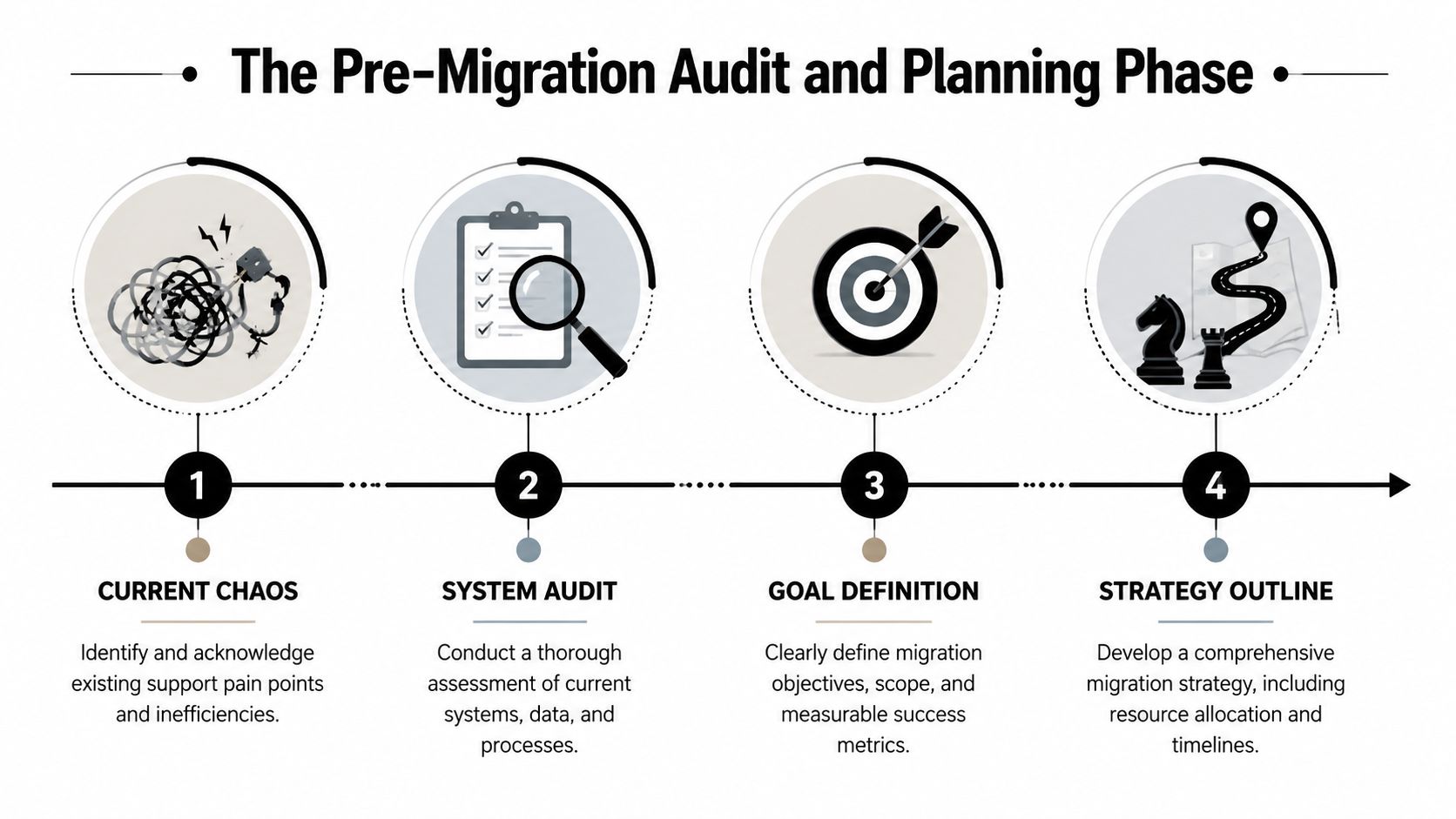
Start by watching work happen.
Sit with agents, moderators, and whoever handles escalations for a few days. Follow a question from the moment it appears in a Discord channel or Telegram group to the moment it gets answered, escalated, closed, or forgotten. Look for the handoffs, the side channels, and the repeat decisions. Those details matter more than the admin view in your current help desk.
Document the parts of the operation that drive support outcomes:
This audit usually exposes an uncomfortable truth. Your migration scope is broader than the ticket data. You are also migrating habits, gaps, and unofficial processes. Some should come with you. Some should be removed on purpose.
Without a planning brief, platform selection turns into a feature contest.
Your team needs a short document that forces decisions early. I keep it simple. What is moving now, what has to work on day one, what can wait, and how will the team judge the result after launch? If those answers stay fuzzy, every stakeholder will optimize for a different outcome.
Use four decision areas:
Decision areaWhat to defineScopeWhich channels, teams, workflows, and knowledge sources are included in this migrationSuccessThe operational outcomes you expect after launch, such as faster triage, fewer duplicate replies, or better visibility across community and web supportConstraintsCompliance requirements, staffing limits, moderator dependencies, launch timing, and vendor limitationsCritical requirementsWhat must keep working during cutover, such as access controls, escalation paths, tagging logic, and audit history
A good requirement is testable. “We need better reporting” is not specific enough. “Agents need to see Discord thread history next to account-level ticket context” is specific enough to validate.
Community support migrations fail in predictable ways. Teams try to preserve every old workflow, import years of low-value noise, or force one tool to behave like three different systems. That creates a bloated rollout and weak adoption.
Make the trade-offs explicit. If you want one inbox for Discord, Slack, Telegram, and web support, your team may need to accept simpler channel-specific workflows. If you want strict permissions and auditability, moderators may lose some of the informal shortcuts they liked. If automation is a priority, your knowledge base and tags need tighter governance than they have today.
That is also the point where platform comparison gets practical. A useful customer support software comparison for multi-channel teams should be judged on channel coverage, identity mapping, automation flexibility, knowledge import support, and reporting that reflects how your support operation functions.
Teams in other fragmented operating environments run into the same issue. The lesson in how operators explore PropTech's role in syndication applies here too. The system change works when the team redesigns coordination and accountability, not when it copies old mess into a newer interface.
Keep the planning phase honest. If a workflow only works because one moderator remembers the workaround, it is not a process. It is a migration risk.
This is the part people underestimate because “export” sounds simple.
In community support, exported data is rarely clean enough to import as-is. Ticket histories contain broken formatting, old bot markers, pasted logs, and replies copied from systems that no longer exist. User identifiers don't always line up across Discord, Telegram, Slack, and web support. Tags drift over time. Knowledge lives in three places, each with a different version of the answer.
Not every historical conversation belongs in the new system.
If the legacy platform contains years of low-value tickets, importing all of them can slow search, pollute reporting, and make AI or automation less reliable. Teams usually get better results by separating support history into three buckets:
That decision should be tied to use case, not sentiment. “We might need it someday” is how dead records end up cluttering a fresh system.
Old data isn't valuable because it's old. It's valuable if agents can still act on it.
The source cleanup pass should focus on anything that breaks routing, search, reporting, or automation.
Common examples include:
Knowledge sources need the same treatment. A migration is the right time to merge duplicate FAQs, delete thin pages, and rewrite articles around actual user questions instead of internal terminology. Teams using AI-assisted support in particular should prepare content in clean, direct language with one answer per page where possible. The import itself matters less than the structure of what gets imported.
For a useful cross-check on the technical hygiene side, Finchum Fixes IT's data migration guide is worth reviewing alongside support-specific planning. The general discipline carries over well, especially around validation and cleanup before cutover.
A team moving knowledge into an AI-enabled environment should also think carefully about how articles are chunked, titled, and updated. This overview of knowledge base integration is a helpful reference for structuring content so it's import-ready rather than just exportable.
Field mapping goes badly when the source is still inconsistent. Standardization has to come first.
That means choosing one naming convention for issue types, one ownership model for queues, one article taxonomy, and one rule for user identity resolution wherever possible. It also means documenting what can't be standardized so the migration team can handle those exceptions deliberately instead of discovering them during import.
A clean import doesn't happen because the destination tool is powerful. It happens because the team stops treating source data like sacred history and starts treating it like raw material.
Support migration in community environments fails when teams map data but not behavior.
A Discord support channel isn't just another inbox. It has public visibility, social proof, moderation side effects, and pressure to answer quickly because everyone can see the silence. Telegram often mixes support, announcements, and scams in the same space. Slack may contain internal customer channels where support and success overlap. If the migration plan ignores those dynamics, the new setup will look organized on paper and feel broken on day one.
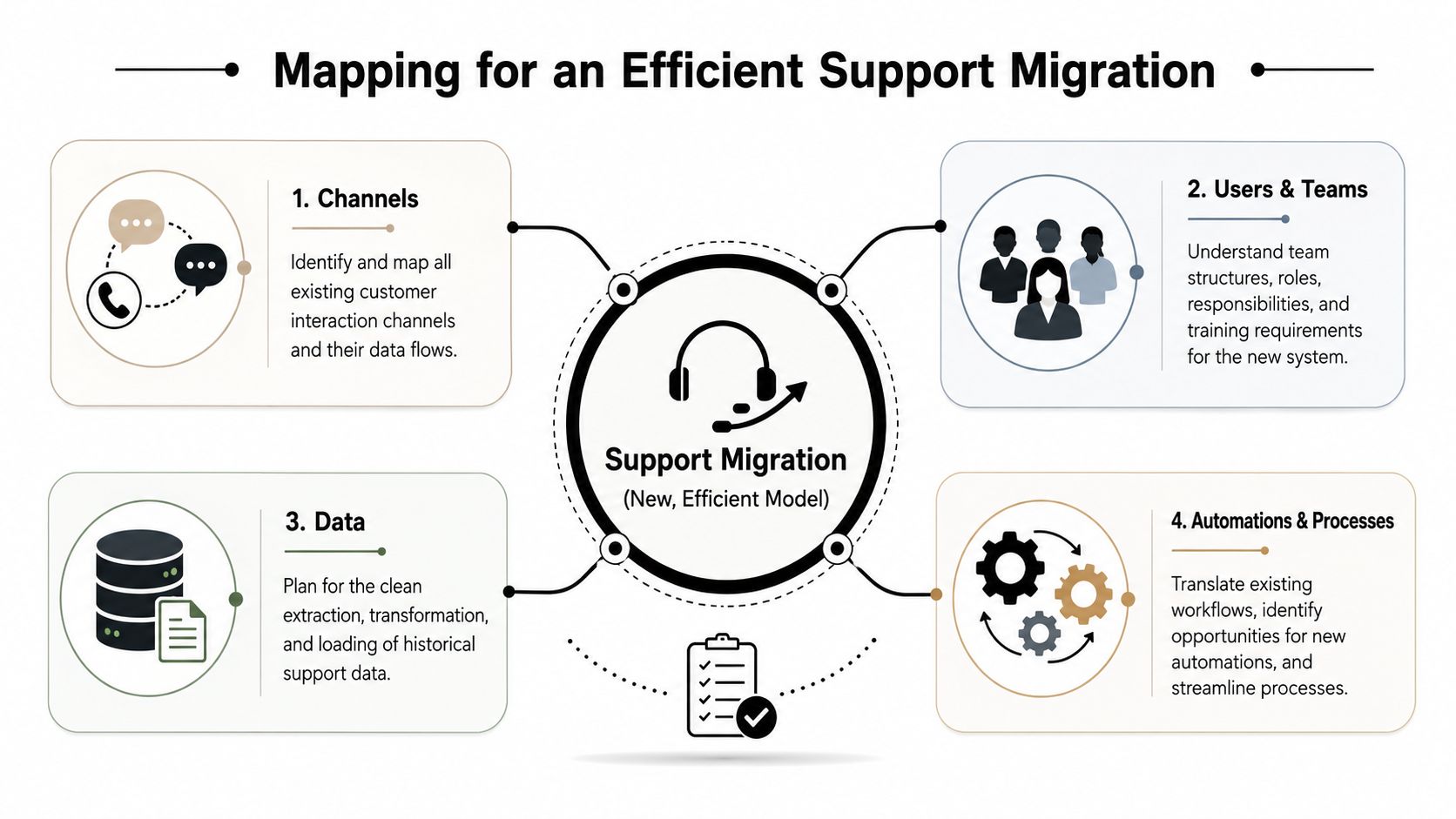
The wrong approach is one-to-one replication. A noisy #support channel does not automatically deserve its own queue in the new system. Neither does every Telegram chat.
The better approach is to classify each channel by what users are trying to do there. In practice, most community support channels fall into a few functional groups:
Channel typeTypical user intentBetter future-state designPublic help channelsQuick questions, bug reports, social troubleshootingConvert to structured intake with visible status where possiblePrivate DMsSensitive account issues, billing, abuse, access problemsRoute into private tickets with identity checks and escalation pathsModerator escalationsSafety, fraud, policy, edge casesSeparate queue with clear permissions and restricted viewsInternal team channelsBack-office collaborationKeep out of customer-facing reporting and use for handoffs only
Unified support design matters. Teams moving beyond fragmented channels should think in terms of one operating layer across entry points, which is the core idea behind omnichannel support and how to implement it.
Permissions shouldn't be copied blindly from the old setup.
Community teams often have a patchwork of mods, part-time agents, contractor responders, product specialists, and senior staff who only step in for escalations. Legacy systems usually reflect that history badly. People accumulate access because it was once convenient.
A clean mapping pass should define who needs to:
This is also the stage to clarify ownership boundaries. If moderators answer support questions today, decide whether that remains true after migration or whether moderators should redirect into a formal queue. That choice changes staffing, permissions, and training.
The migration won't fix role confusion. It will expose it.
Community support teams tend to accumulate bots the way startups accumulate spreadsheets. Each one solved a specific problem at the time. Few still fit the current workflow.
Before rebuilding anything, classify each automation into one of four groups:
FAQ bots are the clearest example. A simple command-based bot may have worked when the volume was low and questions were repetitive. But once knowledge expands, those bots usually become lookup tools that depend on users guessing the right trigger. A more modern setup can connect imported knowledge to AI-assisted responses, route unresolved cases to human agents, and keep the context attached to the conversation.
One option in this category is Mava, which supports shared inbox workflows across Discord, Telegram, Slack, web chat, and email, and can import existing knowledge sources for AI-assisted support. That matters during migration because teams can centralize channels without abandoning the community environments where users already ask for help.
Every migration creates new risks. Public channel support may become too rigid if intake is over-structured. Private tickets may hide issues that used to get solved publicly. Automation may reduce repetitive work but also create dead ends if the fallback path is weak.
That's why mapping isn't documentation work. It's operating model design. The team should be able to explain, for each channel and workflow, where the request starts, who owns it, what automation helps, where human review happens, and how exceptions escape the default path.
If that can't be explained clearly, the future state still needs work.
At 2 a.m., a moderator in Discord flags a scam report, an agent in another time zone picks it up from the new inbox, and the user's message history is missing. The handoff stalls, the wrong macro fires, and now your pilot has found the problem you would rather catch before full launch.
That is the point of this stage.
For community support teams, a pilot has to prove more than whether records imported. It has to prove that support still works across public threads, private tickets, bot handoffs, and moderator escalations, with the messiness of real user behavior included. Standard IT migration tests usually miss that. They validate tables and permissions. They do not show what happens when a Telegram user replies to an old thread, a Discord mod escalates from a public channel, or an automation closes the wrong conversation.
A useful pilot mirrors live operations closely enough that your team can trust the result.
Keep the pilot narrow enough to control, but broad enough to expose failure. In support, “representative” matters more than “small.”
Include the work that creates risk. Test public community questions, private account issues, moderator interventions, duplicate contacts, reopened conversations, and cases where automation should hand off cleanly to a human. If your operation spans Discord, Slack, and Telegram, run the pilot across all three. Channel differences that look minor on a workflow diagram often become major once agents are replying under time pressure.
Staff the pilot like a real shift. Include experienced agents, newer agents, and at least one person who did not help design the migration. Design teams are often too close to the system. They know what was supposed to happen and can miss what an ordinary agent will trip over in the first hour.
The strongest pilots use a simple review structure and apply it to actual support work, not demo cases.
One warning sign shows up fast. If agents start keeping side notes, reopening old tools, or creating unofficial workarounds, the pilot is telling you something important. The process is harder than it looks on paper, or the new system is hiding information your team needs to do the job well.
That kind of feedback matters more than executive reactions to a clean dashboard.
A product walkthrough can help teams see what they should be validating in the live environment:
Do not end the pilot because the calendar says it is time.
End it when your team can answer a short set of operational questions with confidence. Can agents work a full queue without asking where things went? Can managers see what needs attention? Can moderators and support agents pass cases between public and private channels without losing context? Can your team explain how to handle exceptions, not just the happy path?
Write the acceptance criteria before the pilot starts, then force explicit decisions on anything unresolved. Fix it before launch. Accept the risk with a mitigation plan. Remove the feature from scope. Those are the actual choices.
This is also the stage to be honest about trade-offs. Some teams learn that a workflow is technically correct but too slow for high-volume Discord traffic. Others find that private ticketing improves control but hides issues that used to get solved in public. A good pilot does not protect the original plan. It gives you enough evidence to change it before users pay the price.
Cutover decisions are usually framed as technical choices. For support teams, they're customer experience choices.
Users don't care whether your team chose a big bang launch or a phased rollout. They care whether their message gets answered, whether context is lost, and whether they have to repeat themselves. That's why the cutover strategy should be selected based on disruption tolerance, channel complexity, and staffing confidence, not on which approach sounds cleaner in a project plan.
Expert guidance favors phased or parallel migration for larger, user-facing systems because it lowers disruption compared with a big-bang cutover, and it also warns that teams often underestimate rollback and recovery planning, as noted in RudderStack's data migration process guide.
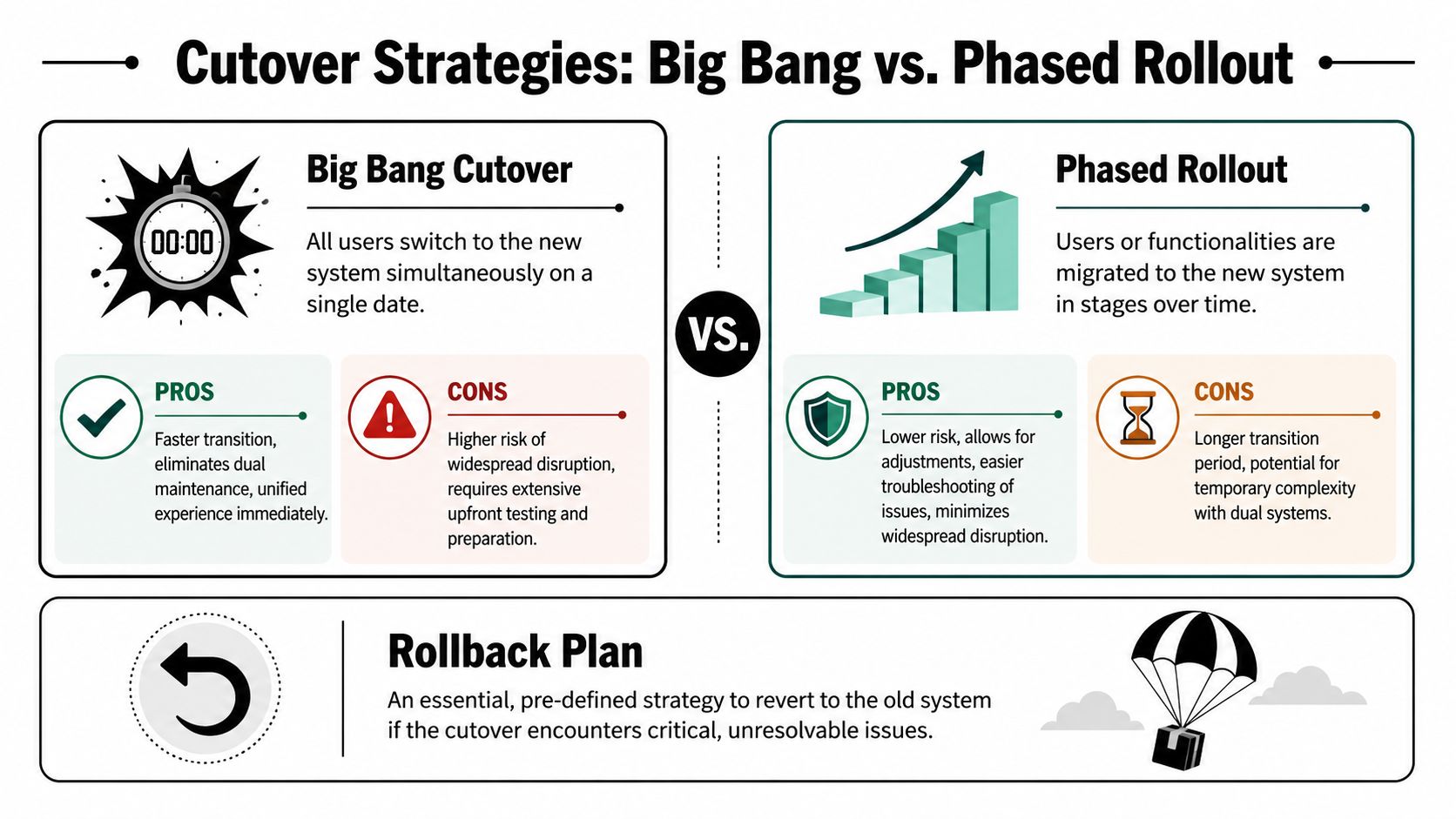
Both approaches can work. The right choice depends on how tangled the current operation is.
StrategyWhen it fitsMain advantageMain riskBig bangFewer channels, simpler workflows, strong testing confidenceFaster transition and no dual-system confusionIf something breaks, everyone feels it at oncePhased rolloutMultiple channels, community-heavy support, layered automationsLower operational risk and easier troubleshootingTemporary complexity while old and new systems coexist
For community support, phased rollout is usually more forgiving. A team might move web chat and email first, then migrate Discord intake, then bring Telegram over once routing and agent workflows are stable. Another team might shift only one region, one product line, or one ticket category first.
That slower rhythm gives operators room to watch the edge cases. It also reduces the chance that moderators, agents, and automation all break in the same week.
Rollback planning gets skipped because nobody wants to imagine failure after weeks of migration work. That's exactly why it's dangerous.
A rollback plan should answer five blunt questions:
A rollback plan isn't pessimism. It's the control that lets the team launch with discipline instead of hope.
Not everything has to switch at once, even inside a phased rollout.
Some teams keep knowledge editing frozen during cutover windows. Others allow article updates but pause bot changes. Some continue using the old system as a passive archive while the new platform handles all fresh intake. The point is to reduce moving parts.
The highest-risk combination is launching a new inbox, new automations, new permissions, and a newly rewritten knowledge base on the same day with no recovery path. That's not confidence. It's stackable uncertainty.
A calm cutover comes from restraint. Change what needs to change. Keep enough stability in reserve to recover quickly if the launch behaves differently under real load than it did during pilot testing.
Going live proves the migration happened. It doesn't prove the support operation improved.
That judgment comes later, when the team looks at what changed in day-to-day work. The strongest post-migration reviews connect the launch back to the objectives set at the beginning. If the goal was faster triage, shorter time-to-answer, cleaner ownership, better self-serve resolution, or lower moderator involvement in routine support, those are the outcomes to inspect first.
In the first stretch after launch, teams should review a tight set of operational signals frequently.
That usually includes:
The point isn't to build a perfect executive dashboard immediately. It's to spot friction while it's still small enough to fix quickly.
Post-migration benchmarking matters because some regressions are subtle. A new workflow may look cleaner and still slow agents down. Automation may deflect repetitive questions and still create more escalations if confidence thresholds are too loose. Validation shouldn't stop at launch. Performance should be checked before and after migration to catch regressions in load times or workflow latency, as emphasized earlier in the migration guidance.
A useful review cadence is simple:
Review windowWhat to inspectFirst daysBroken routing, missing context, permission issues, agent confusionEarly weeksAutomation quality, channel mix, duplicate work, knowledge gapsFollowing periodQueue design, staffing alignment, article maintenance, escalation health
Many migrations often stall here. The team starts producing cleaner metrics, but nobody turns them into operational changes.
If one channel generates a disproportionate share of escalations, tighten the intake flow or rewrite the guidance users see before submitting. If agents keep editing the same AI-assisted answer, fix the source article instead of coaching each agent individually. If moderators still handle requests that should be formal tickets, redesign the handoff trigger. If one queue drifts into backlog while another stays quiet, revisit ownership and staffing.
The best post-migration teams treat every repeated exception as design feedback.
Community support environments change constantly. Product updates, token launches, game patches, billing changes, and policy shifts all reshape demand. A support migration gives the team a cleaner operating system, but it still needs tuning. The teams that get the most value from migration are the ones that keep refining channel design, knowledge quality, and automations after the excitement of launch is over.
If your team is handling support across Discord, Telegram, Slack, and the web, Mava is worth evaluating as part of that next step. It gives teams a shared inbox for multi-channel support, AI-assisted answers from imported knowledge, and analytics that make post-migration optimization easier to manage.
.png)
.png)
.png)
