.png) Get Started
Get Started
Support usually breaks long before the team admits it's broken.
A fast-growing SaaS company launches a Discord server to stay close to users. Then support starts arriving everywhere at once. Bug reports land in public channels. Billing issues show up in email. Moderators get tagged in threads, then pinged again in DMs. Someone answers in Discord, another agent replies differently by email, and nobody knows whether the issue is already handled.
That's the point where a proper ticketing system CRM stops being a nice-to-have and becomes operating infrastructure. The job isn't just to collect messages. It's to turn scattered conversations into accountable work, tie that work to the right customer record, and keep context intact across channels.
That need isn't niche. The global ticket management system market was valued at USD 3.2 billion in 2022 and is projected to expand at a 12.4% CAGR through 2030, driven by the need for efficient support processes that stop issues from getting lost in communication shuffles, according to ticket management system market analysis.
The pattern is familiar. A team starts with lightweight tooling because it feels fast. Discord handles discussion, a shared inbox catches email, and a basic form covers everything else. For a while, that works.
Then volume changes the math. Public questions get buried in active channels. Community managers answer the same setup issue five times in different places. A paying customer reports a broken integration in Telegram, then follows up by email because they haven't heard back. An engineer fixes the issue, but nobody closes the loop with the user because the original context lives in a chat thread nobody can find.
Community-first support diverges from the old help desk model. Traditional support assumed users would submit a ticket through email or a portal. Modern teams often meet users in Discord, Telegram, Slack, web chat, and social channels first. The support operation has to capture those conversations without stripping away the context that made them understandable in the first place.
Public chat is fast for the user and fragile for the support team. Without structure, every resolved question disappears into scrollback.
A lot of teams still try to force community support into tools built for email queues. That usually creates one of two bad outcomes. Either the support team ignores public channels because they're hard to track, or they manage them manually and lose consistency as volume rises.
The better model is a support stack built for both conversation and follow-through. That's the gap between community-led support and older help desk assumptions, and it's why many teams start rethinking their tooling after reading more about community-led support vs help desks.
A lot of confusion comes from trying to define both systems with the same language. They aren't the same thing.
A CRM answers the question, who is this person?
A ticketing system answers the question, what needs to happen next?
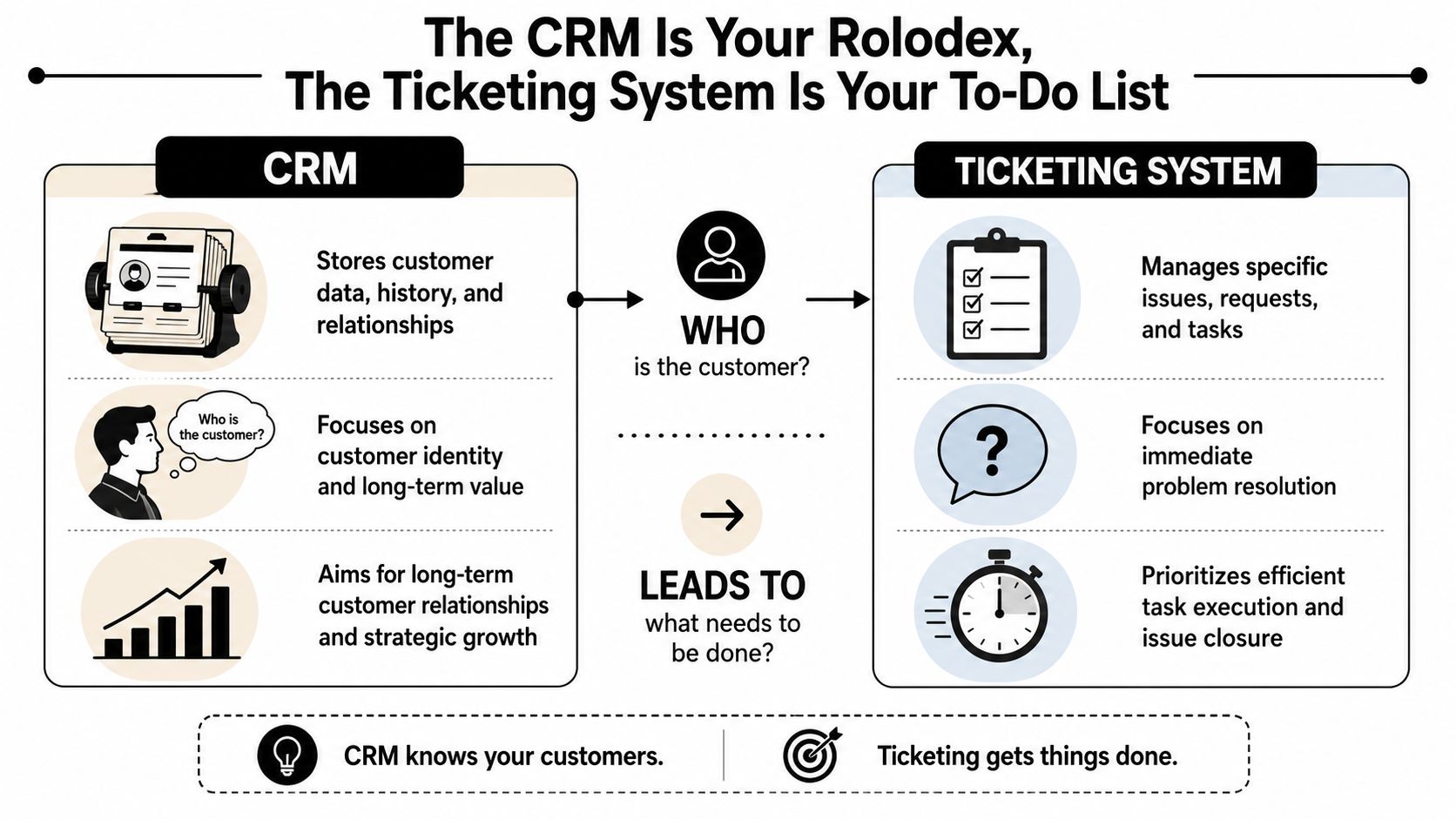
The CRM is the team's durable memory. It stores the customer record over time. That includes account details, plan information, prior conversations, lifecycle stage, and often signals from sales or success.
Think of it as a digital Rolodex with history attached. It doesn't just store a name and email. It tells the team whether the user is on a trial, whether they've contacted support before, and whether they're attached to a strategic account.
A CRM is strongest when the team needs long-range context:
The ticketing system is the shared to-do list for the support team. It captures a problem, assigns ownership, tracks progress, and records whether the issue is open, waiting, escalated, or solved.
That workflow matters more than many teams realize. Without it, questions don't become work. They become messages people vaguely intend to come back to.
A good ticketing layer handles operational control:
FunctionCRMTicketing systemStores customer profileYesSometimes, but usually lightlyTracks issue statusNot wellYesManages queues and assignmentLimitedYesSupports long-term relationship viewYesLimitedOrganizes team follow-upLimitedYes
Practical rule: If a tool is good at remembering people, it usually isn't good at managing queues. If it's good at closing tasks, it usually needs richer customer context from somewhere else.
The strongest support operations treat these as complementary systems. The CRM holds the customer story. The ticketing system manages the active work tied to that story.
Trying to run support from a CRM alone usually turns the CRM into a cluttered database full of half-managed tasks. Trying to run support from a ticket bot alone usually turns every interaction into a contextless transaction.
Both models fail for different reasons.
CRMs are built to organize accounts, opportunities, and relationships. They aren't usually designed to manage a live support queue with statuses, assignees, triage logic, and resolution workflows across chat, email, and community channels.
The result is predictable. Agents create notes instead of tickets. Internal comments replace real ownership. Follow-ups depend on memory. Escalations happen in Slack or Discord and never get tied back to the customer record in a usable way.
That setup also makes prioritization harder. A bug affecting ten users and a single feature request can sit side by side in the same account timeline without any operational distinction.
The opposite mistake shows up constantly in Discord and Slack communities. A team adds a lightweight ticket bot, creates private support threads, and assumes the problem is solved. It isn't.
The bot can capture the conversation, but it often can't answer the questions an agent needs:
Without CRM context, agents work blind. They solve the symptom in front of them instead of handling the broader account situation.
There's a second problem here too. Not every automation layer is equal. Teams evaluating smarter routing or auto-resolution should understand the difference between scripted bots and systems that can reason across intent, escalation, and workflow. A useful primer is this guide on AI agents versus chatbots explained.
Legacy help desks assume the support journey starts with a form or inbox. Community teams know that's often false. The support journey starts in a public message, a side thread, or a moderator ping.
Modern systems need support for flexible statuses, priorities, categories, queues, and assignee assignments across various channels, as noted in this discussion of CRM and ticket system requirements. Standard guides rarely show how to convert a transient community message into a structured support record without losing the context that made the message actionable.
That gap is why standalone tools keep underperforming in community-heavy environments. One side lacks workflow. The other lacks customer memory.
The integrated model is straightforward in principle and powerful in practice. A message arrives from any support channel. The system turns it into a trackable ticket. That ticket is linked to the right customer record. The agent sees both the issue and the account context in one place.
That's the difference between handling messages and running support.
A clear visual helps make the flow concrete.
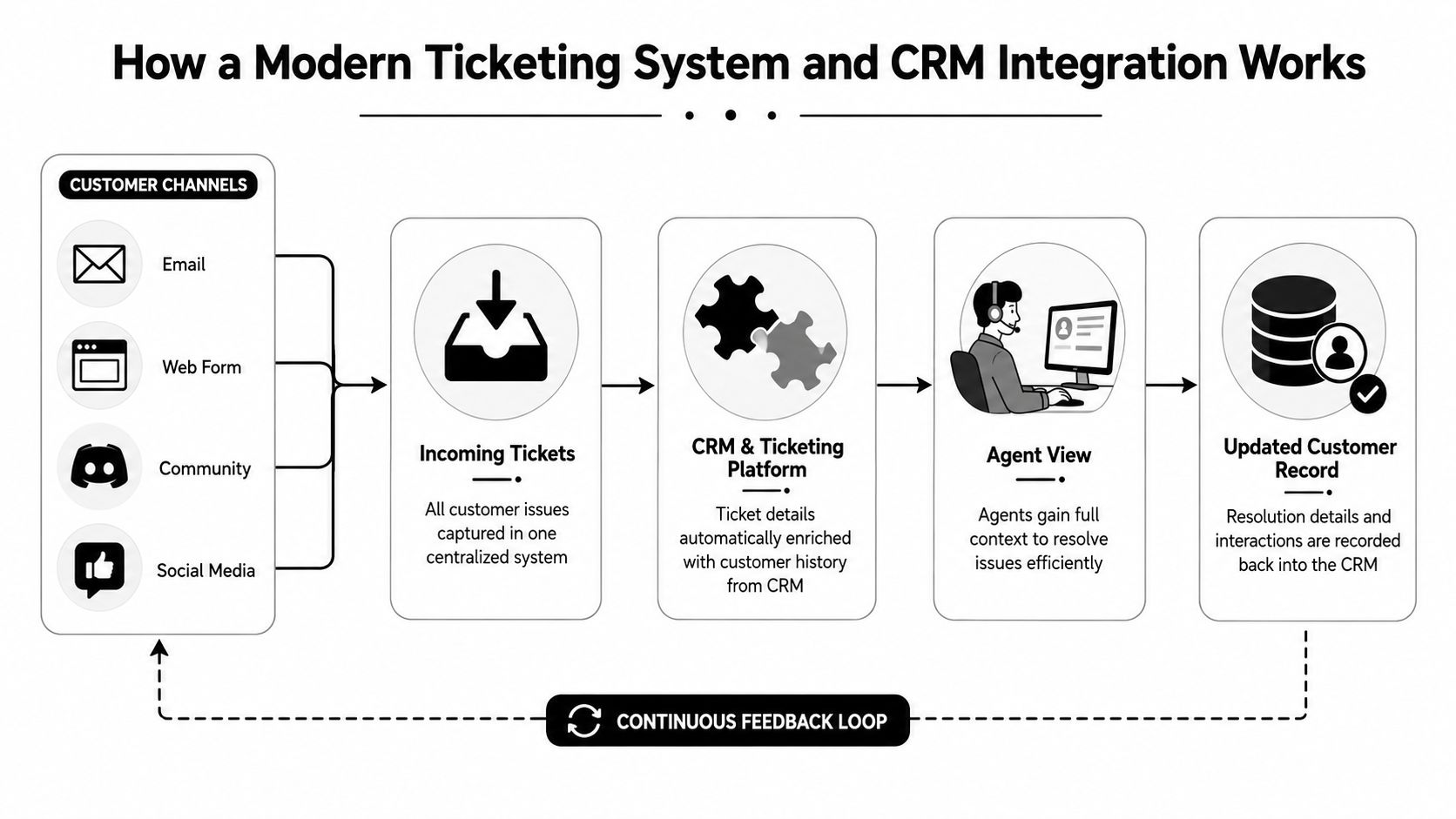
In a strong integration, the ticket and the customer record are linked bi-directionally through a unique ticket ID in a unified schema. That means the issue record can pull from the customer profile, and the customer profile can reflect the current issue state without manual copy-paste.
A simple example makes this real. A user posts in a Discord help channel that their API key isn't working. The platform captures that message as a ticket, associates it with the user's account, and shows the agent the relevant history immediately. The agent doesn't need to jump between the Discord thread, the CRM, and a separate support queue to understand what's going on.
When ticket metadata and customer attributes live in a unified platform, teams see 20 to 30% faster resolution times because agents avoid redundant entry and manual cross-referencing, according to Hiver's overview of CRM ticket systems.
For teams building or refining that setup, these CRM best practices are a useful reference point.
The embedded walkthrough below shows the kind of workflow modern teams are aiming for.
If the agent view still requires tab-hopping, the integration isn't finished. A good operational screen should combine:
The single source of truth isn't a slogan. It's the practical condition that lets agents respond with speed and consistency instead of reconstructing context manually on every ticket.
Community support needs a different feature set than a classic email help desk. The test is simple. Can the platform take a messy, public, fast-moving conversation and turn it into structured work without stripping away the user context?
That requirement changes what matters.
The first requirement is a unified inbox that lives up to its name. Discord, Telegram, Slack, email, web chat, and forms should feed into one operational view. Not five side panels. Not a chat plugin bolted onto a help desk.
For community teams, the hard part isn't receiving messages. It's preserving the original context. Public posts often include prior replies, moderator interventions, and surrounding discussion that explain the actual issue. If the platform reduces that to a bare ticket subject and one copied message, agents lose critical signal.
The system should let teams convert public chat into a persistent support record while keeping thread context attached.
Automation should do more than assign a tag. Good systems route based on channel, intent, urgency, and account context. Billing questions should move differently from bug reports. Community moderation issues should not land in the same queue as developer API problems.
AI can materially improve this if the architecture is built correctly. AI-driven ticketing systems can use a multi-agent architecture that evaluates intent and urgency, reducing repetitive ticket volume for human agents by 40 to 60% while escalating complex issues correctly, according to this explanation of multi-agent support architecture.
That only works if the automation has access to usable knowledge. Teams that haven't formalized documentation should first explore knowledge base solutions that can consolidate content from docs, internal guides, and product explainers.
A practical buying list usually includes:
What doesn't work is a traditional help desk with a thin chat connector. Those tools often capture messages but fail to support the operational reality of high-volume communities.
Many organizations start with response time. That's useful, but it's nowhere near enough for community-first support. The key question is whether the support stack is reducing load, improving consistency, and helping the business keep customers.
The right KPIs should show both workflow health and business impact.
A practical dashboard for a ticketing system CRM should include a mix of queue, channel, and automation measures.
A team can have fast first responses and still run a poor support operation if tickets bounce between agents or reopen repeatedly.
Support leaders also need to connect service quality to broader outcomes. When the support stack is integrated well, customer context improves prioritization, recurring pain points become visible faster, and commercial teams get clearer account signal.
Organizations that use AI-powered ticketing and CRM systems are 83% more likely to exceed their sales goals, and those systems deliver an average ROI of $8.71 for every $1 spent, according to CRM statistics on AI adoption and ROI.
That doesn't mean every support dashboard should turn into a sales report. It means support should be measured as a function that affects growth, retention, and expansion.
The best KPI set answers three questions. What's coming in, how efficiently the team handles it, and whether the customer relationship is getting stronger or weaker afterward.
For teams refining reporting models, this breakdown of Zendesk metrics and analytics is useful because it pushes beyond simple vanity numbers and into operational interpretation.
Selecting the stack is only half the job. Many teams buy software that looks right in a demo, then struggle during rollout because ownership, field sync, and migration rules were never defined.
That's where support stack projects usually get expensive.
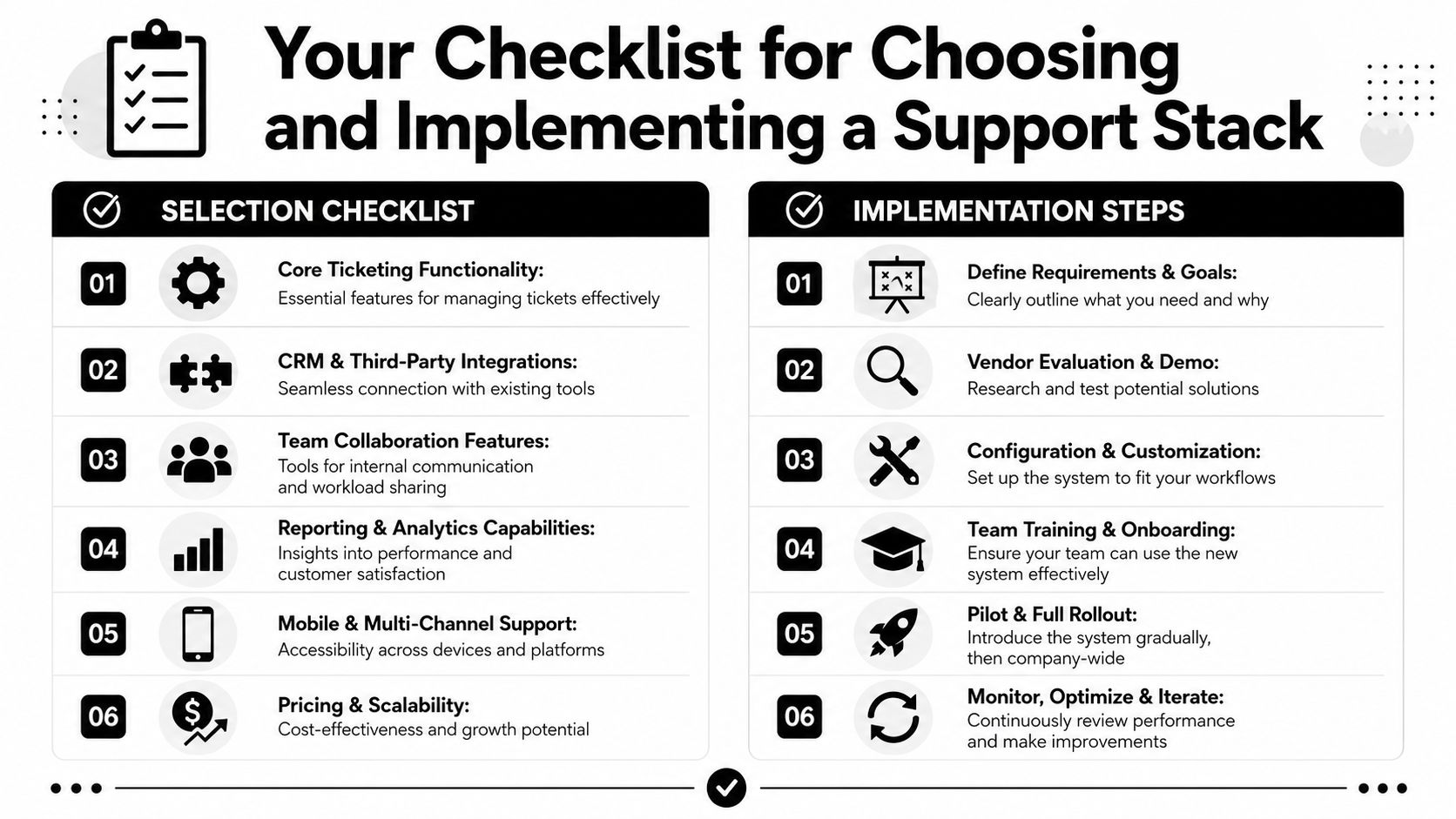
A strong evaluation process starts with operational fit, not feature sprawl.
A quick scorecard helps filter options early:
Evaluation areaWhat to checkCommunity integrationsNative support for Discord, Telegram, SlackTicket workflowQueues, assignment, statuses, escalationsCRM syncLinked records and clean write-back behaviorAI readinessAbility to use existing knowledge sourcesAnalyticsChannel, agent, automation, and satisfaction visibilityScale fitPricing and governance that won't break later
Integration costs are often “likely” and “overlooked,” and mature systems need clear rules for who controls each critical field to avoid conflicting updates when syncing community platforms with a central CRM, as noted in this implementation guidance video.
That's the key implementation lesson. Every shared field needs an owner.
Operational advice: Define source-of-truth ownership before migration. If support edits plan tier in one tool while billing owns it in another, sync errors aren't a possibility. They're a certainty.
A rollout plan should cover at least these decisions:
Migration also needs a communication plan. Moderators, support agents, customer success, and operations all touch the workflow differently. If only one team understands the new logic, the system won't hold.
Teams planning that transition can save time by reviewing a dedicated guide to support migration.
A modern support stack should do more than turn messages into tickets. It should preserve community context, connect every issue to the right customer record, and give teams a way to scale without forcing users into rigid support forms. For companies supporting users on Discord, Telegram, Slack, the web, and email, Mava is built for that exact workflow. It combines a shared inbox, AI agents, automation, and community-native support operations in one platform, so teams can manage high-volume support without losing the thread.
.png)
.png)
.png)
