.png) Get Started
Get Started
A lot of teams search for a Zendesk alternative at the exact moment their support operation stops feeling manageable. The inbox isn't the problem by itself. The issue is that customer conversations are spread across Discord, Slack, Telegram, email, and web chat, while the support system still expects everything to behave like an email ticket.
That mismatch creates daily friction. A moderator answers publicly in Discord, a teammate replies privately in Telegram, someone else starts an email follow-up, and now three people are solving one issue without knowing it. The platform technically works, but the workflow doesn't.
The breaking point usually looks ordinary at first. A product launch goes live, traffic picks up, and support volume starts coming from everywhere at once. Public questions appear in Discord channels, bug reports arrive in Slack, account issues come through email, and high-value users send direct messages in Telegram.
Legacy help desks can collect those messages. They just don't handle them in the way modern communities talk.
That's why the search for a Zendesk alternative isn't really about replacing one ticket queue with another. It's about moving from an email-era support model to a community support model where public threads, private follow-ups, and fast handoffs all live in one operational system. The difference matters more than most comparison pages admit.
A lot of teams already know this instinctively. They don't need another feature grid. They need a tool that treats Slack and Discord as core channels instead of awkward extensions. That distinction is also the heart of the shift from old-school help desks to community-led support vs help desks.
Three symptoms usually show up before a migration even becomes a formal project:
Public and private conversations don't behave like separate tickets. They're usually the same support story happening in different places.
That's the tipping point. Once a team sees that clearly, “Zendesk alternative” stops meaning cheaper software. It starts meaning software designed for how support happens now.
Zendesk became popular for good reasons. Traditional ticketing, macros, forms, and workflows still matter. But the original model was built around a queue of private, structured requests. Community support isn't structured that way.
In a modern community, a large share of issues starts in public. One user asks a question in Discord. Others pile on with similar details. A moderator gives a partial answer. Then one person needs a private follow-up for billing, account verification, or a sensitive bug report. If the platform treats those moments as disconnected events, agents spend more time reconstructing context than solving the issue.
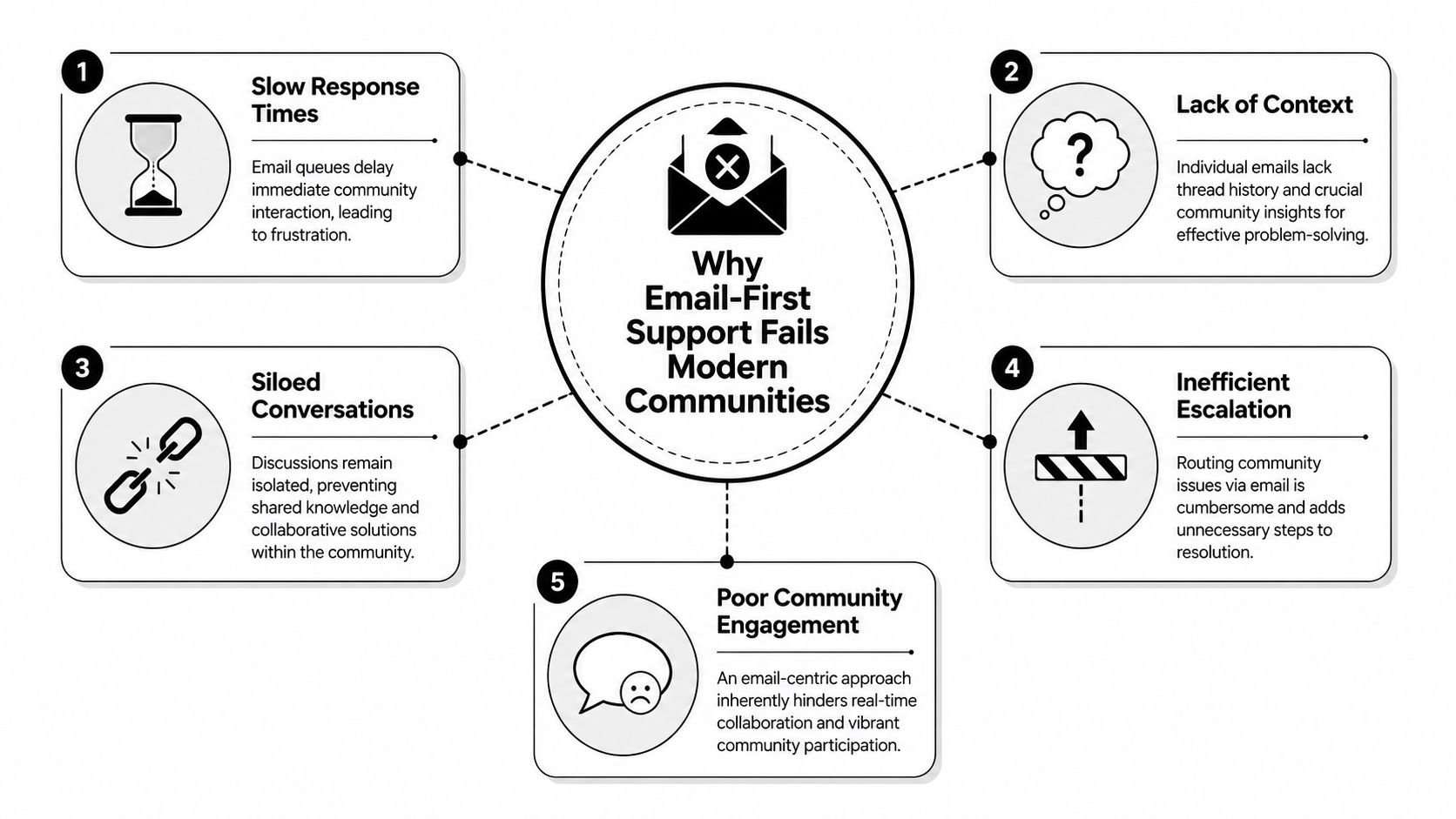
This is the part many teams underestimate. A platform may advertise omnichannel support, but the lived experience can still be fragmented. If Discord, Slack, or Telegram arrives through separate connectors and separate logic, agents still do the stitching manually.
Community-driven support teams using multi-channel platforms like Discord, Slack, and Telegram report that legacy ticketing systems like Zendesk cause a 30 to 40% increase in manual context-switching time because those channels are treated as secondary bolt-ons rather than first-class workflows, according to DevRev's Zendesk alternatives analysis.
That context switching isn't just annoying. It changes team behavior. Agents start avoiding messy channels. Escalations get delayed. Duplicate replies increase because nobody has confidence that they're seeing the whole conversation.
Email-first systems assume one issue belongs to one requester inside one clean thread. Communities don't work that way.
A support issue in Discord might include:
When a help desk can't preserve that chain naturally, the team pays for it through manual notes, copied links, screenshots, and handoff friction.
Practical rule: If a vendor says it supports community channels, ask whether an agent can move from a public thread to a private follow-up without losing the original history.
That question usually reveals whether the product was designed for communities or merely adapted for them.
Support expectations are faster now, but speed alone isn't the point. Teams need continuity. Users don't care which channel they started in. They care whether the next person understands the issue without asking them to repeat everything.
That's why the old assumption breaks down. A Zendesk alternative for a community-driven business can't just be “another ticketing tool with chat.” It has to preserve conversational context across channels and make automation practical enough to deploy before the next launch, outage, or product update hits.
The shortlist looks different when the evaluation starts with community workflows instead of email workflows. A good platform for this environment needs three things. Native support for real-time channels. A shared inbox that preserves context. AI that helps during spikes without a long implementation cycle.
Here's a quick comparison built around those criteria.
PlatformBest fitCommunity channel strengthAI practicalityMain trade-offMavaDiscord, Telegram, Slack, web support teamsNative community focusFast to deploy on existing docs and community workflowsNarrower fit for teams that only need classic email ticketingIntercomSaaS teams with chat-first supportStrong for conversational support, less native to public community threadsAdvanced AI automation and autonomous handlingBetter for product-led chat than community-native public/private flowsFrontTeams prioritizing collaboration in a shared inboxUseful for shared visibility across channelsQuality-first AI support for triage and summariesStill feels more inbox-centric than community-nativeFreshdeskSMB and mid-market omnichannel teamsBroad channel coverageStrong general-purpose AI capabilitiesBetter for conventional omnichannel than complex community supportSalesforce Service CloudLarge enterprise support organizationsPowerful, but heavier to implementAdvanced AI in enterprise stackComplexity and overhead can outweigh benefits for lean teams
Near the top of any community-first list, one option keeps coming up because it's designed around the channels that break email-first systems.
For teams handling support across Discord, Telegram, Slack, and the web, Mava fits the way the work already happens. The key difference is that those channels are native to the workflow instead of being layered on through extra apps and routing rules.
That matters most during volume spikes. After a feature launch, teams often face dozens of near-identical questions across multiple channels at once. In a unified community inbox, agents can see whether someone already answered publicly, step into private follow-ups where needed, and let AI handle repetitive questions consistently.
That shared visibility solves a very specific operational problem. Platforms with native unified inboxes for Discord, Slack, and Telegram report a 40 to 50% reduction in ticket resolution time and eliminate an average of 18 hours per week spent checking whether someone already replied, according to Front's analysis of Zendesk alternatives.
Intercom is one of the strongest options for SaaS companies that already run chat-heavy support. The platform has moved hard into AI-driven service, and the industry shift is real. In 2026, AI-powered platforms like Intercom and Pylon demonstrated autonomous resolution rates between 60% and 73% for customer queries without human intervention.
That makes Intercom compelling for teams with a lot of repetitive support and a product-led motion. The trade-off is that community support often requires stronger handling of public context than standard in-app chat workflows provide.
A closer product walkthrough helps show how AI-first support platforms are evolving in practice:
Front is often a better fit than Zendesk for teams that need collaboration more than strict ticketing. It handles the shared inbox model well, and that matters when multiple agents or departments touch the same issue. It's also notable for quality-first AI, especially around triage and summarization rather than just blunt deflection.
The limitation is that Front still feels like an advanced inbox product first. For some community teams, that's enough. For others, especially those living inside Discord and Telegram, it still doesn't fully replace a community-native operating model.
Freshdesk has become the most widely adopted Zendesk alternative globally in 2026, serving over 74,000 businesses across 150+ countries, including Pearson and Decathlon. It offers a broad omnichannel set and lower entry pricing relative to Zendesk's historical enterprise positioning.
For many SMB and mid-market teams, Freshdesk is a practical choice. But broad adoption doesn't automatically mean best fit for community support. Teams that rely heavily on public threads and native community workflows should still test whether the platform handles public-to-private context the way they need.
The cleanest way to compare a community platform with Zendesk is to stop looking at feature counts and start looking at workflows. What matters is whether agents can handle the support day without stitching systems together by hand.
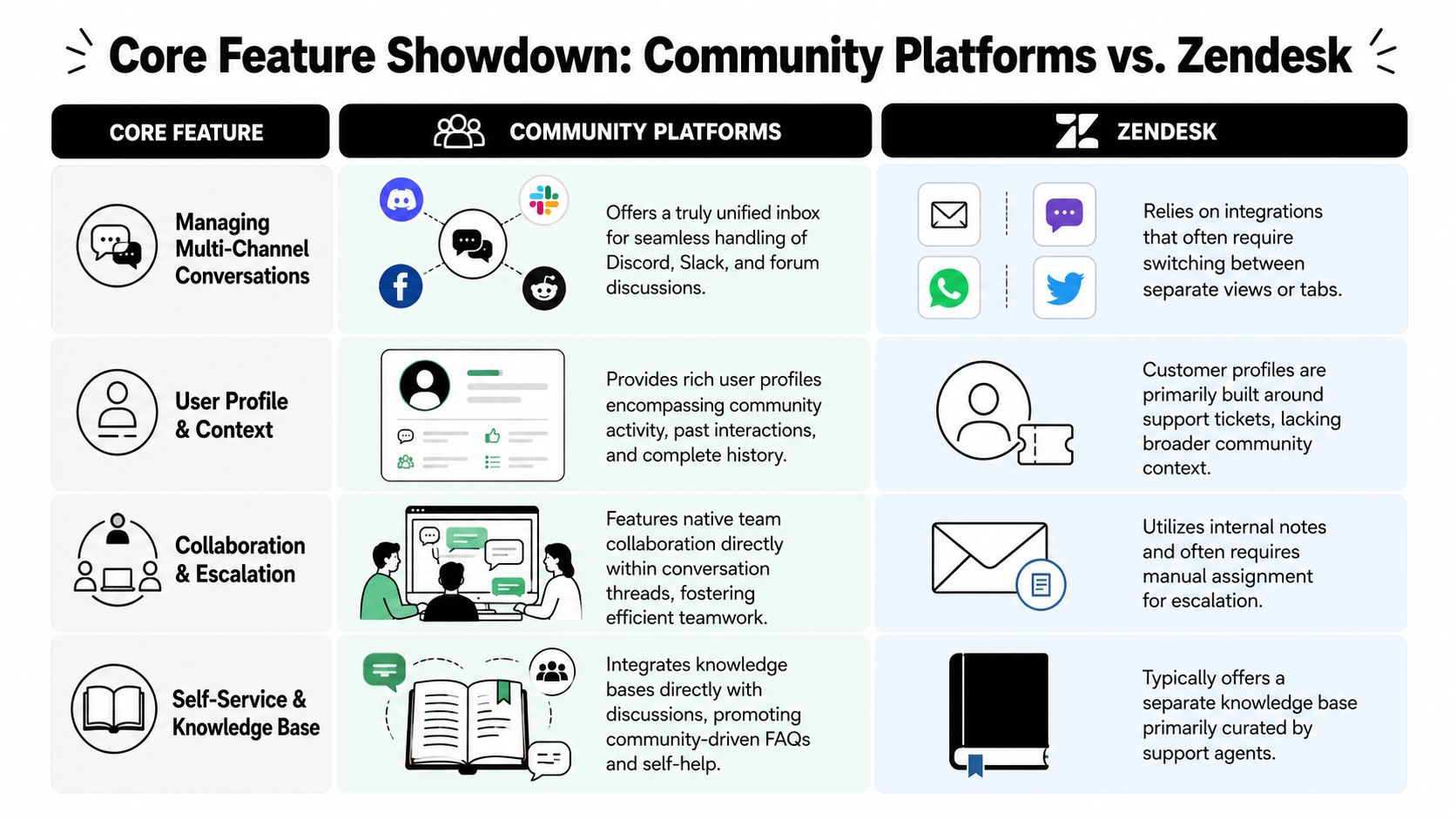
Zendesk can connect many channels. That's not the same as making them feel native.
In community platforms, the goal is simple. One workspace should show the public thread, the private continuation, internal collaboration, and status of the issue without making the agent jump between tools. In Zendesk, teams often end up depending on multiple integrations and separate views to approximate that same experience.
A common stress test is the launch-day scenario. A new feature ships, and similar questions flood Discord, Slack, Telegram, and email. In a community-native platform, AI can resolve repetitive questions while humans focus on edge cases. In Zendesk, teams can automate parts of the flow, but the setup and context stitching often become the primary bottleneck.
The issue usually isn't message volume. It's how many of those messages still need a human because the system can't carry context across channels.
A common flaw in Zendesk alternative content is its sloppiness. Vendors often talk about AI resolution rates as if every support environment behaves the same way. It doesn't.
A 2026 Gartner AI in Customer Service Study found that in community-driven environments like Discord and Slack, general AI resolution rates drop to 25 to 30% for non-trivial queries because the models lack contextual training on public knowledge bases, as noted by Gartner's customer service research.
That distinction matters in demos. If the AI can answer a basic FAQ, fine. If it can't understand the public thread that produced the private escalation, resolution rates will look good in marketing and weak in production.
Teams evaluating this should ask whether the system can import knowledge directly from GitBook, Google Docs, or an existing help center, and how quickly agents can verify what the AI is doing. Teams that also need better reporting across these workflows often build or create custom support dashboards so channel mix, AI performance, and handoff quality are visible in one place.
Zendesk analytics are strong when the operation is ticket-centric. Community teams need a different lens.
The useful questions aren't limited to ticket backlog and SLA. They include:
That's why analytics quality depends on data model quality. If the platform stores only isolated tickets, reporting can't tell the whole story. If it understands the conversation as one cross-channel event, the metrics become operationally useful.
Organizations often get this decision wrong by buying against a generic feature checklist. The better approach is to test the platform against the messiest support scenarios the team already has.
If most questions come through email, a classic help desk may still be enough. If the team spends the day inside Discord, Slack, Telegram, and web chat, the shortlist should change immediately.
During a demo, useful questions include:
A lot of platforms now promise autonomous support. That promise means very different things depending on the workflow.
Quality-first AI automation in platforms like Front and BoldDesk focuses on triage and context generation, producing one-click conversation summaries that reduce agent cognitive load by 40% and improve response consistency by 25% compared with legacy Zendesk workflows. Those gains matter because they help the human team work better even when full automation isn't realistic.
What to ask in the demo: “Show how the AI handles a repeated launch-day question across Discord, Slack, and email, then show where a human steps in.”
That question reveals whether the product is doing real support work or just generating polished drafts.
Setup time is not a side detail. It shapes whether AI becomes a real workflow or a postponed initiative.
A practical evaluation checklist looks like this:
If a tool can't survive that test, it probably isn't the right Zendesk alternative, even if the feature list looks impressive.
Migration feels bigger than it usually is. The hard part isn't exporting data. The hard part is deciding what the team wants the new workflow to look like.
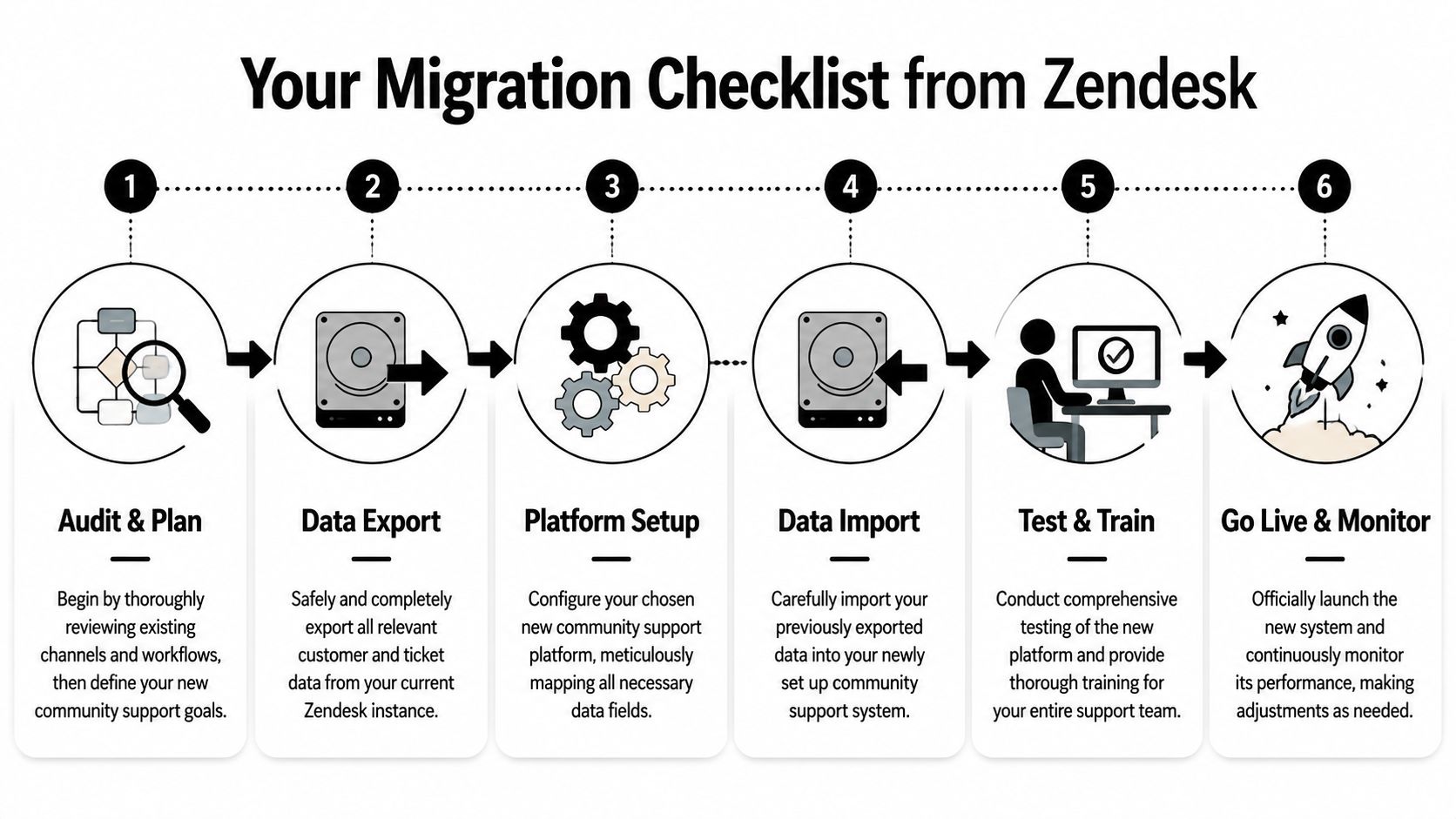
Migrations fail when teams try to preserve every old habit. They work when the new tool is allowed to simplify the operating model.
A few mistakes cause most of the pain:
The first month after switching platforms can be misleading if leadership only watches ticket volume. Users are often asking the same questions they asked before. What changes first is how much of that work still needs a person.
A stronger KPI set includes:
That framing reflects what matters operationally. A migration is successful when repetitive work is absorbed, not merely when the inbox count changes.
One of the clearest signs of improvement is fewer internal handoffs caused by missing history. When agents can see the full conversation regardless of where the user started, support feels smoother both for the team and for customers.
This is also the right moment to widen the lens beyond ticket metrics and look at service quality indicators like response consistency, repeat-contact patterns, and customer feedback. Teams building that scorecard often revisit broader customer satisfaction metrics so they don't confuse automation activity with genuine support quality.
A strong migration doesn't just make agents faster. It makes the experience feel more coherent to the customer.
In the first 30 to 90 days, that coherence usually shows up before every dashboard is perfect. Fewer repeated answers. Fewer “can you send that again?” moments. Faster responses on common questions. Cleaner escalation paths for the hard ones.
Teams that are outgrowing email-first support usually don't need another generic ticket queue. They need a platform built for Discord, Telegram, Slack, and web conversations with AI that's practical to deploy. Mava is one option for that kind of community-driven workflow, especially for teams that want a unified inbox and automation without rebuilding support around integrations.
.png)
.png)
.png)
