.png) Get Started
Get Started
The support queue looked fine on Monday morning. By Wednesday, the same onboarding questions were stacked in Slack, bug reports were flooding Discord, and the web chat widget had become a ticket factory. That's usually the moment a team stops asking whether it needs an AI Customer Service Bot and starts asking which parts of support should be automated, which parts should stay human, and which channel is safest to touch first.
The strongest implementations don't try to sound clever. They reduce repeat work, preserve context, and know when to get out of the way. The market is already large enough to matter in planning, with one 2025 synthesis putting the AI chatbot market at $9.08 billion in 2025 and $18.27 billion by 2028 in the Zoom chatbot statistics roundup. That growth reflects a shift from novelty to infrastructure, especially for community-led SaaS, gaming, and web3 teams that need support coverage without burying moderators and agents.
One useful benchmark for what's coming next is the Solana Tracker prediction data, which gives a sense of how quickly AI capability gets folded into product and community expectations. In practice, the winning bot is usually narrower than the pitch deck suggests. It handles the high-frequency, low-risk stuff cleanly, then hands the rest to humans with enough context to move fast.
A growing community usually doesn't fail because the product is broken. It fails because the same five questions keep landing in three different places at once. A Discord moderator answers the setup issue for the tenth time, a support rep in Slack rewrites the same onboarding note, and the website chat repeats the password-reset flow while somebody in email is still waiting for a response.
That's where an AI customer service bot starts to make sense. In 2026, this isn't a rigid FAQ tree with canned replies. It's closer to a retrieval-based support layer that can read from docs, pull the right answer, ask a clarifying question when needed, and escalate when confidence drops.
It doesn't replace judgment. It replaces repetition. The bot takes on the work that clogs up the queue, then preserves human attention for edge cases, billing disputes, bug escalation, and emotionally charged conversations.
The market data helps explain why this has become normal rather than experimental. A 2026 synthesis in the Zoom chatbot statistics roundup says the market is already above $9 billion and could reach $27–32 billion by 2030–2031, which implies steady enterprise adoption rather than a passing trend. For support leaders, that matters because budget decisions are now being made around containment, handoff design, and multichannel coverage, not just around “adding a bot.”
Practical rule: automate the questions that repeat, not the ones that create risk when answered poorly.
That's especially true in community spaces. A public answer in Discord can calm a thread or damage trust instantly. A bot that knows when to stop talking is often more valuable than one that tries to answer everything.
A production bot is not one model. It's a stack of small decisions that keep the system usable under load. The architecture works because each layer does one job well, and because the bot can decide whether to answer, retrieve, call a tool, or escalate instead of forcing every message through the same path.
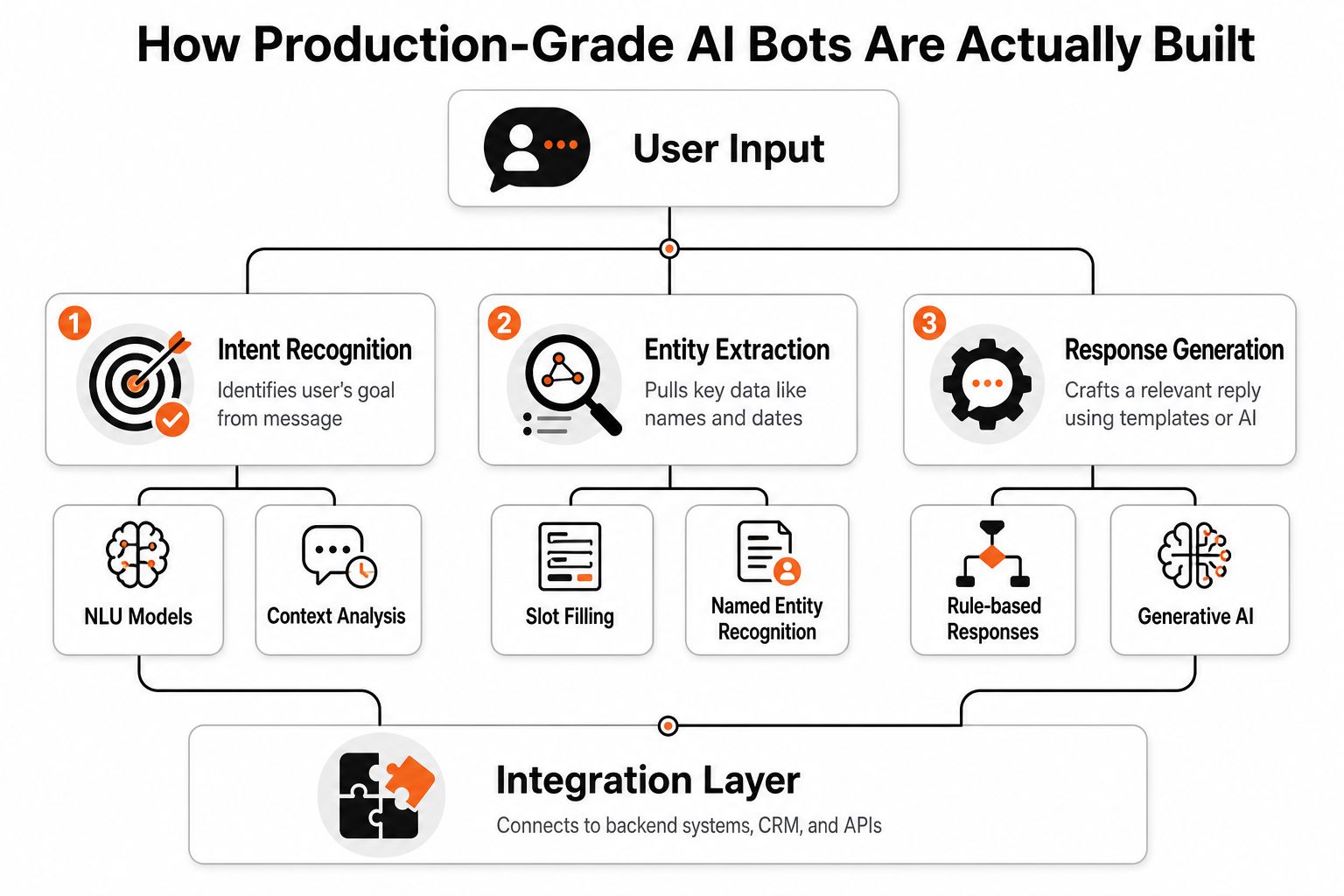
Ingress and routing handles where the message came from. Discord, Slack, web chat, and email all arrive differently, and the bot needs to preserve that channel context from the start.
Preprocessing cleans the message before anything else touches it. That means normalizing formatting, stripping noise, and handling the kinds of shorthand people use in support threads.
Orchestration is the decision layer. It decides whether the message should go to retrieval, a backend tool, a response template, or a human.
Retrieval-augmented generation, or RAG, keeps the bot grounded in support content. A good retrieval layer uses chunking, hybrid search, re-ranking, and citation management so answers come from real docs instead of model guesswork, which is exactly why the layered architecture in the AI customer support chatbot architecture guide matters.
Tooling connects the bot to live systems such as order status, account lookup, or subscription data. That's what moves it beyond static answers.
State and memory preserves the thread. For support, context is often the difference between a useful response and a second message that confuses the user.
Safety and compliance is where PII redaction, jailbreak defenses, and permission checks belong. These are not nice-to-haves. They're the difference between a bot that can be trusted and one that becomes an incident report.
A bot that can retrieve safely and escalate cleanly usually beats a bot that tries to sound smart.
Response shaping tailors the answer to the channel. A long, structured reply might work in email, while Discord and Slack need tighter formatting.
The Blockchain Jobs career listings are a good reminder that this stack isn't abstract. Teams are hiring around data, model, and workflow plumbing because the hard part is no longer “can a bot answer?” It's “can it answer in the right place, at the right time, with the right fallback path?”
Most bot failures start with bad training habits. Teams dump a knowledge base into the system, expect magic, then wonder why the bot answers confidently and incorrectly. Real support data works better because it reflects how customers ask for help, not how documentation pages are written.
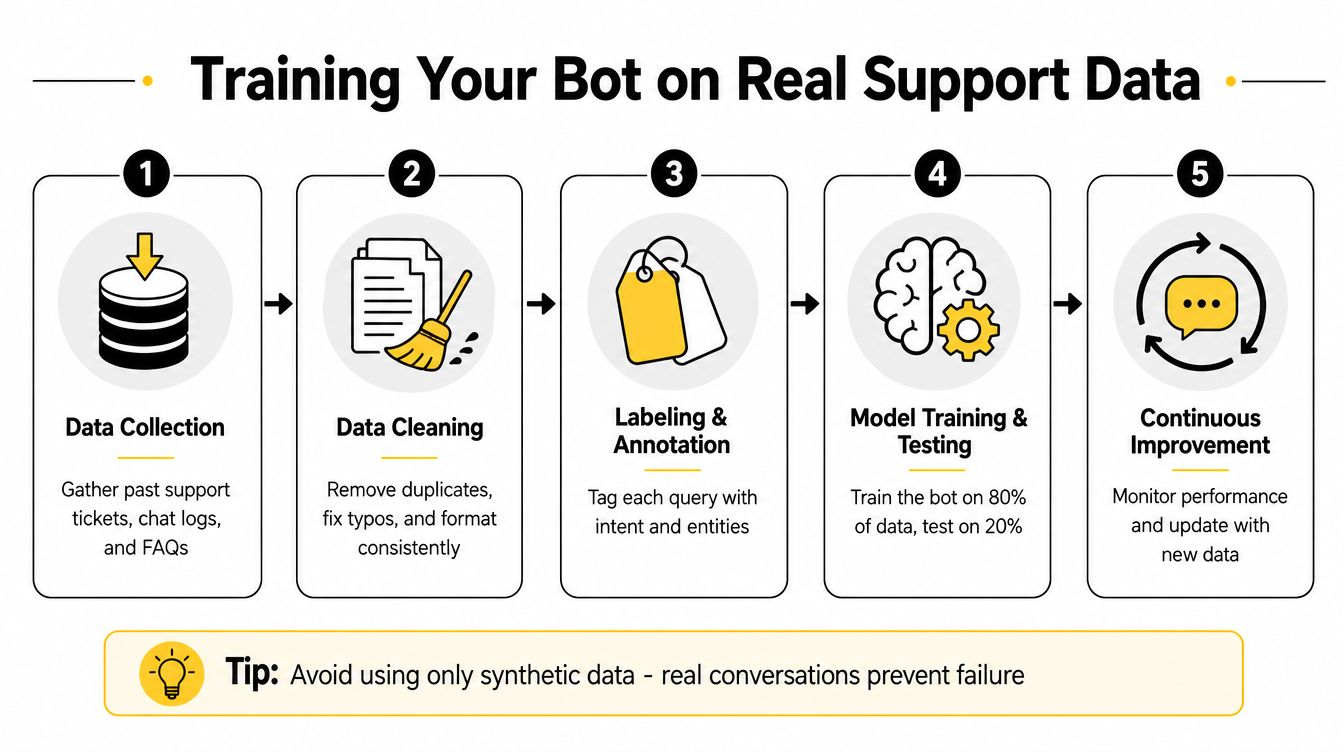
The most practical approach begins with the top 5 highest-volume intents. The implementation guide in the Mava knowledge base training article recommends about 200 training examples per intent from real tickets, then shipping only that narrow scope first. That constraint matters because it lowers ambiguity and keeps classifier behavior more stable.
The raw data should come from the last 90 days of interactions, not from whatever happens to be easiest to export. That window usually shows which questions repeat often enough to justify automation.
Each example needs intent tags, and the labeling has to be consistent. If two agents would label the same message differently, the bot will inherit that confusion. A narrower intent set usually performs better than a broad one because the model gets cleaner boundaries and the blast radius of a bad answer stays small.
The same source recommends a 10% traffic canary for two weeks before a wider rollout, so the team can measure resolution rate and CSAT before expanding coverage. Another expert implementation guide recommends 200 to 500 labeled utterances per intent, which is a strong sign that intent density matters more than generic volume.
Operational reality: a bot trained on messy intent data usually fails in familiar ways, it repeats itself, misroutes users, and escalates too late.
That's also why synthetic-only training is risky. Real conversations include slang, typos, partial questions, follow-ups, and frustration. Those are the conditions the bot has to survive in production.
The goal isn't broad coverage on day one. It's trustworthy behavior on a small set of high-frequency requests, then controlled expansion after the bot proves it can stay grounded.
Channel choice changes the risk profile immediately. A bot that performs well in private web chat can create trouble in a public Discord thread, and the same response that feels useful in Slack can look careless in Telegram if it's not formatted clearly. The automation boundary should follow risk, visibility, and interaction type, not just volume.
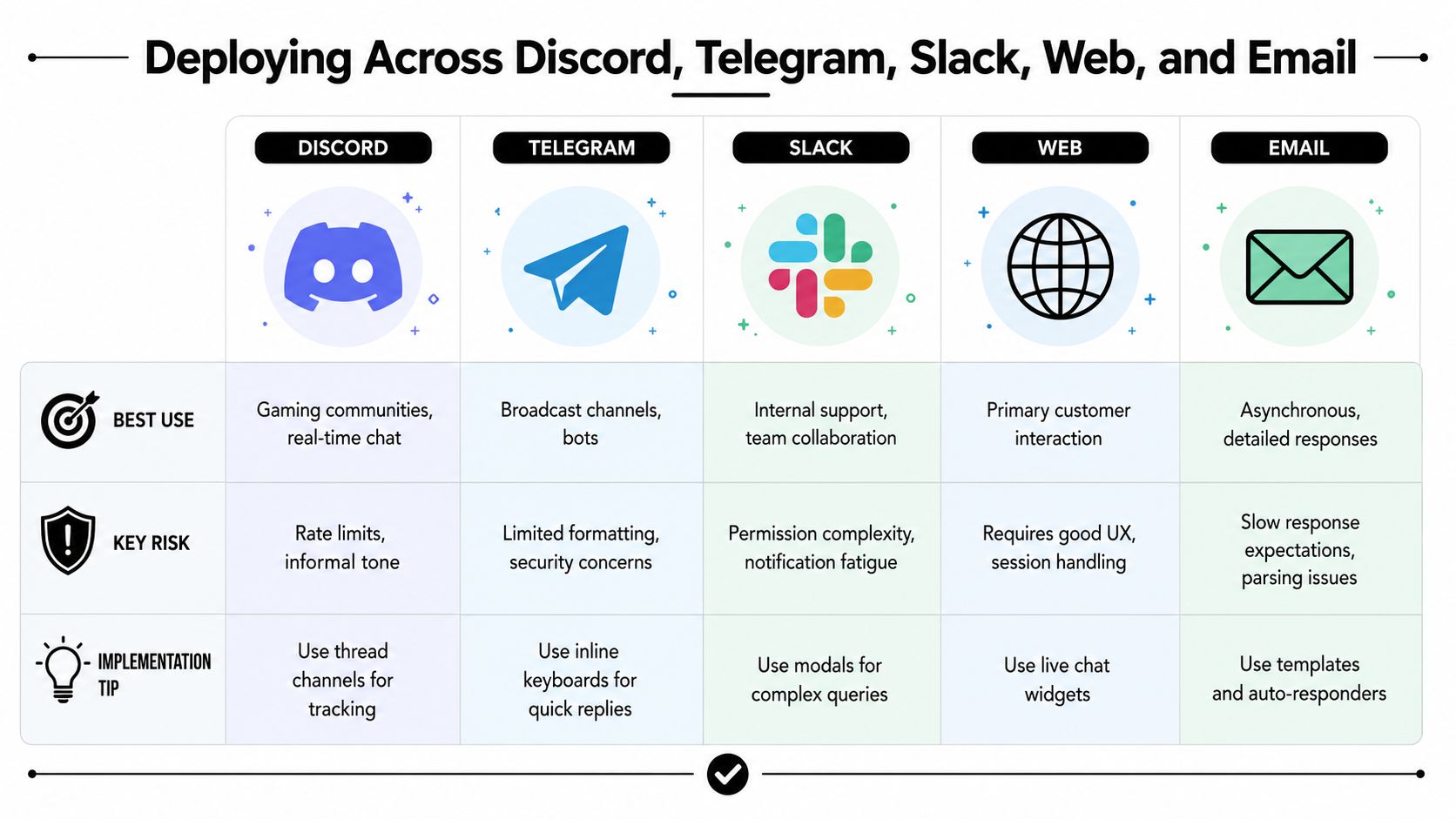
Discord is powerful for community support, but public visibility makes wrong answers expensive. The Mava Discord bot guide is useful here because it reflects that thread-based tracking matters when everyone can see the conversation.
Telegram behaves like a fast-moving broadcast and support surface at the same time. It's a good fit for quick updates, but response style needs to stay concise and reliable.
Slack works best when the bot understands threading, permissions, and workspace context. Internal support tends to be easier than external support because the tone and escalation paths are more predictable.
Web chat is where speed matters most. Users expect near-immediate responses, and if the bot can't resolve the issue quickly, handoff quality becomes the entire experience.
Email is the most forgiving on latency and the least forgiving on parsing. Long, detailed responses work here, but the bot needs strong context handling because the back-and-forth is slower.
ChannelVisibility RiskLatency SensitivityBest ForDiscordHighHighCommunity questions, public supportTelegramMediumHighBroadcast support, quick repliesSlackMediumMediumInternal support, team workflowsWebMediumVery highPrimary customer supportEmailLowLowDetailed, asynchronous resolution
The Mava channel coverage and support workflow model fits this pattern because it treats each surface differently rather than assuming one bot behavior works everywhere. That's the right mindset. Start where the risk is contained, then expand only after the handoff path and response shape work in the channel.
Escalation is often treated like a checkbox. Add a button, pass the ticket, move on. That misses the core problem, which is whether the handoff preserves enough context for a human to solve the issue quickly.
A good escalation path usually triggers when the user repeats themselves, sentiment drops, or confidence falls below a threshold. The bot should hand over the full conversation history, detected intent, prior attempts, and any relevant account or order context. Without that, the agent starts from zero and the user repeats the same story twice.
The bot should transfer the conversation in a form the agent can act on, not just a transcript. That means the user's goal, what the bot already tried, and where the conversation started to stall.
A visible handoff is important, but invisible context transfer is what prevents frustration. That's the part many teams miss.
Good escalation is a resolution tool, not an admission of failure.
The contrarian lesson is straightforward. A bot that escalates well can outperform a bot that tries to answer everything, especially when the issue is high-friction or emotionally charged. In community support, speed and context usually matter more than squeezing out one more automated reply.
The IBM customer service guidance is useful because it reinforces visible handoff and repeated-frustration triggers, while also exposing the gap. Most public guidance talks about escalation as a feature. Fewer teams measure whether escalated tickets were resolved faster, or whether the bot merely delayed the conversation.
That's why repeat-contact rate after escalation matters. So does time-to-resolution for escalated cases versus bot-contained cases. If handoff is working, the user shouldn't feel like they've been routed into a dead end with nicer formatting.
Support teams get misled when they measure only deflection. A bot that avoids tickets but frustrates users is not a win. The metrics need to reflect both containment and whether the user got help.
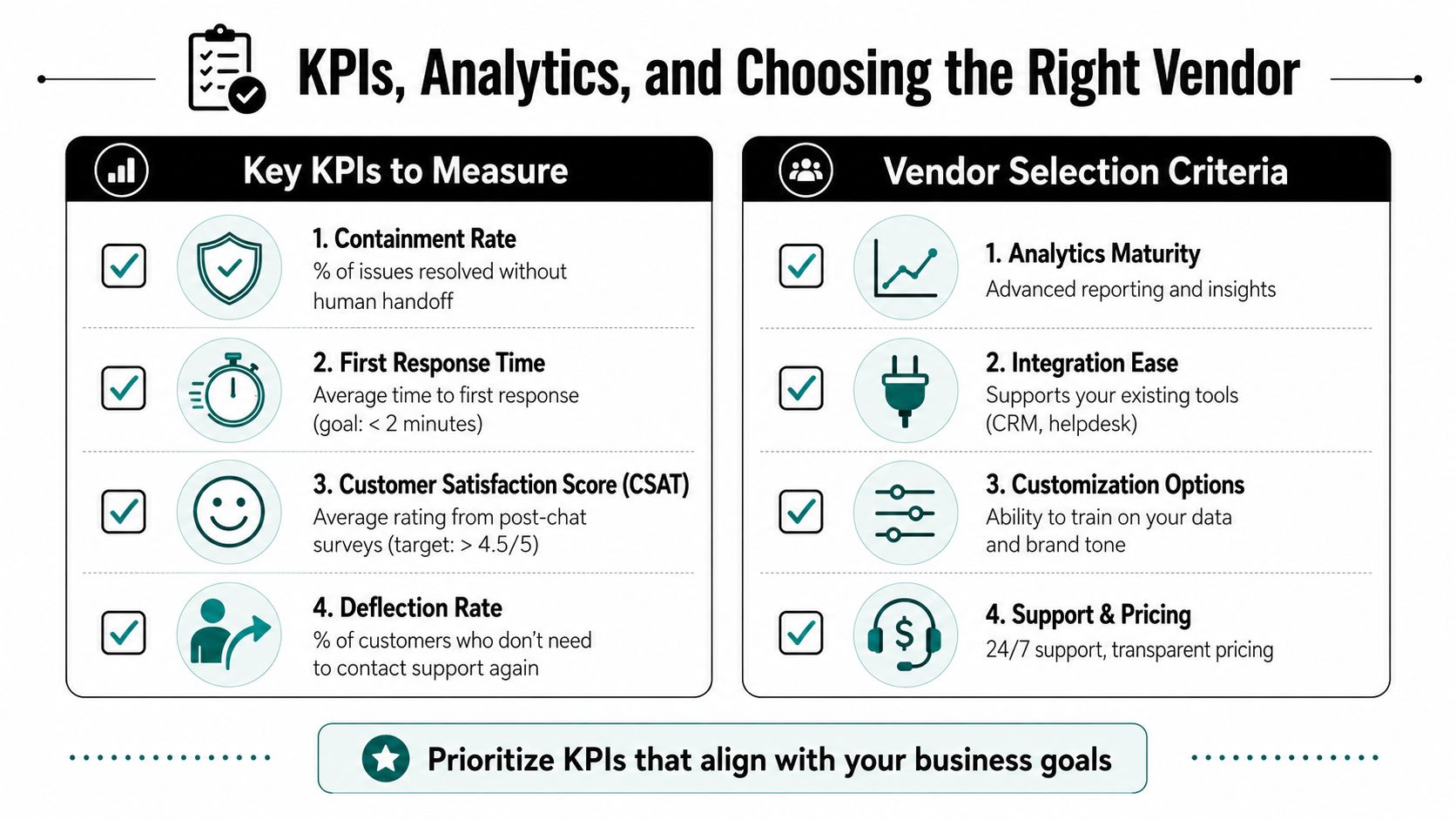
The metrics that matter most are containment rate, resolution quality, response latency, escalation rate, and repeat-contact rate. Containment tells you what the bot handled without human help. Resolution quality tells you whether the answer solved the problem. Latency tells you whether the experience feels immediate. Repeat-contact rate tells you whether the first answer held up.
The analytics side matters just as much as the bot itself. The Mava conversational AI analytics guide is relevant because teams need more than a dashboard with vanity numbers. They need visibility into where the bot is failing, which intents are leaking to humans, and whether escalation is improving the outcome.
A useful vendor checklist looks like this.
One option in this category is Mava, which supports support workflows across Discord, Telegram, Slack, web, and email, and uses a shared inbox plus AI agents to handle repetitive questions while handing off to humans when needed. It's the kind of platform that makes sense when a team cares more about operational control than flashy demos.
The best vendor is the one that lets support leaders see where automation ends and service quality begins. If those lines are blurry, the team won't know whether the bot is helping or just hiding the backlog.
The first 30 days should focus on data, not tuning. Pull the last 90 days of support interactions, identify the top 5 highest-volume low-complexity intents, and collect roughly 200 training examples per intent from real tickets. Label the examples carefully, then decide which channel carries the lowest risk for the first release.
Days 31 to 60 should focus on the narrow deployment. Set up the layered architecture, train the bot on the chosen intents, and launch a 10% traffic canary for two weeks to watch resolution quality, latency, and escalation behavior. If the bot repeats itself, escalates too late, or confuses users, the fix is usually in the data or the handoff path, not in a bigger prompt.
Days 61 to 90 should focus on controlled expansion. Add only the next set of intents that passed the canary, refine escalation triggers, and audit whether human agents got the context they needed. Then decide which channel deserves rollout next, based on visibility risk and support complexity rather than enthusiasm.
The winning pattern is narrow, measurable, and boring in the best way. It handles repeatable questions with speed, sends edge cases to humans with context intact, and keeps support from becoming a public failure mode.
If your team is trying to automate support without losing control, Mava is built for that workflow. It gives community-led companies a shared inbox, AI agents, and multichannel support across Discord, Telegram, Slack, web, and email, so the bot can handle repeat questions while humans stay in the loop. Visit Mava if you want to see how that setup can fit a support stack that's already under pressure.
.png)
.png)
.png)
