.png) Get Started
Get Started
Support in Discord and Telegram often looks healthy right before it starts breaking. New members join, message volume climbs, moderators stay busy, and the AI bot answers around the clock. From the outside, that can feel like progress.
Inside the queue, it's usually messier. The same issue appears in a public channel, then in a private DM, then again in a bug thread. A bot marks conversations as handled, but users still ask the same question a few minutes later. Human agents step in without a clear record of what the bot already said. The team feels busy, but nobody can say with confidence whether support is improving.
That's where conversational AI analytics stops being a nice dashboard project and starts acting like operational control. It turns messy conversations into evidence. It shows whether automation is helping, where users get stuck, which intents deserve better coverage, and when the AI is creating more work than it removes.
A common failure mode in community support is mistaking activity for progress. A Discord server can be full of answered threads and still deliver a poor support experience. Telegram can feel responsive because somebody is always replying, even when users bounce between channels before getting a useful answer.
That gap matters more now because conversational support is becoming core infrastructure, not an experiment. The global conversational AI market was valued at USD 16.02 billion in 2025 and is projected to reach USD 89.80 billion by 2033, growing at a 24.04% CAGR, with customer support holding 42.4% of the market according to Data Bridge Market Research on the global conversational AI market.
In practical terms, that means more teams are putting bots in front of users. It doesn't mean those teams know what the bots are doing.
In unstructured communities, support doesn't arrive as neat tickets with fixed categories. It arrives as half-explained complaints, screenshots without context, emotional follow-ups, duplicate questions, and side conversations that drift off topic. Traditional support metrics miss most of that.
A team might think the bot is reducing load because moderators are touching fewer first messages. But if users have to rephrase a question three times, or abandon the thread and ask publicly for a human, the system hasn't improved. It has only changed where the friction appears.
Practical rule: If the team can't tell which conversations were resolved by AI, rescued by humans, or silently abandoned, it isn't measuring support quality. It's counting motion.
Conversational AI analytics gives community teams a way to answer the questions that matter:
That shift is the difference between running support by instinct and running it by evidence. In communities, instinct helps with triage. It doesn't scale well enough to guide hiring, bot tuning, knowledge base changes, or moderation workflows.
Conversational AI analytics is the practice of turning messy support conversations into structured signals that a team can use to improve service quality, automation performance, and operational decisions. It goes far beyond exporting chat logs.
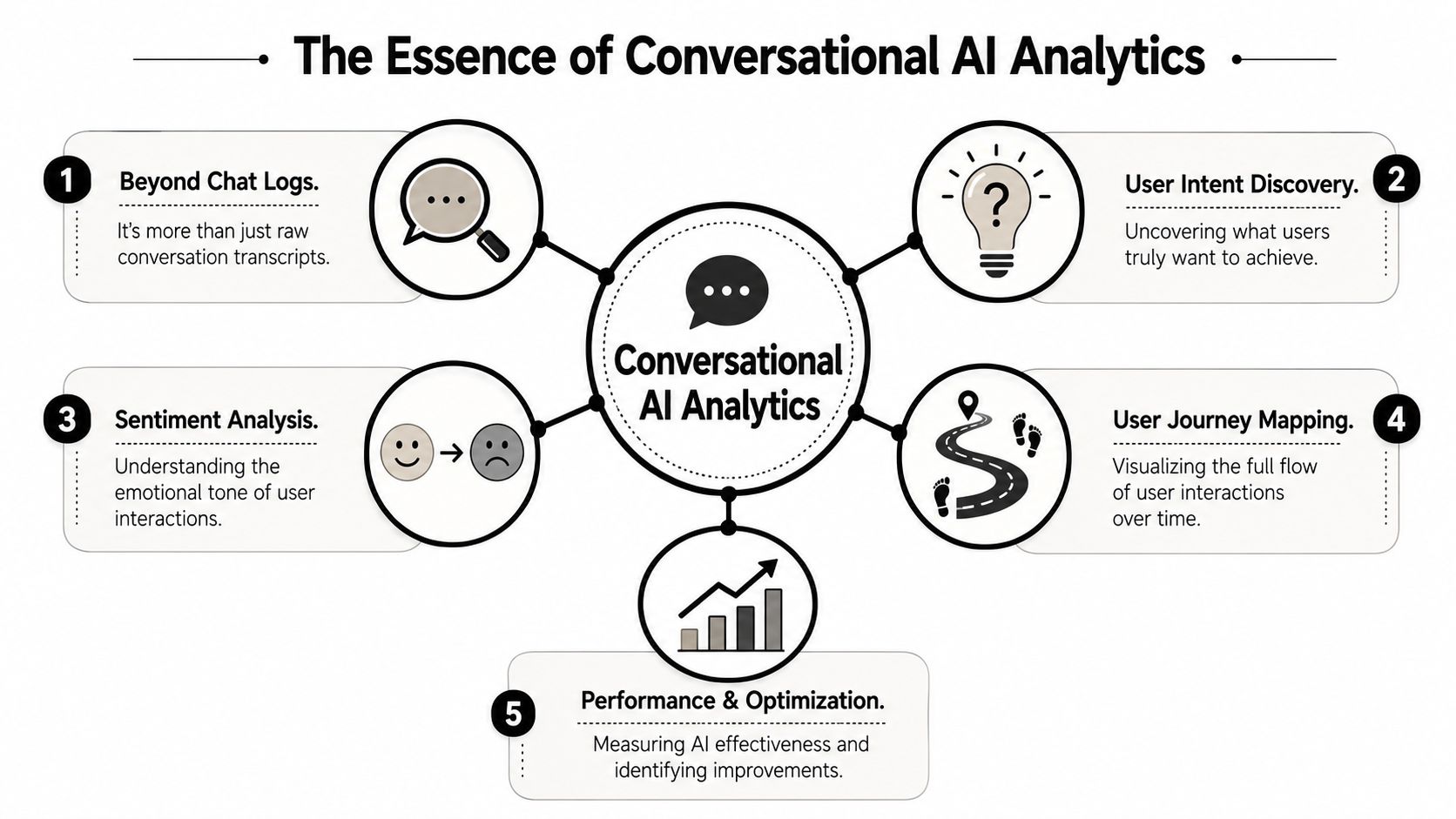
A useful way to think about it is as a fitness tracker for support operations. A tracker doesn't just count movement. It interprets patterns. It shows whether the system is fast, strained, improving, or degrading. Conversational AI analytics does the same for support across Discord, Telegram, web chat, Slack, and email.
Reading transcripts can reveal individual failures, but it doesn't create an operating model. Analytics structures those conversations into measurable dimensions such as intent, sentiment, response quality, escalation behavior, handoff patterns, and resolution outcomes.
That matters in community environments because raw chats are chaotic by default. A single user might ask for refund help, complain about a bug, and vent about moderation in one thread. Unless the team can separate those signals, it can't see what needs fixing.
The systems behind conversational AI analytics rely on language processing to classify what users are trying to do and how the exchange unfolds over time. In practice, teams use that structure to map:
That's the layer community teams need because classic web analytics won't explain why a user posted “this still doesn't work” after the AI said the issue was solved.
Good conversational AI analytics doesn't ask, “How many chats happened?” It asks, “What did users need, what happened next, and was the outcome acceptable?”
The market direction also explains why this category is becoming more important operationally. The AI chatbots segment is expected to account for 62.23% of the global conversational AI market in 2026, while cloud deployment will hold 59.19%, according to Juniper Research on the conversational AI market. That shift reflects wider use of scalable systems that can analyze conversations across channels in near real time.
For community teams, the implication is simple. More support is happening through AI, and more support data is available. The competitive advantage isn't having logs. It's knowing how to turn them into decisions.
Many organizations start with the wrong dashboard. They count bot conversations, ticket volume, and maybe average reply speed. Those are useful, but they won't tell a Discord or Telegram team whether automation is genuinely improving the support experience.
The better approach is to track a small set of metrics that connect user need, AI performance, and human intervention.
MetricWhat It MeasuresWhy It Matters for Community SupportAI resolution rateHow often the AI fully handles the issueShows whether the bot is reducing human workload or just greeting usersDeflection qualityWhether users avoid human escalation and don't come back with the same problemSeparates real self-service from hidden failureIntent accuracyWhether the AI correctly understood the user's requestBad classification creates bad answers even when tone sounds polishedFallback rateHow often the bot can't proceed or needs human takeoverExposes weak content, poor prompting, or unsupported scenariosAverage response timeHow quickly users get an initial useful replyCritical in fast-moving public communities where silence escalates frustrationSentiment trendEmotional pattern inside conversations over timeHelps moderators catch brewing frustration before it spreads publiclySatisfaction signalDirect feedback or post-resolution quality signalConfirms whether “resolved” matches the user's view of the outcome
A bot can appear effective because it reduces moderator touches. That's not enough. In community support, AI resolution rate should mean the issue was handled without human intervention and without obvious repeat contact shortly after.
Deflection quality adds the missing layer. It asks whether the user accepted the answer and moved on, or whether the issue resurfaced somewhere else. This distinction matters most in public channels, where users often reopen unresolved problems in front of everyone.
If the AI misreads a billing complaint as a feature question, the rest of the conversation is already off course. Teams often spend too much time tuning response wording when the underlying problem is intent detection.
A practical review process looks at failed conversations by intent cluster, not one transcript at a time. If the same class of question repeatedly falls into fallback or escalates with frustration, the intent model or routing logic likely needs work.
High fallback isn't always bad. Some issues should go to humans quickly, especially account-specific, trust-sensitive, or moderation-related cases. The problem is uncontrolled fallback, where the AI stalls, asks vague follow-ups, or loops users into dead ends.
A strong fallback metric should answer three things:
Average response time still matters in communities because users expect instant acknowledgment. But teams shouldn't celebrate low response time if the first answer is generic and forces the user to restate the issue.
That's why many teams pair response time with resolution behavior and sentiment trend. Fast but unhelpful support often looks good in simple reporting and bad in actual conversations.
CSAT in community support is harder than in classic ticketing because many conversations don't end with a formal survey. Teams often need a blend of explicit feedback and behavioral signals such as whether the user reopens the issue, reacts negatively, or asks for a human right after a bot resolution.
For teams refining that layer, this guide to customer satisfaction metrics is a useful companion because it helps separate shallow satisfaction reporting from indicators that reflect support quality.
Track fewer metrics, but define them tightly. A blurry dashboard creates false confidence faster than no dashboard at all.
Instrumentation is where many community teams either overbuild or give up. They know what they want to measure, but Discord threads, Telegram messages, bot events, knowledge base lookups, and human takeovers all live in different systems.
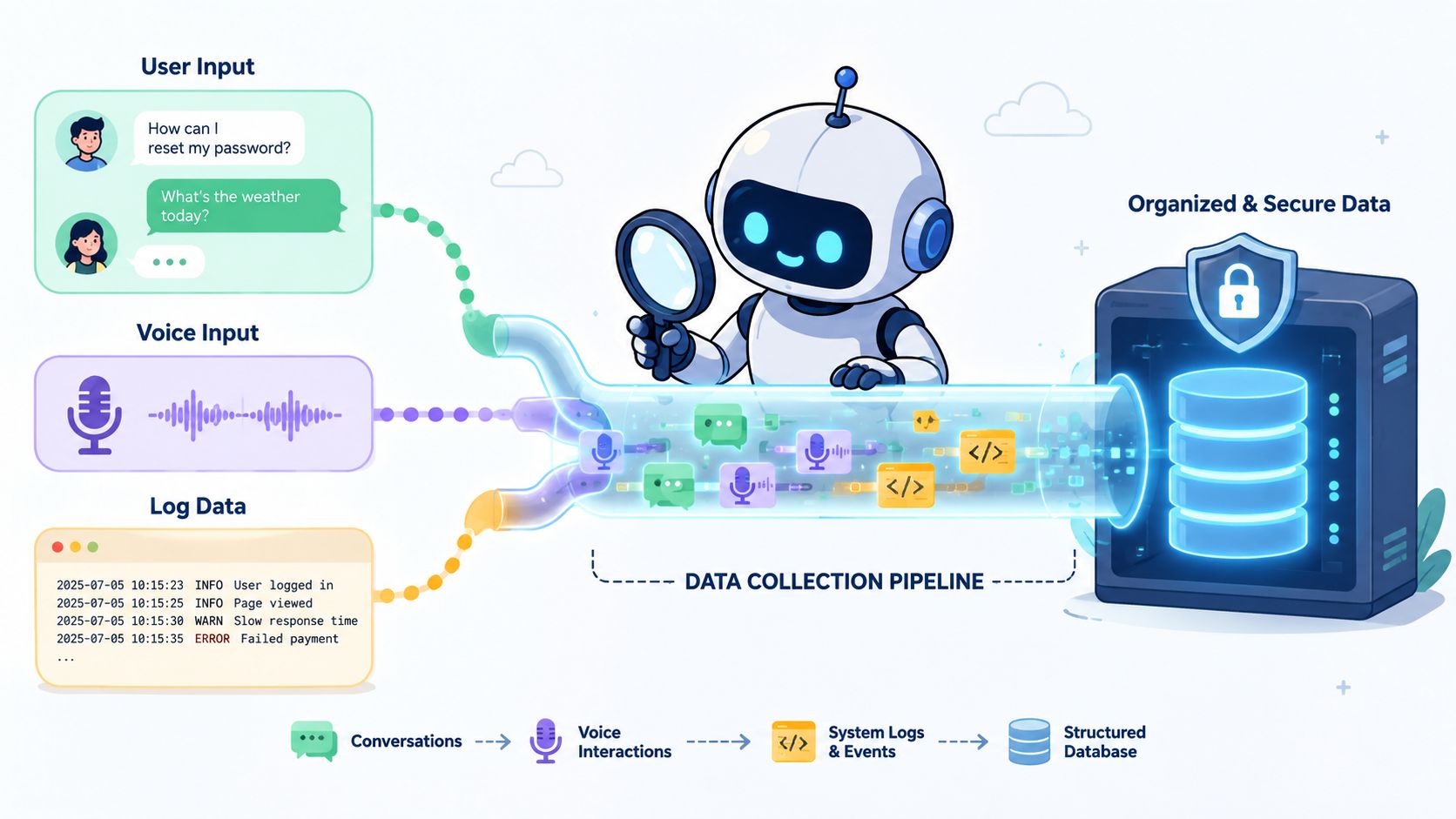
The job is to create a clean event trail. Each conversation should carry enough metadata to answer basic operational questions later. That includes channel, timestamp, detected intent, whether AI responded, whether fallback happened, whether a human joined, and how the conversation ended.
In practice, useful instrumentation usually starts with these event types:
Without those basics, reporting gets fuzzy quickly. Teams end up arguing about definitions instead of improving operations.
A lot of community teams try to patch this together with exports, webhooks, Google Analytics 4, and BigQuery. That can work, especially for technically strong organizations, but it's rarely as simple as the setup docs make it sound.
According to Seer Interactive's breakdown of conversational analytics implementation costs, GA4 API access is free for 200K tokens daily, but complex queries and BigQuery integration can cost $635 to $1,125 per month for multi-source pilots, rising to $2,500 per month for enterprise deployment. That pricing catches many teams off guard.
For community-led support, the trade-off is straightforward:
Teams that rely heavily on AI answers also need strong content hygiene. A clean knowledge base integration workflow matters because poor source content creates bad analytics later. If the AI is trained on overlapping, stale, or vague help content, the dashboard will faithfully measure a broken system.
Instrument the handoff, not just the answer. In community support, the most expensive failures usually happen between “the bot replied” and “the user got help.”
Most support dashboards try to do too much. They mix operational alerts, executive reporting, channel comparisons, and raw volume charts into one crowded screen. In a community setting, that usually leads to two bad outcomes. Moderators ignore the dashboard because it isn't actionable, and managers mistrust it because it doesn't explain trends.
A better dashboard tells one clear story per audience.
Moderators need a live operating view. They care about queue pressure, unresolved escalations, sudden fallback spikes, and sentiment dips that may spill into public channels. This is a tactical dashboard.
Managers need a trend view. They care about recurring intents, AI resolution movement over time, handoff quality, channel-level patterns, and whether support load is shifting because product or documentation changed.
Trying to satisfy both groups in one screen usually produces clutter. A role-specific layout works better than a universal “single source of truth” dashboard.
Snapshot metrics are seductive because they look clean. A bot resolved a certain share of conversations today. Response time was low. Satisfaction looked stable. None of that explains whether the system is improving, degrading, or just getting lucky with easier conversations.
Trend lines expose the story. They show whether a fallback spike aligns with a new feature release, whether sentiment worsens after a documentation change, or whether a revised routing rule improved human takeover flow.
A good dashboard should answer questions like these at a glance:
Teams building dashboards for AI-supported queues often benefit from examples of a dedicated ticket bot dashboard, especially when support spans both public threads and private conversations.
A dashboard isn't a report archive. It's a decision tool. That means every chart should lead naturally to an action such as revising an intent, improving documentation, retraining moderators, or changing handoff rules.
This walkthrough shows the kind of product thinking teams should aim for when visualizing AI-supported support operations.
If a dashboard can't help someone decide what to fix before the next shift starts, it's too abstract for frontline support.
Analytics only matters if the team uses it to change behavior. In community support, the best operators work through a simple loop. They spot a pattern, inspect the transcripts behind it, change one part of the system, and watch whether outcomes improve.
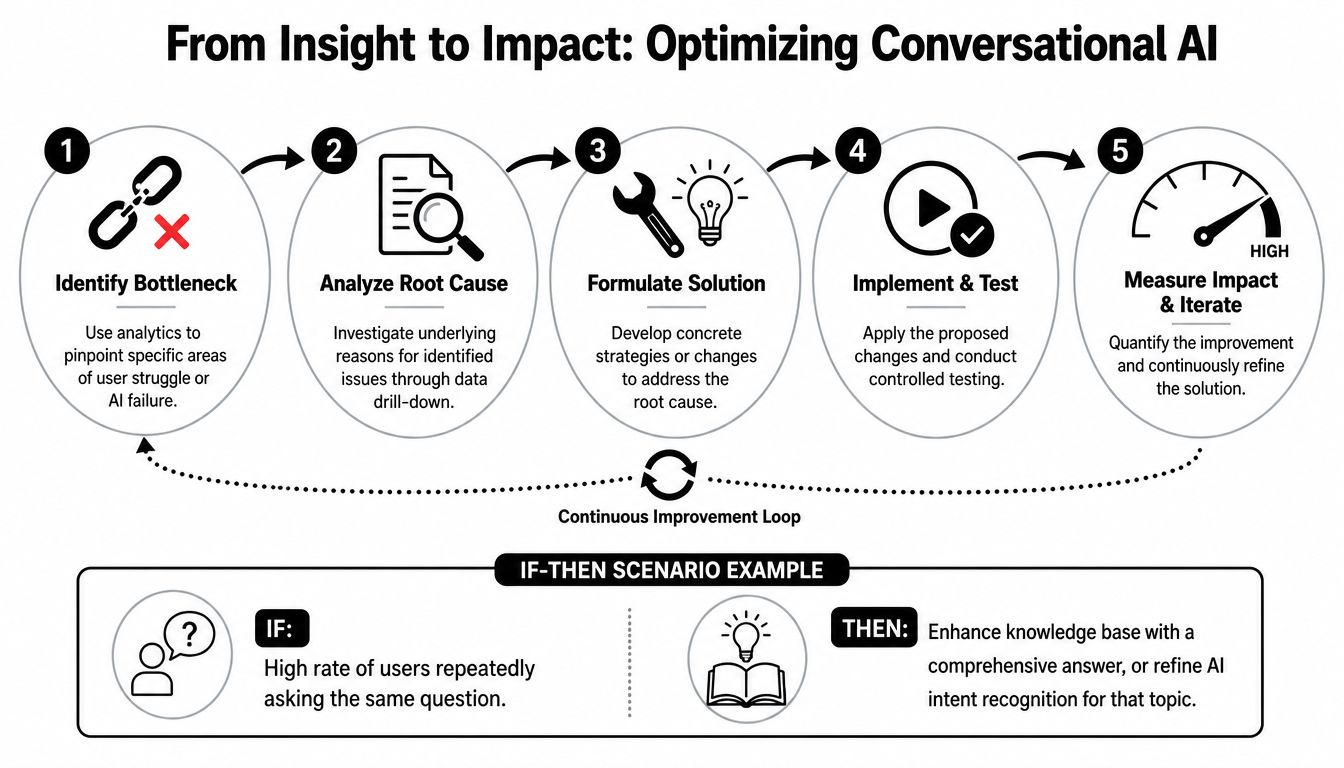
The hard part is knowing what action fits which signal.
If fallback spikes for one intent, the first check should be content coverage. Billing, wallet access, role gating, and account recovery often fail because the knowledge base doesn't answer the exact wording users bring into chat. Rewrite the source material around real user phrasing, not internal terminology.
If negative sentiment rises inside conversations marked resolved, the AI may be giving technically correct but emotionally poor answers. That usually points to tone, missing empathy, or a bad resolution definition. A user who gets an answer but still feels dismissed is likely to reopen the problem publicly.
If response time is fast but human workload stays high, the bot may be acting as a receptionist instead of a resolver. Tighten success criteria. Count only conversations that ended without avoidable escalation.
If users repeatedly ask the same question after launch events or product updates, the issue may not be the bot at all. The announcement copy, onboarding flow, or docs may be creating the confusion.
Many dashboards continue to exhibit shortcomings. Standard reporting focuses on containment, handoff, and sentiment. That misses the problems that matter most with large language models.
Industry data cited by Quiq on conversational AI analytics and observability shows that 40% of enterprises deploying LLM assistants lack observability into model drift and hallucination patterns. In community support, that gap is dangerous because wrong answers can spread in public, get copied by users, and damage trust faster than a slow queue ever could.
Teams should review conversations for signals such as:
The strongest teams don't redesign the whole support system every month. They run a steady cadence of small improvements:
That operating rhythm is what turns conversational AI analytics into trustable support performance instead of decorative reporting.
A gaming community is a useful example because support there is rarely clean. Players report bugs in public channels, ask account questions in DMs, complain about bans in heated language, and expect immediate answers when events or updates go live.
Before analytics, the team usually works on instinct. Moderators know the queue feels rough. They know certain questions keep coming back. They know the bot helps sometimes and frustrates people other times. But they can't separate anecdote from pattern.
Once the team starts classifying conversation intents, tracking handoffs, and reviewing failed resolutions, the support picture becomes clearer. The same top issues show up repeatedly. Certain question types are safe to automate. Others should go straight to humans. A few public channels generate most of the visible frustration, while private conversations carry the account-specific cases that need tighter handling.
That clarity changes staffing and workflow decisions. Moderators stop wasting time on repetitive, low-risk questions and spend more time on escalations, trust-sensitive issues, and community engagement. The AI becomes more useful because the team can see where it fails and fix those points directly.
Community teams often move fast and instrument later. That's risky. Support conversations can contain personal details, payment concerns, account identifiers, and emotional disclosures. Analytics should only collect what the team needs to improve service.
A sensible privacy baseline includes:
Community support is public by default in many places. That doesn't make it free-for-all data. Teams still need boundaries, consent logic, and clear internal access rules.
The strongest community operations treat analytics and privacy as part of the same system. If users can't trust the handling of their support data, the support experience itself starts to erode.
No. It's especially useful in communities because Discord and Telegram create more ambiguity than standard ticket queues. The messier the environment, the more valuable structured analytics becomes.
Start with AI resolution rate, but define it carefully. It should reflect issues solved without avoidable human intervention, not just conversations where the bot sent a reply.
Yes, if the team starts narrow. A small set of intents, consistent handoff tags, and a basic reporting view is enough to create useful signal. The main mistake is trying to instrument everything at once.
Because they overcount activity and undercount failure. A bot can look productive while misunderstanding users, looping vague answers, or pushing work into public channels where moderators have to clean it up.
Usually yes, but with clear privacy boundaries and access controls. Public doesn't mean unrestricted internal use. Teams should define what gets stored, who can review it, and how long it remains available.
Mava helps community teams run AI-powered support across Discord, Telegram, Slack, web chat, and email without stitching together a fragile stack. Its shared inbox, AI agents, knowledge base sync, and built-in analytics make it easier to track response times, AI resolution rates, satisfaction trends, and handoffs in one place. For teams that need enterprise-style support operations in messy community environments, Mava is worth a look.
.png)
.png)
.png)
