.png) Get Started
Get Started

A community manager checks Discord before bed and sees the same questions piling up again. A token claim issue in Telegram. A billing question in web chat. A setup question buried in a Slack thread. By morning, users have repeated themselves, moderators have copied the same answer five times, and a few frustrated people have gone silent.
That silence is usually the part teams miss.
An automated customer support system helps with volume, but for community-led companies it also helps with continuity. It keeps answers consistent across channels, gives users help when moderators are offline, and reduces the odds that someone leaves after one bad experience nobody noticed. The hard part isn't just turning on a bot. It's making sure the system understands messy, scattered knowledge and knows when frustration is building.
A community team rarely works from one tidy source of truth. Product answers live in GitBook. Policy updates sit in Google Docs. Past fixes are buried in Discord threads. Moderators remember edge cases from old Telegram conversations, but that knowledge often stays in people's heads.
That's why support becomes repetitive so quickly. The same question shows up in different places, phrased in different ways, and the team has to reconstruct the answer each time.
An automated customer support system is a setup that uses AI, workflow rules, and connected support channels to answer common questions, route complex ones, and hand conversations to humans with context intact. For community teams, that matters because support doesn't arrive in a neat queue. It shows up in public channels, private messages, email, and web chat, often all at once.
A useful way to think about it is this. Manual support is like having sticky notes scattered across a desk. Automation is like building a front desk, a filing system, and an assistant who can answer basic questions any time of day.
The business case is getting harder to ignore. The global AI customer service market is projected to reach $15.12 billion in 2026, up from $12.06 billion in 2024, with a 25.8% CAGR toward $47.82 billion by 2030, according to Lorikeet's AI customer service statistics roundup. The same source says 80% of routine customer interactions are expected to be fully handled by AI in 2026, and 85% of companies already use AI or automation in customer service in some form.
For teams thinking beyond ticket handling, Mara on automating customer journeys is a helpful companion read because it connects support automation to the broader user experience, not just the inbox.
Silent churn often starts with a small support failure that never becomes a formal complaint.
The easiest mistake is treating automation like a single bot. In practice, a solid system has several moving parts that need to work together.
A simple mental model helps. Think of the whole setup as a small support operation with five roles. One part answers questions. One collects messages. One connects channels. One stores institutional knowledge. One decides what should happen automatically.
| Component | What it does | Community analogy |
|---|---|---|
| AI agent | Answers repetitive questions and gathers context | A librarian who finds the right answer fast |
| Unified inbox | Pulls conversations into one workspace | A control room for moderators |
| Channel integrations | Connects Discord, Telegram, Slack, web chat, and email | Bridges between separate neighborhoods |
| Knowledge training layer | Feeds docs, threads, and guides into the system | The memory of the team |
| Automation rules | Routes, tags, escalates, and assigns work | House rules for who handles what |
The AI agent is the part organizations often recognize first. It reads the user's message, identifies intent, and gives an answer or asks a clarifying question. Good AI behaves less like a script and more like a trained support teammate.
The unified inbox matters just as much. Without it, the team still jumps between tabs and loses context. With it, moderators can see public and private support activity in one place and avoid duplicate work.
A strong setup also needs channel integrations. Community support isn't limited to one place, so the system has to meet users where they already ask for help.
Later in the evaluation process, many teams end up comparing how platforms handle knowledge syncing. A practical reference is this guide to knowledge base integration for support teams, especially for teams importing content from multiple tools instead of one formal help center.
Most articles treat training data like a checkbox. Community teams know it isn't.
When support knowledge is fragmented, the AI can still answer quickly, but speed without context creates bad replies. A policy answer from an old Discord thread may conflict with the newer GitBook version. A region-specific rule may apply only to a subset of users. A subscription detail may be correct for one plan and wrong for another.
Practical rule: If the team can't explain where an answer comes from, the AI shouldn't send it automatically.
Intelligent customer service automation that uses NLP and machine learning has been linked to a 35% reduction in response times and a 45% increase in first-contact resolution rates, according to the PhilArchive paper on intelligent customer service automation. Those gains depend on intent recognition and proper routing, not just on adding a chatbot.
A short walkthrough helps make the architecture concrete:
Community teams usually ask a fair question before rolling anything out. Is automation worth the effort, or does it just move problems around?
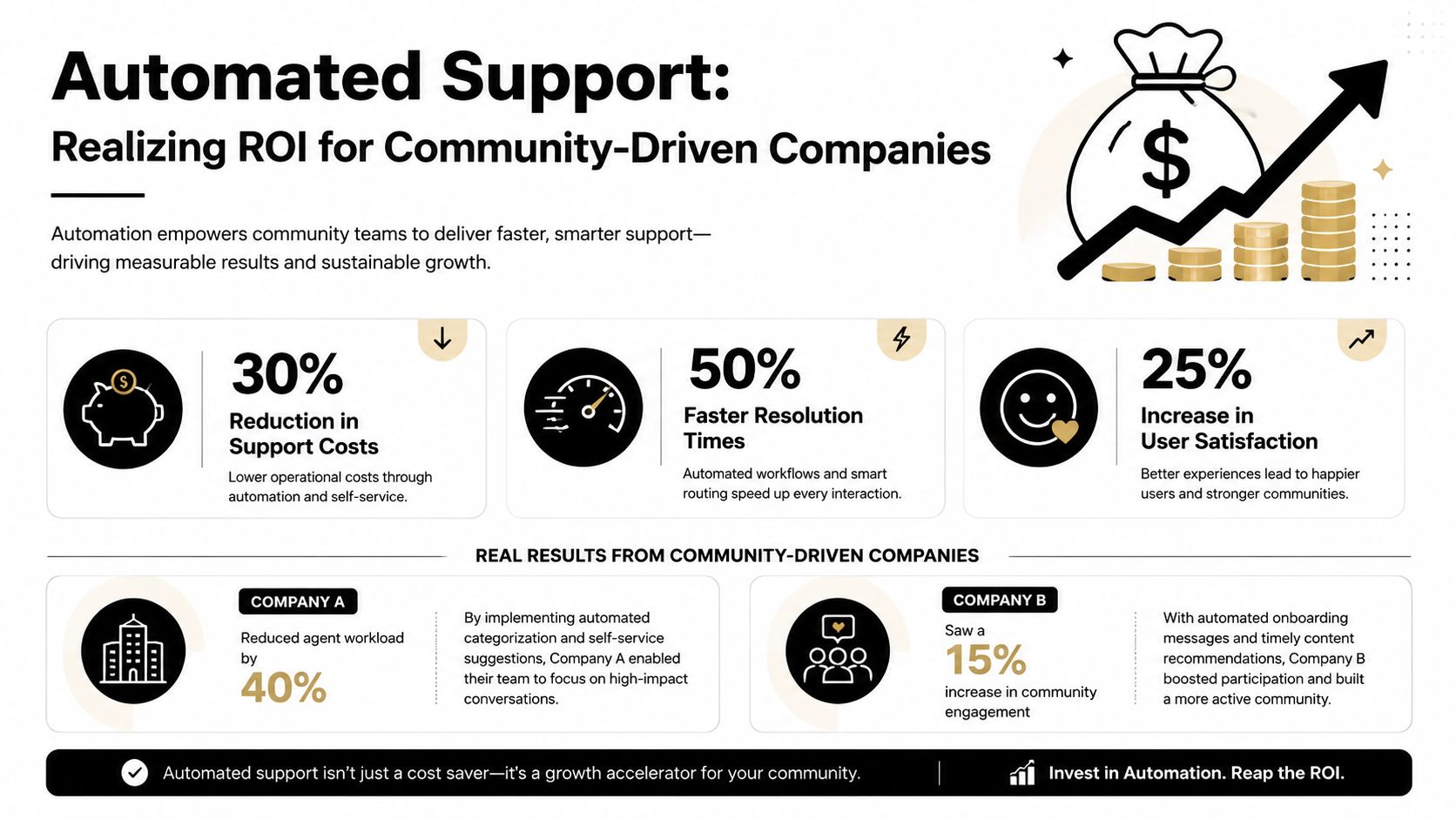
The clearest answer comes from cost and capacity. Automated support systems deliver strong economic efficiency, with the average cost per automated interaction ranging from $0.25 to $0.50 compared to $6 to $12 for a human-handled ticket. The same data shows support cost reductions of 20–30% for small businesses and 25–40% for companies with mature automation programs within 18 months, based on Dante AI's customer service chatbot statistics.
That gap matters a lot in communities where routine questions dominate volume. Access issues, role questions, reward eligibility, order status, account setup, and “where do I find this?” requests often don't need a moderator's judgment. They need a fast, consistent answer.

A community team usually sees value in three places:
There's also a productivity angle. AI chatbots achieve a 75% query resolution rate without human intervention, and AI-assisted support agents handle 13.8% more customer inquiries per hour, according to the same Dante AI statistics roundup. For lean teams, that can mean absorbing growth without immediately adding headcount.
The ROI story isn't just “automate everything.” Satisfaction can drop if the bot resolves a ticket technically but leaves the person feeling dismissed. The same source notes that CSAT for bot-resolved tickets averages 68%–74%, while fully human interactions average 82%–86%. At the same time, overall satisfaction with AI-assisted support has reached 87% globally, up from 73% in 2023.
That distinction is important. Users often like AI when it helps humans respond better. They like it less when it blocks access to a human during edge cases.
A community doesn't judge automation by how many tickets disappear. It judges automation by whether the answer feels reliable and the handoff feels respectful.
For leadership, the practical conclusion is simple. Automation works best as a filter, responder, and assistant for routine work. Human moderators still carry the relationship during disputes, trust-sensitive moments, and unusual cases.
Many rollouts fail because the team starts with the bot and skips the groundwork. Community support has a different problem from traditional help desks. The knowledge is decentralized, inconsistent, and full of context that doesn't fit neatly into one article.
That's why the first phase isn't deployment. It's cleanup.
Start by gathering the sources the community already relies on. That usually includes GitBook pages, pinned Discord posts, moderator macros, old support threads, Google Docs, website FAQs, and internal notes.
Then separate them into three buckets:
The hardest part is usually the handoff problem. As FPT Software's discussion of AI-augmented contact centers points out, teams often struggle to train automated support on decentralized sources like Discord threads, GitBook, and Slack without losing context during escalation. Many bots pass only the last message to a human instead of the full thread, intent, and shared materials.
Once the knowledge is sorted, the team can train the AI and connect the support channels that matter most. This doesn't mean every channel has to go live on day one. A narrower rollout is usually safer.
A pilot often starts with one or two high-volume channels and a small set of repetitive intents. Good early candidates include onboarding questions, account status checks, community rules, or product setup basics.
When evaluating setup patterns, teams often look for examples of how to automate customer support across channels, especially when they need both public-thread replies and private-ticket workflows.
At this point, an automated customer support system becomes operational instead of theoretical.
Useful rules include:
A human handoff should include more than a transcript. It should show the user's likely intent, the sources the AI referenced, what was already tried, and any files or links shared earlier in the thread.
If the human agent has to ask the customer to repeat everything, the automation didn't save time. It just delayed support.
After launch, the team should review where the AI succeeds, where it hesitates, and where it creates confusion. Then it can gradually cover more intents and channels.
A good expansion pattern is simple. Add complexity only after the team trusts the basic flows.
Support leaders can get misled by neat dashboards. A high AI resolution rate may look impressive while frustrated users abandon the channel. For community-driven support, the strongest dashboard includes both operational metrics and behavioral warning signs.
That's where many teams need a mindset shift. Traditional reporting asks, “How many tickets were closed?” Better reporting asks, “Which interactions created confidence, and which ones pushed people away?”

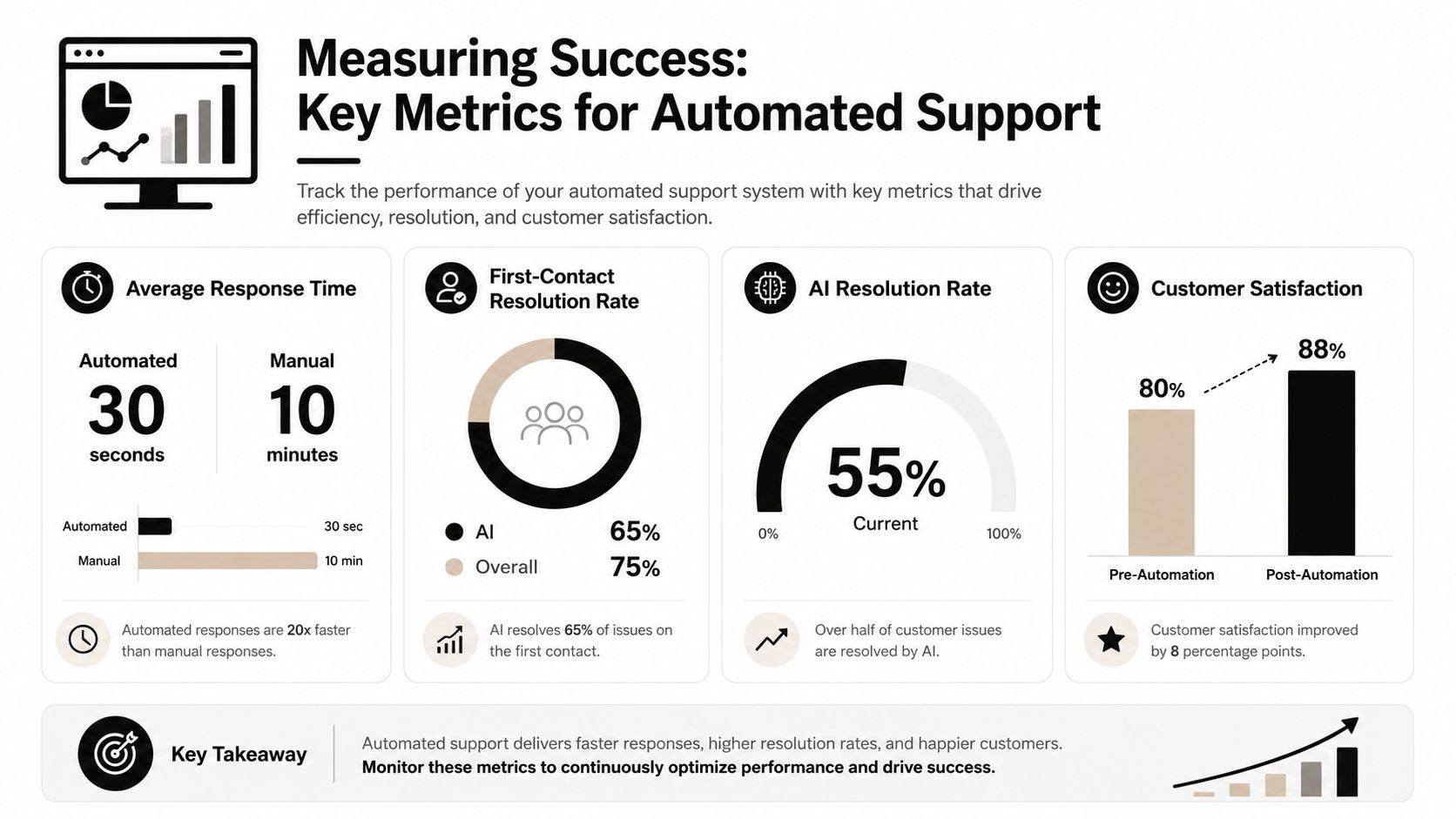
A useful scorecard combines speed, quality, and behavior:
| Metric | Why it matters | What it can miss |
|---|---|---|
| Response time | Shows how quickly users get help | Fast replies can still be wrong |
| First-contact resolution | Measures whether the issue ended in one interaction | Doesn't capture silent frustration |
| AI resolution rate | Shows automation coverage | Can reward over-automation |
| Satisfaction trend | Shows whether the experience improved over time | Often arrives too late |
| Repeat contact within 48 hours | Flags weak or incomplete answers | Needs cross-channel visibility |
| Rage clicks or repeated messages | Signals immediate friction | Often ignored in classic support tools |
There's a strong operational case for tracking the first three. Intelligent customer service automation with NLP and machine learning has been linked to a 35% reduction in response times and a 45% increase in first-contact resolution rates, as reported in the PhilArchive analysis of intelligent automation.
But the more distinctive signal for community teams is frustration behavior.
Rage clicks as a predictor of AI support failure is an overlooked angle in support operations. The article describes rage clicks, such as repeatedly pressing the same button or repeating messages, as an early indicator of silent churn. That matters in Discord and Telegram communities because users often don't submit a complaint before leaving. They stop engaging.
Three practical failure patterns show up often:
A useful companion practice is reducing bad outputs before they reach users. Teams working on quality control often review guidance on preventing AI hallucinations in support workflows, especially when knowledge sources are inconsistent.
Watch what frustrated users do, not just what satisfied users report.
Choosing a vendor is less about flashy AI features and more about fit. Community teams need systems that can absorb messy knowledge, support public and private conversations, and preserve context across channels.
The market is growing fast, which gives buyers more options. The global AI customer service market is projected to reach $15.12 billion in 2026, according to Lorikeet's AI customer service statistics roundup. For buyers, that usually means stronger platform maturity and more product variety.
A practical evaluation matrix usually includes these criteria:
A gaming studio on Discord usually cares most about public-thread support, moderation-adjacent workflows, and quick answers for repetitive player issues. It should prioritize thread-aware handling and strong escalation paths for harassment, bans, or account disputes.
A Web3 project on Telegram often faces round-the-clock volume, impersonation risk, and repeated onboarding questions. It should prioritize private-ticket routing, policy guardrails, and careful handling of trust-sensitive queries.
A SaaS company using Slack and web chat usually needs a bridge between community questions and formal support operations. It should prioritize clean handoffs, searchable knowledge, and reporting that helps support and success teams work from the same context.
One option in this category is Mava, which supports support workflows across Discord, Telegram, Slack, the web, and email, with a shared inbox, AI agents, knowledge imports, and human handoff features for community-driven teams.
An automated customer support system works when it does three jobs well. It answers routine questions fast, hands difficult cases to humans with context, and helps the team spot frustration before users disappear.
The next move is usually straightforward:
Community support rarely breaks because the team lacks effort. It breaks because knowledge is scattered and frustration hides in plain sight.
Teams that need support automation across Discord, Telegram, Slack, web chat, and email can explore Mava as one platform built for community-driven workflows. It combines a shared inbox, AI agents, knowledge imports, automations, and analytics so moderators and support teams can manage high-volume conversations without losing context.
.png)
.png)
.png)
