.png) Get Started
Get Started
Your inbox is already full, Slack keeps lighting up, and a Discord thread just turned into three separate customer questions with no clean handoff. That's the moment teams start searching for a Help Scout alternative, not because Help Scout is broken, but because support has moved into places where a classic email-first help desk feels too narrow. The market keeps expanding, with customer service software projected to grow from $8.79 billion in 2024 to $18.58 billion by 2032 in one industry analysis, which explains why vendors are pushing harder on shared inboxes, automation, self-service, and omnichannel workflows. For community-led SaaS teams, the question is simple: which platform can keep context intact across Discord, Telegram, Slack, web chat, and email without turning support into a pile of manual triage?
A support queue can start in email, then spill into Discord, Telegram, and Slack before anyone has a clean handoff. Mava is built for that reality. It suits community-driven companies and modern SaaS teams that need to answer customers where the conversations already happen, while keeping context in one place across Discord, Telegram, Slack, web chat, and email.
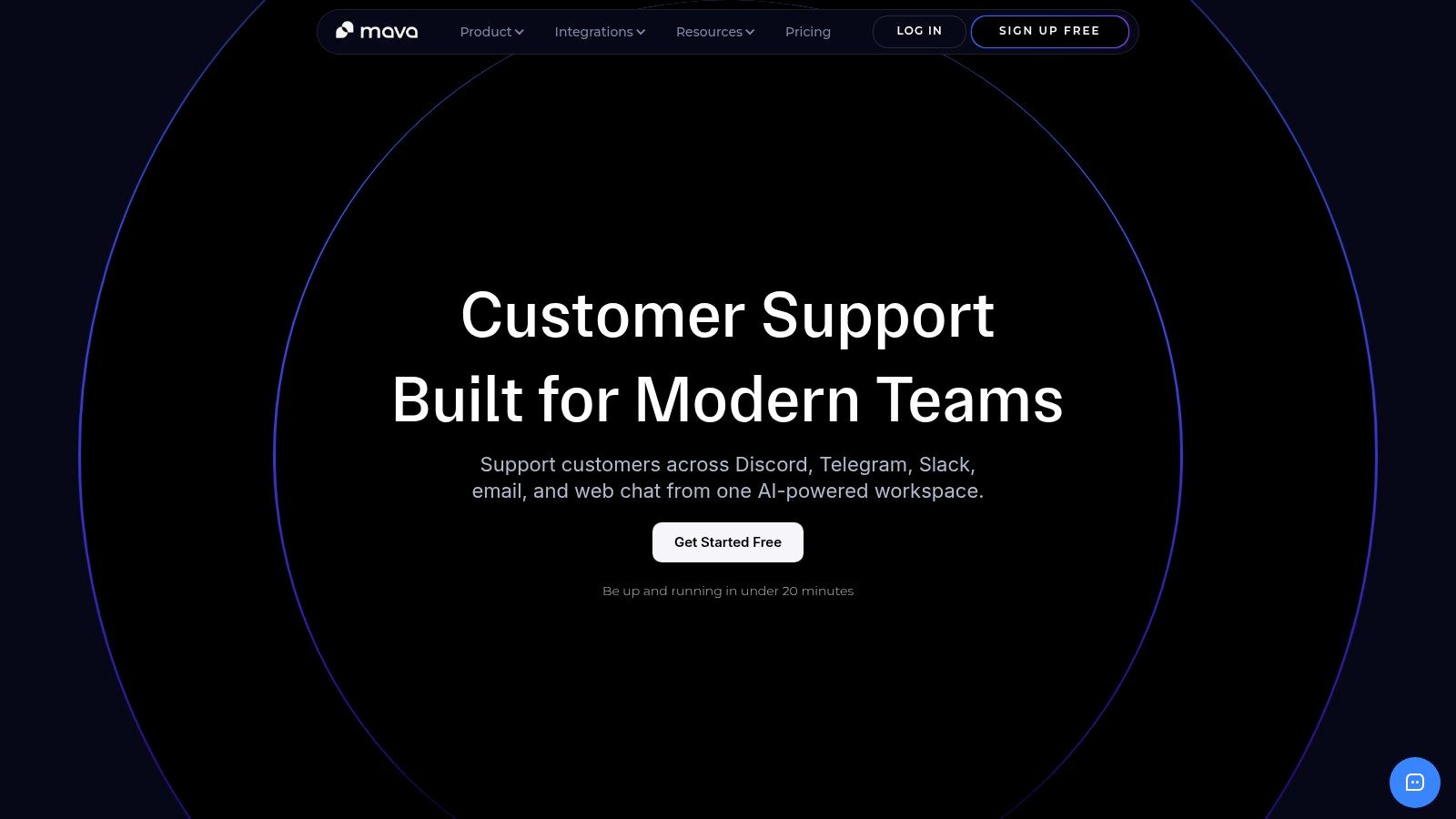
Mava is more than a Discord ticket bot. It brings conversations into a shared inbox, uses AI agents to handle repetitive questions, and passes issues to humans when a response needs judgment, moderation, or escalation. That matters in community support because the work is rarely just answering FAQs. Teams also need thread history, consistent public replies, and a clear path from a noisy channel to a private follow-up.
Practical rule: If support happens in public channels, the best tool is the one that preserves context while making handoff boring.
The setup is built to be quick. Teams can import knowledge from a website, GitBook, Google Docs, and other sources, then test the AI before they turn it loose on real traffic. That makes Mava a sensible fit for SaaS teams that already have content in place but do not want a long implementation cycle just to support multi-channel requests.
Mava also fits teams that care about AI automation without giving up human control. It includes built-in analytics, custom views, and status tracking, so leaders can monitor response times, AI resolution rates, ticket volume trends, and satisfaction patterns in one system. The company positions the product as trusted by thousands of communities, with large volumes of private tickets and public AI responses, and says it can reduce ticket load by up to 60% for customers. Support leaders should still test that claim against their own workflows before rolling it out broadly.
The trade-off is clear. Mava is not an outsourced moderation service, it is the platform your own team runs, so staffing still matters. Free and Founder plans have agent limits, and exact pricing tiers are not shown on the site, so buyers who need budget certainty should confirm commercial terms before rollout. If you are comparing it against broader social and support tooling, the trade-offs are easier to see in a Help Scout vs. Mava alternative guide, especially for teams weighing community workflows against classic ticketing. For a wider SaaS growth comparison, the AI growth tool showdown gives useful context on how AI-first tools are being positioned across different parts of the stack.
Website: Mava
Zendesk is the enterprise-depth choice, and that's the right framing for teams that have already moved past lightweight inbox software. Market comparisons consistently place it as the most mature option for scale, especially when a team needs omnichannel agent workspaces, voice, routing, governance, and a deep app ecosystem. That lines up with the broader market trend toward more conversations handled by fewer agents, across more channels, not fewer.
Its technical appeal is less about a single feature and more about the system around it. Zendesk's AI stack now sits alongside routing, copilot tools, analytics, and a large marketplace, which makes it attractive for organizations that need standardized workflows across support, operations, and adjacent teams. The flip side is that this kind of depth rarely feels light during setup, and smaller teams often end up paying for capability they won't use right away.
Recent Help Scout alternative coverage puts Zendesk in a very different AI pricing lane from Help Scout. One 2026 benchmark table lists Intercom Fin at $0.99 per resolution, Front Autopilot at $0.05 per conversation, and Richpanel at about $0.20 per conversation, while Zendesk and Freshdesk lean more on seat pricing plus AI add-ons, which shows how strongly AI economics are now tied to support volume rather than simple licensing. For high-volume teams, that means the buying decision is about total operational shape, not just whether the help desk “looks nice.”
The best fit is a team that needs enterprise governance, complex routing, and room to grow into a contact-center style model. The weakest fit is a smaller support team that mainly wants a cleaner inbox and some automation, because Zendesk's setup and add-on structure can feel heavier than the problem deserves.
Zendesk makes sense when the support operation needs to be standardized, not just organized.
Website: Zendesk
Freshdesk is usually the most natural step up for teams that like Help Scout's simplicity but need more muscle. It keeps the help desk model familiar, then adds omnichannel support, Freddy AI, routing, dashboards, and a more explicit automation story. That makes it a practical help scout alternative for SMB and mid-market teams that want time to value without jumping straight into a heavy enterprise stack.
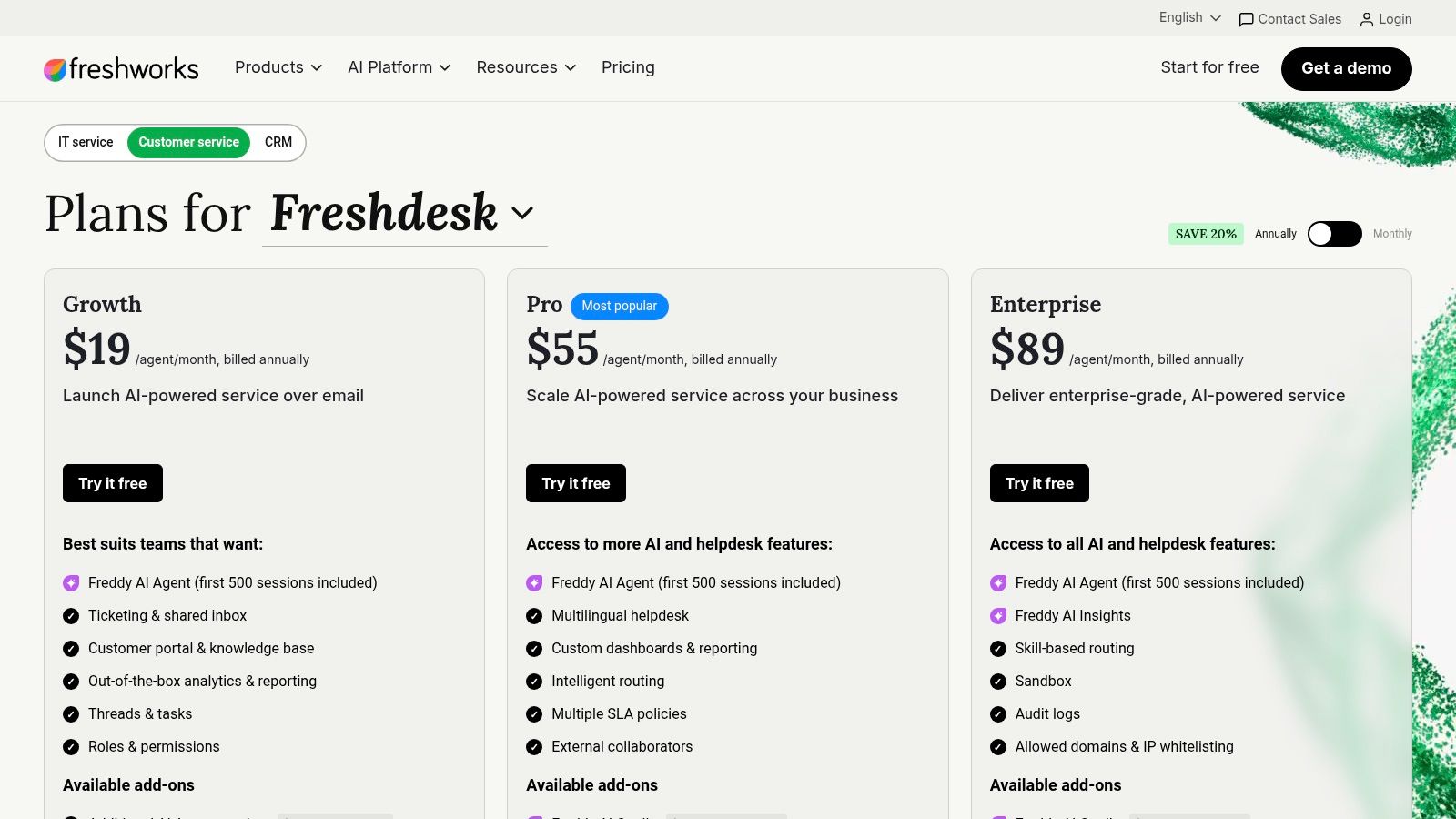
The pricing posture is one of Freshdesk's biggest advantages. Its product page keeps tiering relatively transparent, and current pricing examples show 500 AI sessions included on some tiers, which is a more tangible starting point than a pure per-resolution surprise bill. That matters to support leaders who need to forecast spend against actual ticket volume, especially when AI usage is the main reason they're shopping alternatives.
Freshdesk works best when the team wants a mainstream support platform with enough automation to reduce manual work, but not so much complexity that admins need a separate project just to maintain it. It supports ticketing, shared inbox workflows, a knowledge base, and customer portal features, so it covers the standard support foundation well.
The trade-off is that advanced automation and expanded AI can still move behind add-ons or higher tiers. That means the cheapest visible price is not always the price once routing, reporting, and AI usage become operational necessities. For teams already worried about hidden AI costs, that's the part to model carefully.
Rule of thumb: Freshdesk is strongest when the team wants “better than Help Scout” without changing the whole support philosophy.
Website: Freshdesk
Intercom is the platform teams choose when support and product experience are tightly linked. Its strength is the combination of an in-app messenger, proactive outreach, bots, and the Fin AI Agent, which makes it especially relevant for SaaS teams with product-led onboarding or support that happens inside the app. That's a very different shape from Help Scout, and for the right team, that difference is the point.
The pricing model also tells you a lot about how Intercom wants to be used. One current comparison notes $0.99 per Fin AI resolution on the Essential plan, with higher tiers bundling more capability. That's useful if the business can tie support automation directly to product usage, but it can become harder to justify when support volume rises and the AI meter becomes a line item the finance team notices quickly.
Intercom is excellent for conversational support inside a product experience. It's also strong for proactive messages, tours, banners, and tooltips, which means support and lifecycle messaging can live in one place. For product-led SaaS, that's a real advantage because the support team can influence outcomes before a ticket ever gets opened.
What it doesn't naturally solve is community-native support in public channels like Discord or Telegram. That's the key distinction for modern SaaS and Web3 teams, because once support shifts into community spaces, the work becomes part moderation, part handoff, part knowledge management. Intercom is built for product conversation, not for public-channel support operations.
Website: Intercom

Front is the strongest choice for teams that live in email but still need real collaboration. G2's alternative framing puts it as the collaboration-first option, and that tracks with how it feels in practice. It's built around shared inbox workflows, internal comments, drafts, and cross-functional handoff, which makes it ideal for support teams that work closely with ops, finance, account management, or success.
The product's main appeal is that it keeps email-native support fast while making teamwork visible. That matters because many support failures aren't caused by missing answers, they're caused by answers getting trapped in side conversations. Front gives teams a way to keep one thread of truth without forcing everything into Slack.
Front's pricing and packaging show a platform that's willing to trade breadth for clarity. The Starter tier limits teams to a single channel type and up to 10 seats, which makes the product feel intentionally scoped for smaller collaboration-heavy teams before they graduate to more complex omnichannel work. It also offers AI add-ons like Copilot and Smart QA, which can be useful, but they come with the same practical question most support leaders ask, does the team need AI to deflect volume, or collaboration to keep humans aligned?
For community-driven companies, Front works best when support still begins in email and only occasionally reaches into adjacent channels. It's less convincing as a community-native support layer because the best parts of the product are tied to structured inbox work, not public-channel orchestration.
Website: Front
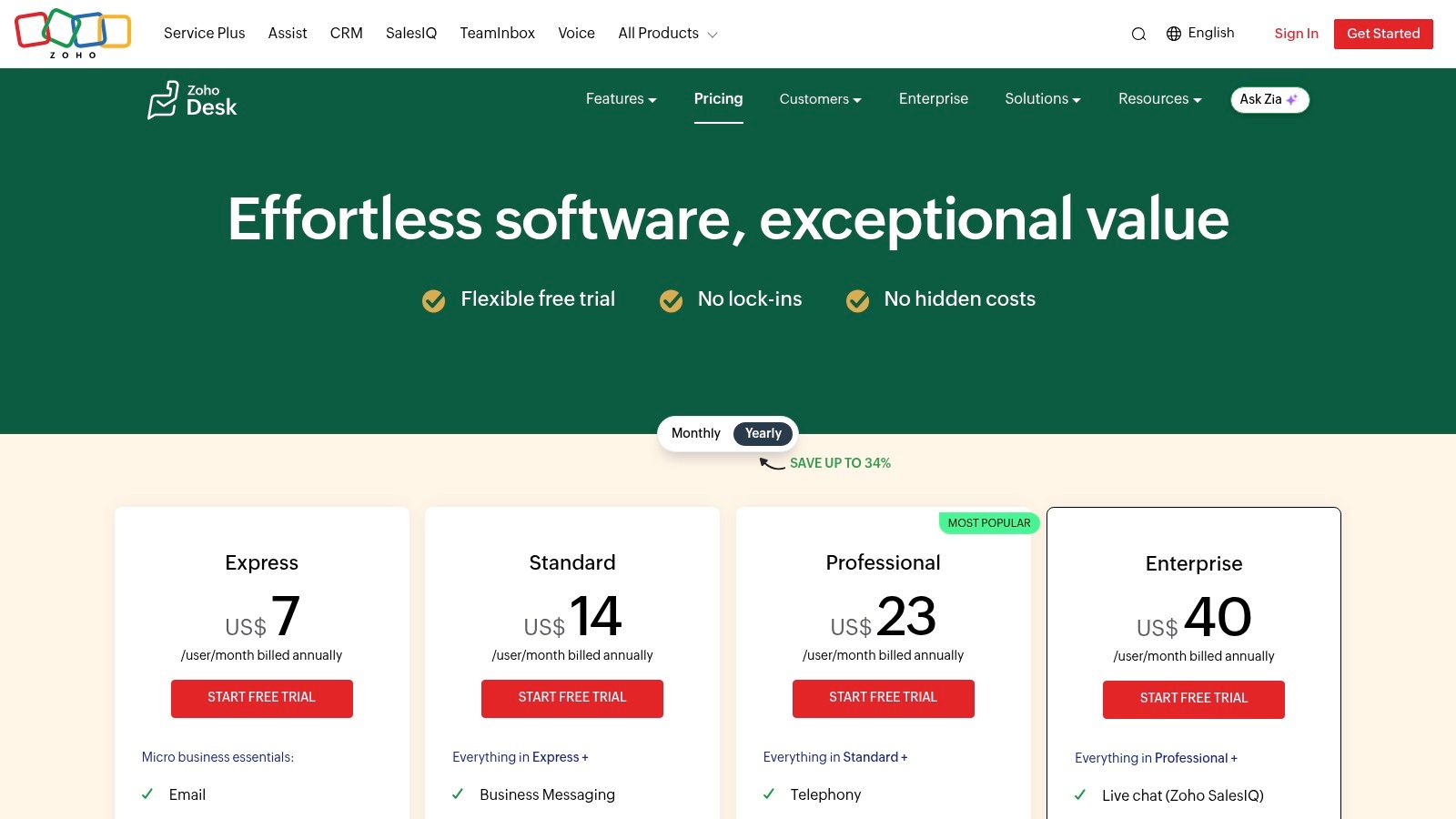
Zoho Desk is the value play for teams that want a broad help desk without enterprise pricing pressure. It's especially compelling inside the Zoho ecosystem, where CRM, analytics, and adjacent apps already share context. For budget-conscious support leaders, that integration story can matter more than polish, because the cost in support is often the time wasted bouncing between systems.
The channel coverage is broader than many teams expect. Zoho Desk supports email and social ticketing, knowledge base workflows, multilingual help center features, and instant messaging modules that can reach channels like WhatsApp, Instagram, and Telegram. That makes it more relevant than the usual “cheap help desk” label suggests, especially for teams that need to meet customers in more than one place.
Zoho Desk's biggest challenge is not capability, it's ramp-up. Teams often need time to learn how the system wants to be used, especially once they start leaning into Blueprints, skill-based routing, and the wider Zoho stack. That can be fine for admins who enjoy configurability, but it's a real consideration for lean teams that want quick adoption and minimal process overhead.
Its AI story also deserves a sober read. Zoho's Zia stack covers useful support automation, but buyers looking for AI as a major differentiator should be honest about how much tuning they want to do. Zoho Desk is strongest as a cost-effective, extensible support system, not as the most advanced AI workspace in the category.
Website: Zoho Desk
Gorgias is the obvious pick when support is part of the ecommerce revenue engine. It's built around storefront context, especially for Shopify, and that means agents can work directly with order data instead of tab-switching between tools. For brands handling refunds, edits, cancellations, and order questions all day, that saves real time and reduces the back-and-forth that frustrates both agents and customers.
The product is specialized on purpose. That makes it excellent for ecommerce teams and unnecessary for general SaaS support. It also explains why Gorgias often feels more expensive than simpler tools once volume rises, because its ticket-based and AI outcome pricing are tied to activity rather than just seats.
Gorgias is strongest when support agents are also influencing conversion, retention, and order recovery. Its automation and AI tools are designed around that reality, and the product's ecommerce focus is what gives it clarity. If a team is handling a lot of transactional support and wants order actions inside the help desk, Gorgias is hard to beat.
If the business is not commerce-first, the specialization becomes a downside. The platform's strengths are concentrated in storefront and order workflows, so general SaaS teams can end up paying for capabilities they don't need. For those teams, a broader shared inbox or community-native platform usually makes more sense.
Website: Gorgias
HelpCrunch is the leaner, lower-cost option for teams that want support and lightweight engagement in one place. It combines live chat, shared inbox, chatbot, knowledge base, email campaigns, and popups, which makes it useful for SMBs that don't want to stitch together a support stack from multiple vendors. That consolidation is often a primary reason teams look at it, not because it's the most advanced platform on the list.
The appeal here is operational simplicity. Support teams can manage conversations and basic lifecycle touches without jumping between a help desk, chatbot tool, and newsletter app. That's appealing for smaller SaaS teams that need coverage, not a giant administration surface.
HelpCrunch is not trying to compete with the deepest enterprise tools. Its governance, integrations, and advanced admin controls are lighter than what larger teams usually want, and its pricing interface can require a closer look before procurement signs off. That makes it a better fit for smaller teams that value quick setup and a lower-maintenance support stack.
For community-led companies, HelpCrunch can work if the main need is live chat plus a shared inbox. It's less compelling when the problem is multi-channel support across public channels, because it doesn't make community operations feel native in the way a purpose-built platform does.
Website: HelpCrunch
Crisp is a strong fit for startups and communities that want predictable pricing per workspace and broad channel coverage. It supports an omnichannel inbox including Telegram, WhatsApp Business, Instagram, and SMS, which gives it an immediate edge for teams that know their users don't all start in email. That channel flexibility is the main reason it shows up on shortlists for modern SaaS and community support.
The product leans into AI-first support as well, with AI Agent, knowledge training, Copilot, and workflow automation. The practical value is that the workspace model includes seats, which can make pricing easier to reason about than seat-plus-meter combinations that keep changing with usage. For early-stage teams, that predictability matters almost as much as raw feature depth.
Crisp's biggest strength is its native support for community channels like Telegram. That makes it a better fit than many classic help desks for teams where support happens in chat communities, public messaging spaces, and light-touch support flows. It also gives teams a knowledge base and customer portal on higher plans, which broadens the self-service story.
The trade-off is that some enterprise-grade features, including more advanced analytics and SLA controls, are pushed upward. AI credits and advanced automations may also require plan upgrades, so teams should check the actual operating cost once usage gets real. Crisp is best when the priority is flexibility and channel coverage, not enterprise governance.
Website: Crisp
Kustomer is the most CRM-like option on this list, and that's what makes it valuable for complex businesses. It brings together omnichannel support, custom objects, workflows, routing, SLAs, and a broad AI layer, which means it can model customer context in a way that simpler help desks can't. For teams that need support to reflect the business data around the customer, that flexibility is hard to ignore.
The platform covers chat, email, SMS, voice, and WhatsApp, so it's not limited to one interaction style. That makes it a serious option for operations-heavy teams that want a single workspace where customer history, workflow rules, and automation live together. It's also the kind of system that makes sense when support leaders are tired of stitching context together by hand.
Kustomer's biggest strength is its flexible data model. Custom objects let teams connect support to the rest of the business in a way that generic ticket fields usually can't. The AI stack, including conversation summaries, translation, and writing tools, adds another layer of usefulness for teams that operate across channels or languages.
The downside is commercial and operational. Pricing is quote-based, AI and voice are typically add-ons, and the platform is designed for teams that are willing to do a more serious implementation. That makes it less appealing as a quick Help Scout replacement and more appealing as a structural upgrade for teams that need a bigger system.
Website: Kustomer
| Platform | Core Features | Target Audience | Unique Selling Point | Pricing & Scale | UX & Metrics |
|---|---|---|---|---|---|
| Mava | Unified shared inbox (Discord, Telegram, Slack, web, email); AI agents with human handoff; knowledge base import; automations; analytics | Community-driven companies, Discord/Telegram communities, SMB support teams | Native community channel integrations; testable AI sandbox; reduces ticket load by ~60% | Free plan; AI included on all plans; higher tiers offer unlimited seats | Fast setup; analytics for response time, AI resolution rate, and customer satisfaction; improves conversion |
| Zendesk | Omnichannel agent workspace (email, chat, voice, messaging); advanced routing, automation, and integrations | Enterprises and large contact centers | Broad enterprise feature set with governance, security, and a large ecosystem | Tiered enterprise pricing; AI and add-ons can substantially increase cost | Mature analytics; highly scalable, though administration and setup can be complex |
| Freshdesk (Freshworks) | Ticketing, shared inbox, knowledge base, Freddy AI, routing, and dashboards | SMBs and mid-market teams upgrading from shared inboxes | Transparent pricing tiers and quick time-to-value with competitive AI features | Transparent pricing; some AI and automation require higher tiers or add-ons | Strong reporting with fast onboarding and time-to-value |
| Intercom | In-app messenger, Fin AI, bots, proactive messaging, and product tours | Product-led teams needing in-app support and customer engagement | Best-in-class in-app support experience and proactive engagement tools | Mix of per-seat and usage-based AI/outbound pricing; can become expensive | Excellent engagement metrics; pricing complexity can impact ROI |
| Front | Email-first shared inbox with ticketing, collaboration, omnichannel support, and AI add-ons | Teams centered around collaborative email workflows | Superior collaborative email experience with strong internal teamwork features | Clear pricing tiers; starter plans limit channels and seats; AI add-ons increase cost | Highly collaborative UX with predictable workflows for email-first teams |
| Zoho Desk | Email and social ticketing, knowledge base, Zia AI, Blueprints, and multilingual support | SMBs seeking an affordable help desk within the Zoho ecosystem | Competitive pricing with deep integration across Zoho applications | Cost-effective pricing (regional variations apply); confirm USD pricing at checkout | Feature-rich platform with a learning curve for new users |
| Gorgias | Ecommerce ticketing with embedded storefront data, Shopify actions, and AI | Ecommerce merchants using Shopify, BigCommerce, or Magento | Perform order actions directly from support tickets to reduce context switching | Ticket- and AI outcome-based pricing; costs increase with support volume | Highly optimized for ecommerce support workflows |
| HelpCrunch | Live chat, shared inbox, chatbot, knowledge base, email campaigns, and popups | SMBs looking for an all-in-one support and engagement platform | Lean, affordable alternative to Intercom with integrated engagement tools | Competitive pricing; interactive pricing may require contacting sales for US quotes | Easy setup with strong value for small and growing businesses |
| Crisp | Omnichannel inbox (Telegram, WhatsApp, Instagram), AI agent, automation, and knowledge base | Startups and online communities seeking predictable pricing | Flat workspace pricing with included seats and native community channel support | Predictable workspace pricing; advanced AI features may require upgrades | Simple user experience; enterprise analytics are limited on lower tiers |
| Kustomer | Omnichannel support, custom objects, workflows, AI Agent Studio, and reporting | Complex businesses requiring CRM-style customer context and custom data models | Flexible data model with powerful workflow automation | Seat-based, quote-driven pricing; AI and voice capabilities sold separately | Advanced reporting and observability; requires more onboarding than simpler platforms |
Switching help desks is a strategic decision, not a feature shopping exercise. The best Help Scout alternative is the one that fits your primary support motion, your real channel mix, and the way your team works under load. A platform can look great in a demo and still fail if it doesn't match where your users ask for help, whether that's a Discord server, a Telegram community, a Slack workspace, or a classic email queue.
Start with the channels, because channels shape everything else. If support happens in public or semi-public community spaces, tools like Mava and Crisp deserve attention first because they're built around multi-channel context and faster handoff. If the team still lives mostly in email and internal collaboration is the bottleneck, Front and Zendesk are stronger fits because they lean into shared inbox structure and team coordination.
Then look at AI economics. The market is moving toward agentic AI with metered resolution pricing, and the practical question isn't whether AI exists, it's whether the billing model matches your support volume. The categories are already diverging, some tools charge by seat, some by resolution, and some by conversation, so teams should model what happens when volume rises rather than assuming the first month's bill is representative. As noted earlier, the current market is being shaped by the pressure to handle more conversations with fewer agents, which is why automation, routing, and deflection matter more than they used to.
Reporting depth matters too. If the weekly ops review depends on more than a few basic metrics, lightweight inbox tools will eventually feel thin. If the team mainly wants fast answers and a clean workflow, then a lighter platform can be the smarter move, because unnecessary complexity slows adoption and creates admin overhead.
The most reliable way to choose is to pilot the top two candidates against a real queue. Use a live support stream, track the handoff quality, watch how much context survives across channels, and check whether the AI lowers manual work or just adds another layer to manage. That kind of pilot tells the truth faster than a feature checklist ever will.
If the goal is community-native support with AI that works across Discord, Telegram, Slack, web chat, and email, Mava is built for that exact job. It gives teams a shared inbox, fast AI setup, and the automation needed to keep volume under control without losing context. Visit Mava to see how it can replace scattered ticket bots and simplify support across every channel your users already prefer.
.png)
.png)
.png)
