.png) Get Started
Get Started
A lot of community teams are in the same loop right now. A user posts in Discord, follows up in a website widget, then replies to an automated email as if it's part of the same conversation. The moderator who picks it up has to reconstruct the story from fragments, ask the same questions again, and hope the user hasn't already given up.
That's the core problem behind live chat in app. It isn't just about adding a chat bubble to a product. It's about giving support, success, and community teams one place to continue the same conversation without losing the thread.
A basic widget sits on a page and waits for someone to click it. In-app live chat works differently. It lives inside the product or community experience, carries user context with it, and stays connected to what the person was doing when they asked for help.
For community-first teams, that distinction matters. A Discord member reporting a wallet issue, a SaaS user asking about billing inside the dashboard, and a gamer flagging a bug from within the game client are not starting generic support requests. They're bringing live context that should travel with the conversation.
Teams often don't struggle because they lack channels. They struggle because every channel creates another partial record.
A moderator sees one message in Discord. A support rep sees a separate ticket. A bot logs another exchange somewhere else. The user thinks it's one conversation. The company handles it like three.
Support quality drops fast when teams have to reconstruct context instead of resolving the issue.
That's why live chat in app should be treated as a communication layer, not a standalone feature. It can connect product state, user identity, prior messages, and channel history into a single thread. If a team is still evaluating whether a simple website widget is enough, this guide to a chat widget for website support helps clarify where widgets help and where they fall short.
The category has moved well beyond experimentation. The global live chat software market was valued at approximately $1.16 billion in 2022 and is projected to reach $2.09 billion by 2033, while Fortune 500 live chat adoption increased from 54% in 2022 to 73% in 2025, according to Business Research Insights on the live chat market.
That shift says something important. Large companies no longer treat embedded chat as a nice extra. They treat it like core support infrastructure.
A system usually deserves the label when it does most of the following well:
When those pieces are missing, teams don't have live chat in app. They have one more inbox.
A new member is halfway through onboarding, hits a wallet error, asks an AI assistant for help, then gets passed to a human. If that handoff drops the original thread, the member has to restate the problem, paste screenshots again, and wait while the agent rebuilds context. In community products, that is where trust falls apart.
In-app chat changes that support moment into a product moment. The user stays in flow, the agent sees the conversation history, and the team can resolve the issue without pushing someone into a ticket queue or a public channel that was never built for account-specific problems.
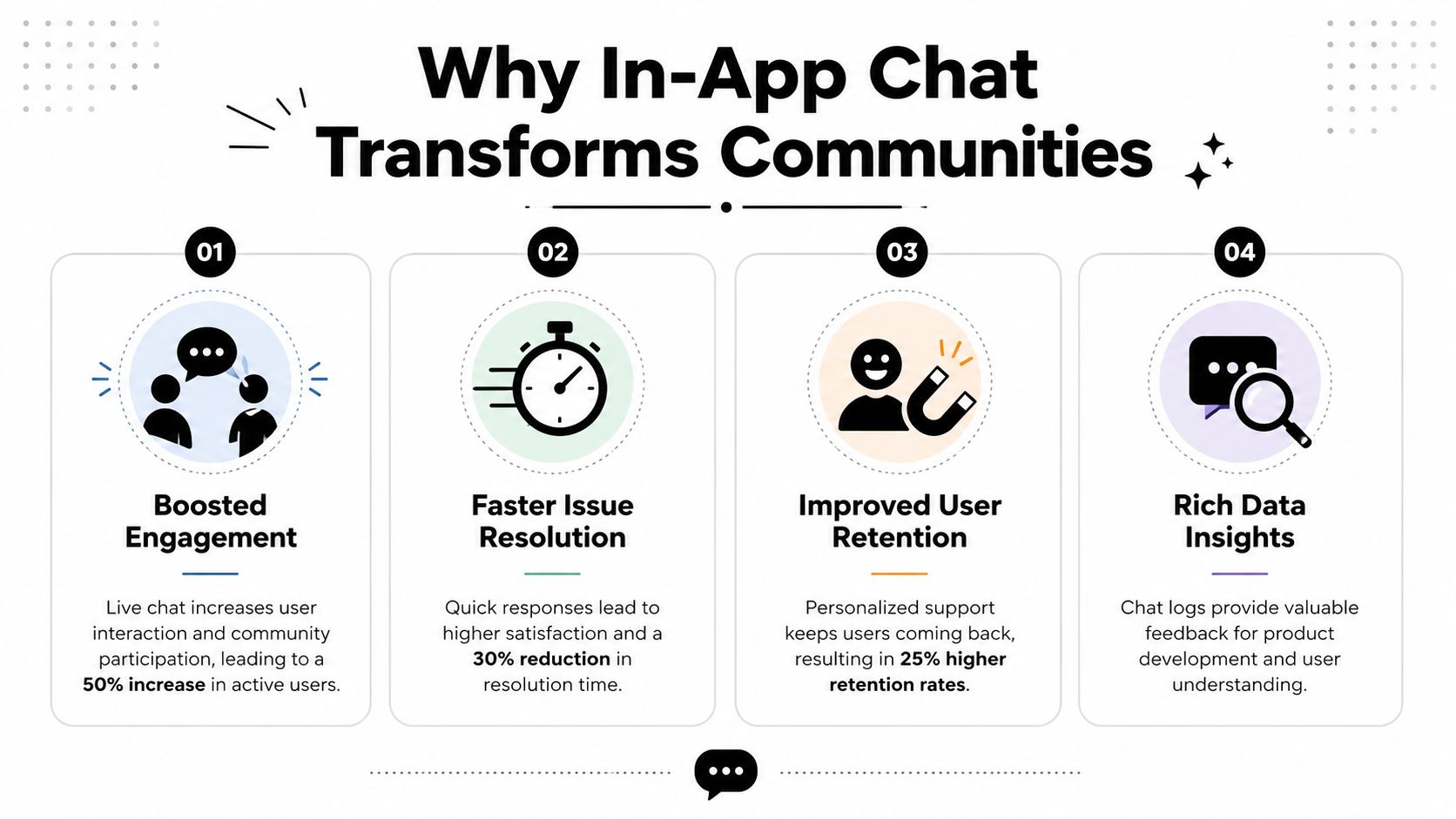
Live chat delivers an average CSAT score of 88%, the highest of any digital support channel, and businesses using it also report a 20% average increase in conversion rates, while customers who chat before a purchase spend 60% more on average, according to Ringly's roundup of live chat statistics.
Those numbers matter, but the operational effect matters just as much. Community teams often get measured on deflection and queue volume, even though they are one of the few functions speaking to users at the exact point where activation, conversion, or churn is decided.
That is why strong in-app chat changes the economics of support. It does not just reduce cost. It helps revenue, retention, and community health.
When chat is embedded properly, the team gets more than faster replies.
One practical rule has held up across products I have worked on. If people have to switch tools to get help, resolution time goes up and confidence goes down.
Classic support logic assumes one queue, one ticket, one issue. Community operations rarely behave that cleanly. A user may start with a bot, continue in-app, reference a Discord thread, and need a specialist for a sensitive account action. If each step lives in a different system, every handoff adds delay and drops signal.
That is why in-app chat matters for community-led businesses. It preserves context across AI, human agents, moderators, and channels, so support can operate as an engagement engine instead of a disconnected cost center. Teams answer faster, keep public spaces cleaner, and make better decisions because the full conversation stays intact.
Performance still matters. If the chat experience lags during handoffs or traffic spikes, users stop trusting it. Teams that want to understand that side of the problem should review Appjet.ai's guide on latency.
A fast answer helps. A fast answer with full context is what shortens resolution time and builds durable trust.
A member asks a bot for help inside your product, gets part of the answer, then needs a human because the issue touches billing permissions on a connected Discord role. If the handoff drops the earlier messages, the user starts over, the agent guesses, and resolution slows down for reasons that have nothing to do with staffing.
Good chat architecture prevents that failure. It keeps transport fast, preserves message order, and carries conversation history from AI to human support without forcing people to repeat themselves.
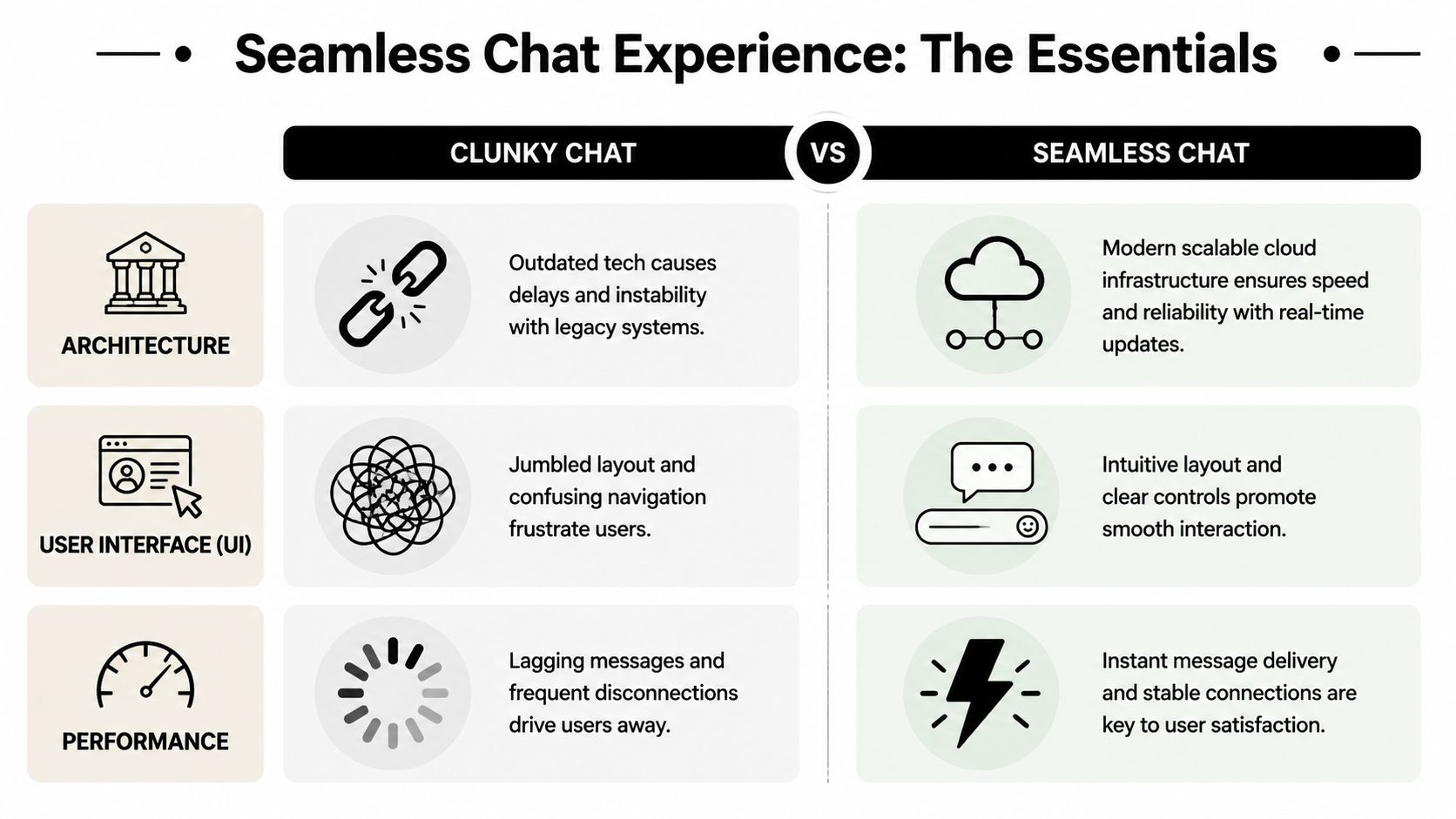
In-app chat needs persistent WebSocket connections if it is supposed to feel live. Without them, apps often fall back to HTTP polling, which adds overhead and makes delivery feel inconsistent, as explained in GetStream's glossary entry on real-time chat.
That trade-off gets expensive during bursts. Community teams do not see neat, even support volume. They see spikes around launches, moderation incidents, access problems, and announcements. A stack that polls for updates under load burns resources while making users wait longer for the very signals that tell them support is active.
Latency work matters here, but so does continuity. Appjet.ai's guide on latency is useful for diagnosing transport and rendering delays. Once speed is under control, the next question is whether the system can preserve the full thread when a bot escalates to a person.
Fast transport by itself does not create trust. Users need visible signs that their message arrived, that someone is handling it, and that the thread will stay intact if the issue changes hands.
A chat experience worth shipping usually includes:
Those features affect operations, not just polish. If presence is wrong, users assume nobody is there. If ordering breaks, agents misread what happened. If reconnect logic drops earlier messages, AI to human escalation turns into a transcript reconstruction exercise.
That is why teams evaluating an in-app web chat solution for unified support should inspect the handoff model as closely as the UI. A polished widget does not help much if moderators, AI agents, and human support reps cannot work from the same conversation history.
The fastest way to evaluate a chat stack is to test the moments where context usually gets lost:
CheckpointWhat good looks likeWhat breaks when it's weakConnection modelPersistent real-time transportLag, retries, duplicate fetchesMessage orderingClear sequence handling across agents and botsConfusing history during escalationsOffline recoveryReconnects without dropping prior messagesUsers repeat details after refresh or reconnectPresence routingAgent availability shown accuratelyChats sit idle or route to the wrong queueHandoff continuityAI and human agents see the same threadResolution slows because context has to be rebuilt
Teams often buy the interface first and discover later that the underlying system cannot support continuity across channels, agents, and edge cases. For community-first products, that is the core architecture question. Can the chat system keep the full conversation intact from first message to final resolution?
There are three common ways to add live chat in app. Teams can build from scratch, assemble a solution from libraries, or adopt a support platform that already handles the core infrastructure and workflows.
The right choice depends less on ambition and more on constraints. Engineering capacity, launch urgency, and channel complexity usually decide the outcome.
Build from scratch makes sense when the chat experience is integrally tied to proprietary workflows, custom permissions, or unusual product constraints. The trade-off is obvious. The team owns everything, including reliability, moderation logic, delivery guarantees, analytics, and ongoing maintenance.
Use a chat library or plugin when the need is narrower. This can accelerate mobile or hybrid app rollouts. For example, teams building with Capacitor may find this Capacitor plugin for live chat useful as a reference point for getting embedded chat into an app shell quickly. The downside is that libraries solve interfaces faster than they solve support operations.
Adopt a support platform when the challenge isn't just messaging, but routing, AI handoff, shared inboxes, channel unification, and reporting. One example is Mava's web chat product, which adds a web chat channel alongside community channels and routes conversations through one inbox.
A fast launch can still become a slow operation if the tool only handles messages and leaves everything else to manual process.
ApproachUpfront CostTime to MarketScalability & FeaturesBuild from scratchHigh engineering investmentSlowestMaximum control, but the team must build routing, analytics, moderation, security, and handoff logicLibrary or pluginLower than full custom buildFasterGood for embedding chat UI, but often limited for cross-channel workflows and support operationsPlatformSubscription cost instead of heavy build costFastestStronger operational coverage, especially for inbox management, automation, and channel coordination
Teams usually estimate the front-end work correctly. They underestimate everything after launch.
That includes:
A library can be enough for a narrow use case. A custom build can be right for product-heavy teams with unusual requirements. But if the operational burden is already the pain point, the decision shouldn't be framed as “how do we add chat.” It should be framed as “how do we run support without multiplying systems.”
A support queue breaks in predictable ways. AI handles the easy questions, a human picks up the harder ones, then the user follows up in Discord or Telegram and has to repeat the whole issue because the prior context never made it across. Response time matters, but scale usually fails on continuity.
The teams that handle volume well design support as an operating system, not a chat box.
High-volume communities cannot afford to treat every new thread the same way. If agents spend their day answering repetitive questions, specialist issues wait longer, moderation gets delayed, and users with legitimate edge cases lose patience.
A better model separates work by risk, complexity, and channel:
That last point matters more as volume grows. Every time an escalation drops context, the queue gets longer because agents spend time collecting details the system already had.
Silence creates more follow-ups than delay. Users can tolerate a wait if they know the issue is acknowledged, routed, and progressing.
Show queue state clearly. Confirm that the message was received. Let users see when automation is still gathering information and when a human has taken ownership. In practice, those small signals reduce duplicate pings and keep public community threads from turning into status-check loops.
I have seen this make a measurable operational difference. Teams often focus on shaving seconds off response time while ignoring the cost of uncertainty. A visible handoff state does more to calm a queue than another canned auto-reply.
In community products, support and moderation are often the same motion viewed from different angles. A billing complaint can turn into an impersonation report. A bug report can expose abuse. A public thread can require a private follow-up in minutes.
Scaling that work requires workflow controls, not just more agents:
This also applies before chat starts. Better intake quality reduces avoidable back-and-forth later, especially for account, billing, and trust cases. Teams working on capturing better form intelligence usually see the same pattern. Cleaner inputs make escalations faster because agents start with useful context instead of fragmented notes.
This is a useful product demo for teams thinking through operational design in practice:
A long metrics dashboard does not help if managers still cannot decide where to automate, where to staff, and where the product is causing support demand.
Track a tighter set of signals:
For community-first teams, context retention deserves the same attention as response time. If an AI assistant answers in-app, a human continues the case, and the user later follows up in Telegram, that should still be one conversation. If your reporting cannot show where that continuity breaks, the operation will keep scaling cost without improving resolution quality.
The hardest part of community support usually isn't answering the question. It's preserving the path that led to it.
A user starts with an AI assistant in a website chat. Then the issue gets handed to a human. Later, the same person follows up in Discord because they didn't get a clear resolution. If each handoff starts from zero, the team creates frustration even when the final answer is correct.
A critical issue in live chat workflows is that 40 to 60% of support escalations from AI to humans fail due to missing user history and conversation context, especially in fragmented environments like Discord and Telegram, according to SupportGPT's analysis of live chat in app.
That failure shows up in familiar ways:
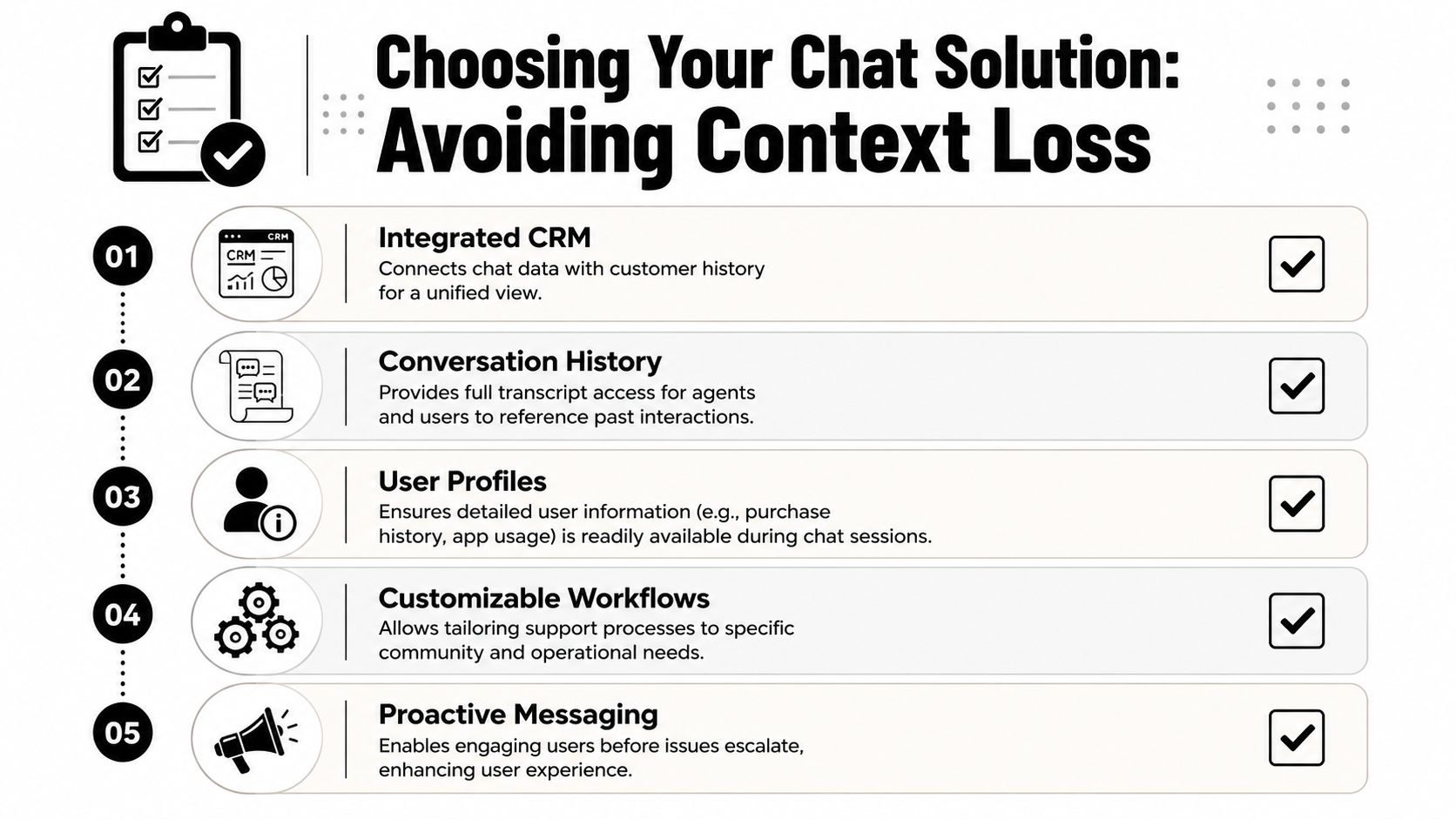
A lot of buying processes focus on interface polish, AI claims, or pricing tiers. Those matter. But for community-heavy teams, the sharper questions are about continuity.
Ask vendors things like:
This same context problem appears outside chat too. Teams that rely on forms often lose key details before the first response is sent. That's why this article on capturing better form intelligence is worth reading alongside chat evaluations. The pattern is the same. Weak intake creates weak support.
The true handoff isn't AI to human. It's context to no context. That's where service quality usually breaks.
For community platforms, a good solution should unify identity, transcripts, routing, and channel history into one operational view. If it can't do that, the team may still get chat. It won't get continuity.
That's the bar worth using in evaluation. Not whether the widget looks modern, but whether the system keeps the conversation intact when reality gets messy.
Teams that adopt live chat in app well don't just answer faster. They stop making users restart the same conversation in different places.
That's the broader shift. A community operation moves from fragmented tickets, disconnected bots, and manual reconstruction toward one continuous support layer that follows the user across product and channel touchpoints. The operational gain is obvious. The strategic gain is bigger. Support becomes part of onboarding, conversion, retention, and trust.
For teams handling Discord, Telegram, web chat, and email together, this is closely related to a broader omnichannel customer support strategy. The difference is that community platforms feel the pain sooner because public and private support collide every day.
In the end, the strongest support systems don't just route messages. They preserve context, manage handoffs cleanly, and let users feel known from the first question to the final answer.
If the goal is to run community support without losing context between AI, human agents, Discord, Telegram, and web chat, Mava is one option built for that operating model. It brings those conversations into a shared inbox, supports embedded web chat, and helps teams manage public and private tickets as one continuous workflow.
.png)
.png)
.png)
