.png) Get Started
Get Started

A community support queue rarely breaks all at once. It frays at the edges first.
A Discord mod answers a billing question in public because it looked quick. Someone else takes the same issue to email because the user also wrote to support@. A Telegram admin promises a follow-up in direct messages, but the product team only sees the Slack thread. By the time a real owner picks it up, the user has repeated the issue three times and the team is arguing about who already handled it.
That's the point where shared inbox management stops being a nice operational upgrade and becomes basic damage control. Community teams don't just manage email anymore. They manage public posts, private messages, bot escalations, moderator handoffs, and AI-assisted replies across several channels at once. Without one operating system for all of that, support turns into guesswork.
Most community teams start with good instincts. They answer fast, stay friendly, and jump between Discord, Slack, Telegram, and email because that's where users are. Early on, that feels responsive.
Then volume changes the rules.
A bug report arrives in a public Discord channel. A frustrated customer sends a direct message to a moderator. A partner asks for help in Slack Connect. An account issue lands in email. None of those conversations live in the same place, and none of them follow the same handoff process. The team still thinks it's running “support,” but it's really running several disconnected queues.
The first failure isn't usually rudeness or lack of effort. It's fragmentation.
A moderator replies in public without seeing that a support agent already asked for logs in private. Another teammate archives an email because it looked resolved, but the Discord thread is still active. Someone screenshots a conversation into Slack for context, and now the actual history lives in three places.
That creates a pattern every community operator recognizes:
Support chaos usually looks like a people problem from the outside. It's almost always a queue design problem.
Teams often respond by adding more check-ins, more pings, and more heroic effort. That rarely works for long. More effort inside a broken workflow just creates faster confusion.
Community support needs a system that can separate signal from noise, move a conversation from public to private when needed, preserve context, and show exactly who is responsible at every point. That system is shared inbox management. Not as a mailbox feature, but as the control layer for every inbound conversation the team has to handle.
Shared inbox management is often mistaken for a shared email login or a support@ address that several people monitor. That's too narrow. For community teams, it works more like air traffic control.
Every message enters the same operating environment, whether it starts in Discord, Telegram, Slack, web chat, or email. The job isn't just to “see messages.” The job is to route them safely, assign responsibility, and make the current state obvious to everyone involved.
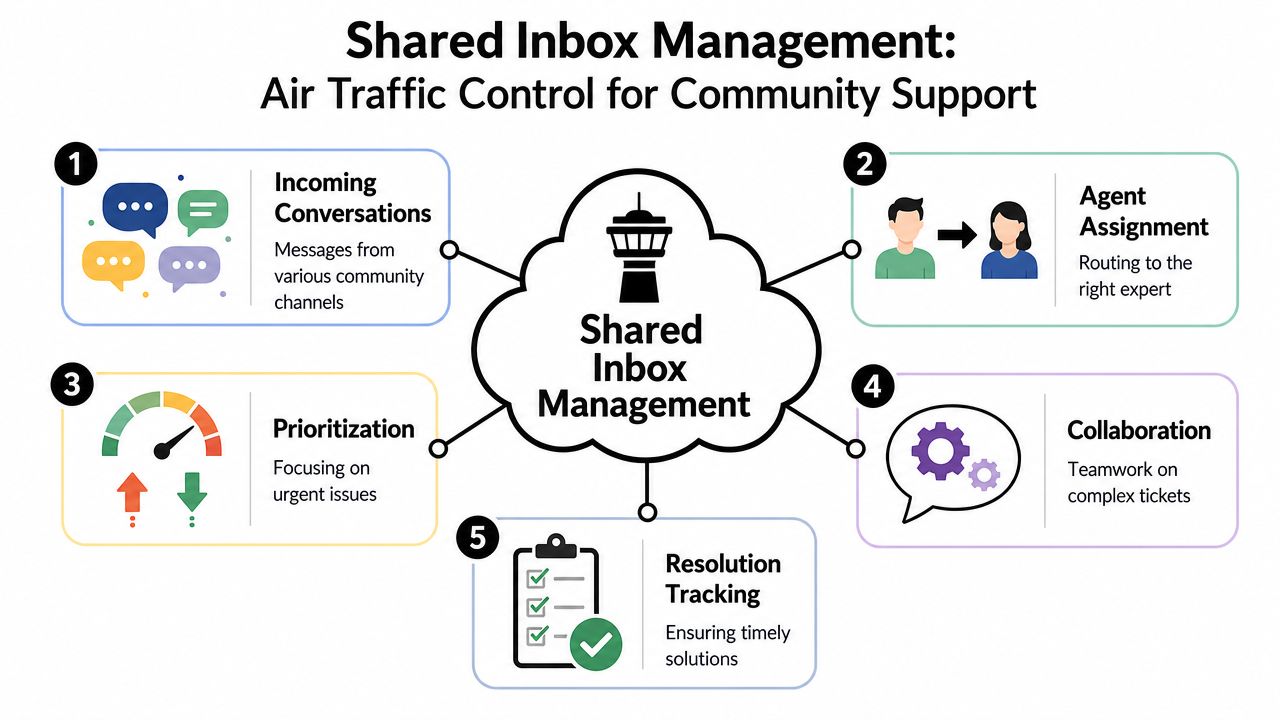
A shared inbox that only centralizes email still leaves community teams blind. True value comes from pulling public and private support flows into one place, then treating them as related conversations rather than isolated events.
That means a support lead should be able to answer basic questions immediately:
Without that unified view, teams don't manage work. They chase notifications.
The strongest shared inbox setups are built on three pillars.
If context lives partly in Discord, partly in Slack, and partly in an agent's head, the team has no reliable record. A shared inbox needs to become the place where the current status, conversation history, and internal notes live.
This is what makes handoffs work. It also stops the common failure where a user gets different answers from different people because nobody saw the full thread.
Visibility is not ownership. A thread can be visible to ten people and still be neglected.
High-functioning teams treat each support conversation as assigned work, not communal awareness. One person owns next action. Others can collaborate, but they don't compete to answer.
Operational rule: if a conversation has no owner, it isn't in progress. It's waiting to fail.
Read status tells a team almost nothing. An opened message might still need research, legal review, engineering input, or a reply in another channel.
Community support needs explicit states. New. Assigned. In progress. Waiting on customer. Waiting on internal review. Resolved. That state layer is what turns a pile of messages into a workable queue.
Once shared inbox management is set up properly, the team stops operating like scattered responders and starts operating like a coordinated desk. Mods know when to escalate. Agents know what's theirs. Leads can spot backlog risk before users complain publicly.
That's the difference between “we answer everywhere” and “we run support.”
A wallet complaint starts in a Discord channel. A moderator asks the user to switch to DMs because account details are involved. Ten minutes later, the same user emails support because nobody answered in private fast enough. By the time an agent sees the email, the public thread has three community replies, one partial answer from a mod, and no clean record of what already happened.
That is the core failure pattern in community support. Teams are not just managing volume. They are managing movement between public chat, private chat, and email without losing context or giving unsafe advice.
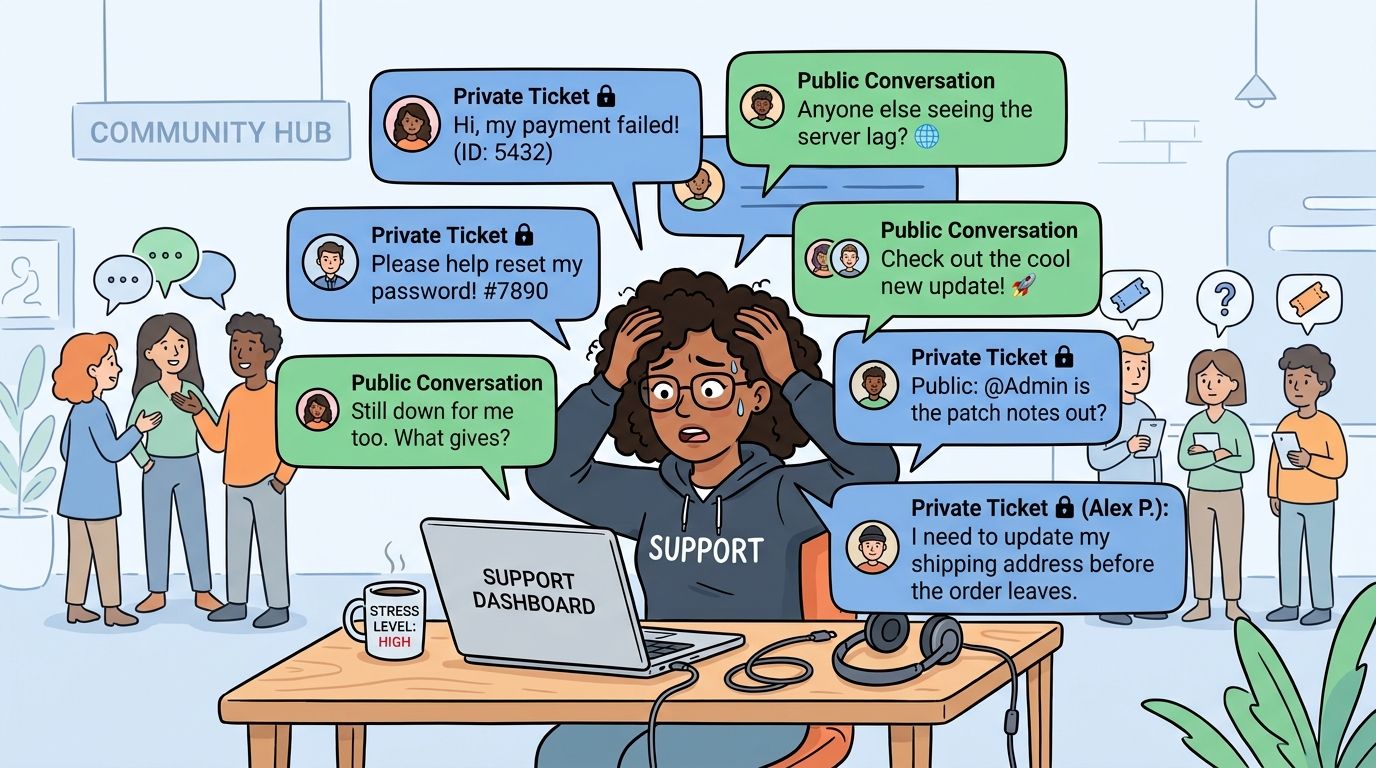
In email-only support, the unit of work is usually clear. In community support, one user issue can split across a Discord thread, a Telegram DM, a Slack Connect message, and an inbox reply. If those touchpoints are not stitched together, agents work fragments instead of cases.
The first visible symptom is duplicate handling. Shared mailbox teams regularly run into cases where more than one person replies because ownership is unclear, a risk Microsoft calls out in its guidance on shared mailboxes earlier in this guide. The more expensive failures are quieter. A moderator promises an update in public. An agent replies privately without seeing that promise. The user gets two different timelines and loses confidence fast.
Channel design makes this worse:
This is why teams comparing chat support with formal queueing eventually need a clearer model of how a ticketing system structures ownership and follow-up.
Community teams are adopting AI to answer common questions, draft replies, classify issues, and deflect repetitive work. That helps. It also creates a handoff problem that classic shared inbox advice barely addresses.
If AI answers publicly in Discord or Slack and then a human takes over in email or DMs, the team needs a clean record of what the bot said, what confidence it had, and why the case was escalated. Without that, the human starts cold, repeats questions, or contradicts the bot. Users read that as disorganization, not automation.
The practical trade-off is simple. Faster first responses are useful only if the handoff preserves context. Otherwise teams save a minute upfront and lose ten in repair work.
Teams often try to stretch basic mailbox or chat tools far past their design limits. That usually works until history, search, or permissions start breaking the workflow.
Microsoft documents that shared mailboxes can require licensing changes once storage and feature needs grow, which matters for support teams that need long conversation history close at hand and accessible to multiple responders. The operational issue is not the storage number by itself. The issue is what happens when teams start archiving aggressively, splitting history across tools, or limiting access just to keep the system usable.
Once that starts, the inbox stops being a source of truth. It becomes a partial record.
I have seen this show up in community ops teams that were otherwise disciplined. They had good people and decent response habits, but no reliable way to see the full journey from public question to private resolution. That gap creates rework, shaky moderation decisions, and missed risk signals.
In many communities, moderators and community managers become the unofficial intake layer. They spot issues early, calm users down, move conversations out of public view, and try to pull in the right expert. Without structured routing, they spend too much of the day acting as dispatch.
Here is what that looks like in practice:
Failure pointWhat the team feelsWhat users seeNo linked history across channels“I know this started somewhere, but I can't find it”Repeated questionsUnclear AI-to-human handoff“Did the bot already promise something?”Conflicting answersManual escalation from mods“I'm chasing the right person again”Slow private follow-upPublic and private work split across tools“We solved it, but nobody updated the original thread”Visible dead ends
This staffing problem shows up outside support too. Teams that compare tech recruiting solutions run into a similar issue when work starts in one channel and decisions happen somewhere else. The handoff gap becomes the primary bottleneck.
Community support breaks when one user journey gets treated like three separate conversations.
That is the central challenge. Shared inbox management for Discord, Slack, Telegram, and email has to track the whole path of the issue, including the AI reply, the moderator intervention, the private follow-up, and the final resolution. If the system cannot do that, the team is not managing support. It is chasing it.
A community inbox usually stops feeling manageable all at once. One Discord thread needs a private follow-up. A Slack message turns into a billing question. An email reply lands after a mod already answered in Telegram. The team is still "responding," but nobody is working from the same queue.
The teams that stay steady under load tend to run four workflows well. They triage fast, keep labels useful, assign ownership before replying, and watch response timers early enough to act.
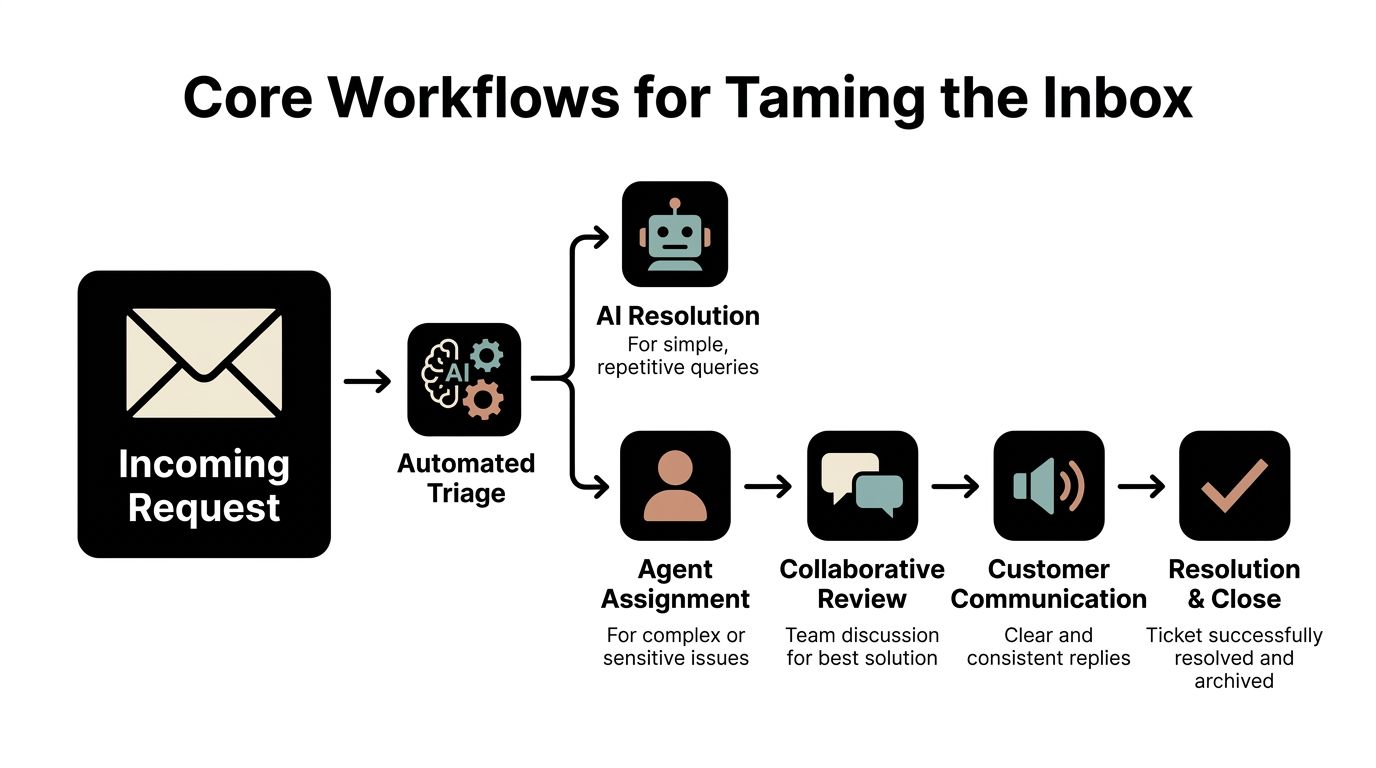
In community support, triage decides whether a conversation stays public, moves private, or needs another team entirely. That decision has to happen quickly, especially when moderators are juggling Discord mentions, Slack DMs, and email replies at the same time.
A good first pass answers four operational questions:
That is usually the point where teams outgrow ad hoc chat handling and need a clearer queue model. If you are deciding whether to formalize that process, this primer on what a ticketing system is helps frame the trade-off.
Tags work best when they help someone do the next step. They fail when they turn into a reporting hobby.
The cleanest setups usually stick to three label types:
Anything beyond that needs a reason. If a label does not change routing, reporting, or review, it usually creates noise. I have seen teams with thirty tags and less clarity than teams with six.
Shared inboxes break when multiple people feel half-responsible. In community channels, that problem gets worse because public conversations create pressure to jump in before anyone claims the thread.
The rule that holds up best is simple. Reply only from an assigned state.
That one habit reduces collisions, makes handoffs visible, and gives leads a live view of who owns what. It also helps prevent duplicate responses, a common failure in shared support queues that Front describes in its guide to managing shared inboxes and improving team accountability.
Practical rule: no assignment, no reply.
Ownership discipline also shows up in other high-volume team workflows. Recruiting teams run into the same coordination problem when they compare tech recruiting solutions. Work gets missed when intake is shared but ownership is vague.
A useful SLA setup helps the team intervene before a user asks, "Is anyone looking at this?" It is less about punishment and more about protecting response quality when volume spikes or a public thread starts drawing attention.
The strongest setups separate active work from waiting work and make aging visible at the queue level.
Workflow pieceWhat worksWhat failsFirst responseViews sorted by oldest unclaimed conversationsDepending on memory or side pingsAssignmentA visible owner on every active thread"Someone is probably on it"Follow-upSeparate queues for pending user replies and active investigationMixing waiting threads with urgent workEscalationClear triggers for finance, trust, legal, or incident casesEscalating only after the thread goes sideways
For Discord, Slack, Telegram, and email, this matters because the same issue can move across channels before it is resolved. If the queue does not surface ownership and age at each step, the inbox looks busy while real work stalls.
AI is now the first responder in many support stacks, but the handoff is where the core design work begins. A bot can classify, draft, or answer routine questions. It can't safely improvise on sensitive issues, ambiguous complaints, or emotionally charged situations without strict limits.
That matters even more in community-driven support, where one conversation may begin in public, shift to a private thread, and then require a human decision with full history intact.
The best AI use cases are repetitive and bounded. Password help. Shipping status. Basic product education. Documentation retrieval. Policy reminders. Those are ideal because the desired answer is stable and the risk of misunderstanding is lower.
More complex cases need a trigger-based handoff. A human should take over when the issue involves account-specific data, moderation judgment, billing disputes, trust concerns, or a frustrated user who's already been through several loops.
Recent business context summarized in this shared inbox overview notes that 40% of SaaS startups now use AI for initial triage, while also highlighting a major gap around context leakage in public channels. That gap is especially serious in Discord and Telegram, where private ticket history can accidentally surface in shared community spaces if the workflow doesn't separate what AI can access from what it can display.
A bad handoff makes the user start over. A good handoff transfers enough context that the human can act immediately.
That means the human should receive:
Teams exploring AI-assisted support design can get a broader view of the workflow in this guide to how to automate customer support.
One practical challenge is deciding what the AI may know versus what it may say. Internal ticket notes, prior disputes, and account history may be useful to a human agent but unsafe to expose in public. Shared inbox management for community support has to build that distinction into permissions, prompts, and review rules.
The core handoff question isn't “Can AI answer this?” It's “Can AI answer this safely in this channel?”
A short product demo helps illustrate what a smoother transition from automation to agent handling looks like in practice:
Community channels add a risk that many email-first guides don't address. Public visibility changes the cost of a mistake. A support error isn't just private confusion. It can become a screenshot shared across the whole server.
The safest AI-to-human workflows usually include:
That's the modern handoff problem in a sentence: automation is useful, but only if the team designs for context continuity and context containment at the same time.
A strong shared inbox process won't look identical across Discord, Slack, Telegram, web chat, and email. The queue can be unified, but the handling style can't be uniform. Each channel teaches users different expectations about speed, privacy, and tone.
Discord and Telegram create the most visible support pressure. Users often begin in public because it's faster, easier, and socially reinforced. That's fine for broad questions. It's dangerous for account-specific issues.
The team needs a rule set for when to acknowledge publicly and when to redirect privately. If that handoff isn't consistent, moderators improvise. That's when details leak, threads sprawl, and different staff members answer the same problem in different places.
Slack is trickier because it often serves two audiences. In shared customer channels, the team is supporting an external partner. In internal channels, the same tool becomes an escalation lane.
That overlap can create false confidence. Because everyone is “already in Slack,” teams start using it as the record of truth. It shouldn't be. Key decisions still need to land in the shared support system, especially when a customer thread later moves into email or web chat.
Proper permission setup matters here too. In mailbox-based systems, staff often need Full Access to monitor the inbox and Send As permissions for replies so sent messages stay in the shared history instead of an individual's sent folder. That preserves conversation continuity and prevents the context loss described in this accountability-focused guide to shared inbox permissions.
For teams stitching these channels together, a broader view of omnichannel customer support helps frame when to unify the queue and when to keep channel-specific rules.
Email remains the cleanest place for sensitive resolution, approvals, and long-form follow-up. Web chat often behaves like a faster intake lane, but the same ownership rules should apply once a conversation becomes real work.
Here's a simple comparison that keeps channel behavior grounded:
ChannelPrimary ChallengeKey Workflow TacticDiscordPublic posts mix support with discussionAcknowledge publicly, move sensitive issues to private handling fastTelegramInformal direct messages are hard to auditStandardize intake and log the handoff into the shared queueSlackCustomer collaboration and internal escalation blur togetherSeparate external response handling from internal discussion notesWeb chatQuick inquiries can become complex without warningConvert qualifying chats into owned support threads earlyEmailLong history becomes messy without clear ownershipUse assignment and visible states to keep the thread coherent
Channel strategy works best when teams standardize ownership and status, but vary tone, escalation, and privacy rules by channel.
A support queue can look busy and still be failing.
I have seen community teams answer fast in Discord, miss the private follow-up in email, and then wonder why trust drops as volume grows. Activity is not the same as control. If a team wants to scale a shared inbox across Slack, Telegram, Discord, and email, it needs a small set of metrics that show where work stalls, where AI helps, and where the human handoff breaks down.
The useful metrics are usually first response time, time to resolution, queue aging, topic volume, AI containment rate, handoff rate, and customer satisfaction. That mix gives a clearer view than speed alone. It shows whether the system can keep up without burning out the team or dropping context between channels.
Raw message volume rarely answers the question. Leaders need to see where a request waits, where it bounces between people, and which channel creates the most expensive work.
Start with a few practical questions:
For shared inbox teams, elapsed-time tracking matters most when a conversation moves across systems. A Discord thread may start in public, continue in a bot flow, and end in email with a human owner. If those steps are measured separately, the team gets a false sense of speed. Teams need one timeline for the whole case, from intake to closure, even when the handoff crosses tools. Gartner's guidance on customer service metrics supports tracking measures tied to service outcomes and operational bottlenecks rather than relying on volume alone (Gartner customer service and support metrics).
This is the part many email-first guides miss.
In community support, AI often handles the first pass. It tags intent, suggests help docs, answers simple questions, or collects details before a person steps in. That creates a new measurement problem. A high AI resolution rate can look good while masking poor escalation quality. If the bot hands off incomplete context, the human agent starts from zero, the member repeats themselves, and resolution time climbs.
Track the handoff directly:
These metrics show whether automation is reducing work or just moving it around.
Good measurement helps staffing, tooling, and channel strategy. It shows whether Discord is acting as a fast triage lane, whether Slack conversations are turning into slow internal debates, and whether email is absorbing the sensitive cases that need tighter ownership.
It also helps teams make harder decisions. If Telegram creates high-volume, low-context requests that constantly require manual cleanup, the answer may be stricter intake rules. If AI resolves common questions well in public channels but fails on billing or account issues, automation should stay narrow and the handoff path should get more structure.
A disciplined shared inbox gives leaders evidence. They can see what to automate, where to assign specialists, and which workflows need to be redesigned before support chaos returns.
A modern community support team needs one place to manage public questions, private tickets, AI triage, and human handoffs without losing context. Mava is built for that reality, giving teams a shared inbox across Discord, Telegram, Slack, web chat, and email so support stays organized as volume grows.
.png)
.png)
.png)
