.png) Get Started
Get Started
The team is probably dealing with the same pattern most fast-growing community-led companies hit sooner or later. Support starts in Discord threads, Slack channels, Telegram DMs, and a shared inbox. Then volume climbs, moderators improvise, agents copy messages between tools, and nobody is fully sure which conversations are handled, which are waiting, and which were answered publicly but still need a private follow-up.
That's the moment when a generic help desk demo stops being convincing.
A real ticketing system comparison for modern support has to answer a different question than older buyer guides do. It isn't just “Which platform has macros, SLAs, and reports?” It's “Which system can operate where the users already are, preserve context across public and private conversations, help moderators and support agents work together, and scale without turning community support into manual triage?”
The comparison table below is a practical starting point.
CategoryBest fitStrength in Slack, Discord, TelegramMain limitationBest evaluation lensEnterprise incumbentsLarger support orgs with formal workflowsUsually possible through integrations, but often feels bolted onCommunity context can fragment across channels and agentsGovernance, SLA depth, admin controlDeveloper-centric toolsProduct and engineering-heavy teamsWorks better for issue escalation than day-to-day community careCan feel too rigid for conversational supportEngineering handoff, bug workflows, internal visibilityCommunity-first platformsTeams supporting users in chat communitiesBuilt around conversational, multi-channel support flowsNeeds a strong knowledge base and clear operating model to shineChannel-native support, deflection, collaboration, speed
Most legacy platforms were built around a simple assumption. A customer sends a message, it becomes a ticket, one agent owns it, and the conversation proceeds in a fairly linear way.
That model still works for email-heavy support teams. It breaks down fast in communities.
In Discord, one support issue may start as a public post, pull in a moderator, move into a private thread, trigger an internal engineering discussion, and need a follow-up in email or web chat. In Slack, support often happens inside shared channels where multiple people from both sides join the same thread. In Telegram, speed and continuity matter more than formal ticket fields. Traditional systems can ingest these channels, but they often flatten them into something that behaves like email.
This is why many teams feel that their support stack is chaotic even when they technically have a ticketing system in place. The issue usually isn't a lack of features. It's a mismatch between a queue-first tool and a conversation-first environment.
A community support workflow has a few traits older systems don't handle well:
Teams don't usually outgrow email support first. They outgrow the assumption that every support interaction should behave like email.
That distinction matters because the market is moving toward broader channel coverage. The global help desk and ticketing software market is projected to grow from US$ 3.64 billion in 2023 to US$ 7.51 billion by 2031 at a 9.5% CAGR, driven in part by omnichannel support adoption and self-service trends, according to The Insight Partners' help desk and ticketing software market report.
Many vendors say they support modern channels. In practice, that can mean a connector that forwards messages into the help desk while stripping away the social and conversational structure that made the original channel useful.
That leads to familiar problems:
What teams expectWhat weak implementations doUnified cross-channel historyCreate separate records with partial contextNative thread handlingFlatten threads into disconnected messagesEasy moderator and agent collaborationForce handoffs into notes, tags, or side channelsFast public-to-private transitionsRequire manual copying and reassignment
For community-led companies, the better question isn't whether a tool can ingest Slack, Discord, or Telegram. It's whether the tool can support the operating model those channels require.
A useful framing sits inside this breakdown of community support versus traditional support. The core difference isn't just channel choice. It's how support work gets created, shared, and resolved.
What works is a platform that treats community support as its own discipline. It should preserve conversational context, support shared ownership, and make public knowledge creation part of the workflow.
What doesn't work is forcing a real-time community into a ticket queue designed for static inboxes.
A strong ticketing system comparison gets much easier once the evaluation criteria are clear. For community-led teams, five pillars separate a usable platform from one that creates more admin work.
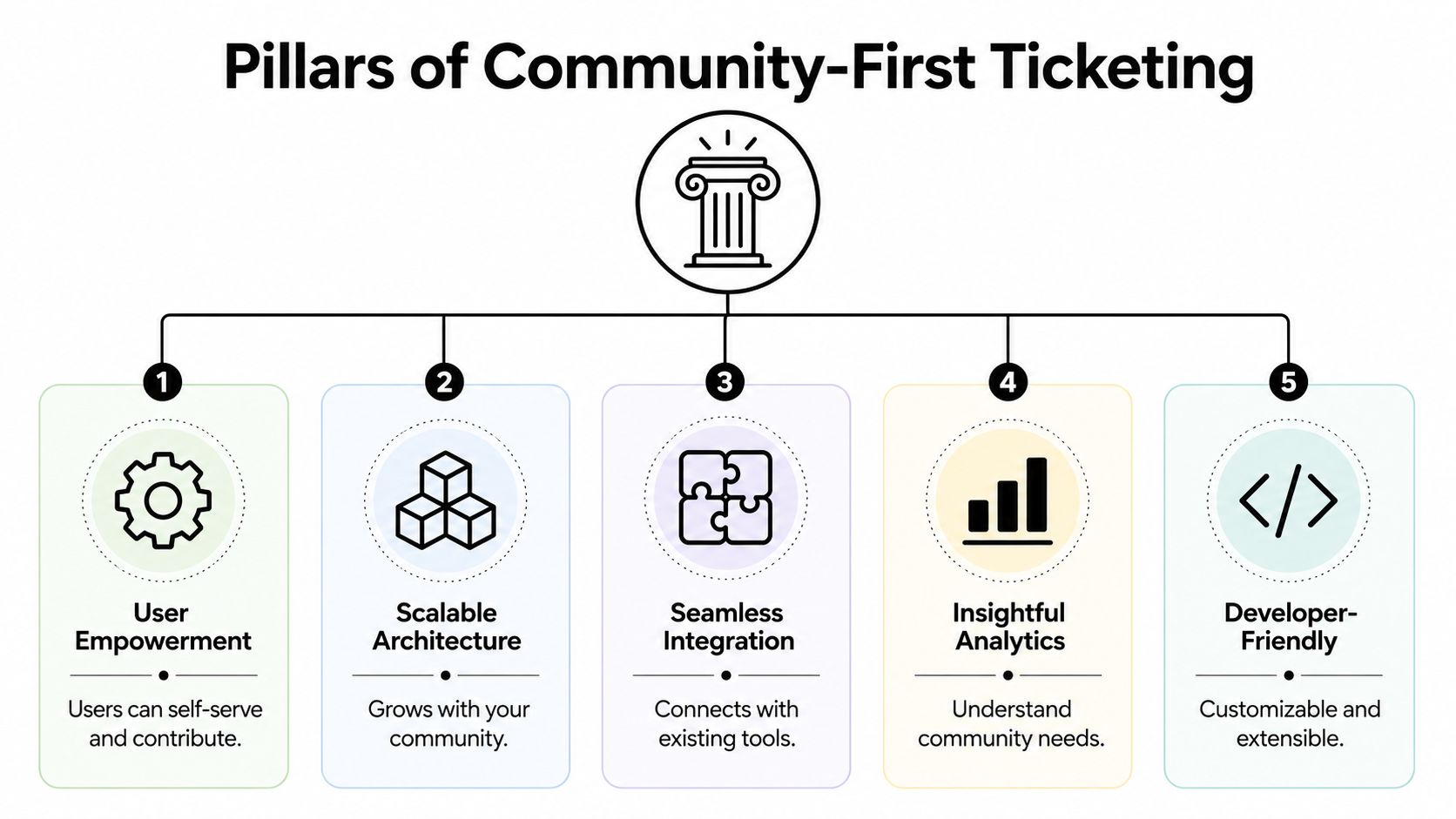
This is the first filter. Not “Does it integrate with chat?” but “Can the team work inside those channels without breaking context?”
A capable system should let agents manage Slack, Discord, Telegram, email, and web conversations through one operational layer while preserving the details that matter. That includes thread structure, channel identity, previous interactions, and the ability to continue the conversation in the right place.
Weak multi-channel support usually shows up fast in demos. The chat connector exists, but the workflow still depends on manual forwarding, switching tabs, or losing thread history.
For high-volume support, AI isn't just an add-on anymore. It's part of basic capacity planning.
Advanced systems can auto-classify, prioritize, and route tickets based on content and sentiment, which can reduce First Response Time by an average of 50% according to Monday.com's overview of simple ticketing systems and AI triage. In practice, that matters most when community traffic spikes and agents need the system to separate urgent product issues from repetitive questions.
Good AI support workflows also include pre-escalation deflection. If a user asks a common question in Discord or web chat, the system should be able to suggest the relevant knowledge base content before an agent gets involved.
Practical rule: If a vendor's AI story starts with response drafting but says little about triage, routing, and knowledge-based resolution, the team will still spend too much time on intake.
Community support is collaborative by default. Moderators, support specialists, CSMs, and product teams often touch the same issue. A system built for this reality should make collaboration feel native, not improvised.
The practical tests are simple:
A clean collaborative experience matters more than a long feature list. If agents need side conversations in Slack just to understand what's happening in the help desk, the system is missing the point.
Traditional support dashboards often over-index on queue metrics while underreporting the information community teams need to know. A stronger system should show where demand originates, what topics repeat, where automation is helping, and where human escalation still dominates.
The most useful analytics answer questions like:
Integrations matter most when they remove handoff friction. Product teams need clean issue escalation. Success teams need account context. Support leads need analytics that don't live in isolation.
The test isn't how many logos appear on the integrations page. It's whether the platform fits the existing operating stack without forcing agents to rebuild context in every tool.
Organizations often don't need a giant vendor spreadsheet. They need a realistic sense of which category of tool fits the way support happens.
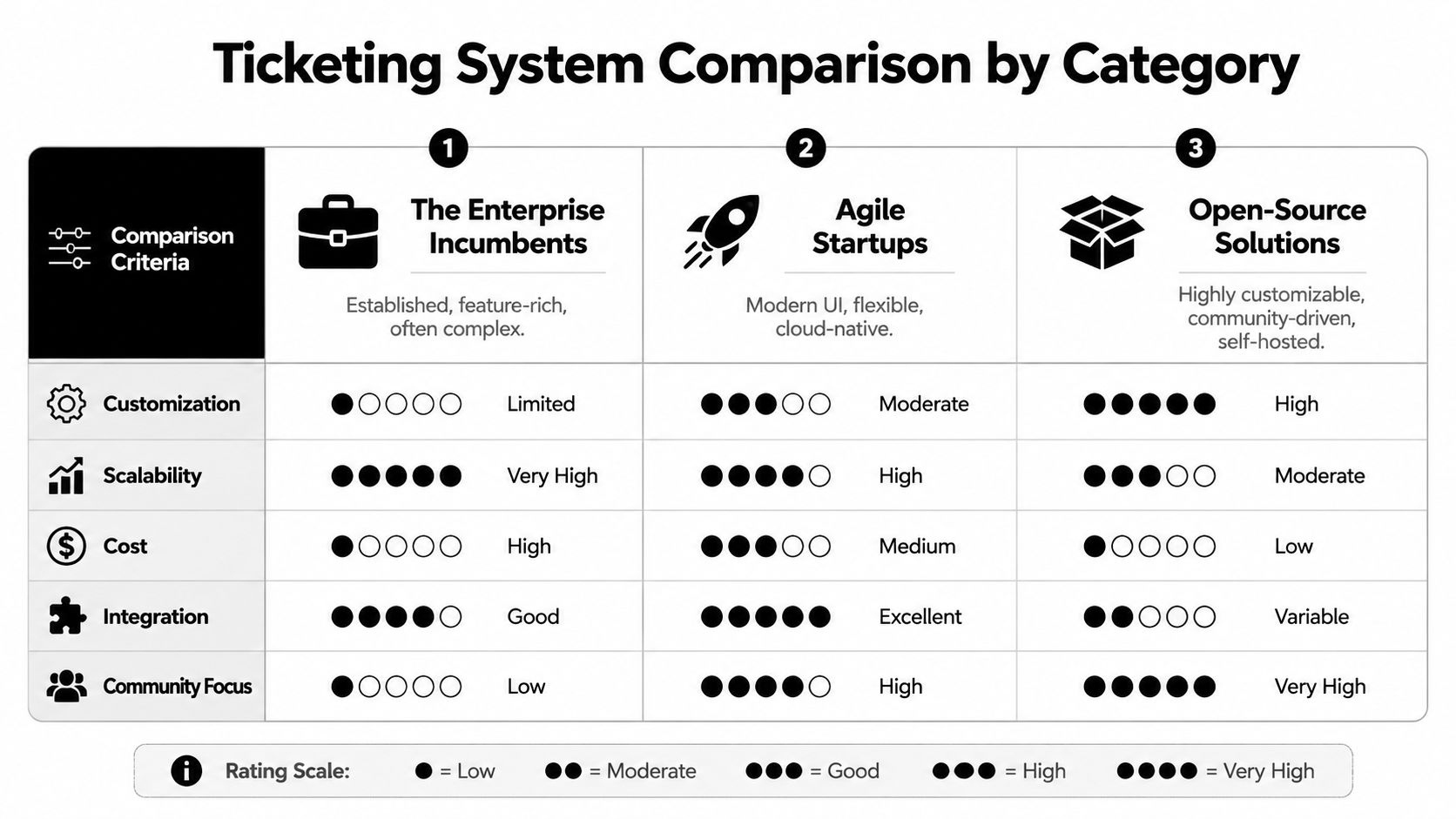
This group includes platforms such as Zendesk, ServiceNow, Freshdesk, and Zoho Desk. These tools are established for a reason. They tend to offer strong admin controls, solid SLA structures, mature reporting, and broad ecosystem support.
For email, forms, and conventional support operations, they can work well.
Where they often struggle is community-native support. Slack, Discord, and Telegram usually arrive through integrations rather than through a workflow philosophy designed around those channels. That means the support organization gets formal structure, but the frontline team may still have to patch over missing context.
Where incumbents work well
Where they get clumsy
A legacy platform can be feature-rich and still be the wrong operational fit. The friction usually appears in the handoffs, not in the brochure.
For readers who want a broader vendor spectrum beyond community-first use cases, this in-depth help desk platform review is a useful secondary lens.
A lot of teams exploring this category are also comparing alternatives to Zendesk specifically. This roundup of Zendesk alternatives for modern support teams is relevant when the main frustration is channel rigidity rather than a missing feature.
Jira Service Management sits in a different category. It's often a strong fit for teams where support and engineering are tightly linked, especially when bug tracking, incident workflows, and technical escalations dominate the queue.
That strength comes with a trade-off. Developer-centric systems can be excellent at structured issue handling and still feel heavy for everyday community support. The more conversational the workload, the more important usability becomes for moderators, non-technical agents, and cross-functional teammates.
These systems tend to perform best when the support motion is close to technical operations. They tend to perform worse when the main need is fluid community care.
This category is built around the reality that support now happens where users gather, not just where companies open tickets.
The biggest difference is not cosmetic. It's architectural. These tools are designed to unify live community conversations, private support, and knowledge-driven automation in one workflow. That matters because self-service performance can differ dramatically. Neutral data shows traditional ticketing systems achieve only 0 to 15% self-service deflection, while unified knowledge-driven platforms can reach 60 to 80% deflection, according to MatrixFlows' comparison of help desk software and ticketing systems.
That gap changes staffing, moderator burnout, and service quality.
Buying criterionEnterprise incumbentsDeveloper-centric toolsCommunity-first platformsSlack, Discord, Telegram handlingOften available, but not always native-feelingBetter for escalation than direct community supportStrongest fit for daily channel-native workAI triage and deflectionCan be capable, but quality varies by setupUseful for internal routingBest when tied closely to knowledge-driven supportAgent collaborationStrong for formal teamsStrong with technical stakeholdersStrong for moderators plus support agentsEngineering handoffUsually possibleExcellentGood when product feedback loops are built inEase for non-technical teamsMixedOften lowerUsually higher
Some teams will still choose an incumbent because procurement, compliance, or existing stack decisions outweigh workflow elegance. That's a valid decision. But for companies whose support demand lives in community channels, the operating cost of a poor fit adds up every day in manual triage, repeated answers, and messy handoffs.
A short product walkthrough can help make those workflow differences concrete:
The right answer usually becomes clearer when the team stops comparing abstract features and looks at the actual support environment.
This team started with email, maybe a lightweight chat widget, and one or two shared Slack channels with customers. Support volume is no longer tiny, but the company still needs speed more than bureaucracy.
The best fit here is usually a platform that can unify web, email, and community channels before support fragments into separate systems. The key requirement isn't maximal configuration. It's a setup that can mature without forcing a migration the moment the company launches a customer community or opens a support Slack workspace.
The startup should favor:
This is a different kind of pressure. Traffic can spike suddenly. Questions repeat constantly. Moderators handle a mix of basic support, account issues, event questions, and emotionally charged complaints.
A conventional email-first system usually creates more friction than relief in this environment. What matters most is quick classification, clear routing, and a workflow that treats public and private conversations as part of one support system.
This team should prioritize:
If the moderators are still answering the same questions manually in public channels all day, the team doesn't have a tooling problem alone. It has a workflow design problem.
This team already has process maturity. It probably has SLAs, reporting needs, multiple support tiers, and stakeholders who care about audit trails and change management. The challenge isn't inventing structure. It's modernizing channel support without losing operational control.
The migration path here should focus on preserving the essentials while replacing the parts that make community support cumbersome. The ideal platform gives the team modern collaboration and channel-native support without turning governance into a side project.
The enterprise team should look closely at:
NeedWhy it matters in migrationWorkflow mappingPrevents accidental loss of ownership and escalation rulesKnowledge base readinessDetermines whether automation will help or disappointRole designClarifies what moderators, agents, and specialists each ownPilot channel selectionReduces risk before a full cutover
The decision point is simple. If support happens mostly in structured forms and email, a traditional platform may still fit. If the company's most important customer interactions happen in Slack, Discord, or Telegram, the platform needs to be optimized for that reality from the start.
A migration succeeds when the team treats it as an operating model change, not just a data transfer.
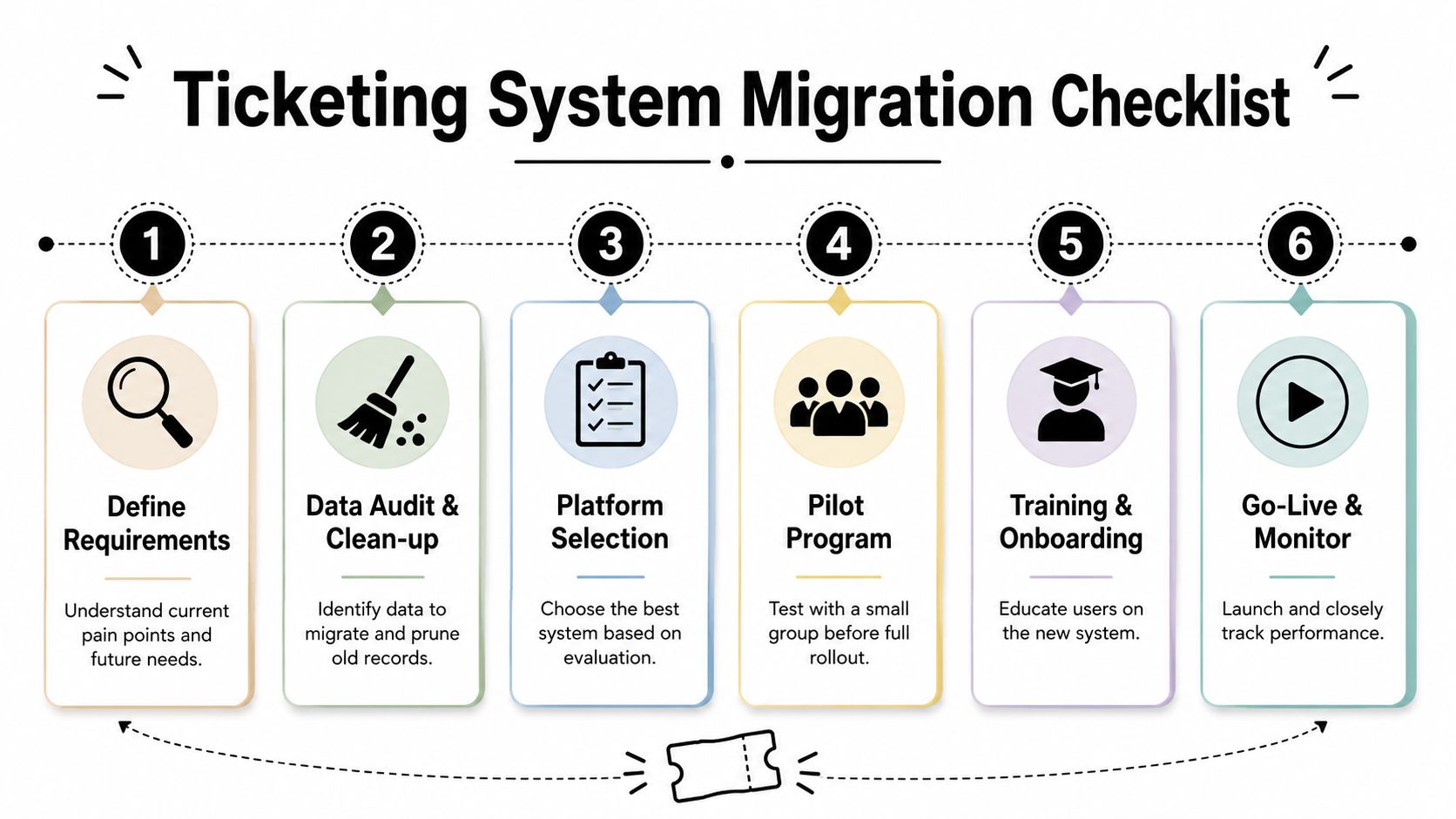
Organizations often underestimate how many support interactions happen outside the formal queue. Before choosing anything, audit every place users ask for help. That includes Discord channels, Slack Connect spaces, Telegram groups, email inboxes, in-app chat, and moderator DMs.
Document where requests originate, where they get resolved, and where context gets lost.
AI performance depends heavily on source material quality. If the knowledge base is outdated, contradictory, or scattered across docs, the system will automate confusion.
Start with the topics that repeat most often. Rewrite them into clean, current, decision-ready content. Organize them so the support team and the AI layer can both use them consistently.
Migration is the right moment to challenge legacy habits. Some macros, tags, and routing rules exist only because the previous tool made them necessary.
Focus the redesign on a few practical questions:
The most useful metrics are the ones that change staffing and workflow decisions. Systems that integrate performance metrics directly into automation can reduce ticket backlogs by up to 40% in high-volume environments, according to Meegle's guide to ticketing systems for performance metrics.
That matters because the migration shouldn't just reproduce the old queue in a new interface. It should help the team identify and remove bottlenecks faster.
A strong post-migration scorecard usually includes:
Don't switch every channel at once. Start with one high-volume but manageable environment, often a single Discord server, Slack workspace, or a defined support queue.
This pilot should test channel behavior, collaboration, automation, and reporting under real conditions. It should also expose where documentation or team habits still need work.
A more detailed operational walkthrough lives in this guide to support migration planning.
Training should focus less on buttons and more on judgment. Agents and moderators need to know when to keep a discussion public, when to pull it private, when to escalate, and how to use automation without over-trusting it.
That's where most migrations either stick or stall.
The best ticketing system comparison in 2026 isn't the one with the longest matrix. It's the one that starts from the team's actual support environment.
For more companies now, that environment isn't an inbox alone. It's a mix of Discord threads, Slack channels, Telegram messages, web chat, and email. Support teams that ignore that shift usually end up layering chat on top of an email-era process and calling it omnichannel. The result is more switching, more duplication, and less clarity.
The better approach is to choose a platform that lives where users already ask for help. That changes the economics of support in a practical way. It improves context, reduces repeated answers, makes collaboration easier, and gives automation a real chance to absorb routine demand.
The strongest support orgs don't buy for the demo. They buy for daily operations.
That usually means prioritizing:
Even the right platform won't fix weak habits on its own. Teams still need clean knowledge, clear escalation paths, and training that reflects real support work.
For leaders building that training layer, this guide on building effective video training for support teams is useful because it focuses on how teams absorb repeatable operational workflows.
The winning system is usually the one that removes the most context switching from the people doing the work.
That's the essential standard to use. Not whether the platform can technically connect to Discord, Slack, or Telegram, but whether the support team can run those channels cleanly, collaboratively, and at scale.
Teams that support users across Discord, Slack, Telegram, web chat, and email need more than a legacy help desk with chat connectors. Mava is built for that exact environment, with a shared inbox, AI agents, knowledge-based automation, and channel-native workflows that help community-driven teams scale support without losing context.
.png)
.png)
.png)
